Unpatched vulnerabilities remain the single most common initial access vector in enterprise breaches. Mandiant's M-Trends report consistently places exploitation of known (patched) vulnerabilities as the top or second-ranked initial compromise method, accounting for over 30% of intrusions year after year. Not zero-days. Not novel attacks. Known vulnerabilities for which patches existed but were not applied.
The challenge is not awareness. Every security team knows patching matters. The challenge is execution at enterprise scale. An organization with 50,000 endpoints, 5,000 servers, and 200 unique applications generates a patching workload of 500,000 to 2,000,000 individual patch deployments per month. Managing that volume while maintaining system availability, testing for compatibility, meeting compliance timelines, and coordinating with application owners requires systematic processes that most organizations have not fully matured.
This guide covers the complete enterprise patch management lifecycle, from the vulnerability intelligence that triggers the process through the verification metrics that prove it works. It is written for organizations that have outgrown ad-hoc patching but need a structured framework that balances security urgency with operational stability.
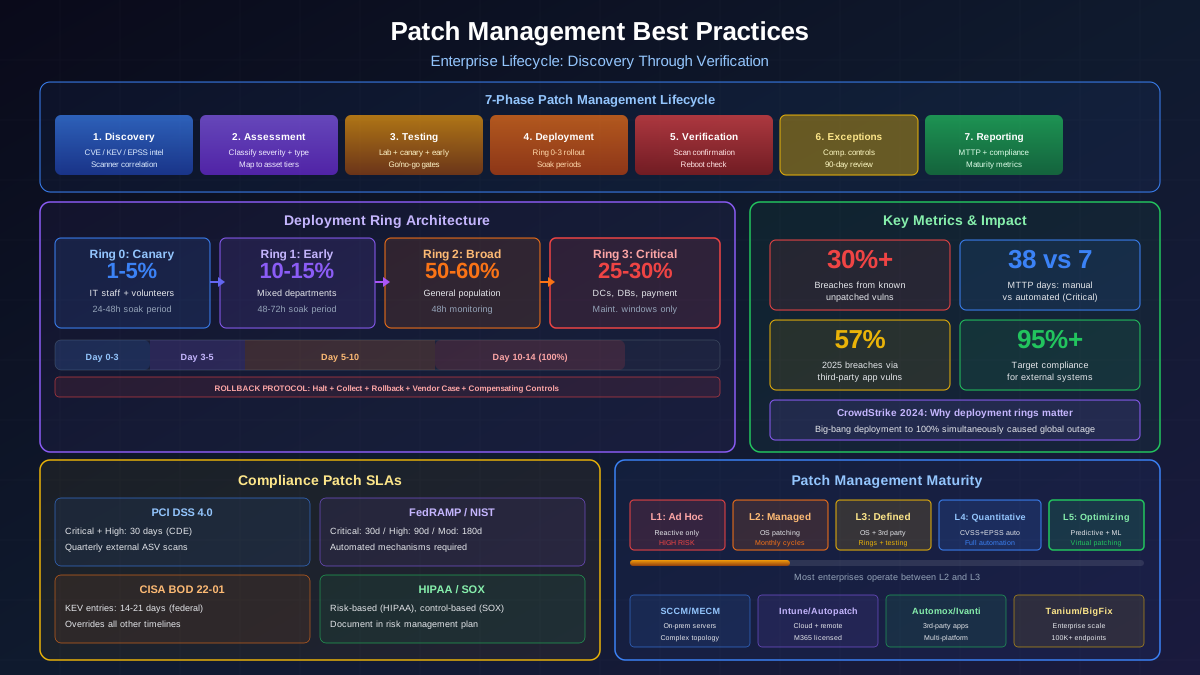
The Patch Management Lifecycle: Seven Phases
Enterprise patch management follows a structured lifecycle. Skipping or compressing phases creates predictable failure modes: skip testing and you deploy patches that break production. Skip verification and you believe you are patched when you are not. Skip reporting and you cannot demonstrate compliance. Each phase serves a specific function.
Phase 1: Discovery and Intelligence
The cycle begins when a patch becomes available. Intelligence sources include:
- Vendor security bulletins — Microsoft Patch Tuesday (second Tuesday monthly), Oracle Critical Patch Updates (quarterly), Adobe monthly updates, etc. Subscribe to every vendor whose software runs in your environment.
- CVE databases — NVD, MITRE CVE, vendor-specific advisories. Automated ingestion through APIs is essential at scale.
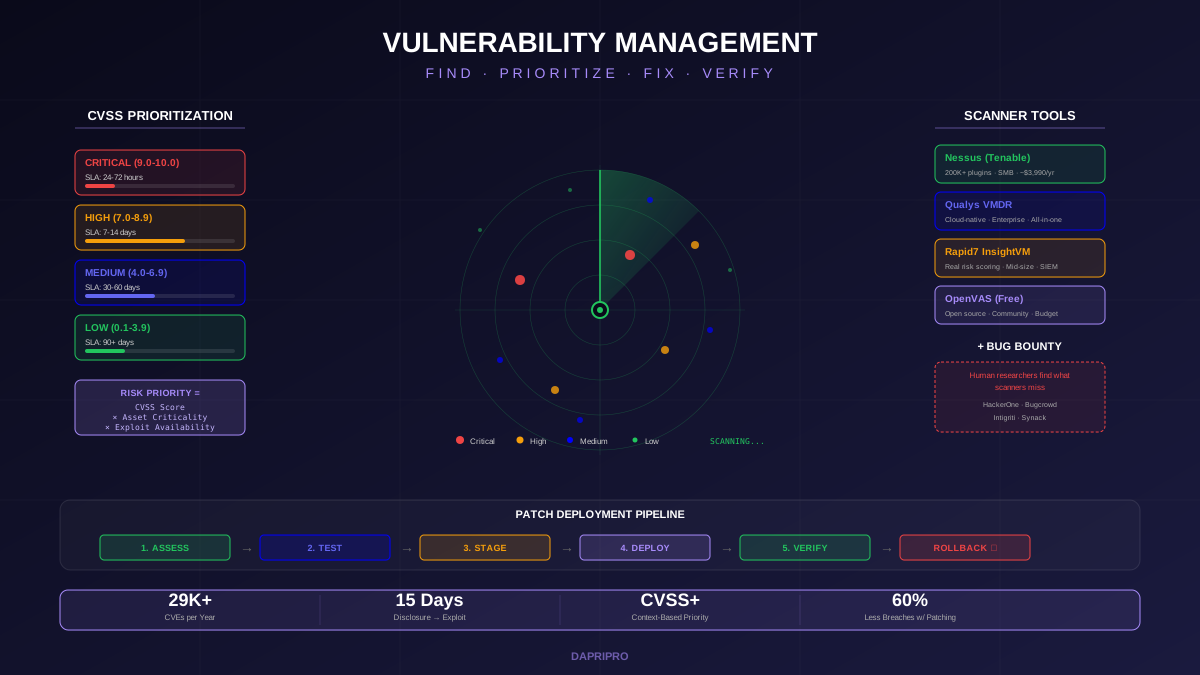
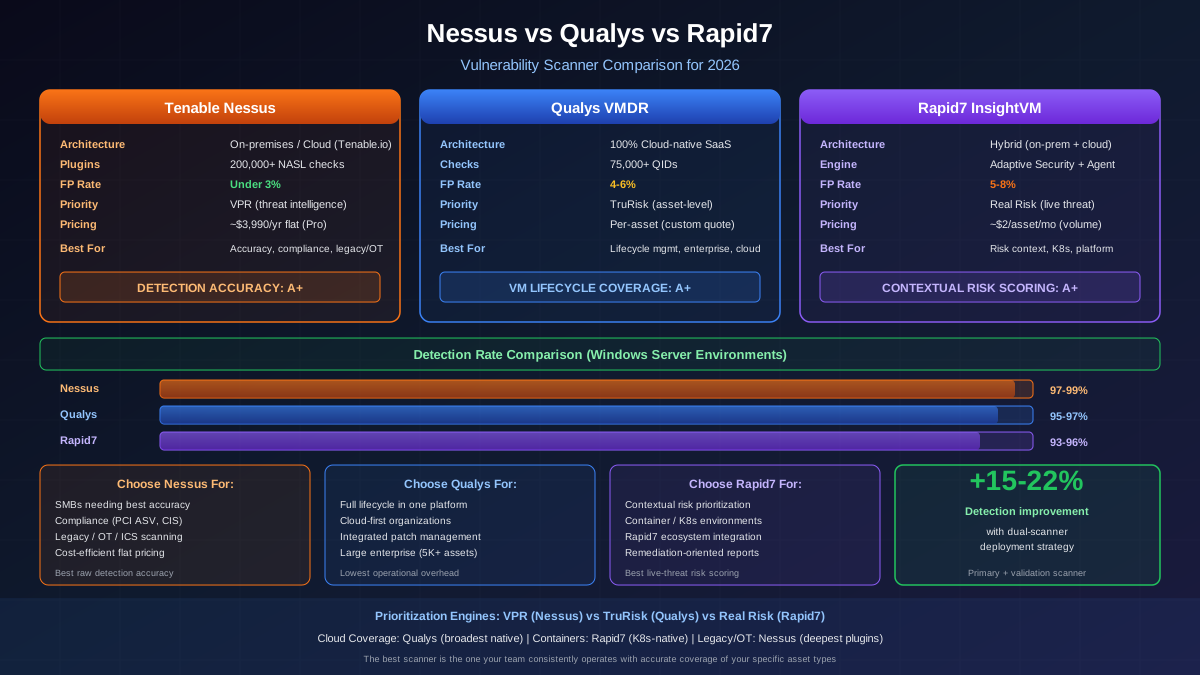
- Vulnerability scanner results — Nessus, Qualys, or Rapid7 scans identify specific instances of unpatched software in your environment. These are your ground truth for patch gaps.
- CISA KEV catalog — Known Exploited Vulnerabilities trigger accelerated timelines. Integrate the JSON feed for automated alerting.
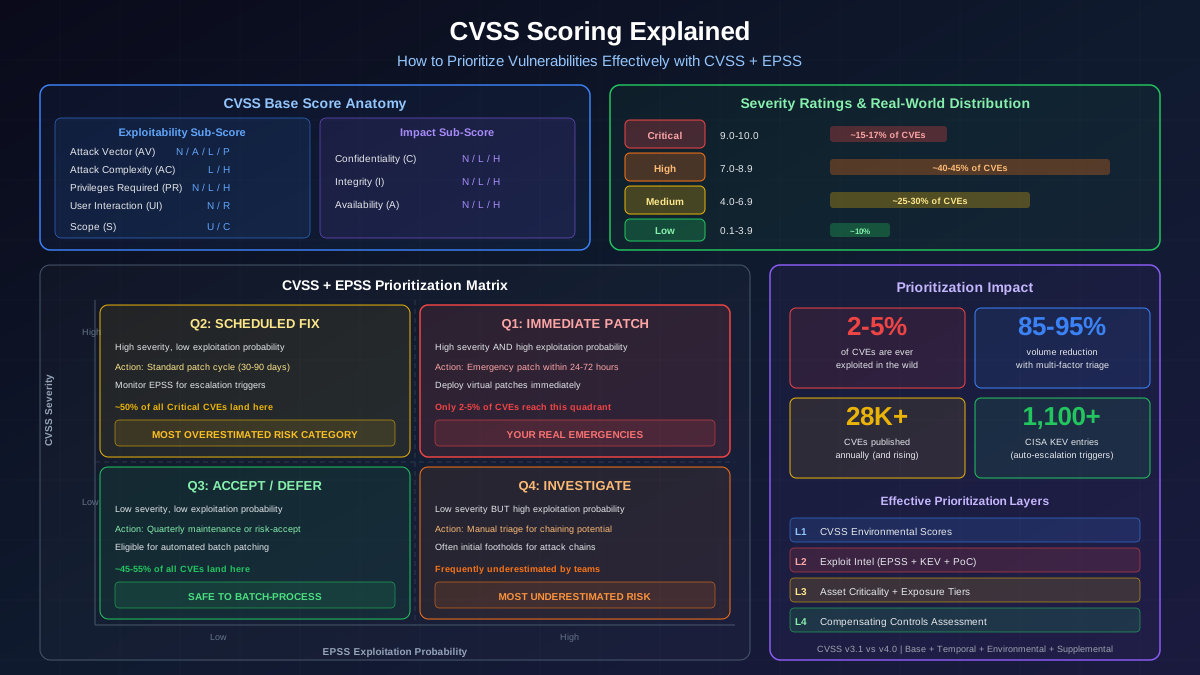
- EPSS scores — Exploitation probability data helps prioritize when you have more patches than deployment capacity.
The goal of Phase 1 is a complete, correlated inventory: which patches are available, which of your systems need them, and what is the risk profile of each unpatched vulnerability.
Phase 2: Assessment and Classification
Not all patches are equal. Assessment classifies each patch along multiple dimensions:
- Security vs. functional vs. feature patches — Security patches address CVEs. Functional patches fix bugs. Feature patches add new capabilities. Only security patches should follow security-driven timelines; functional and feature patches follow normal change management.
- Criticality based on CVSS + EPSS + KEV status — Use the four-quadrant prioritization matrix covered in our CVSS scoring guide. High CVSS + High EPSS (Q1) vulnerabilities enter the emergency track. Others follow standard cycles.
- Affected system tiers — A Critical patch for a Tier 4 development server follows a different timeline than the same Critical patch for a Tier 1 domain controller.
- Patch complexity and risk — A kernel update with reboot requirements carries different risk than a user-space library update. Cumulative updates that bundle hundreds of fixes carry higher regression risk than targeted hotfixes.
Phase 3: Testing
Testing is the phase most organizations compress under time pressure, and it is the phase where compression causes the most damage. A defective patch deployed to 50,000 endpoints simultaneously can cause more disruption than the vulnerability it was supposed to fix.
Structured testing follows three stages:
Stage 1: Lab Validation (Day 0-1)
- Deploy the patch to lab systems that mirror production configurations
- Run automated smoke tests against critical applications
- Verify service availability, authentication flows, and data access patterns
- Check for driver compatibility on standard hardware models
- Test rollback procedures to confirm they work before you need them
Stage 2: Canary Deployment (Day 1-3)
- Deploy to Ring 0 (1-5% of production, typically IT staff and volunteer machines)
- Monitor for Blue Screens, application crashes, performance degradation, and login failures
- 24-48 hour soak period with active monitoring of event logs and performance counters
- Go/no-go decision based on canary health metrics
Stage 3: Early Adopter Deployment (Day 3-5)
- Deploy to Ring 1 (10-15% of production across representative departments)
- 48-72 hour soak period with user-reported issue monitoring
- Focus on application compatibility across the full software catalog
- Final go/no-go for enterprise-wide deployment
Phase 4: Deployment
With testing complete, deploy through the remaining rings using your patch management platform. Key deployment principles:
- Phased rollout — Even after testing, deploy to Ring 2 (general population, 50-60%) before Ring 3 (production-critical servers and systems, 25-30%). This catches issues that only manifest at scale or on rare configurations.
- Avoid big-bang deployments — Never deploy a patch to 100% of systems simultaneously. The CrowdStrike incident of July 2024 demonstrated what happens when a content update reaches the entire fleet at once without staged rollout controls.
- Respect maintenance windows — Server patches deploy during approved change windows. Workstation patches can deploy during business hours with deferred reboots.
- Handle reboot requirements explicitly — Some patches require reboots to complete installation. Schedule reboot deadlines (e.g., 72 hours after deployment) and enforce them to prevent systems from running in a partially-patched state indefinitely.
Phase 5: Verification
Deployment is not the same as patching. A patch is only effective when it is successfully installed, the system has been rebooted (if required), and the vulnerability is confirmed remediated. Verification confirms all three conditions:
- Agent-based verification — Endpoint management agents (SCCM, Intune, Tanium) report installation status including pending reboots. Systems showing "installed, pending reboot" are NOT patched.
- Scan-based verification — Run a targeted vulnerability scan against previously-identified vulnerable assets within 48-72 hours of deployment completion. If the scanner still detects the vulnerability, the patch either failed silently, was not applied to that specific component, or the system needs a reboot.
- Compliance reconciliation — Cross-reference patch deployment reports against the original vulnerability findings. Every original finding should map to either "remediated" or "exception documented." Unresolved items become follow-up tasks.
Phase 6: Exception Management
Some systems cannot be patched. Legacy applications with no vendor support, systems running EOL operating systems, embedded devices with fixed firmware, and production environments with frozen change windows all create patching exceptions. Managing these responsibly requires:
- Formal exception documentation — Record the CVE(s), affected systems, business justification for deferral, compensating controls in place, risk owner (must be a named individual, not a team), and re-evaluation date.
- Compensating controls — Network segmentation to limit attack surface, enhanced monitoring with specific detection rules for exploitation attempts, application-layer firewalls with virtual patch rules, and EDR policies tuned for the specific vulnerability's exploitation techniques.
- Exception aging and review — Exceptions older than 90 days require re-approval by the risk owner and CISO. Exceptions older than 180 days require an active project plan for system replacement or upgrade.
Phase 7: Reporting and Metrics
Reporting serves two audiences: security leadership (are we reducing risk?) and compliance auditors (are we meeting regulatory requirements?). Report on both coverage metrics and operational metrics:
- Patch compliance rate — Percentage of in-scope systems at current patch level. Target 95%+ for internet-facing systems, 90%+ for all managed systems.
- Mean Time to Patch (MTTP) — Average days from patch availability to deployment. Track by severity level. Industry median for Critical is 38 days; top-quartile programs achieve under 7 days.
- Patch success rate — Percentage of deployment attempts that succeed without manual intervention. Below 95% indicates configuration management issues.
- Rollback rate — Percentage of patches that required rollback. Above 2% indicates insufficient testing.
- Exception count and age — Total active exceptions and their age distribution. Growing exception counts signal architectural debt that needs investment.
Third-Party Application Patching: The Hidden Attack Surface
Operating system patching has matured significantly. Windows Update, WSUS, and SCCM provide reliable mechanisms for deploying Microsoft patches. Linux distributions have built-in package managers with security repositories. But third-party applications represent the fastest-growing attack surface, and they are the area where most enterprise patching programs have the largest gaps.
Why Third-Party Patching Is Different
Third-party application patching faces challenges that do not exist for OS patches:
- No central update mechanism — Each vendor has its own update process, release schedule, and distribution method. Chrome updates itself. Java does not. Adobe has its own updater. Custom LOB applications have no automated update path at all.
- Shadow IT — Users install unapproved applications that IT does not know about and cannot patch. A vulnerable instance of 7-Zip, WinRAR, or Notepad++ installed by an individual user is just as exploitable as an enterprise-deployed application.
- Version fragmentation — Organizations may have five different versions of Java, three versions of Python, and multiple browser versions across their fleet. Each version may have different vulnerabilities and different patch requirements.
- Application dependencies — Updating a shared library (OpenSSL, Log4j, libcurl) may break applications that depend on specific versions. Dependency analysis must precede deployment.
Third-Party Patching Solutions
Purpose-built third-party patching platforms address these challenges:
- Automox — Cloud-native platform that supports Windows, macOS, and Linux with pre-built patching policies for 500+ third-party applications. Automatically detects installed software, downloads patches, and deploys them through configurable policies. Particularly strong for remote workforce management.
- Ivanti Neurons for Patch Management — Enterprise-grade solution with application dependency analysis, pre-deployment compatibility testing, and rollback capabilities. Supports over 600 third-party applications and integrates with ServiceNow for change management workflows.
- ManageEngine Patch Manager Plus — Supports 850+ third-party applications with automated scanning, testing, and deployment. Includes a patch repository that mirrors vendor sources for offline deployment scenarios.
- SCCM with third-party catalogs — Microsoft Endpoint Configuration Manager supports third-party update catalogs from vendors like Patch My PC and Flexera that extend SCCM's patching capabilities to hundreds of non-Microsoft applications.
Patch Management Tooling: Platform Comparison
Selecting the right tooling depends on your environment type, workforce distribution, and operational maturity. Here is how the major platforms compare across key dimensions:
WSUS (Windows Server Update Services)
WSUS is free, on-premises, and handles Microsoft-only patches. It is sufficient for small organizations with exclusively Windows environments and straightforward patching needs. Limitations include no third-party patching, limited reporting, no deployment rings, and no cloud management capability. WSUS requires significant manual effort for approval workflows and provides minimal automation. Consider WSUS only if budget is the primary constraint and the environment is under 500 endpoints.
SCCM / MECM (Microsoft Endpoint Configuration Manager)
SCCM is the enterprise standard for complex on-premises environments. It provides advanced deployment targeting, maintenance windows, deployment rings, detailed compliance reporting, and supports third-party patching through catalog extensions. SCCM requires significant infrastructure (distribution points, site servers, SQL databases) and operational expertise but provides the most granular control over deployment behavior. Best for organizations with large server fleets, complex network topologies, and on-premises-heavy environments.
Microsoft Intune and Windows Autopatch
Intune is Microsoft's cloud-native endpoint management solution, included with Microsoft 365 E3/E5 licensing. Windows Autopatch (additional service on top of Intune) automates the entire Windows patching lifecycle including deployment rings, soak periods, and automatic rollback for defective updates. Intune excels for remote and hybrid workforces where devices are not always connected to the corporate network. Limitations include less granular server management compared to SCCM and dependency on reliable internet connectivity.
Cloud-Native Platforms (Automox, JumpCloud)
Cloud-native patching platforms are purpose-built for modern distributed environments. They manage Windows, macOS, and Linux from a single console without on-premises infrastructure. These platforms typically offer the fastest time-to-value with deployment in days rather than weeks. Best for organizations with fewer than 10,000 endpoints and a modern, cloud-first IT strategy.
Compliance-Driven Patching Requirements
Regulatory frameworks establish minimum patching requirements that your program must meet regardless of internal risk appetite. Understanding these requirements prevents audit findings and potential penalties:
PCI DSS 4.0
Requirement 6.3.3 mandates that Critical and High vulnerabilities on systems within the cardholder data environment be addressed within 30 days. "Addressed" means either patched, mitigated with compensating controls, or documented as an accepted risk with business justification. PCI also requires quarterly vulnerability scans (Requirement 11.3.1) by an Approved Scanning Vendor (ASV) for external systems, and scans after any significant system changes.
NIST 800-53 / FedRAMP
Control SI-2 (Flaw Remediation) requires timely installation of security-relevant software updates. FedRAMP specifies: Critical within 30 days, High within 90 days, Moderate within 180 days. FedRAMP Moderate and High baselines also require automated patching mechanisms (CM-6) and continuous monitoring (CA-7) that includes vulnerability scanning and patch verification.
HIPAA Security Rule
The Technical Safeguards do not specify patch timelines, but the Risk Analysis requirement (164.308(a)(1)) and Protection from Malicious Software requirement (164.308(a)(5)(ii)(B)) create an implied obligation to patch known vulnerabilities in systems handling ePHI. OCR enforcement actions have cited failure to patch as a violation. Document your patching procedures as part of your Risk Management Plan.
SOX (Sarbanes-Oxley)
SOX Section 404 requires internal controls over financial reporting, which includes IT general controls covering change management and system integrity. Auditors evaluate patch management as evidence that systems processing financial data maintain integrity. Missing Critical patches on financial systems typically results in a control deficiency finding.
Automation Strategies for Enterprise Scale
Manual patch management does not scale beyond a few hundred endpoints. Automation is not a luxury at enterprise scale — it is a survival strategy. Here are the automation opportunities across the patch lifecycle:
Automated Discovery and Classification
Configure vulnerability scanners (Nessus, Qualys, Rapid7) to run scheduled scans aligned with your patch assessment cadence. Use API integrations to automatically pull scan results into your patch management workflow. Map CVE findings to available patches using vendor-provided correlation data. Flag CISA KEV entries for automatic escalation using the KEV JSON feed API.
Automated Testing
Build automated smoke test suites that run after patch deployment in lab environments. Use infrastructure-as-code to spin up mirror environments for testing, run validation scripts, and tear down when complete. Common test scenarios include: web application functionality tests (Selenium, Playwright), authentication workflow validation (can users still log in), database connectivity checks, and API endpoint health verification.
Automated Deployment with Guardrails
Windows Autopatch automates deployment rings including automatic rollback when error rates exceed thresholds. For Linux environments, Ansible playbooks can automate patch deployment with pre/post-deployment checks. Deploy with guardrails: set maximum simultaneous deployment percentages, configure automatic pause on failure rate thresholds, and require explicit approval before proceeding to production-critical rings.
Automated Verification
Schedule post-deployment vulnerability scans to run automatically 48-72 hours after each ring completes deployment. Use compliance dashboards that auto-generate from scanner data and patch management platform reports. Flag systems where patches report as installed but the vulnerability still appears in scans (reboot-pending detection).
Common Enterprise Challenges and Solutions
Challenge: Application Owners Blocking Patches
Application owners frequently resist patching because they fear breaking their applications. This creates chronic exception accumulation. Solution: establish a shared responsibility model where the security team provides patches tested in standard configurations, application teams have 5 business days to test in their specific environments, and failure to respond within 5 days constitutes implicit approval for deployment. Escalate persistent blockers to the CTO/CISO with specific risk quantification.
Challenge: Legacy Systems That Cannot Be Patched
Systems running Windows Server 2012 R2, RHEL 6, or custom applications with no vendor support cannot receive security patches. These require compensating controls: strict network segmentation (place on isolated VLANs with firewall rules limiting traffic to specific ports and sources), enhanced monitoring (deploy dedicated SIEM rules for exploitation attempts against known vulnerabilities), application whitelisting (only allow approved executables to run), and active project plans for replacement with funded timelines.
Challenge: Reboot Resistance
Some patches require reboots to fully apply, but users and system owners resist reboots because of disruption. For workstations: implement forced restart policies with 72-hour grace periods and clear user notifications. For servers: coordinate reboots during maintenance windows and use rolling restart strategies for clustered services. For database servers: schedule reboots during lowest-activity periods with application team coordination. The key principle: a system that needs a reboot to complete patching is not patched. Track and report on reboot-pending states separately from unpatched states.
Challenge: Remote and Mobile Workforce
Traditional on-premises patching tools cannot reach devices that rarely connect to the corporate network. Cloud-native solutions (Intune, Automox, Workspace ONE) patch devices wherever they have internet connectivity. For organizations using VPN, configure split-tunnel policies that allow patch management traffic to reach cloud services without requiring full VPN connectivity. Ensure endpoint agents are configured to check for updates at intervals of no more than 4 hours.
Measuring Patch Management Program Maturity
Patch management maturity evolves through predictable stages. Assess where your program stands and target the next level:
Level 1: Ad Hoc
Patching is reactive, triggered by security incidents or audit findings. No consistent process exists. Individual admins patch systems they manage using their own methods and schedules. Metrics: not tracked. Risk: Critical. Most organizations in breach were at Level 1 for the exploited system.
Level 2: Managed
A defined process exists with documented SLAs. Patch management tools are deployed for OS patching. Monthly patch deployment cycles aligned with Patch Tuesday. Compliance reports are generated but not consistently acted upon. Metrics tracked: patch compliance percentage. Gap: third-party applications, no risk-based prioritization.
Level 3: Defined
Comprehensive patching program covering OS and major third-party applications. Deployment rings with testing stages. Exception management process with documented compensating controls. Integration between vulnerability scanners and patch management platforms. Metrics tracked: compliance, MTTP, rollback rate. Gap: limited automation, no EPSS integration.
Level 4: Quantitatively Managed
Fully automated testing and deployment pipelines. Risk-based prioritization using CVSS + EPSS + asset criticality. Real-time dashboards with automated alerting on SLA breaches. Post-incident analysis when patching delays contribute to security incidents. Metrics tracked: all Level 3 plus escape rate, risk reduction efficiency, coverage by asset tier. Gap: predictive capabilities.
Level 5: Optimizing
Predictive patching based on threat intelligence correlation. Automatic compensating control deployment (WAF virtual patches) within minutes of vulnerability disclosure, ahead of formal patch availability. ML-based prediction of patch compatibility issues. Continuous improvement through formal retrospectives on every patching cycle. Few organizations reach Level 5, but it represents the target state for critical infrastructure and high-value target environments.
Most enterprises operate between Level 2 and Level 3. Advancing to Level 3 delivers the highest return on investment in terms of reduced breach probability and improved compliance posture. Advancing from Level 3 to Level 4 requires significant tooling investment but dramatically reduces operational effort through automation.