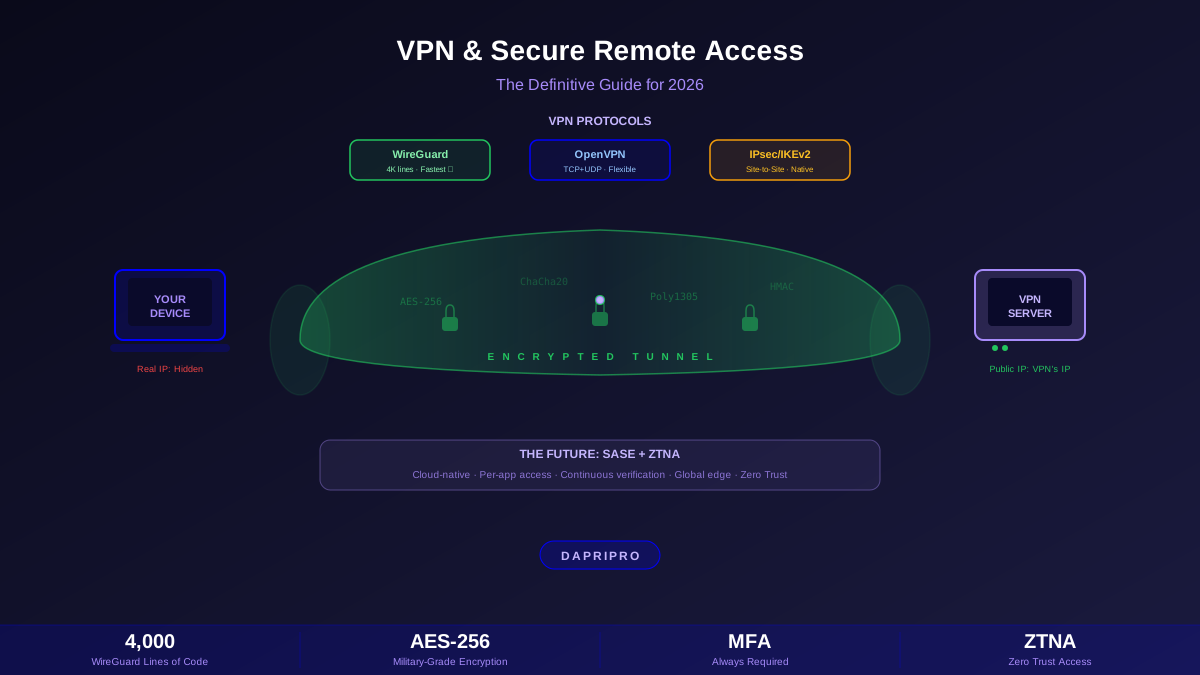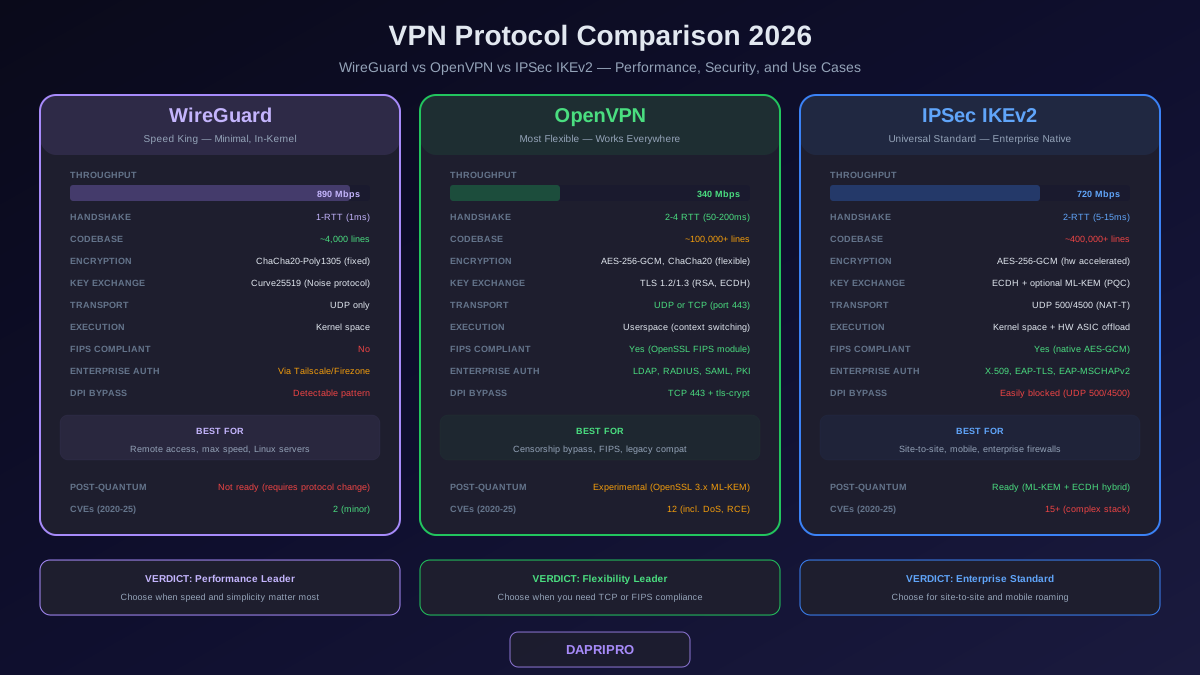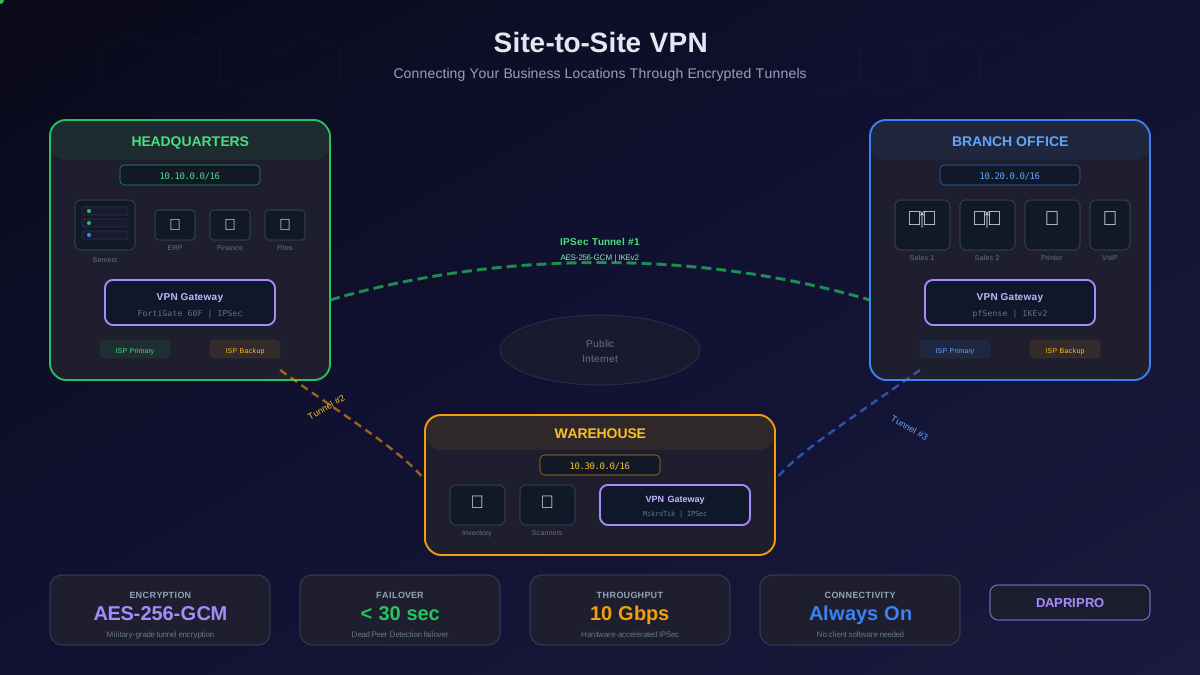
Your network architecture was designed for a world that no longer exists. A central headquarters with on-premises servers, a perimeter firewall guarding the edge, branch offices connected by MPLS links, and remote workers tunneling through a VPN concentrator to reach internal applications. Every packet flowing through the central data center for inspection. Every user treated as trusted once they authenticated to the VPN.
That architecture cannot secure a workforce where 75 percent of employees access SaaS applications directly from their laptops, branch offices route traffic to cloud services through local internet breakouts, and contractors connect from personal devices in countries you have never operated in. The perimeter is gone. The hub-and-spoke topology is a bottleneck. The VPN is a liability. SASE — Secure Access Service Edge — was designed to replace all of it with a single cloud-delivered platform that converges networking and security at the edge.
What SASE Actually Is (and What It Is Not)
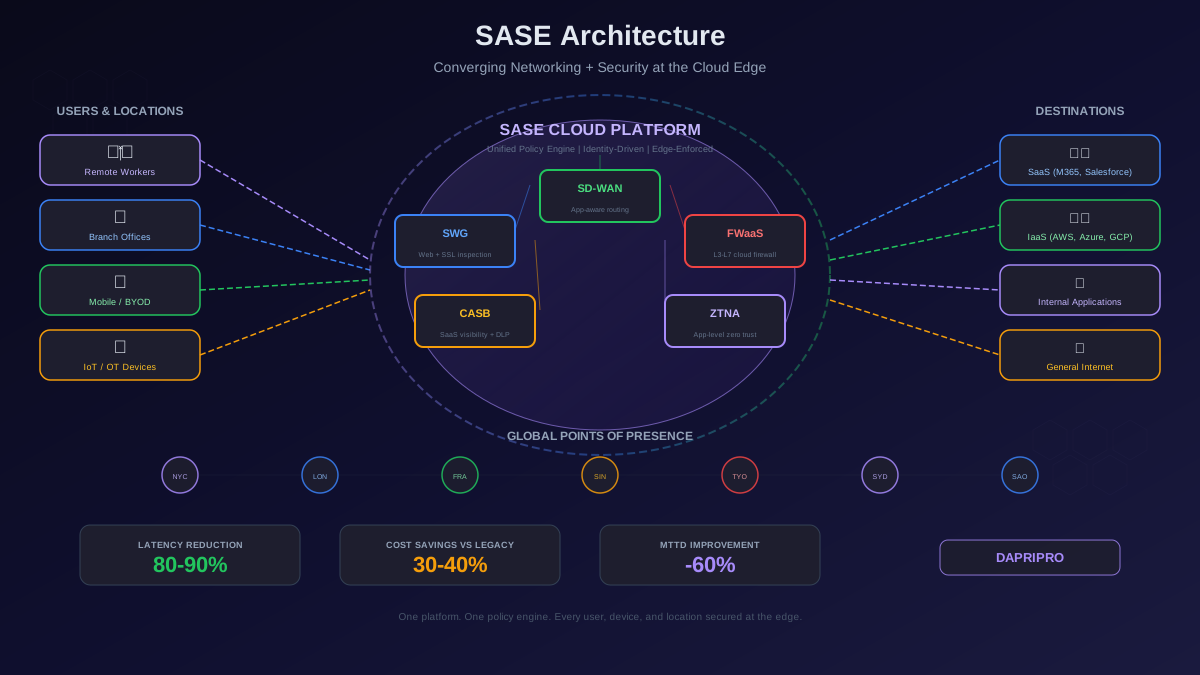
Gartner coined the term SASE in 2019, but the concept is straightforward: move security enforcement from centralized hardware appliances to distributed cloud points of presence (PoPs), and deliver both networking and security as a unified service. Instead of maintaining a VPN concentrator, a next-gen firewall, a web proxy, a CASB, and a separate SD-WAN controller from five different vendors, you consolidate everything into one platform from one vendor.
SASE is built on five core service pillars that work together:
| SASE Component | What It Replaces | Primary Function |
|---|---|---|
| SD-WAN | MPLS circuits + WAN routers | Application-aware traffic routing across multiple links (broadband, LTE, MPLS) with automatic failover and path selection |
| SWG (Secure Web Gateway) | On-prem web proxy appliance | URL filtering, malware scanning, SSL/TLS inspection for all internet-bound traffic |
| CASB | Shadow IT discovery tools | Visibility and control over sanctioned and unsanctioned SaaS applications, DLP for cloud data |
| FWaaS (Firewall as a Service) | On-prem next-gen firewall | Layer 3-7 firewall policies enforced at the cloud edge instead of a physical appliance |
| ZTNA (Zero Trust Network Access) | VPN concentrator | Per-application access based on identity, device posture, and context — no network-level access |
What SASE is not: it is not a single product you can buy off a shelf, it is not just a VPN replacement, and it is not something you deploy in a weekend. SASE is an architectural framework. Every vendor claiming to offer SASE delivers a different combination of these five pillars, with varying degrees of integration, and some components are more mature than others.
Why Legacy Hub-and-Spoke Architecture Fails in 2026
Understanding why SASE exists requires understanding exactly how the traditional network architecture breaks down:
The Backhaul Problem
In a hub-and-spoke design, a branch office user accessing Microsoft 365 has their traffic routed from the branch over an MPLS link to HQ, inspected by the firewall, and then sent out to the internet. The response takes the same path in reverse. A request that should take 15 milliseconds through a direct internet connection takes 150 to 300 milliseconds through the backhaul path. Multiply this by every SaaS application and every branch office, and you have a network that actively degrades productivity.
The VPN Bottleneck
VPN concentrators were designed for 10 to 20 percent of the workforce connecting remotely at any given time. When remote work became the default, organizations discovered their VPN hardware hit capacity limits at 200 to 500 concurrent connections. Adding capacity meant buying more hardware, expanding licenses, and provisioning additional bandwidth at the data center — a process that takes weeks to months. Meanwhile, users experienced dropped connections, slow application performance, and authentication failures during peak hours.
The Lateral Movement Risk
Traditional VPN grants network-level access. Once a user connects, they are on the corporate network with access to every subnet their credentials allow. If an attacker compromises a VPN credential (through phishing, credential stuffing, or malware), they have the same network access as the legitimate user. They can scan internal networks, find vulnerable systems, and move laterally — exactly how the majority of ransomware attacks unfold. The VPN trusts anyone who authenticates, regardless of device posture, location, or behavior.
How ZTNA Replaces Your VPN
The most immediately impactful component of SASE for most organizations is ZTNA — Zero Trust Network Access. ZTNA fundamentally changes how remote and branch office users access internal applications.
VPN Access Model (What You Have Now)
User authenticates to VPN concentrator with username and password. VPN assigns the user an IP address on the corporate network. User can reach any system on any subnet their network ACLs allow. The VPN trusts the connection — it does not inspect what the user does after authentication. If the user's device is compromised, the attacker has the same network access.
ZTNA Access Model (What SASE Delivers)
User opens an application (not a VPN client). The ZTNA agent on their device checks identity (who they are), device posture (is the OS patched, is disk encryption enabled, is EDR running), location (are they in a sanctioned geography), and risk score (has this user triggered any anomalies). If all checks pass, the agent creates an outbound-only encrypted tunnel to the specific application — not to the network. The user can access that one application and nothing else. There is no network-level access, no IP address on the corporate subnet, and no ability to scan or pivot to other systems.
ZTNA Provider Comparison
| Feature | Zscaler ZPA | Prisma Access ZTNA | Cloudflare Access | Netskope Private Access |
|---|---|---|---|---|
| Deployment model | Agent + agentless | Agent-based (GlobalProtect) | Agent + agentless | Agent-based (Netskope Client) |
| Global PoPs | 150+ | 100+ | 300+ (Anycast) | 75+ |
| App discovery | App Connector auto-discovery | Cloud identity engine | Tunnel-based mapping | Publisher-based discovery |
| Device posture checks | Built-in + CrowdStrike, SentinelOne integration | Built-in + Cortex XDR | WARP client checks + 3rd party | Built-in + EDR integrations |
| Protocol support | TCP, UDP, ICMP | TCP, UDP, ICMP | TCP (UDP via WARP tunnel) | TCP, UDP |
| Pricing model | Per user/year | Per user/year or per Mbps | Per user/month (free tier available) | Per user/year |
SASE Platform Deep Dive: The Big Four
Zscaler (ZIA + ZPA)
Zscaler pioneered the cloud-native security proxy model. ZIA (Zscaler Internet Access) handles SWG, FWaaS, and CASB for internet-bound traffic. ZPA (Zscaler Private Access) handles ZTNA for internal application access. The two work together through the Zscaler Client Connector agent. Zscaler does not offer native SD-WAN — you pair it with a third-party SD-WAN vendor (Viptela, Silver Peak, Velocloud) for the networking component, making it technically an SSE rather than a full SASE platform. Strength: largest inline security cloud with the most mature threat intelligence. Weakness: no integrated SD-WAN, and the licensing model gets expensive for organizations over 5,000 users.
Palo Alto Prisma Access
Prisma Access is the closest to a single-vendor SASE platform. It delivers ZTNA through the GlobalProtect agent (the same agent Palo Alto customers already use for their on-prem firewalls), FWaaS with Palo Alto firewall policies in the cloud, SWG, CASB via Prisma SaaS, and SD-WAN through the Prisma SD-WAN acquisition (formerly CloudGenix). If your organization already runs Palo Alto firewalls, Prisma Access is the most natural migration path because it uses the same policy framework and management console (Strata Cloud Manager). Strength: unified platform with tight integration between all components. Weakness: higher cost than competitors, and the GlobalProtect agent can be resource-intensive on endpoints.
Cloudflare One
Cloudflare One leverages the company's massive Anycast network (300+ cities) to provide SASE with the lowest latency of any platform. It includes Access (ZTNA), Gateway (SWG + DNS filtering + FWaaS), and supports CASB through API-driven integrations. The Magic WAN product provides SD-WAN connectivity for branch offices. Cloudflare differentiates on performance: because every PoP can perform every security function (no traffic forwarding between different PoP types), inspection adds minimal latency. Strength: largest edge network, generous free tier for small teams, developer-friendly API. Weakness: FWaaS capabilities are less mature than Palo Alto or Zscaler, and enterprise support response times can lag behind dedicated security vendors.
Netskope NewEdge
Netskope built its reputation on CASB and data loss prevention for SaaS applications. NewEdge extends this into a full SASE platform with SWG, FWaaS, ZTNA (Netskope Private Access), and SD-WAN partnerships. Netskope excels at inline data protection — its DLP engine can inspect content in real time within SaaS applications, block sensitive file uploads, and enforce collaboration policies at the API level. Strength: best-in-class CASB and DLP for organizations with heavy SaaS usage and strict data governance requirements. Weakness: smaller PoP footprint than Zscaler or Cloudflare, and SD-WAN requires a partner integration.
Migrating to SASE: A Phased Approach
Attempting a big-bang migration — ripping out all legacy infrastructure and deploying SASE in one move — is a recipe for a major outage. Every successful SASE migration follows a phased approach that maintains connectivity and security throughout the transition.
Phase 1: ZTNA Replaces VPN (Months 1 to 4)
Start with the component that delivers the most immediate value and has the lowest risk: ZTNA replacing the legacy VPN. Deploy the SASE agent (Zscaler Client Connector, GlobalProtect, WARP, or Netskope Client) to all endpoints alongside the existing VPN client. Configure ZTNA policies for a subset of internal applications — start with web applications, which are the easiest to proxy. Run both VPN and ZTNA in parallel so users can fall back to VPN if ZTNA has issues. Migrate application groups progressively — once an application group is stable on ZTNA for two weeks with no incidents, disable VPN access for those applications. Continue until all applications are on ZTNA, then decommission the VPN concentrator.
Phase 2: SWG and CASB Replace Web Proxy and Shadow IT Tools (Months 3 to 8)
Once ZTNA is stable, route internet-bound traffic through the SASE platform's SWG instead of backhauling to the on-prem proxy. This is where you gain the latency improvement — branch office traffic goes directly to the nearest PoP instead of traversing MPLS to HQ. Configure SSL/TLS inspection with bypass rules for applications that break under interception (certificate-pinned apps, mutual TLS services, certain financial and healthcare platforms). Enable CASB discovery to catalog all SaaS applications in use across the organization. Create policies for sanctioned versus unsanctioned applications. Set up DLP policies for sensitive data types in cloud storage and collaboration tools.
Phase 3: SD-WAN Replaces MPLS (Months 6 to 18)
This is the most complex and longest phase because it involves physical infrastructure changes at branch offices. Deploy SD-WAN appliances (or virtual appliances) at each branch alongside existing routers. Configure SD-WAN overlays using local internet circuits (broadband, DIA, LTE/5G) as primary transport and MPLS as backup. Validate application performance on SD-WAN for two to four weeks per branch before decommissioning MPLS at that location. The cost savings from MPLS decommissioning typically fund the entire SASE deployment.
Designing SASE Security Policies
One of the advantages of SASE over point solutions is unified policy management. Instead of maintaining separate firewall rules, proxy policies, VPN ACLs, and CASB rules across different consoles, you define policies once and they follow the user everywhere — in the office, at home, at a coffee shop, or on a mobile device.
Identity-Based Policy Structure
SASE policies are built on identity, not IP addresses. A typical policy structure looks like this:
| Policy Element | Legacy (IP-Based) | SASE (Identity-Based) |
|---|---|---|
| Who | Source IP 10.20.30.0/24 | Engineering group in Okta/Azure AD |
| What | Destination port 443 to 192.168.1.50 | Application: GitLab (auto-discovered) |
| When | Always (no time awareness) | Business hours + on-call schedule |
| Where | Any (no location awareness) | Approved countries only |
| How | Allow/deny | Allow if device posture passes: OS patched within 30 days + EDR running + disk encrypted |
| Then | Log connection | Log connection + inspect payload + DLP scan + record session for audit |
SSL/TLS Inspection Strategy
Over 95 percent of web traffic is encrypted. Without SSL/TLS inspection, your SASE platform cannot scan for malware, enforce DLP policies, or detect data exfiltration in encrypted channels. However, enabling TLS inspection breaks some applications. Build your inspection policy with these categories:
Always inspect: General web browsing, social media, file-sharing services, webmail, unknown or uncategorized sites.
Never inspect: Banking and financial services (certificate pinning), healthcare portals (HIPAA compliance and mutual TLS), government services, applications using certificate pinning that you cannot override.
Inspect with monitoring: SaaS applications where you need DLP but breakage is possible — enable inspection and monitor for errors for 72 hours before enforcing in block mode.
Measuring SASE Success: KPIs That Matter
SASE deployments generate massive amounts of telemetry. Focus on these key performance indicators to validate that your migration is delivering the expected outcomes:
| KPI | Pre-SASE Baseline | SASE Target | How to Measure |
|---|---|---|---|
| Application latency (SaaS) | 150-300ms (backhaul) | 15-40ms (direct to PoP) | Synthetic monitoring from branch offices and remote endpoints |
| VPN support tickets / month | 50-200 (connection drops, slow speeds) | Near zero (VPN decommissioned) | ITSM ticket tracking filtered by VPN category |
| Mean time to detect (MTTD) | 197 days (IBM 2024 report) | Under 24 hours | SASE analytics dashboard — time from first anomaly to alert |
| Shadow IT applications discovered | Unknown | Full catalog with risk scores | CASB discovery report — applications by risk level |
| WAN circuit cost / month | MPLS at 5 to 20x internet cost | 40-60 percent reduction via broadband + SD-WAN | Monthly circuit billing comparison |
| Security policy exceptions | Dozens across multiple consoles | Centralized, auditable, and reviewed quarterly | SASE policy exception report with approval workflows |
Common SASE Deployment Mistakes
After working with organizations that have deployed or attempted SASE, these are the mistakes that cause the most pain:
Mistake 1: Skipping the TLS inspection proof of concept. Organizations enable SSL inspection for all traffic on day one and break dozens of applications. Finance cannot access their banking portal, healthcare workers cannot reach EHR systems, and the security team spends weeks creating bypass rules reactively. Always run a 30-day proof of concept with inspection in monitor-only mode before enforcing.
Mistake 2: Treating SASE migration as a network project, not a security project. SASE is not a WAN upgrade. If the security team is not driving the policy design, you will end up with a faster network but the same security gaps. The CISO should own the SASE initiative, with network engineering as a key partner — not the other way around.
Mistake 3: Migrating all users simultaneously. Pilot with a single department (usually IT or engineering, who can troubleshoot issues), validate for four weeks, then expand to the next group. A 10-percent-at-a-time rollout catches edge cases before they affect the entire organization.
Mistake 4: Ignoring the agent deployment challenge. Every SASE platform requires an endpoint agent. Deploying, updating, and troubleshooting that agent across thousands of devices — including personal devices and BYOD — is a significant operational challenge. Plan for agent management as a dedicated workstream with MDM/UEM integration.
Mistake 5: Not planning for vendor lock-in. Once you migrate all your security policies, ZTNA configurations, and SD-WAN overlays to a SASE vendor, switching costs are enormous. Negotiate multi-year contracts carefully, maintain policy documentation in vendor-neutral formats, and avoid vendor-proprietary features where open standards exist.
SASE for Compliance and Audit
SASE platforms simplify compliance because security enforcement is consistent regardless of where the user connects from. A remote worker in their home office and a branch office user both have the same DLP, access control, and logging policies applied at the SASE PoP. This consistency is valuable for frameworks that require uniform security controls:
PCI DSS 4.0: SASE provides network segmentation through ZTNA (Requirement 1), encrypted communications via TLS inspection (Requirement 4), access control based on least privilege (Requirement 7), and centralized logging (Requirement 10) — all from a single platform.
SOC 2 Type II: SASE audit logs demonstrate continuous monitoring, access controls, and data protection across all network segments. The unified dashboard simplifies evidence collection for auditors.
HIPAA: CASB and DLP capabilities prevent PHI from being uploaded to unauthorized SaaS applications, while ZTNA ensures that access to systems containing PHI requires multi-factor authentication and compliant device posture.
The Future of SASE: What Changes in 2027
SASE is evolving rapidly. Several trends will shape the next generation of these platforms:
AI-driven policy automation: Instead of manually writing security policies, SASE platforms will observe traffic patterns and user behavior to recommend and auto-generate policies. Zscaler and Netskope have already shipped early versions of this — expect it to become a core feature by 2027.
Digital Experience Monitoring (DEM) integration: SASE platforms are adding end-to-end performance monitoring (hop-by-hop latency, packet loss, jitter) so IT teams can diagnose application performance issues without separate monitoring tools. This unifies NetOps and SecOps in a single console.
IoT and OT device support: Current SASE platforms are designed for managed endpoints running agents. The next challenge is extending SASE enforcement to IoT devices, industrial control systems, and other unmanaged devices that cannot run agent software — likely through agentless proxy and network-level enforcement at the SD-WAN edge.
SASE is not a product you buy — it is an architecture you build toward. The organizations that start now, even with a simple ZTNA deployment replacing their VPN, are positioning themselves to adopt each new capability as the platforms mature. Those waiting for a single perfect SASE product will be waiting indefinitely while their legacy architecture becomes increasingly difficult to secure and increasingly expensive to maintain.
For deeper coverage of the individual SASE components, see our guides on VPN and Secure Access, Firewall and Intrusion Detection, and Cloud Security Posture Management.