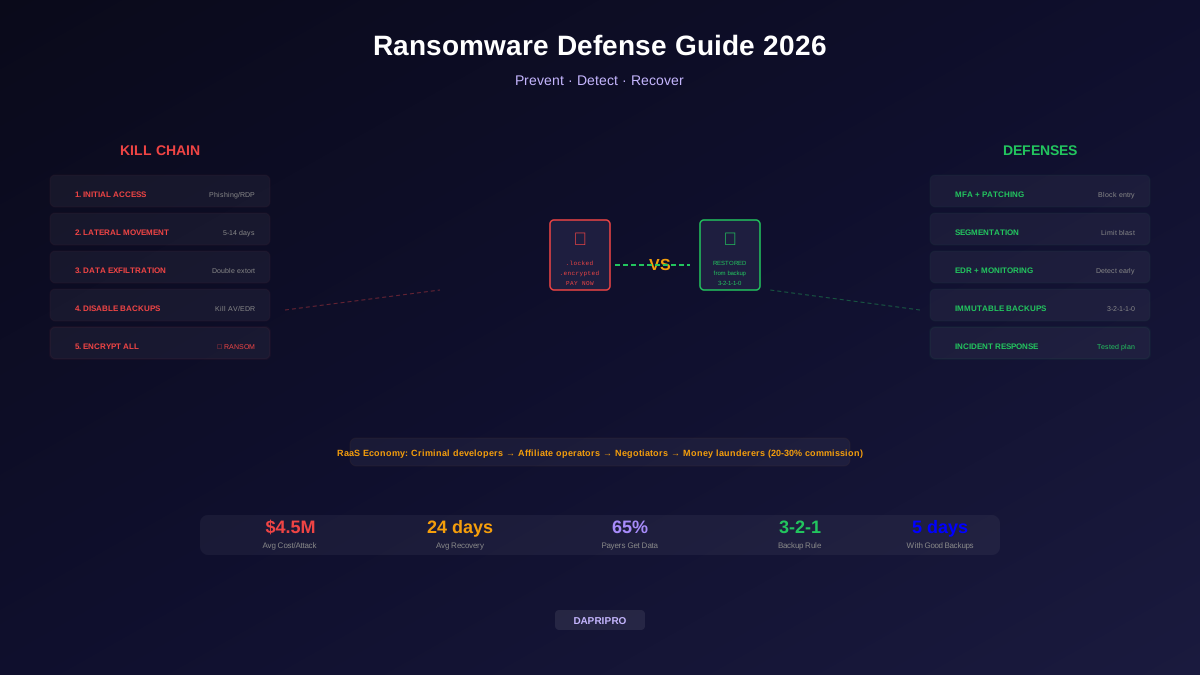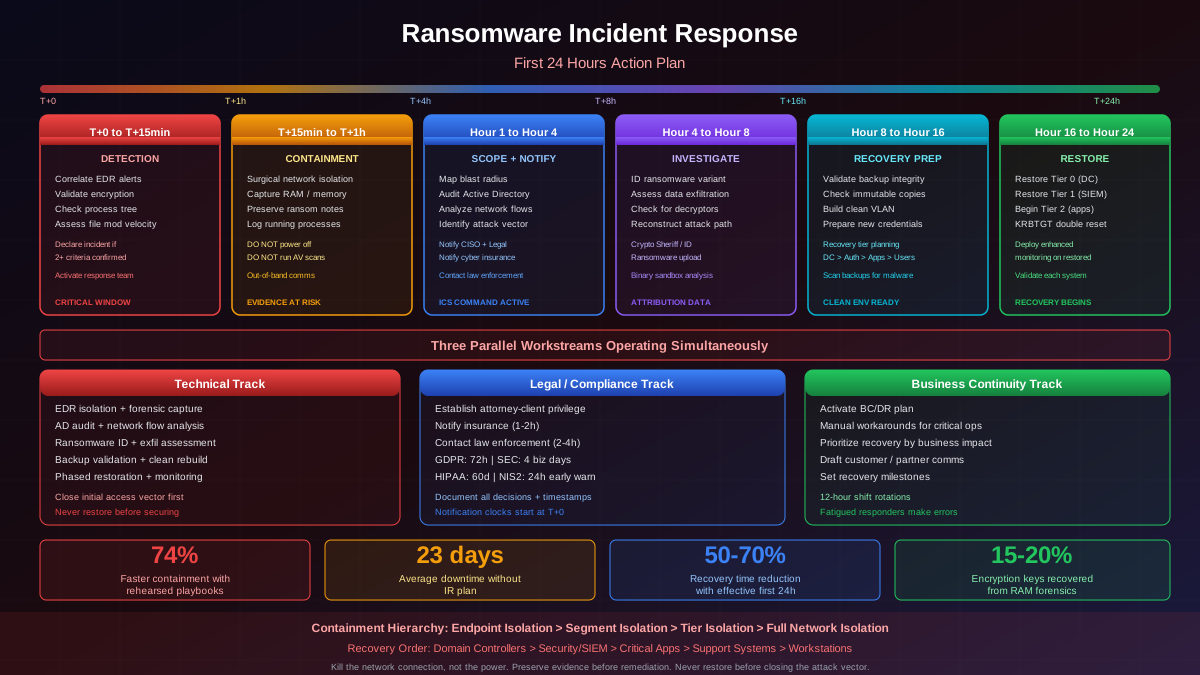
The moment a ransom note appears on a screen or your EDR console erupts with encryption alerts, a clock starts ticking that will determine whether your organization loses hours of productivity or months of operational capability. The first 24 hours of a ransomware incident are the most consequential period in any organization's cybersecurity lifecycle. Every decision made, every minute spent, and every action taken during this window compounds, either accelerating recovery or deepening the crisis.
Having led incident response engagements across financial services, healthcare, manufacturing, and government sectors, I have watched the same patterns repeat. Organizations with rehearsed playbooks activate coordinated responses that contain incidents to single segments. Organizations without them devolve into panic, making catastrophic mistakes like wholesale shutdowns that destroy forensic evidence, delayed notifications that trigger regulatory penalties, or premature recovery attempts that allow attackers to re-encrypt restored systems. The difference between these outcomes is not budget or technology. It is preparation.
This guide provides a minute-by-minute operational playbook for the first 24 hours, structured around the phases that determine whether an organization survives a ransomware incident or suffers permanent damage.
Hour Zero: Initial Detection and Alert Validation (T+0 to T+15 Minutes)
The first fifteen minutes establish the foundation for everything that follows. The immediate goal is not to understand the full scope of the attack but to validate that you are dealing with an actual ransomware incident and trigger the response chain.
Detection Sources and Alert Correlation
Ransomware detection typically arrives through one of several channels, and the detection source significantly influences your initial response posture. EDR platforms like CrowdStrike Falcon, SentinelOne, or Microsoft Defender for Endpoint may fire behavioral detection alerts for mass file modification, suspicious process trees (cmd.exe spawning from Word), or known ransomware signatures. SIEM platforms may correlate multiple signals: unusual SMB traffic patterns, bulk file renaming events, and anomalous process execution. End users may report being unable to access files, seeing ransom notes, or encountering unusual system behavior.
The critical first action is correlating these signals to distinguish a confirmed ransomware incident from false positives. A single endpoint showing file encryption is different from twenty endpoints simultaneously reporting issues. Check your EDR console for the following indicators within the first five minutes:
- Process genealogy analysis — trace the encryption process back to its parent. Legitimate ransomware typically shows a chain like phishing attachment → macro execution → PowerShell download → ransomware payload. If the encrypting process spawned from a known business application with no suspicious parents, investigate before declaring an incident.
- File modification velocity — ransomware encryption typically modifies hundreds to thousands of files per minute. Normal backup or compression operations modify files at predictable rates. Check whether modifications are targeting specific file extensions (.docx, .xlsx, .pdf, .sql, .bak) or all files indiscriminately.
- Network communication patterns — modern ransomware communicates with command and control infrastructure before encryption begins. Check for DNS requests to recently registered domains, direct IP connections to known malicious infrastructure, or Tor traffic.
- Lateral movement indicators — check for new SMB sessions between systems that do not normally communicate, PsExec or WMI remote execution, or new scheduled tasks appearing across multiple endpoints simultaneously.
Incident Declaration Criteria
Declare a ransomware incident when any two of the following conditions are confirmed: ransom note files are present on any system, files on one or more systems have been encrypted with unknown extensions, EDR has detected known ransomware indicators of compromise, or multiple systems are simultaneously exhibiting file modification behavior inconsistent with normal operations. Do not wait for certainty. False positive incidents waste hours. Missed true positives waste months.
First Hour: Containment and Evidence Preservation (T+15 to T+60 Minutes)
Containment is the single most impactful action in the first hour. The difference between a 50-endpoint incident and a 5,000-endpoint incident is often determined by how quickly and effectively containment is executed. However, containment must be surgical, not wholesale.
Network Isolation Hierarchy
Effective containment follows a hierarchy of isolation actions, escalating in scope as the situation demands. Understanding this hierarchy prevents the common mistake of over-isolating (shutting down the entire network) or under-isolating (quarantining a single endpoint while the attacker has already moved laterally to dozens of systems).
Level 1: Endpoint isolation. Use EDR platform network isolation to quarantine confirmed compromised endpoints. CrowdStrike's "Contain" action, SentinelOne's "Disconnect from Network," and Microsoft Defender's "Isolate Device" all sever network connectivity while maintaining management channel access for remote investigation. This is the fastest and least disruptive containment action.
Level 2: Segment isolation. If multiple endpoints in the same VLAN or subnet are compromised, isolate the entire network segment at the switch or firewall level. Implement ACLs that block all traffic from the compromised segment except management protocols (SSH, RDP through jump hosts) needed for investigation. If you have implemented microsegmentation, activate containment policies that restrict east-west traffic.
Level 3: Tier isolation. If compromise has reached privileged infrastructure, especially Active Directory domain controllers, isolate the entire AD tier. Disable all trust relationships with other domains. Block all Kerberos, LDAP, and DNS traffic between tiers. If Tier 0 (domain controllers, PKI, Azure AD Connect) is compromised, the scope of the incident is effectively enterprise-wide regardless of how many endpoints show encryption.
Level 4: Full network isolation. This is the last resort, used only when encryption is actively spreading faster than targeted isolation can contain it, or when the attacker demonstrates the ability to circumvent lower-level isolation (indicating deep persistent access). Disconnect external internet connectivity at the perimeter firewall while maintaining internal network connectivity for investigation. Shutting down the entire network, including internal connectivity, should be avoided as it prevents investigation and can trigger destructive malware behaviors.
Evidence Preservation: The Actions You Cannot Undo
Evidence preservation must happen in parallel with containment, not after it. The most critical forensic evidence is volatile, meaning it exists only in RAM and active system state. Once a system is powered off or rebooted, this evidence is permanently destroyed.
For each confirmed compromised system, capture the following evidence before any remediation begins:
Volatile evidence (capture immediately):
- Memory dump — use tools like WinPmem, Magnet RAM Capture, or FTK Imager to capture full physical memory. Encryption keys are frequently recoverable from RAM if captured before the malware process terminates. Memory dumps have led to successful decryption in 15-20% of incidents where no public decryptor exists.
- Running processes — capture process listings with full command-line arguments, parent-child relationships, loaded DLLs, and network connections. Use
Get-Process | Select-Object *combined withGet-NetTCPConnectionon Windows, orps auxwwwithnetstat -antupon Linux. - Network connections — active C2 connections reveal attacker infrastructure. Capture DNS cache (
ipconfig /displaydnson Windows), ARP tables, routing tables, and active TCP/UDP connections with associated process IDs. - Logged-in sessions — document all active user sessions, RDP connections, VPN connections, and service accounts with active tokens. This maps the accounts the attacker may have compromised.
Semi-volatile evidence (capture within first hour):
- Windows event logs — Security (4624/4625 logons, 4672 privilege escalation, 4688 process creation), System (7045 service installations), PowerShell operational logs (4104 script block logging). Export these before any log rotation or attacker cleanup.
- Ransom notes — photograph and preserve all ransom note files. These contain the ransomware family identifier, attacker communication channels, unique victim identifiers, and payment instructions. This information is essential for law enforcement, insurance claims, and identifying available decryptors.
- File system metadata — capture MFT (Master File Table) entries, file creation and modification timestamps, and directory listings of encrypted files. The encryption pattern (which directories were hit first, which extensions targeted) reveals the malware's configuration and can confirm the ransomware variant.
What Not to Do During Containment
The most damaging actions during the first hour are well-intentioned but catastrophic:
- Do not power off compromised systems. This destroys volatile memory evidence including potential encryption keys. Isolate the network connection instead.
- Do not run antivirus scans on compromised systems. AV scans will quarantine or delete the ransomware binary, destroying the primary forensic artifact needed to identify the variant, check for decryptors, and understand the attacker's capabilities.
- Do not begin restoring from backups yet. Until the attack vector is identified and closed, restored systems will be re-encrypted. Additionally, the attacker may have compromised backup infrastructure. Premature restoration wastes time and may trigger backup integrity issues.
- Do not communicate about the incident over potentially compromised channels. If the attacker has access to email servers, Slack workspaces, or internal communication platforms, they can read your response plans. Establish an out-of-band communication channel immediately: personal cell phones, a new Signal group, or a pre-established emergency communication platform.
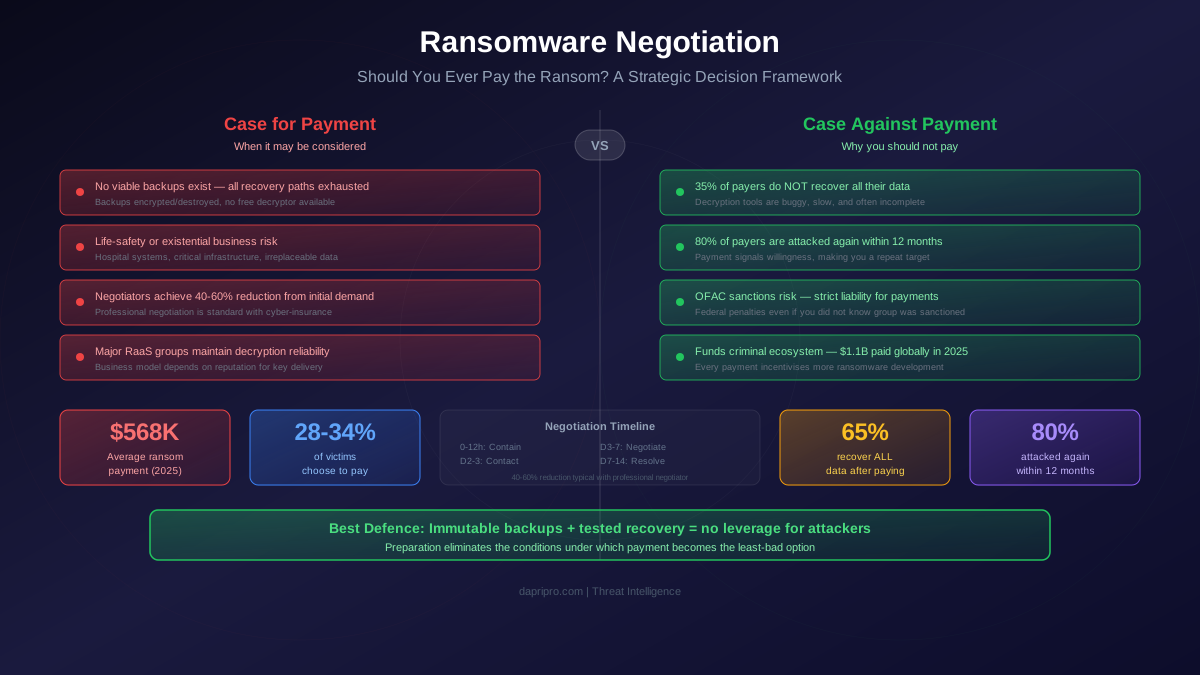
- Do not attempt to negotiate with the attacker independently. Untrained negotiation frequently results in higher ransom demands, accelerated data leak timelines, or attacker hostility. If negotiation becomes necessary, use a professional ransomware negotiation firm.
Hours 1-4: Scope Assessment and Stakeholder Activation
With containment in progress and evidence preservation underway, the next phase focuses on understanding the full scope of the compromise and activating the organizational stakeholders who will drive decision-making for the duration of the incident.
Systematic Scope Determination
Scope assessment answers three fundamental questions: How far has the attacker penetrated? What data has potentially been accessed or exfiltrated? What systems remain clean and trustworthy?
Active Directory and identity infrastructure audit: Active Directory is the backbone of enterprise Windows environments and the primary target for ransomware operators seeking to maximize encryption scope. Query AD for accounts created in the last 30 days that were not part of approved provisioning workflows. Check for modifications to high-privilege groups (Domain Admins, Enterprise Admins, Schema Admins, Backup Operators). Review Group Policy Objects for recently modified policies, especially those deploying scripts or software. Examine Kerberoasting indicators: accounts with SPNs that have had TGS requests from unusual sources. Check for Golden Ticket and Silver Ticket indicators in Kerberos authentication logs.
Network flow analysis: If you have network detection and response (NDR) tools like Darktrace, ExtraHop, or Vectra, query for unusual traffic patterns in the 72 hours preceding detection. Look for large data transfers to external IP addresses (exfiltration indicator), unusual SMB traffic between workstation subnets (lateral movement), RDP connections between systems that do not normally communicate, and DNS tunneling patterns (high-volume TXT record queries to single domains). Without NDR, NetFlow data from routers and firewall logs provide partial visibility into these patterns.
Endpoint coverage assessment: Generate a list of all endpoints from your asset inventory and compare it against your EDR deployment coverage. Systems without EDR agents represent visibility gaps where the attacker could maintain persistence undetected. Check which EDR-covered endpoints show any indicators of compromise. Create three categories: confirmed compromised, suspected compromised (adjacent to confirmed systems or showing anomalous but inconclusive behavior), and presumed clean (no indicators, fully monitored, in isolated segments).
Stakeholder Communication Framework
Within the first four hours, the following stakeholders must be notified through pre-established (and ideally out-of-band) communication channels:
Internal escalation (within first 2 hours):
- CISO or security leadership — overall incident command authority, resource allocation decisions, and executive communication.
- CIO or IT leadership — infrastructure impact assessment, recovery resource mobilization, and business system prioritization.
- CEO and executive team — strategic decision-making authority, especially regarding ransom payment considerations, public disclosure timing, and business continuity directives.
- General counsel or legal department — regulatory notification requirements, privilege considerations for investigation communications, and liability assessment.
- Communications or public relations — preparation of holding statements, media response protocols, and customer communication drafts.
External notification (within first 4 hours):
- Cyber insurance carrier — policy notification requirements, assignment of breach coach and approved forensics firm, expense pre-authorization.
- External incident response firm — if not already on retainer, engage through the insurance carrier's approved panel to ensure coverage. Firms like Mandiant, CrowdStrike Services, Kroll, and Secureworks maintain 24/7 incident response hotlines.
- Law enforcement — FBI IC3 or local field office (US), Action Fraud and NCA (UK), or relevant national CERT. Early engagement provides threat intelligence, potential decryption keys, and does not increase regulatory scrutiny.
- Regulatory bodies (as required) — begin assessing notification obligations but do not file formal notifications until scope and data impact are better understood. Document the discovery timestamp precisely, as notification clocks start from this moment.
Incident Command Structure
Effective ransomware response requires a clear command structure that prevents the chaos of ad hoc decision-making. The Incident Command System (ICS) model, adapted from emergency management, works well for cyber incidents:
Incident Commander (IC) — typically the CISO or senior security leader, owns overall incident direction, sets priorities, and makes resource allocation decisions. The IC is the single point of authority and the final decision-maker on containment, eradication, and recovery actions.
Technical Lead — senior incident responder or forensic analyst who directs the technical investigation. Manages the investigation timeline, assigns technical tasks, and reports findings to the IC. Coordinates with external forensics firms if engaged.
Communications Lead — manages all internal and external communications. Drafts status updates, coordinates press responses, and ensures all stakeholder communications go through a single channel to prevent conflicting messages.
Legal and Compliance Lead — tracks regulatory notification deadlines, ensures attorney-client privilege is maintained on sensitive investigation documents, and coordinates with outside counsel on disclosure obligations.
Business Continuity Lead — manages manual operations and workarounds while systems are offline. Coordinates with department heads to maintain critical business functions and sets recovery priorities based on business impact.
Hours 4-8: Forensic Investigation and Threat Profiling
With containment holding and the command structure activated, the forensic investigation enters its detailed analysis phase. The primary objectives are identifying the ransomware variant, understanding the attacker's methods, determining whether data exfiltration occurred, and assessing the feasibility of recovery options.
Ransomware Variant Identification
Identifying the specific ransomware variant is critical because it determines available recovery options, attacker behavior patterns, and the likelihood of data exfiltration. Identification methods include:
- Ransom note analysis — each ransomware family uses distinctive ransom note templates with specific language, formatting, anonymous communication channels (Tor sites, encrypted email), and payment instructions. Compare the note content against known templates in threat intelligence databases.
- File extension mapping — encrypted file extensions are often unique to ransomware families or specific campaigns. Extensions like
.lockbit,.blackcat,.play, or.royaldirectly identify the variant. Generic extensions require additional analysis. - Automated identification tools — upload a ransom note and sample encrypted file to ID Ransomware (id-ransomware.malwarehunterteam.com) or No More Ransom's Crypto Sheriff (nomoreransom.org/crypto-sheriff). These tools match against databases covering 1,100+ ransomware variants and immediately indicate whether free decryption tools exist.
- Binary analysis — if the ransomware executable was preserved (not quarantined by AV), submit it to sandbox environments for behavioral analysis. Tools like ANY.RUN, Joe Sandbox, or VirusTotal provide behavioral reports, YARA rule matches, and community intelligence about the specific variant.
Data Exfiltration Assessment
Modern ransomware operations overwhelmingly employ double extortion, where data is stolen before encryption and used as additional leverage. Determining whether exfiltration occurred is critical for regulatory notifications, legal liability, and ransom negotiation strategy.
Evidence of exfiltration includes:
- Large outbound data transfers — review firewall and proxy logs for large uploads (hundreds of GB to TB) to cloud storage services (Mega.nz, file.io, Dropbox, anonymous FTP servers), direct IP connections, or Tor exit nodes. Attackers frequently use legitimate cloud storage to avoid detection.
- Data staging indicators — check for compressed archives (.7z, .zip, .rar) created in unusual locations (temp directories, recycling bins, shared drives) that were not part of normal operations. Attackers typically stage data before exfiltration.
- Tool artifacts — look for evidence of exfiltration tools: Rclone configuration files (rclone.conf pointing to cloud storage), WinSCP or FileZilla recent connection logs, PowerShell Invoke-WebRequest history, or custom exfiltration scripts.
- Attacker claims — if the ransomware group has a leak site (most major groups do), monitor it for preliminary victim listings. Groups like LockBit, ALPHV/BlackCat, and Play typically list victims within 24-72 hours of the attack as a pressure tactic.
Attack Vector Reconstruction
Understanding how the attacker initially gained access is essential for two reasons: it must be closed before recovery begins, and it may reveal the full scope of compromise. Common initial access vectors and their investigation approaches:
Phishing (accounts for approximately 40% of ransomware incidents): Review email gateway logs for messages containing malicious attachments or links delivered in the 7-14 days prior to detection. Check whether the recipient opened the attachment, whether the endpoint registered macro execution, and whether subsequent PowerShell or scripting activity occurred. If identified, determine whether the same phishing campaign targeted other employees.
Exploited public-facing applications (approximately 25%): Review VPN concentrator logs, web application firewall logs, and public-facing server access logs for exploitation attempts. Check for known CVE exploitation patterns, especially for frequently targeted services: Citrix NetScaler, Fortinet FortiOS, MOVEit Transfer, and Microsoft Exchange. Cross-reference with CISA's Known Exploited Vulnerabilities catalog.
Compromised credentials (approximately 20%): Check whether any organizational credentials appear in recent breach databases. Review VPN and RDP login logs for brute-force attempts or successful logins from unusual geographic locations. Check for credential purchases by searching initial access broker forums (through threat intelligence services) for your organization's domain.
Supply chain compromise (approximately 10%): If the initial access vector does not match the patterns above, investigate whether any third-party software updates, managed service provider connections, or vendor VPN tunnels served as the entry point. SolarWinds, Kaseya, and MOVEit demonstrated this attack vector at scale.
Hours 8-16: Recovery Planning and Infrastructure Preparation
By hour eight, the investigation should have produced a reasonably clear picture of the attack scope, the ransomware variant, and the potential for data exfiltration. The focus now shifts to recovery planning, which must be methodical, not rushed.
Backup Integrity Validation
Before any recovery can begin, backup integrity must be verified. Sophisticated ransomware operators specifically target backup infrastructure, so the assumption that backups are clean is dangerous until proven otherwise.
Backup infrastructure assessment:
- Backup server compromise check — examine the backup server(s) for indicators of compromise. Ransomware groups like LockBit and ALPHV specifically target Veeam Backup and Replication servers (CVE-2023-27532), Commvault, Veritas, and other backup platforms. Check for unauthorized access, modified configurations, or deleted backup jobs.
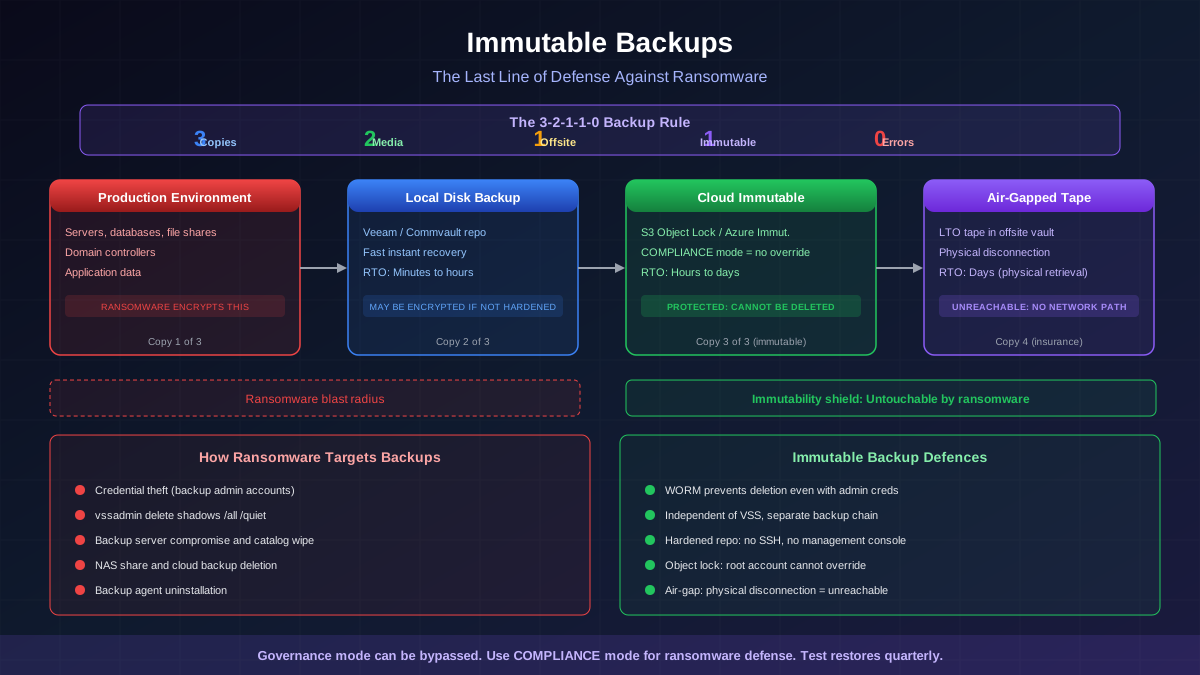
- Immutable backup verification — if you implemented immutable backups (S3 Object Lock, Azure Immutable Blob Storage, Veeam Hardened Repository), verify that the immutability settings are still intact and that backups within the retention window have not been modified. Immutable backups are your most reliable recovery path.
- Offline or air-gapped backup validation — if you maintain offline tape backups or air-gapped backup copies, these are the highest-confidence recovery source. Retrieve and verify them in an isolated environment before connecting them to any production network.
- Backup content verification — restore a sample of critical files from the most recent backup to an isolated test environment. Verify that files open correctly, databases have integrity, and application configurations are complete. Run malware scans on restored content to ensure backups were not encrypted or infected before the backup job captured them.
Recovery Tier Prioritization
Not all systems are equal. Recovery must follow a strict priority order based on dependencies, with each tier fully validated before the next tier begins:
Tier 0: Identity and authentication infrastructure (restore first). Active Directory domain controllers, DNS servers, DHCP, certificate authority (PKI), and Azure AD Connect servers. No other system can be securely restored until identity infrastructure is operational. If AD was compromised, a full forest recovery may be required, which involves building new domain controllers from clean media, restoring from the oldest clean system state backup, and resetting every password in the directory.
Tier 1: Security and monitoring infrastructure. SIEM, EDR management consoles, network monitoring tools, and firewall management platforms. These must be operational before production systems come online to detect any re-infection or persistent access.
Tier 2: Critical business applications. ERP systems, financial platforms, email (if not cloud-hosted), databases supporting customer-facing services, and manufacturing control systems. Prioritize based on business impact and revenue dependency.
Tier 3: Business support systems. Internal collaboration tools, development environments, HR systems, and secondary applications. These are important but can tolerate longer outages.
Tier 4: User workstations. End-user desktops and laptops are rebuilt from clean images, not restored from backup. User data is restored from backups only after the workstation is reimaged and EDR agents are deployed and reporting.
Clean Recovery Environment Construction
Never restore systems back into a potentially compromised network. Build a clean recovery environment first:
- Isolated VLAN or network segment — provision a segment with no connectivity to the compromised environment. Use new switches or firewall rules that provide complete isolation. This becomes the staging area for restored systems.
- Fresh management infrastructure — deploy new jump hosts with freshly installed operating systems and known-good administrator credentials (not the credentials used in the compromised environment). All recovery actions must be performed from these clean management systems.
- New credentials — generate entirely new administrator passwords, service account credentials, and API keys. Do not reuse any credentials from the compromised environment, as the attacker likely has access to credential stores, cached hashes, and Kerberos tickets.
- Enhanced monitoring — deploy network-level and endpoint-level monitoring in the recovery environment that specifically watches for indicators of the ransomware variant identified in the investigation. Set alerting thresholds to maximum sensitivity during the recovery period.
Hours 16-24: Initial Recovery and Continuous Monitoring
The final eight hours of the first day transition from planning to execution. Recovery begins with the highest-priority systems and follows a disciplined process of restore, validate, monitor, and proceed.
Phased Restoration Process
Each system restoration follows a five-step protocol:
- Restore to isolated environment — bring the system online in the clean recovery segment with no connectivity to production networks or internet access. Restore from the most recent verified-clean backup.
- Integrity validation — verify that the restored system is functional. For servers, check that services start correctly, data is intact, and application-level health checks pass. For databases, run consistency checks (DBCC CHECKDB for SQL Server, pg_isready with data validation for PostgreSQL).
- Malware scan — run a full malware scan with updated signatures on the restored system. Additionally, run a targeted scan using IOCs identified during the investigation (specific file hashes, registry keys, scheduled tasks, service names associated with the ransomware variant).
- Credential rotation — change all passwords, API keys, certificates, and service account credentials on the restored system. Remove any accounts that should not exist. Reset local administrator passwords to new unique values.
- Monitored production transition — move the validated system into a monitored production segment (not the original compromised segment). Maintain elevated monitoring for 72-96 hours after restoration, watching for any indicators of re-infection or persistent access.
Active Directory Recovery Specific Procedures
If Active Directory was compromised, recovery requires additional steps due to the pervasive trust AD provides across the enterprise:
- KRBTGT password reset — reset the KRBTGT account password twice (with a TGT max lifetime interval between resets) to invalidate all existing Kerberos tickets, including potential Golden Tickets the attacker may have created.
- Trust relationship review — examine all forest and domain trust relationships. Remove any unauthorized trusts. Re-evaluate whether existing trusts are still necessary.
- Group Policy audit — review every GPO for unauthorized modifications. Attackers use GPOs to deploy malware, weaken security settings, disable endpoint protection, and create persistence. Compare current GPOs against known-good backups.
- Service account comprehensive review — audit every service account for unauthorized changes to group membership, SPN configuration, delegation settings, and password last set dates. Service accounts with excessive privileges are prime targets for Kerberoasting and persistence.
- Azure AD and hybrid impact — if Azure AD Connect synchronizes with the compromised AD, assess the cloud impact. The attacker may have synchronized malicious accounts or modified password hash sync to gain cloud access. Consider disconnecting Azure AD Connect until on-premises AD is fully remediated.
Regulatory Notification Timeline and Requirements
Regulatory notification requirements vary by jurisdiction, industry, and data type affected, but all share a common characteristic: the clock starts at the moment of discovery, not at the moment the investigation concludes. Failure to meet notification deadlines can result in penalties that exceed the direct impact of the ransomware itself.
Major Regulatory Frameworks and Timelines
GDPR (EU/EEA): 72 hours from awareness of a personal data breach to notify the supervisory authority. If notification cannot be made within 72 hours, a reasoned justification must be provided. Data subjects must be notified without undue delay if the breach poses a high risk to their rights and freedoms. Penalties for non-notification reach 10 million euros or 2% of annual global turnover.
HIPAA (US healthcare): Covered entities must notify affected individuals within 60 days of discovery. If more than 500 individuals in a single state or jurisdiction are affected, notify prominent media outlets. Notify HHS immediately for breaches affecting 500+ individuals, or annually for smaller breaches. The HHS breach investigation can result in penalties up to 1.5 million dollars per violation category per year.
SEC (US public companies): Material cybersecurity incidents must be disclosed via Form 8-K within four business days of determining materiality. The materiality determination itself must be made without unreasonable delay after discovery. The SEC has demonstrated willingness to enforce this through multiple enforcement actions in 2024-2025.
State breach notification laws (US): All 50 US states have breach notification statutes, with timelines ranging from 30 to 90 days after discovery. Some states (California, Colorado, Virginia) have additional requirements under their comprehensive privacy laws. Multi-state incidents require tracking notification obligations for every jurisdiction where affected individuals reside.
NIS2 (EU): Early warning to the relevant CSIRT within 24 hours of becoming aware of a significant incident, followed by incident notification within 72 hours, and a final report within one month. Applies to essential and important entities across critical infrastructure sectors.
Notification Documentation Requirements
Begin documentation from T+0 with the following information that regulators and insurers will require:
- Precise timestamp of initial detection and how the incident was discovered
- Timeline of all response actions with timestamps and responsible individuals
- Assessment of data types potentially affected (PII, PHI, financial data, credentials)
- Number of individuals potentially affected (or estimated range if unknown)
- Description of containment and remediation measures taken
- Risk assessment for affected individuals and mitigating factors
- Contact information for further inquiries
Communication Protocols and Messaging
Communication during a ransomware incident must balance transparency with legal caution. Over-communicating can create liability, while under-communicating damages trust and may violate regulatory requirements.
Internal Communication
Issue brief, factual status updates to all employees at regular intervals (every 4-6 hours during the first 24 hours). Updates should include what is known, what systems are affected, what employees should and should not do, and an estimated time for the next update. Avoid speculation about the attacker, ransom demands, or data exposure in broad internal communications.
For the incident response team, establish a dedicated communication channel (out-of-band from potentially compromised systems) with continuous status sharing. Use a structured format for all updates: current assessment, actions in progress, decisions needed, and blockers.
External Communication Framework
Prepare external messaging that acknowledges the situation without providing details that could benefit the attacker or create legal exposure:
Holding statement (ready within 4 hours): "[Organization] is experiencing a cybersecurity incident affecting some of our systems. We are working with cybersecurity experts and law enforcement to investigate and resolve the situation. We will provide additional information as it becomes available."
Customer notification (if service is disrupted): Focus on what customers need to know and what they should do. Provide clear information about service availability, alternative contact methods, and protective steps they should take if data exposure is possible.
Media response: All media inquiries should be directed to a single spokesperson. Prepare Q&A documents covering anticipated questions but authorize only factual, confirmed responses. Never confirm specific ransom demands, attacker attribution, or data exposure details until the investigation supports these claims.
Post-24-Hour Transition: Setting the Foundation for Full Recovery
At the 24-hour mark, the incident transitions from crisis response to sustained response operations. The actions taken in the first day have established containment, preserved evidence, identified the threat, and begun recovery. The work ahead, which typically spans weeks to months, builds on this foundation.
24-Hour Checkpoint Assessment
At T+24 hours, the incident commander should convene a comprehensive status assessment addressing the following:
- Containment confidence — is containment holding? Are there any indicators of continued attacker activity or new encryption events? Has the initial access vector been definitively identified and closed?
- Scope assessment accuracy — has the scope expanded or contracted from initial estimates? What is the confidence level in the current scope assessment? Are there known visibility gaps?
- Recovery trajectory — when will Tier 0 systems (identity infrastructure) be operational? What is the estimated timeline for critical business function restoration? Are backup integrity levels sufficient for recovery?
- Business impact — what is the current financial impact (lost revenue, response costs, penalties)? What is the projected total impact? Is the impact approaching materiality thresholds for SEC or board reporting?
- Decision points — are there any outstanding decisions requiring executive input (ransom payment consideration, public disclosure timing, business continuity alternatives)?
Transition to Sustained Operations
Shift from crisis staffing to sustainable staffing. The incident response team members who worked the first 24 hours must rotate out for rest. Fatigued responders make errors that compound the incident. Establish 12-hour shifts with thorough handover briefings between shifts.
Formalize the investigation and recovery into workstreams with clear ownership, daily stand-up meetings, and written status reports. The parallel tracks established in the first 24 hours (technical, legal, business continuity) continue but with expanded scope: technical focuses on systematic recovery and root cause analysis, legal focuses on notification compliance and litigation preparation, and business continuity focuses on restoring normal operations while maintaining enhanced security posture.
Lessons Learned Planning
While the incident is still fresh, begin documenting lessons learned observations (without formally convening the lessons learned session, which should wait until recovery is substantially complete). Capture what worked in the response, what failed or caused delays, what information was missing during critical decision points, and what capabilities would have changed the outcome. These observations will inform the post-incident review and drive improvements to the incident response plan, technical controls, and organizational readiness for the next incident, because in the current threat landscape, it is a matter of when, not if.
The first 24 hours of a ransomware incident test every investment your organization has made in cybersecurity preparedness, and expose every gap. The organizations that navigate these hours successfully share common traits: they prepared before the crisis, they practiced their response, and they made decisions based on evidence rather than panic. The time to build this capability is before the ransom note appears.