Every phishing attack, regardless of how sophisticated the social-engineering pretext, ultimately requires the victim to interact with a URL: clicking a link, scanning a QR code, or navigating to a web address. The URL is the operational bottleneck of phishing. If employees and security tools can reliably distinguish malicious URLs from legitimate ones, the attack chain breaks. This guide provides the technical foundations for URL analysis, from manual dissection to automated tooling.
URL Anatomy: The Seven Components
Before analysing phishing URLs, you must understand what a URL actually contains. RFC 3986 defines the generic syntax:
scheme://userinfo@host:port/path?query#fragment

Example breakdown:
https://admin@secure-login.example-bank.com:443/account/verify?session=abc123&redirect=true#top

scheme:   https
userinfo: admin              (often abused to display fake domains)
host:     secure-login.example-bank.com
port:     443                (default for HTTPS, usually omitted)
path:     /account/verify
query:    session=abc123&redirect=true
fragment: top                (client-side only, never sent to server)
Attackers embed deception in every component. Understanding which component you are looking at is the first step in accurate analysis.
The Registered Domain Is the Truth
The single most important analysis step is extracting the registered domain (also called the effective second-level domain or eSLD) from the host component. The registered domain is the domain name that was purchased from a registrar. Everything to its left is a subdomain controlled by the domain owner; everything to its right is the public suffix (.com, .co.uk, .org).
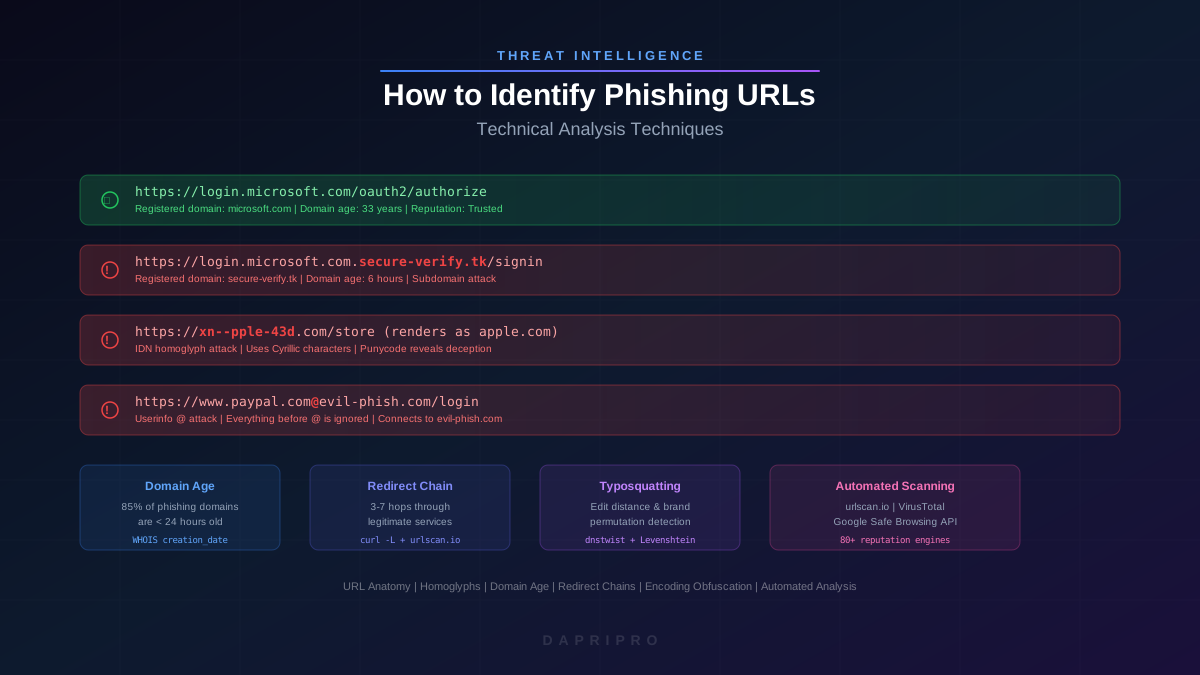
URL: https://login.microsoft.com.secure-verify.tk/signin

Subdomains:       login.microsoft.com
Registered domain: secure-verify.tk     (THIS is what matters)
Public suffix:     .tk

The registered domain is NOT microsoft.com
The attacker owns secure-verify.tk and created the subdomain "login.microsoft.com"
This is the most exploited misunderstanding in phishing. Victims read left-to-right and see "microsoft.com" without recognising it as a subdomain controlled by someone else. The registered domain (the rightmost label before the public suffix) is the only reliable indicator of who controls the URL.
Extracting the Public Suffix
Extracting the registered domain requires knowing the public suffix. This is not as simple as "everything after the last dot" because public suffixes can be multi-label: .co.uk, .com.au, .gov.br. The Mozilla Public Suffix List (publicsuffix.org) maintains the canonical list. Programmatic extraction using libraries like tldextract (Python) or psl (JavaScript) handles edge cases correctly.
# Python example using tldextract
import tldextract

url = "https://login.microsoft.com.secure-verify.co.uk/signin"
parsed = tldextract.extract(url)

print(parsed.subdomain)   # login.microsoft.com
print(parsed.domain)      # secure-verify
print(parsed.suffix)      # co.uk
print(parsed.registered_domain)  # secure-verify.co.uk
Userinfo Abuse: The @ Trick
The userinfo component (the part before the @ symbol) is a legitimate part of URL syntax, originally designed for FTP authentication. In HTTP, it is ignored by the server but displayed in the browser address bar (though modern browsers now strip or warn about it). Attackers exploit this to display a convincing domain before the @:
https://www.paypal.com@evil-site.com/login

What the victim sees: paypal.com
What the browser connects to: evil-site.com
The entire "www.paypal.com" portion is treated as userinfo and ignored
Modern Chrome and Firefox display a warning when userinfo is present in HTTP URLs, but some mobile browsers and older email clients still render the URL without warnings. Always check for the @ symbol in any URL you are analysing.
Homoglyph and IDN Homograph Attacks
Internationalised Domain Names (IDNs) allow domain registration using Unicode characters from non-Latin scripts. This enables legitimate use cases (Arabic, Chinese, and Cyrillic domain names) but also creates a powerful attack vector: characters from different scripts that are visually indistinguishable.
Common Homoglyph Substitutions
Latin "a" (U+0061) vs Cyrillic "a" (U+0430) - identical in most fonts
Latin "e" (U+0065) vs Cyrillic "e" (U+0435) - identical
Latin "o" (U+006F) vs Cyrillic "o" (U+043E) - identical
Latin "p" (U+0070) vs Cyrillic "r" (U+0440) - identical
Latin "c" (U+0063) vs Cyrillic "s" (U+0441) - identical
Latin "x" (U+0078) vs Cyrillic "kh" (U+0445) - identical

Result: "apple.com" using all Cyrillic characters looks identical
but resolves to a completely different server.
Punycode: xn--pple-43d.com (reveals the Unicode deception)
Browser Defences
Modern browsers implement RFC 5892 and display Punycode (the xn-- encoding) when they detect mixed-script domains (e.g., Latin letters mixed with Cyrillic). However, fully homogeneous Cyrillic domains may still render in Unicode, maintaining the visual deception. Chrome applies increasingly strict heuristics, but no browser catches all cases.
Detection Techniques
- Punycode conversion — convert any suspicious domain to Punycode. If the result contains
xn--, the domain uses non-ASCII characters - Unicode category inspection — check whether all characters in the domain belong to the same script block. Mixed scripts (Latin + Cyrillic) are almost always malicious
- Confusable detection — use the Unicode Consortium's confusables.txt database to identify characters that are visually similar across scripts
- Font rendering comparison — render the domain in a monospace font, which often reveals subtle glyph differences invisible in proportional fonts
Typosquatting and Combosquatting
Typosquatting registers domains that are one keystroke away from legitimate targets. Combosquatting appends plausible words to legitimate brand names. Both exploit the speed at which users scan URLs.
Typosquatting Patterns
- Character omission — gogle.com, microsft.com
- Character duplication — googgle.com, microsoftt.com
- Adjacent-key substitution — goofle.com (f adjacent to g on QWERTY)
- Character transposition — googel.com, mircosoft.com
- Character substitution — g00gle.com (zero for o), rnicrosft.com (rn looks like m)
Combosquatting Patterns
- Security-themed suffixes — microsoft-security.com, paypal-verify.com
- Login-themed prefixes — login-microsoft.com, secure-paypal.com
- Support-themed additions — microsoft-support.com, apple-helpdesk.com
- Hyphenated brand names — micro-soft.com, pay-pal.com
Automated detection uses edit-distance algorithms (Levenshtein distance, Damerau-Levenshtein distance) to calculate how many character operations separate a candidate domain from known brand domains. Tools like dnstwist generate comprehensive permutations automatically:
# Generate all typosquatting permutations for a target domain
dnstwist --registered microsoft.com

# Output includes:
# Character omission: microsft.com (A record: 93.184.216.34)
# Adjacent key:       mictosoft.com (A record: 185.230.63.107)
# Homoglyph:          xn--microsoft-d0a.com (A record: 45.33.32.156)
# Subdomain:          m.icrosoft.com (NXDOMAIN)
# Transposition:      mircosoft.com (A record: 93.184.216.34)
Domain Age: The Highest-Signal Heuristic
Domain age is the single most predictive indicator in phishing-URL analysis. The numbers are striking:
- 85% of phishing domains are less than 24 hours old at first use
- 94% are less than 7 days old
- 98% are less than 30 days old
- Legitimate brand-owned domains are typically years or decades old
Any domain less than 30 days old that mimics a brand name, requests credentials, or appears in an unsolicited message should be treated as malicious until proven otherwise.
Checking Domain Age
# WHOIS lookup for domain registration date
whois secure-microsoft-login.com | grep -i "creation date"
Creation Date: 2026-04-25T03:14:22Z   (registered yesterday)

# Alternative: use Python whois library
import whois
w = whois.whois("secure-microsoft-login.com")
print(w.creation_date)    # 2026-04-25 03:14:22
print(w.registrar)        # NameCheap, Inc.
print(w.name_servers)     # ['ns1.registrar-servers.com']
Organisational controls can automate this: configure your email gateway or web proxy to flag or block any URL pointing to a domain registered within the last 30 days. This single rule eliminates a significant majority of phishing URLs with minimal impact on legitimate business communications.
Redirect-Chain Analysis
Modern phishing kits do not link directly to the phishing page. They route victims through a chain of redirects, each serving a specific evasion purpose:
- URL shortener — hides the full URL from the victim and the email gateway (bit.ly, t.ly, rebrand.ly)
- Legitimate redirect service — uses open redirects on trusted domains (Google AMP, Microsoft Azure, Cloudflare Workers, Firebase Hosting) to inherit the domain's reputation
- Cloaking layer — checks the visitor's IP, user agent, geolocation, and referrer. If the visitor appears to be a security scanner (known IP ranges, headless browser user agents, non-target geolocations), redirect to the legitimate website. If the visitor appears to be a real victim, proceed to the phishing page.
- Phishing page — the actual credential-harvesting page, hosted on a freshly registered domain or a compromised legitimate site
Unwinding Redirect Chains
# Follow redirects without rendering (curl)
curl -v -L --max-redirs 10 -o /dev/null "https://bit.ly/3xPhish" 2>&1 | grep "Location:"

# Output shows the full chain:
# Location: https://www.google.com/amp/s/click.redirect-service.com/r/abc123
# Location: https://click.redirect-service.com/r/abc123
# Location: https://secure-login-portal.com/microsoft/oauth/signin

# Python requests following redirects
import requests
r = requests.get("https://bit.ly/3xPhish", allow_redirects=True)
for resp in r.history:
    print(f"{resp.status_code} -> {resp.headers.get('Location')}")
print(f"Final: {r.url}")
Detecting Cloaking
If a URL redirects to a legitimate site when you visit from your analysis workstation but reportedly leads to a phishing page when clicked by the targeted employee, the phishing kit is using cloaking. To bypass cloaking:
- Use a residential VPN exit node in the target geography
- Set a consumer user-agent string (Chrome on Windows, not a bot user agent)
- Include a plausible referrer header matching the email client (e.g., Outlook Web)
- Use urlscan.io with the "private" scan option, which renders from multiple geographic locations
URL Encoding and Obfuscation
Attackers use URL encoding, IP-address encoding, and nested encoding to obscure the true destination from both human inspection and automated scanners.
Percent-Encoding Abuse
Standard percent-encoding replaces characters with %HH sequences. Attackers encode characters that do not require encoding to obscure the URL:
Original:  https://evil.com/phishing
Encoded:   https://evil%2Ecom/%70%68%69%73%68%69%6E%67
Double:    https://%65%76%69%6C%252E%63%6F%6D/%70hishing
IP Address Obfuscation
IP addresses can be represented in multiple equivalent formats, all resolving to the same server:
Standard:    http://93.184.216.34/phish
Decimal:     http://1572395042/phish        (single 32-bit integer)
Octal:       http://0135.0270.0330.0042/phish
Hexadecimal: http://0x5DB8D822/phish
Mixed:       http://93.0xB8.0330.34/phish   (combination of formats)
All five URLs resolve to the same IP address. Automated analysis must normalise all IP-address formats to standard dotted-decimal notation before reputation lookup.
Automated Analysis Tooling
Manual URL analysis is valuable for training and understanding, but operational triage requires automation. The following tools provide programmatic URL analysis:
urlscan.io
Submits the URL to a headless browser, follows all redirects, captures the rendered page screenshot, extracts all loaded resources, and provides a verdict. The API enables bulk submission from SOAR playbooks.
# Submit URL for analysis via API
curl -X POST "https://urlscan.io/api/v1/scan/" \
  -H "API-Key: YOUR_KEY" \
  -H "Content-Type: application/json" \
  -d '{"url": "https://suspicious-link.com/login", "visibility": "private"}'

# Response includes scan UUID for result retrieval
VirusTotal URL Scan
Checks the URL against 80+ reputation engines simultaneously. Useful for consensus-based verdicts, though newly registered phishing domains may show zero detections in the first 2-4 hours.
Google Safe Browsing API
Free API that checks URLs against Google's continuously updated blocklist. Integrated into Chrome, Firefox, and Safari. High coverage but can lag 30-60 minutes behind new phishing pages.
CyberChef
Open-source tool for decoding, deobfuscating, and transforming URLs. Particularly useful for unwinding nested percent-encoding, Base64-encoded payloads in query parameters, and extracting IOCs from obfuscated URLs.
Phishtank
Community-driven phishing-URL database. URLs can be submitted and verified by the community. Useful for checking whether a URL has already been reported and for contributing confirmed phishing URLs to the collective blocklist.
Organisational URL-Analysis Controls
Individual analysis skills are important, but organisations need automated, policy-enforced controls that apply URL analysis to every message and every click.
Email Gateway URL Rewriting
Configure your email security gateway (Microsoft Defender for Office 365, Proofpoint, Mimecast) to rewrite all URLs in inbound emails through a time-of-click proxy. This enables:
- Re-evaluation of URL reputation at click time (not just delivery time)
- Detonation of the destination page in a sandbox
- Enforcement of domain-age policies (block clicks to domains younger than 24 hours)
- Logging of all clicked URLs for forensic analysis
DNS-Layer Filtering
Deploy DNS security (Cisco Umbrella, Cloudflare Gateway, Infoblox BloxOne) to block resolution of known-malicious domains, newly registered domains, and domains associated with phishing campaigns. DNS filtering catches all URL-based threats regardless of the delivery channel (email, chat, browser, QR code).
Browser Extensions
Deploy browser extensions that display domain age, WHOIS information, and reputation scores directly in the browser address bar. This transforms URL analysis from a specialised skill into an ambient awareness tool available to every employee.
User Training Integration
Integrate URL analysis into phishing simulation programmes. When an employee clicks a simulated phishing URL, the teachable moment should include a brief explanation of which URL indicators they could have checked: registered domain, domain age, presence of subdomains mimicking brand names, and URL shorteners in unexpected contexts.
URL analysis is a technical skill that becomes intuitive with practice. Organisations that train employees to check the registered domain before clicking, and that deploy automated controls to catch what training misses, close the most exploitable gap in their phishing defences.