QR codes were designed for speed. A Toyota subsidiary invented them in 1994 to track automotive parts, and their core value proposition has not changed: encode structured data in a two-dimensional pattern that can be scanned faster than a barcode. The pandemic-era explosion of contactless interactions (restaurant menus, vaccine passports, payment terminals) normalised QR-code scanning for billions of people. Attackers noticed.
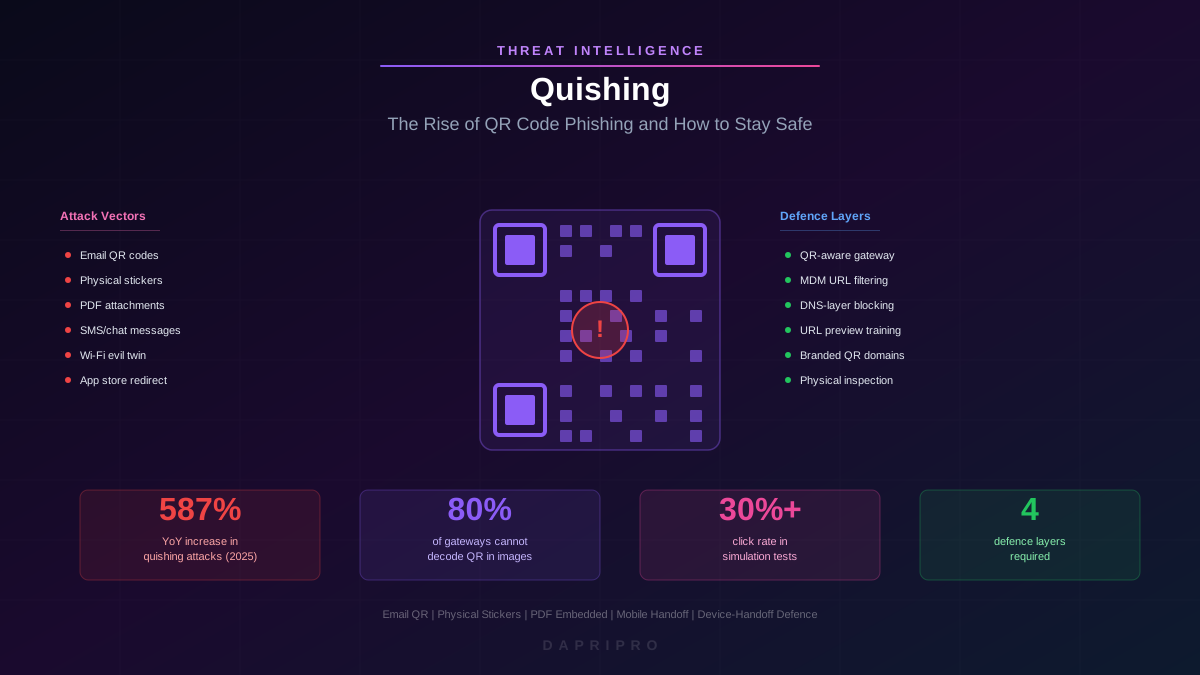
Quishing, the portmanteau of "QR" and "phishing", exploits the fundamental opacity of QR codes: humans cannot read them. Unlike a hyperlink where you can hover to preview the URL, a QR code reveals its payload only after scanning. This opacity, combined with the fact that QR codes bypass traditional email security entirely, has made quishing one of the fastest-growing attack vectors in 2025-2026.
How QR Codes Work: Encoding and Error Correction
Understanding quishing requires understanding QR-code structure. A QR code is a matrix of black and white modules (squares) arranged in a grid. The encoding process converts input data into a binary bitstream, applies error-correction coding (Reed-Solomon), and maps the result onto the module pattern.
Data Capacity
A standard QR code (Version 40, the largest) can encode up to 4,296 alphanumeric characters or 2,953 bytes of binary data. This is more than enough to encode a phishing URL with tracking parameters, obfuscation layers, and victim-specific identifiers. Even Version 2 (25x25 modules), the size commonly used in emails, encodes up to 47 alphanumeric characters: sufficient for a shortened URL.
Error Correction
QR codes include four levels of error correction: L (7%), M (15%), Q (25%), and H (30%). Higher error correction means the code can be partially damaged or obscured and still scan correctly. Attackers exploit this by:
- Overlaying brand logos on QR codes (which damages modules) while maintaining scannability thanks to error correction
- Creating QR codes with embedded visual designs that make them appear legitimate or branded
- Slightly modifying existing legitimate QR codes to redirect to malicious destinations while preserving visual similarity
Encoded Data Types
QR codes are not limited to URLs. They can encode multiple data types, each representing a distinct attack vector:
- URL — opens a web browser to the encoded address (credential harvesting, malware download)
- Wi-Fi configuration — automatically connects the device to a specified network (evil-twin, man-in-the-middle)
- vCard — adds a contact to the address book (social engineering via trusted contact impersonation)
- SMS — pre-populates a text message to a specified number (premium-rate fraud)
- Email — pre-populates an email to a specified address with a specified subject and body
- App Store link — directs to an app download page (trojanised application delivery)
- Plain text — displays arbitrary text (used for social-engineering instructions)
Why Traditional Email Security Misses Quishing
The quishing surge is not driven by sophisticated exploitation; it is driven by a gap in defensive tooling. Understanding this gap is critical for remediation.
The Image-Analysis Gap
Email security gateways process messages in layers:
- Envelope analysis — SPF, DKIM, DMARC checks on the sending domain
- Header analysis — sender reputation, display-name spoofing detection
- Body analysis — URL extraction, text-based keyword detection, sentiment analysis
- Attachment analysis — file-type inspection, macro detection, sandbox detonation
QR codes embedded as inline images fall between layers 3 and 4. The gateway does not extract URLs from pixel patterns in images because that requires QR-code-specific image processing (decoding the matrix pattern). The QR code is not a clickable hyperlink (layer 3 misses it) and is not a potentially executable attachment (layer 4 ignores it). It is a benign image that happens to encode a malicious URL.
The Mobile Handoff
Even if the gateway could decode QR codes, the attack chain involves a device handoff: the email is viewed on a desktop, but the QR code is scanned with a mobile phone. The mobile phone typically:
- Is not protected by the corporate email gateway
- May not route traffic through the corporate web proxy
- May not have MDM-enforced URL filtering
- Uses a different browser (Safari, Chrome mobile) than the desktop
This device handoff breaks the security stack. The email gateway cannot inspect traffic that never passes through it, and the mobile device has fewer security controls than the managed desktop.
Real-World Quishing Campaigns
Quishing is not theoretical. Several large-scale campaigns demonstrate the pattern:
Microsoft 365 MFA Quishing (2024-2025)
The most prolific quishing campaign targeted Microsoft 365 users with emails impersonating IT departments. The email body contained no clickable links, only a QR code with the message: "Your multi-factor authentication is expiring. Scan this QR code from your mobile device to re-verify your identity." The QR code led to a near-perfect Microsoft login clone hosted on a freshly registered domain. Because the email contained no URLs, no attachments, and passed DMARC checks (sent from a compromised legitimate account), it bypassed virtually all email security gateways.
Parking-Meter Quishing (Physical)
Attackers in multiple US and European cities placed stickers with malicious QR codes over legitimate parking-meter payment QR codes. Drivers scanning to pay for parking were directed to a fake payment portal that harvested credit-card data. This attack is significant because it operates entirely outside the email channel: no email gateway, no web proxy, no corporate security controls of any kind.
HR Benefits Enrolment Quishing
During open-enrolment season, attackers sent emails impersonating HR departments with QR codes linking to "benefit plan comparison tools." The emotional urgency of benefits deadlines, combined with the legitimate use of QR codes in HR communications, produced click-through rates exceeding 30% in simulation testing.
Supply-Chain Invoice Quishing
Attackers embedded QR codes in PDF invoice attachments, replacing the legitimate payment QR code with one linking to a fake payment portal. Because the QR code was inside a PDF attachment (not the email body), even QR-code-aware email gateways that scan inline images missed it.
Detection Techniques
QR-Code-Aware Email Security
Next-generation email security platforms now include QR-code detection as a standard feature:
- Image rendering and decoding — the platform renders all inline images and attached images, applies QR-code detection algorithms, extracts the encoded payload, and subjects it to the same URL analysis as clickable hyperlinks
- PDF QR extraction — for QR codes embedded in PDF attachments, the platform renders each page, scans for QR patterns, and extracts encoded data
- Behavioural signals — emails containing QR codes but no clickable links are flagged for elevated scrutiny, because this pattern is unusual for legitimate business communications (which typically include both)
Mobile Device Management (MDM)
MDM solutions can enforce URL-filtering policies on managed mobile devices:
- URL preview enforcement — require the device to display the decoded URL before navigating, giving users a chance to inspect the domain
- Web-content filtering — route mobile browser traffic through a cloud proxy that checks URL reputation, domain age, and category
- QR scanner restrictions — restrict QR-code scanning to approved applications that include built-in URL reputation checking
Network-Level Detection
Even if the QR code bypasses email security and the mobile device lacks MDM, network-level DNS filtering can catch the final destination:
- Deploy DNS security (Cisco Umbrella, Cloudflare Gateway) on the corporate Wi-Fi network
- Configure automatic blocking of newly registered domains (NRDs) younger than 30 days
- Block categories commonly associated with phishing (uncategorised, newly observed, parked domains)
Defending Against Physical Quishing
Physical quishing attacks (malicious QR codes in public spaces) are uniquely challenging because they operate completely outside organisational security controls. The only defence is trained user behaviour.
User Training Principles
- Preview before proceeding — after scanning a QR code, always read the URL displayed on the phone screen before tapping to navigate. Check the registered domain against what you expect.
- Physical inspection — check whether the QR code is a sticker placed over another QR code. Legitimate QR codes on parking meters, restaurant tables, and payment terminals are typically printed or engraved, not adhesive stickers.
- Context verification — if the QR code directs to a payment page, verify the merchant name, URL, and payment amount match expectations. If the QR code requests credentials (login, MFA code), stop and verify through an independent channel.
- Avoid QR-initiated downloads — never install an app via a QR code link. Navigate to the official app store manually and search for the application.
Organisational QR Code Policies
Internal QR Code Standards
If your organisation uses QR codes in internal communications, marketing materials, or customer interactions, establish standards that make legitimate codes recognisable:
- Branded short domains — use a consistent, recognisable domain for all organisational QR codes (e.g., qr.yourcompany.com). Train employees to expect this domain when scanning internal QR codes.
- Visual branding — embed the company logo in internal QR codes using the error-correction margin. This makes it harder for attackers to create convincing fakes.
- Inventory and rotation — maintain an inventory of all QR codes deployed in physical spaces. Inspect them regularly for sticker overlays. Rotate QR codes periodically to invalidate any compromised codes.
- Avoid QR codes for authentication — never use QR codes as the sole mechanism for authentication or credential submission. If a QR code must lead to a login page, use a secondary verification step.
QR Code in Phishing Simulations
Include QR-code-based scenarios in your phishing simulation programme. Employees trained only on email hyperlinks fail QR-code simulations at rates comparable to untrained populations. Effective QR simulations include:
- Email with embedded QR code and no clickable links (the standard quishing pattern)
- Physical QR codes placed in office common areas (break room, lobby, elevator)
- QR codes in printed materials distributed during all-hands meetings or events
- QR codes in SMS messages (smishing + quishing combination)
Technical Countermeasures for Security Teams
Email Gateway Configuration
If your email security platform supports QR-code scanning, enable it with the following configuration:
- Scan all inline images and image attachments for QR patterns
- Extract encoded URLs and subject them to full URL-analysis pipeline (reputation, domain age, sandbox)
- Flag emails containing QR codes but no clickable links (anomalous pattern)
- For PDF attachments, enable per-page rendering and QR extraction
SIEM Detection Rules
Create detection rules that correlate QR-code-related events:
- Alert when multiple users report emails containing QR codes within a short time window (campaign indicator)
- Alert when mobile devices on corporate Wi-Fi navigate to newly registered domains (potential quishing click)
- Alert when the email gateway detects a QR code encoding a URL that fails reputation checks
Incident Response for Quishing
When a quishing attack is confirmed:
- Identify all recipients — search the email gateway logs for the campaign (by sender, subject, or attachment hash)
- Quarantine — remove the email from all recipient inboxes using automated remediation (e.g., Microsoft Purview, Proofpoint TRAP)
- Block the destination — add the phishing URL and domain to your web proxy, DNS, and firewall blocklists
- Check for clicks — if you have mobile-device management, check browser history or proxy logs for navigation to the phishing domain
- Credential reset — for any user who navigated to the phishing page, force a password reset and revoke active sessions
- Notify and train — send a brief notification to all recipients explaining the attack and what to look for, reinforcing the just-in-time training approach
Quishing will continue to grow as long as QR codes remain opaque to human inspection and email security gateways lag in image-analysis capabilities. The organisations that deploy QR-code-aware email scanning, enforce mobile-device URL filtering, and train employees to preview before navigating will be resilient. The organisations that assume their existing email security catches everything will learn otherwise, one scanned code at a time.