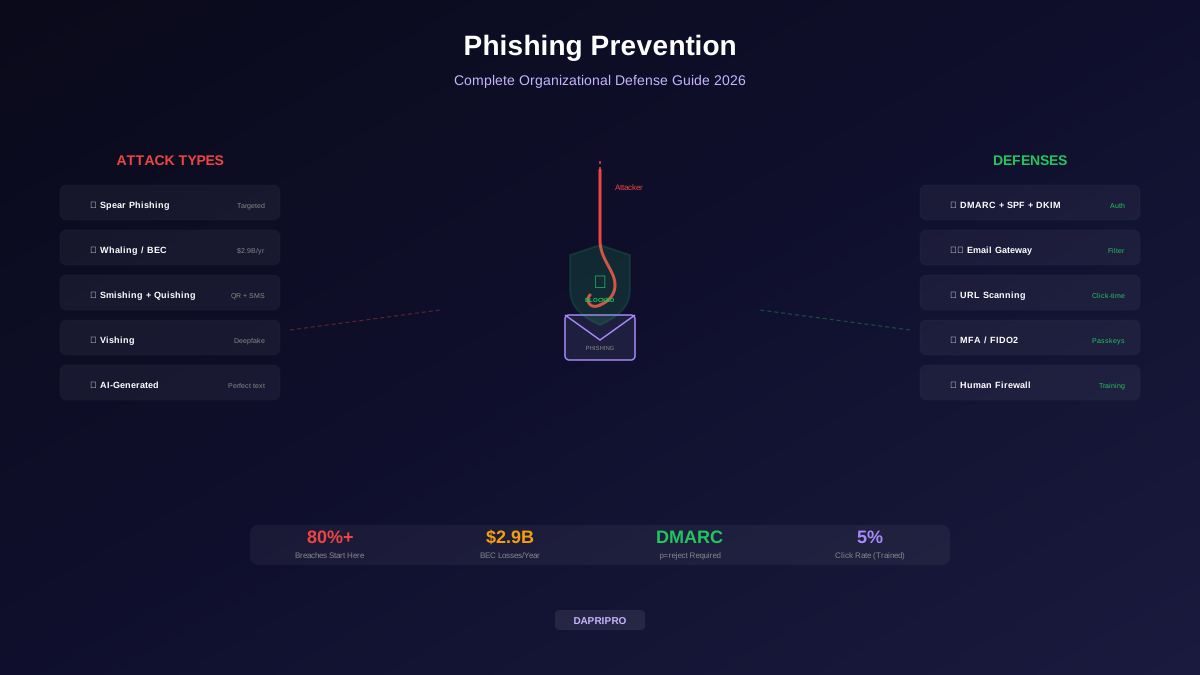
The anti-phishing tool market is saturated with products that promise comprehensive protection. Browser extensions claim to detect phishing sites in real-time. Email gateways promise to filter 99.9% of malicious messages. DNS services pledge to block connections to known-bad domains. Every vendor publishes impressive detection rates, typically measured against known phishing corpora that are days or weeks old.
The reality is more nuanced. Anti-phishing tools work through a combination of blocklists, heuristic analysis, and machine-learning classification. Each approach has specific strengths and measurable blind spots. Understanding how these tools actually detect phishing, and specifically where each detection method fails, is the prerequisite for building a defence stack that works in practice, not just in vendor benchmarks.
How Anti-Phishing Detection Actually Works
Method 1 — URL Reputation and Blocklists
The oldest and most widely deployed detection method is the URL blocklist. Services like Google Safe Browsing, Microsoft SmartScreen, PhishTank, and OpenPhish maintain databases of known phishing URLs. When a user navigates to a URL, the browser or extension checks it against the blocklist. If there is a match, the user sees a warning page.
Blocklist detection is binary and highly accurate for known threats: if a URL is on the list, it is flagged; if not, it passes. The critical weakness is temporal:
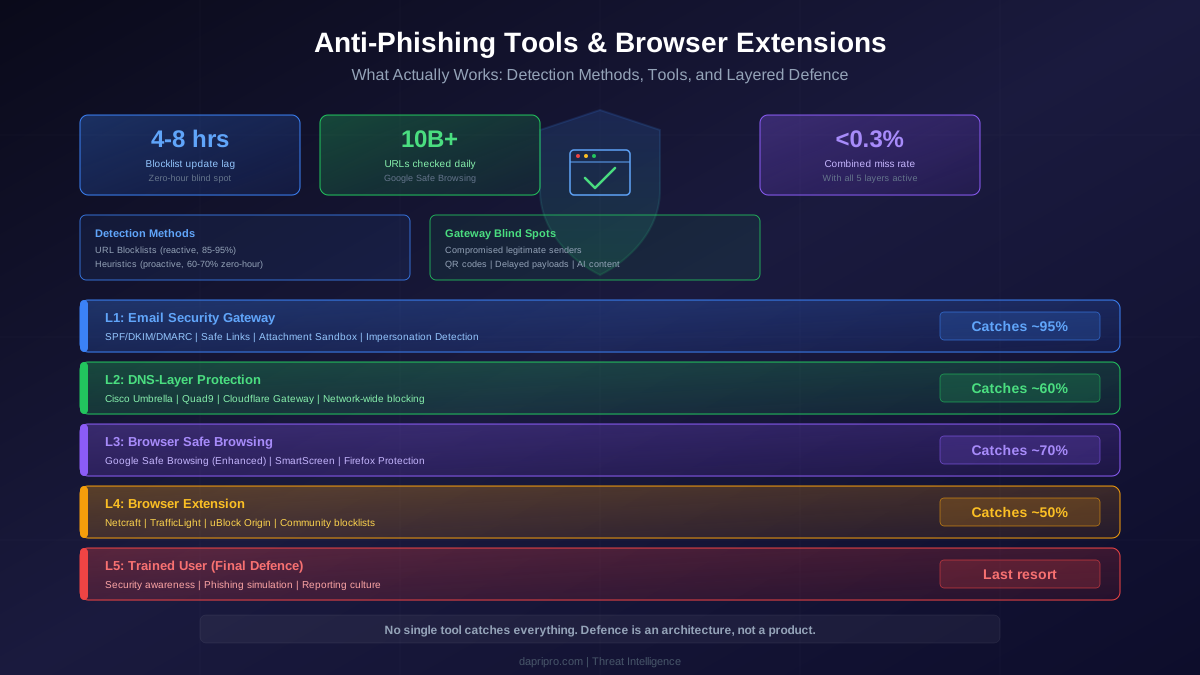
- Average time from phishing-site deployment to blocklist inclusion: 4-8 hours (data from APWG and Google Transparency Reports)
- Average phishing-site active lifetime: 16-24 hours
- Peak attack window: the first 4-6 hours after deployment, when the blocklist has not yet caught up
- Attacker adaptation: sophisticated campaigns rotate domains every 15-45 minutes, ensuring that each individual URL is used for only a handful of victims before being abandoned
Blocklists are essential but inherently reactive. They protect against the long tail of attacks but miss the initial wave when a phishing campaign is most active.
Method 2 — Heuristic Analysis
Heuristic detection examines URL structure, page content, and site characteristics to identify phishing indicators without relying on a known blocklist entry. Common heuristics include:
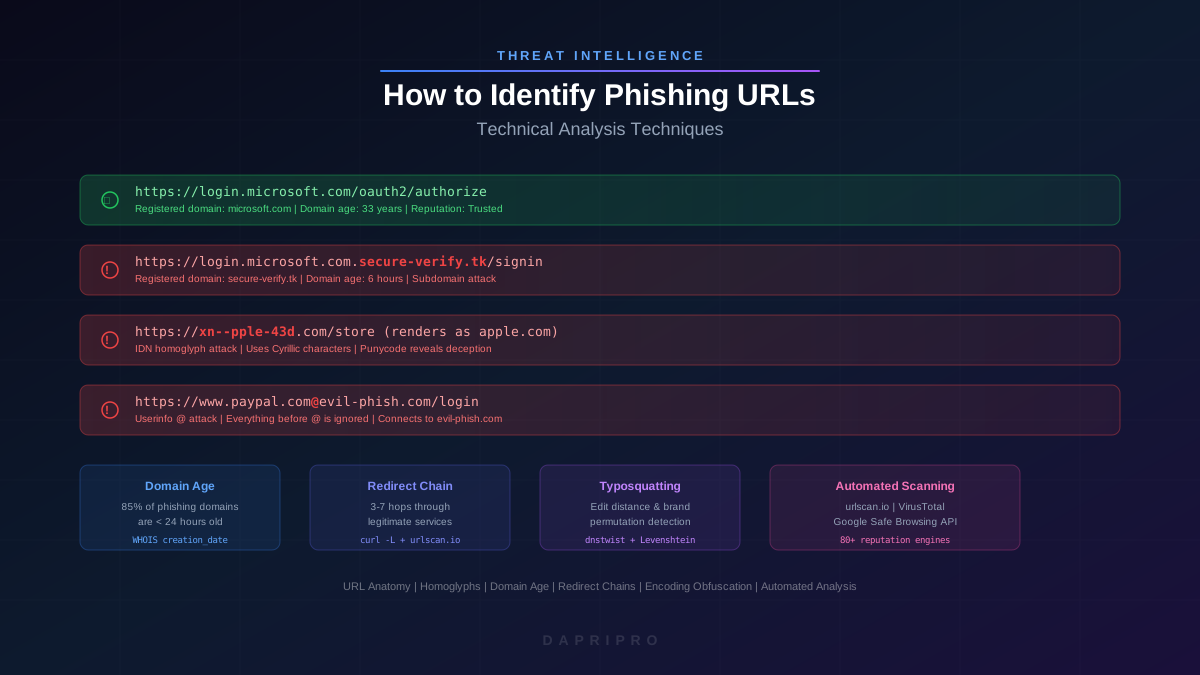
- URL structure analysis — detection of suspicious patterns: excessive subdomains, use of IP addresses instead of domain names, the presence of @ symbols (userinfo abuse), punycode/IDN homoglyphs, and keyword stuffing (e.g., "login-secure-bank-verify" in the URL path)
- Page-content analysis — comparison of page HTML, CSS, and visual layout against known legitimate login pages (e.g., the Microsoft 365 login page). High visual similarity to a known target combined with a non-matching domain triggers a phishing flag.
- Certificate analysis — examination of TLS certificate characteristics: recently issued DV certificates, free CA providers (historically associated with phishing), certificate transparency log analysis
- Form analysis — detection of password input fields on pages that do not match known legitimate domains
Heuristic analysis is more proactive than blocklists because it can flag novel phishing sites that have not been reported. However, it produces false positives: legitimate new websites with unusual URL structures or visual similarity to established brands can trigger heuristic rules.
Method 3 — Machine-Learning Classification
Modern anti-phishing tools increasingly use machine-learning models trained on features extracted from both phishing and legitimate URLs, emails, and web pages. Features typically include:
- URL lexical features (length, special character count, entropy, n-gram distribution)
- Domain registration features (age, registrar reputation, WHOIS privacy)
- Network features (hosting provider, ASN reputation, geographic location)
- Page-content features (DOM structure, JavaScript behaviour, form actions, embedded resources)
- Email-header features (SPF/DKIM/DMARC alignment, header anomalies, sender reputation)
ML classifiers achieve high accuracy on test sets (typically 97-99%) but face challenges in production: adversarial evasion (attackers specifically craft pages to avoid classifier features), concept drift (the characteristics of phishing change faster than models are retrained), and the base-rate problem (at web scale, even a 0.1% false-positive rate generates millions of incorrect warnings daily).
Browser-Native Protections
Google Safe Browsing
Safe Browsing is embedded in Chrome, Firefox, Safari, and several other browsers. It operates in two modes:
Standard Protection — the browser downloads a compact representation of the blocklist (using hash prefixes) every 30 minutes. When a user navigates to a URL, the browser computes the URL hash, checks the first 32 bits against the local prefix list, and only queries the Google server if there is a prefix match. This preserves privacy (Google does not see most browsing activity) while providing broad protection against known threats.
Enhanced Protection — enables real-time URL checking by sending full URL hashes to Google's servers for every navigation. This provides faster detection of new threats (minutes instead of the 30-minute update interval) and enables additional protections: deep file scanning for downloads, advanced phishing-page detection using page content, and predictive protection based on the user's browsing patterns. The trade-off is that Google receives more browsing data.
Detection performance: Safe Browsing processes over 10 billion URLs per day and claims to protect 5 billion devices. Google reports blocking approximately 100 million phishing attempts daily. Independent tests (NSS Labs, AV-Comparatives) typically show Safe Browsing catching 85-95% of phishing URLs, with the Enhanced mode reaching the higher end.
Microsoft SmartScreen
SmartScreen is integrated into Microsoft Edge and Windows. It combines URL reputation checking with application-reputation scoring. For phishing, SmartScreen maintains its own blocklist and heuristic engine. It also provides Enhanced Phishing Protection in Windows 11, which monitors password entry in applications and browsers and warns users when they type their Windows password into a website or application, even if the site is not on a known blocklist.
SmartScreen's unique strength is its integration with the Windows security stack. The Enhanced Phishing Protection feature can detect credential entry in any application, not just the browser, providing protection against phishing sites that redirect users to native applications.
Firefox Phishing Protection
Firefox uses Google Safe Browsing for its phishing and malware protection (configurable by the user). Firefox's implementation is notable for its privacy approach: it downloads the full blocklist locally and performs all initial checks client-side, only contacting Google servers for hash-prefix collisions. Firefox users can also configure custom blocklists or disable Safe Browsing entirely.
Email Security Gateways
Email is the delivery mechanism for the vast majority of phishing attacks. Email security gateways (SEGs) sit between the internet and the organisation's mail server, analysing every inbound email before it reaches the user's inbox.
Microsoft Defender for Office 365
Defender for Office 365 (formerly Advanced Threat Protection) provides multi-layered email filtering:
- Exchange Online Protection (EOP) — baseline filtering using sender reputation, SPF/DKIM/DMARC verification, content filtering, and anti-malware scanning
- Safe Links — URL rewriting that wraps every link in inbound emails with a Microsoft proxy. When the user clicks, the URL is checked against the blocklist at click time (not just at delivery time), catching URLs that become malicious after the email was delivered.
- Safe Attachments — sandboxing of email attachments in a detonation chamber to detect malicious behaviour before delivery
- Anti-phishing policies — ML-based impersonation detection that identifies emails spoofing internal users, domains, or known partners
Proofpoint Email Protection
Proofpoint uses a combination of URL sandboxing (Targeted Attack Protection), behavioural analysis of email patterns, and threat-intelligence feeds to detect phishing. Its key differentiator is the Very Attacked People (VAP) feature, which identifies the individuals in the organisation who receive the most targeted attacks and applies additional scrutiny to their inbound mail.
Mimecast
Mimecast provides URL rewriting and scanning, attachment sandboxing, impersonation protection (using ML to detect display-name spoofing and lookalike domains), and browser isolation for risky URLs. When a user clicks a suspicious link, Mimecast can open it in an isolated browser session rather than the user's local browser, preventing any phishing payload from reaching the endpoint.
Where Email Gateways Fail
- Compromised legitimate accounts — when phishing emails come from a compromised legitimate account (e.g., a partner organisation's real email address), sender reputation is clean and SPF/DKIM/DMARC all pass. The gateway has to rely on content analysis alone.
- Clean emails with delayed payloads — attackers send emails containing links to legitimate pages (e.g., a Google Docs document). After the email passes the gateway, the attacker modifies the linked document to include a phishing link. The gateway checked a clean URL at delivery time.
- QR code phishing (quishing) — most email gateways do not analyse images for embedded QR codes. A phishing email with a QR code image containing a malicious URL bypasses URL scanning entirely.
- AI-generated content — LLM-generated phishing emails are linguistically clean, making content-analysis heuristics less effective.
Browser Extensions: Independent Assessment
Netcraft Extension
Netcraft maintains one of the oldest and most comprehensive phishing-site databases. The browser extension checks every visited URL against Netcraft's threat database in real-time and displays a site risk rating. Netcraft's strength is its community reporting network and rapid blocklist updates (often within minutes of a phishing site being reported).
Permissions: Requires access to all websites to check URLs. Sends visited URLs to Netcraft servers for checking.
Performance impact: Minimal. URL checking is asynchronous and does not block page loading.
Recommendation: Strong choice for users who want an additional detection layer beyond browser-native Safe Browsing.
Bitdefender TrafficLight
TrafficLight analyses search-engine results and visited pages in real-time, marking links as safe, suspicious, or dangerous directly in search results. It uses Bitdefender's cloud-based threat intelligence for classification.
Permissions: Requires access to all websites. Injects visual indicators into search result pages.
Performance impact: Moderate. The DOM injection for marking search results can add 50-200ms to search-page rendering.
Recommendation: Useful for less technical users who benefit from visual safety indicators in search results.
uBlock Origin
While primarily an ad blocker, uBlock Origin blocks connections to known phishing and malware domains using multiple filter lists (including Malware Domain List, PhishTank, and custom community lists). Its content-blocking approach is fundamentally different from dedicated anti-phishing extensions: it blocks the network requests to malicious domains rather than warning about them after the page loads.
Permissions: Requires extensive page access for content filtering, but all processing is local. No data is sent to external servers.
Performance impact: Often improves browsing performance by blocking ad networks and tracking scripts.
Recommendation: Not a replacement for dedicated anti-phishing tools, but a valuable supplementary layer that also reduces exposure to malvertising (malicious advertising that redirects to phishing sites).
Extensions to Avoid
Not all anti-phishing extensions are trustworthy. Red flags include:
- Unknown developer — no verifiable company, no privacy policy, no contact information
- Excessive permissions — requests to "read and change all your data on all websites" without clear justification
- Low user count with inflated ratings — fewer than 1,000 users but 5-star ratings from generic profiles
- No recent updates — an anti-phishing extension that has not been updated in 6+ months is either abandoned or was never serious
- Data-collection monetisation — free extensions that collect and sell browsing data. The extension becomes the privacy threat rather than the protection.
DNS-Layer Protection
DNS-layer protection blocks phishing at the network level by preventing DNS resolution for known-malicious domains. When a user (or a phishing email link) attempts to connect to a phishing domain, the DNS resolver returns a block page instead of the actual IP address.
Cisco Umbrella (OpenDNS) — enterprise DNS security that categorises domains using threat intelligence and ML, blocking connections to phishing, malware, and command-and-control domains. Provides visibility into all DNS queries across the organisation.
Cloudflare Gateway (1.1.1.2 / 1.1.1.3) — free malware-blocking DNS resolver. The 1.1.1.2 resolver blocks known malware domains; 1.1.1.3 adds adult-content filtering. Enterprise Cloudflare Gateway adds policy controls and logging.
Quad9 (9.9.9.9) — non-profit DNS service that blocks connections to domains identified as malicious by a consortium of threat-intelligence providers. Notably privacy-focused: Quad9 does not log client IP addresses.
DNS-layer protection is valuable because it works below the browser: it catches phishing connections from any application (email clients, chat applications, even malware attempting to phone home), not just browser navigations.
Building a Layered Anti-Phishing Architecture
Each tool category addresses a specific segment of the phishing attack chain. No single tool covers the entire chain. A layered architecture assigns each defence to the attack phase where it is most effective:
Recommended Stack for Organisations
- Email gateway — Microsoft Defender for Office 365 (Plan 2), Proofpoint, or Mimecast with Safe Links, attachment sandboxing, and impersonation detection enabled
- DNS protection — Cisco Umbrella for enterprise; Quad9 (9.9.9.9) or Cloudflare (1.1.1.2) for smaller organisations
- Browser configuration — enforce Google Safe Browsing Enhanced mode (or SmartScreen on Edge) through group policy. Block extension installation except from an approved list.
- Approved browser extension — Netcraft Extension or Bitdefender TrafficLight, deployed via enterprise extension policy
- User training — phishing simulation platform (KnowBe4, Cofense, IRONSCALES) with monthly exercises targeting the specific attack patterns that bypass the technical stack
Recommended Stack for Individuals
- Enable Enhanced Safe Browsing in Chrome (Settings > Privacy and Security > Security > Enhanced protection) or ensure SmartScreen is enabled in Edge
- Install a reputable extension — Netcraft Extension or uBlock Origin. Both are free, well-maintained, and do not sell browsing data.
- Switch DNS — configure your router or device to use Quad9 (9.9.9.9) or Cloudflare (1.1.1.2) instead of your ISP's default DNS resolver
- Enable MFA on all accounts — even if phishing captures your password, MFA prevents account compromise (use hardware keys or authenticator apps, not SMS)
- Use a password manager — password managers only auto-fill credentials on the legitimate domain. If you navigate to a phishing page that looks identical to your bank, the password manager will not offer to fill the credentials because the domain does not match. This is one of the most underrated anti-phishing defences available.
How to Evaluate Anti-Phishing Tools
Vendor claims are unreliable without independent validation. When evaluating an anti-phishing tool, assess the following:
- Detection methodology — does the tool use blocklists only, heuristics, ML, or a combination? Blocklist-only tools have known lag. ML-only tools may have false-positive issues.
- Time-to-detection — how quickly does the tool catch a new phishing site? Ask for data on zero-hour detection, not detection against aged corpora.
- False-positive rate — how often does the tool incorrectly flag legitimate sites? A high false-positive rate trains users to click through warnings, defeating the purpose.
- Privacy implications — what data does the tool collect? Where is it sent? Is it shared with third parties? Extensions that harvest browsing data are a privacy threat, not a security tool.
- Performance impact — does the tool slow page loading? Does it inject JavaScript into pages? Does it increase memory consumption?
- Independent testing — look for results from AV-Comparatives, AV-TEST, NSS Labs, or SE Labs. Vendor-commissioned tests are marketing, not evaluation.
The single most important metric is not detection rate but the combined effect of detection rate and false-positive rate. A tool with 98% detection and a 0.01% false-positive rate is vastly more useful than a tool with 99.5% detection and a 1% false-positive rate, because the latter will generate so many false alarms that users will learn to ignore all warnings.
Anti-phishing defence is not a product; it is an architecture. The organisations and individuals who achieve the highest resistance to phishing are those who deploy multiple detection methods at different points in the attack chain, accept that no single tool is sufficient, and invest in user training as the final layer that catches what every automated system misses.