A man in a hard hat and reflective vest walks up to your office building carrying a clipboard. He tells the receptionist he is here for a "scheduled fire alarm inspection." The receptionist does not remember any inspection on the calendar, but the man has a clipboard, a uniform, and an air of authority. She lets him in.
He is not an inspector. He is a penetration tester hired by your company. In 20 minutes, he accesses the server room, plugs in a rogue device, and walks out with a photo of the network rack. No one stopped him. No one asked for ID.
This is social engineering — the art of manipulating people instead of hacking computers. It works because humans are wired to be helpful, to respect authority, and to avoid confrontation. These traits make us good colleagues but terrible security barriers.
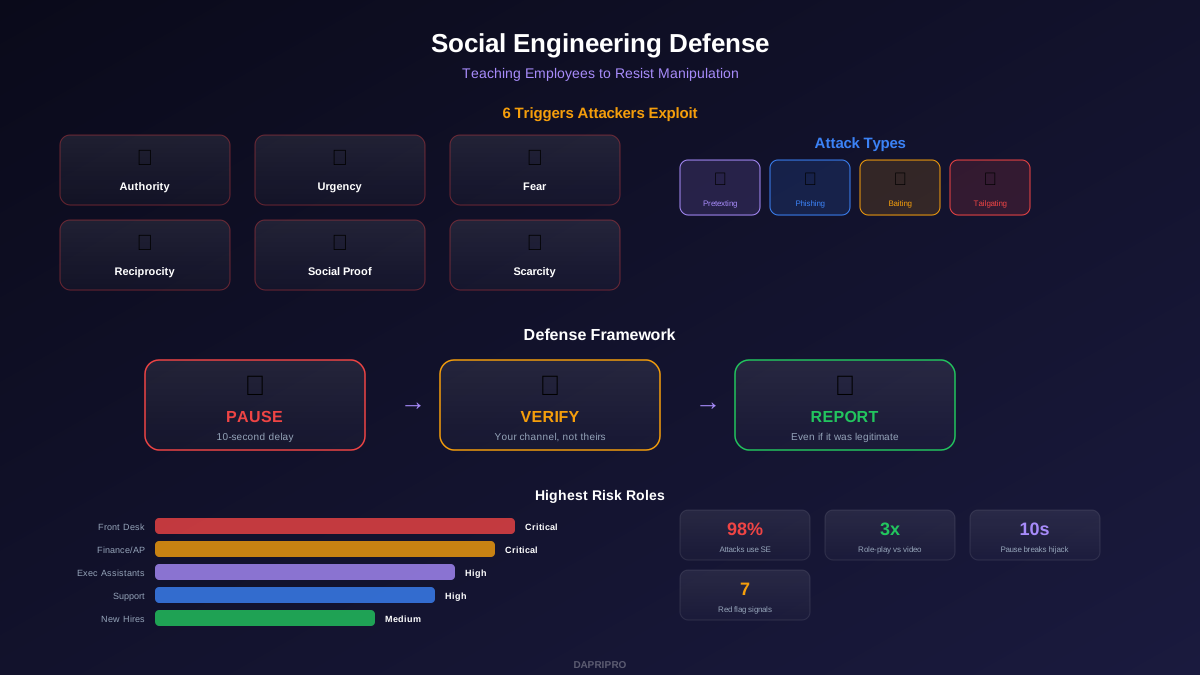
The 6 Psychological Triggers Attackers Exploit
Every social engineering attack uses at least one of these triggers. Teaching employees to recognize these triggers is the single most effective defense:
| Trigger | How It Works | Real Example |
|---|---|---|
| Authority | We obey people in power | "The CEO needs this wire transfer done now" |
| Urgency | Time pressure kills thinking | "Your account will be locked in 30 minutes" |
| Fear | Threat shuts down logic | "We detected unauthorized access to your bank" |
| Reciprocity | We return favors | "I helped you fix the printer — can you let me into the server room?" |
| Social Proof | We follow the crowd | "Everyone else on the team already shared their login" |
| Scarcity | Limited offer drives action | "Only 3 spots left for the company benefit upgrade" |
The defense: when any of these triggers fire, treat it as a signal to slow down, not speed up. Attackers want you in your emotional brain. Your defense is switching back to your analytical brain by pausing.
The 4 Main Attack Types
1. Pretexting
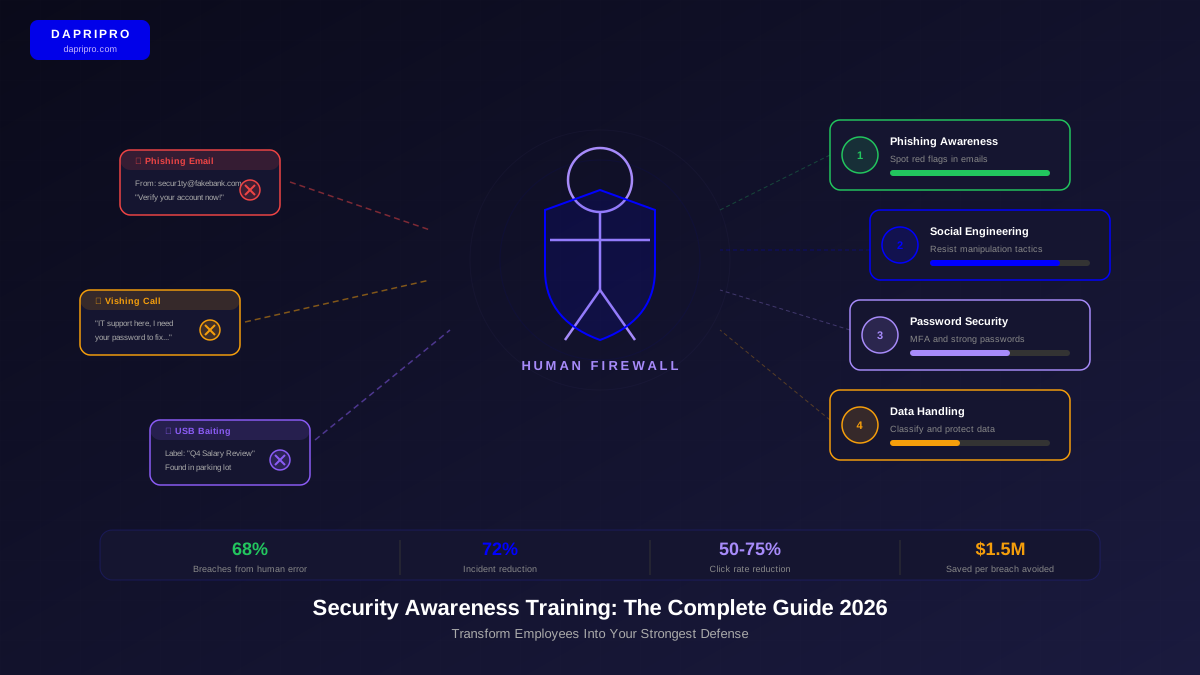
The attacker creates a fabricated scenario with a fake identity. They might pretend to be IT support ("We need to verify your account"), a vendor ("I need to update our billing information"), or a fellow employee ("I am new and my access is not set up yet").
Defense: Always verify identity through a channel you control. If someone calls claiming to be from IT, hang up and call IT at their known number. If a "vendor" emails requesting banking changes, call the vendor using the number on their contract, not the number in the email.
2. Phishing (and Vishing, Smishing)
Fraudulent messages sent via email (phishing), phone (vishing), or text (smishing) designed to steal credentials, install malware, or trick the target into taking a harmful action.
Defense: Check the sender carefully. Hover over links before clicking. Be suspicious of any message that creates urgency or asks for credentials. Use the SLAM method: Sender, Links, Attachments, Message — check all four.
3. Baiting
Physical or digital lures. The classic example: an attacker drops a USB drive labeled "Salary List 2026" in the parking lot. A curious employee plugs it into their work computer. The USB contains malware that compromises the network.
Defense: Never plug in unknown USB drives. Never download software from untrusted sources. If you find a USB drive, turn it in to IT. Curiosity is the trigger — recognize it.
4. Tailgating (Piggybacking)
An attacker follows an authorized person through a secure door. They might carry boxes (so you hold the door for them), wear a uniform (so you assume they belong), or simply walk in closely behind you while looking at their phone.
Defense: Never hold doors for people you do not recognize in secure areas. Politely ask for badge verification. "Sorry, but could you scan your badge? Security policy." It feels awkward. It is supposed to.
The Pause-Verify-Report Framework
Give employees a simple, memorable framework they can apply to any suspicious interaction:
Pause: When something feels "off" — urgency, authority pressure, unusual requests — stop and take a breath. Do not respond immediately. The 10-second delay breaks the emotional hijack and activates critical thinking.
Verify: Confirm the request through a separate, trusted channel. Call back using a known number. Walk to the person's desk. Email their known address. The key rule: never verify using the channel the requester provided.
Report: Even if the request turns out to be legitimate, report the interaction to the security team. This builds a threat intelligence picture and helps identify patterns. "I would rather report 100 false alarms than miss 1 real attack."
Role-Play Exercises That Work
Video training teaches employees what social engineering looks like. Role-play training teaches employees how to respond. The difference is critical.
Run these 4 role-play scenarios quarterly (15 minutes each):
Scenario 1: The Urgent CEO Request
Setup: A team member receives a call from someone claiming to be the CEO, urgently requesting a wire transfer to close a "confidential deal." Practice saying: "I need to verify this through our standard process. I will call you back at the number we have on file."
Scenario 2: The Friendly IT Tech
Setup: Someone calls claiming to be from IT support, saying they need the employee's password to "fix a critical system issue." Practice saying: "Our IT department will never ask for my password. I am going to report this call to security."
Scenario 3: The Tailgate Test
Setup: During a team meeting, practice stopping someone at a secure door. One person plays the visitor with boxes; the other practices asking for badge verification. Practice saying: "Sorry, but could you scan your badge? I need to follow our security policy."
Scenario 4: The Vendor Impersonation
Setup: An "urgent" email arrives from a vendor requesting updated payment information. Practice the verification process: looking up the vendor's actual number, calling to confirm, and reporting the suspicious email regardless.
High-Risk Roles and Targeted Training
| Role | Why They Are Targeted | Specific Training Focus |
|---|---|---|
| Front Desk / Reception | First point of physical access; conditioned to be helpful | Visitor verification, tailgating prevention, information disclosure |
| Customer Support | Handles high volume of external requests daily | Caller identity verification, account access procedures |
| Executive Assistants | Broad access to calendars, email, and financial systems | CEO impersonation, gift card scams, calendar manipulation |
| Finance / AP Team | Authority to process payments and wire transfers | BEC detection, payment verification, vendor change procedures |
| New Hires (First 90 Days) | Unfamiliar with company culture and processes | General SE awareness, reporting procedures, asking for help |
Universal Red Flags to Teach
Regardless of the attack type, teach employees to watch for these universal red flags that signal manipulation:
- Unusual urgency. "This must be done in the next hour." Real emergencies allow time for verification.
- Authority name-dropping. "The CEO told me to call you directly." Authority is the attacker's favorite tool.
- Requests to bypass process. "I know we usually do it through procurement, but this time it needs to go through you directly." Processes exist for a reason.
- Emotional pressure. "If you do not help me, I will lose my job." Emotional manipulation shuts down logic.
- Resistance to verification. "You do not need to check — I already verified with your manager." A legitimate person welcomes verification.
- Unusual channel. Your vendor suddenly texts you instead of emailing. Your "CEO" calls from an unknown number. Channel changes signal impersonation.
- Too-good-to-be-true offers. Free software, unexpected bonuses, prize notifications. If it seems too good, it is a lure.
Social engineering defense is not about making employees paranoid — it is about giving them permission to pause, verify, and report without feeling rude or distrustful. The culture shift is from "I should help" to "I should help safely." When employees feel empowered to question unusual requests without fear of being seen as unhelpful, your organization becomes dramatically harder to socially engineer.