Think of Mobile Device Management (MDM) as a remote control for every phone, tablet, and laptop in your company. From a single dashboard, you can install apps, enforce security rules, push updates, and even wipe a lost device — all without physically touching it. In 2026, with employees working from home, coffee shops, and airports, MDM is not optional. It is the only way to keep company data safe on devices you cannot see.
But not all MDM platforms are created equal. Some are built for Microsoft environments, others for Apple. Some cost $2 per device, others cost $16. This guide compares the five leading MDM solutions head-to-head so you can pick the right one without wasting months on the wrong platform.
What MDM Actually Does (and Why You Need It)
MDM is the technology that lets IT teams manage devices remotely. Here is what a modern MDM platform handles:
- Device enrollment — Automatically configures new devices with company settings, Wi-Fi, email, and VPN the moment an employee signs in
- Security policy enforcement — Requires screen locks, encryption, OS updates, and strong passwords on every managed device
- App management — Installs, updates, and removes business apps remotely. Can block unapproved apps on company devices
- Compliance monitoring — Continuously checks whether devices meet your security requirements and flags or blocks non-compliant ones
- Remote wipe — Erases company data (or the entire device) if it is lost, stolen, or when an employee leaves
- Conditional access — Blocks access to company resources like email and SharePoint if a device fails compliance checks
Why 2026 is different: MDM has merged with Unified Endpoint Management (UEM). Modern platforms now manage not just phones and tablets but also Windows PCs, Macs, Linux machines, and even IoT devices from one console.
Top 5 MDM Solutions Compared: 2026 Rankings
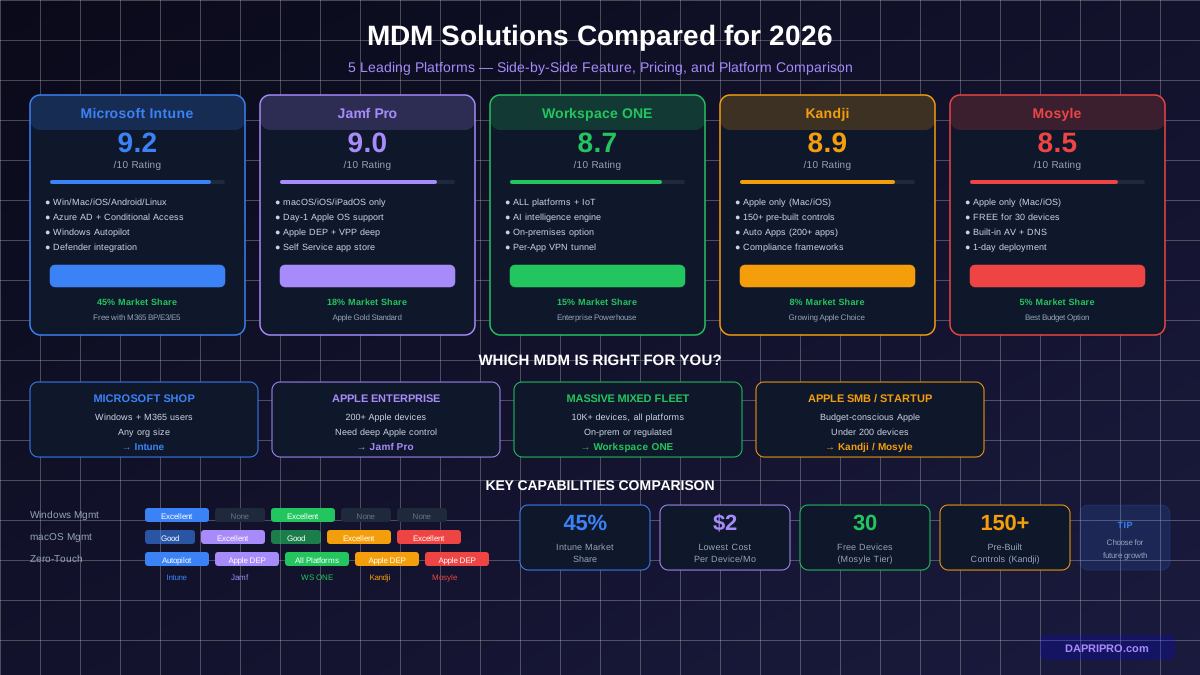
| Feature | Microsoft Intune | Jamf Pro | Workspace ONE | Kandji | Mosyle |
|---|---|---|---|---|---|
| Overall Rating | 9.2/10 | 9.0/10 | 8.7/10 | 8.9/10 | 8.5/10 |
| Best For | Microsoft shops | Apple fleets | Large enterprise | Growing Apple | Education/SMB |
| Price/Device/Mo | $8-16 (standalone) | $9.50-12 | $4-16 | $7-9 | $2-5 |
| Windows | Excellent | Limited (via Jamf Connect) | Excellent | No | No |
| macOS | Good | Excellent | Good | Excellent | Excellent |
| iOS/iPadOS | Excellent | Excellent | Excellent | Excellent | Excellent |
| Android | Excellent | No | Excellent | No | No |
| Linux | Basic | No | Good | No | No |
| Zero-Touch Deploy | Windows Autopilot | Apple DEP | All platforms | Apple DEP | Apple DEP |
| Conditional Access | Native Azure AD | Via integration | Built-in | Via integration | Via integration |
| Setup Complexity | Moderate | Easy | Complex | Easy | Very Easy |
1. Microsoft Intune — Best for Microsoft Environments
Microsoft Intune is the MDM and UEM solution built into the Microsoft 365 ecosystem. If your organization runs Windows devices and Microsoft 365, Intune is the obvious choice because it manages everything — Windows, macOS, iOS, Android, and Linux — from the same admin center you already use.
What Makes Intune Stand Out
- Native Azure AD integration — Conditional access policies work automatically. If a device is not compliant, it is blocked from email, SharePoint, and Teams without configuring anything extra.
- Windows Autopilot — Ship a new laptop directly to an employee. They sign in, and Autopilot automatically joins it to Azure AD, enrolls in Intune, installs apps, and applies policies. Zero IT touch needed.
- Defender for Endpoint integration — Intune automatically onboards devices to MDE and shares compliance signals between the two platforms.
- Co-management with SCCM — Organizations still using on-premises SCCM can gradually move workloads to Intune without a forklift migration.
Intune Limitations
- macOS management is not as deep as Jamf — some Apple-specific features missing
- Complex policy structure with overlapping configuration profiles, compliance policies, and endpoint security policies
- Linux support is basic — enrollment and compliance only, no app management
Pricing: Included in M365 Business Premium ($22/user/month), M365 E3 ($36/user/month), and M365 E5 ($57/user/month). Standalone Intune Plan 1 is $8/user/month. Intune Plan 2 (advanced endpoint analytics) is $16/user/month.
2. Jamf Pro — Best for Apple-Only Organizations
Jamf Pro is the gold standard for Apple device management. Founded in 2002 as a Mac-only MDM, it has the deepest Apple integration of any platform. If your company runs MacBooks, iPhones, and iPads exclusively, Jamf does things no cross-platform MDM can match.
What Makes Jamf Stand Out
- Same-day Apple OS support — Jamf supports new macOS, iOS, and iPadOS versions on the day Apple releases them. Cross-platform MDMs often lag weeks behind.
- Apple Business Manager integration — Deep integration with Apple DEP (Device Enrollment Program) and VPP (Volume Purchase Program) for seamless zero-touch deployment and app licensing.
- Self Service app — Employees get a company app store where they can install approved software without calling IT.
- Custom scripts and profiles — Jamf lets you push custom shell scripts and configuration profiles that other MDMs cannot handle for Apple devices.
Jamf Limitations
- No Android support at all
- Windows support is limited to basic management through Jamf Connect
- More expensive than cross-platform alternatives for the same feature set
- Requires Apple Business Manager setup (which needs a DUNS number)
Pricing: Jamf Pro is $9.50/device/month. Jamf Business Plan (includes Jamf Protect endpoint security) is about $12/device/month. Education pricing available.
3. VMware Workspace ONE — Best for Large Mixed-Device Enterprises
Workspace ONE (now part of Broadcom after the VMware acquisition) is the most feature-complete UEM platform available. It manages every device type on every operating system and integrates with virtually every enterprise IT system. But that power comes with complexity.
What Makes Workspace ONE Stand Out
- True multi-platform UEM — Manages Windows, macOS, iOS, Android, Linux, ChromeOS, and even rugged devices (warehouses, manufacturing) from one console.
- Intelligence engine — AI-powered analytics that predict device issues before they happen and automate remediation.
- On-premises option — For government and highly regulated industries that cannot use cloud MDM, Workspace ONE offers a full on-premises deployment.
- App tunnel (Per-App VPN) — Routes only managed app traffic through VPN without tunneling all device traffic. Better performance and security than full-device VPN.
Workspace ONE Limitations
- Most complex setup of any MDM — plan 2-4 weeks for full deployment
- Broadcom acquisition has created licensing uncertainty
- Admin console can be overwhelming for smaller teams
- Premium features require the highest tier license
Pricing: Standard tier starts around $4/device/month. Advanced tier is $8-10/device/month. Enterprise tier is $12-16/device/month. Custom pricing for 5,000+ devices.
4. Kandji — Best for Growing Apple-First Companies
Kandji is a newer Apple-focused MDM that takes the opposite approach to Jamf: instead of giving you maximum control over every setting, it provides pre-built security blueprints that enforce best practices automatically. Think of it as MDM with training wheels — in a good way.
What Makes Kandji Stand Out
- 150+ pre-built controls — Security settings like FileVault encryption, firewall rules, and OS update enforcement come preconfigured. Just toggle them on.
- Auto Apps — Kandji maintains a library of 200+ popular business apps (Zoom, Slack, Chrome, VS Code) that it automatically updates across your fleet.
- Compliance frameworks — Map your MDM settings directly to CIS benchmarks, SOC 2, and ISO 27001 requirements. Generates audit-ready reports automatically.
- Passport identity — Syncs local Mac accounts with cloud identity providers (Azure AD, Okta, Google Workspace) so employees sign in with one password.
Kandji Limitations
- Apple only — no Windows, Android, or Linux support
- Fewer customization options than Jamf for advanced Apple workflows
- Relatively new company (founded 2018) — smaller community and ecosystem
- No free tier or trial for individual devices
Pricing: Starts at approximately $7/device/month. Custom pricing for larger deployments. No public pricing on website — sales call required.
5. Mosyle — Best Budget Option for Apple Devices
Mosyle is the most affordable Apple MDM on the market, with a genuinely free tier for up to 30 devices. It started in education (managing school iPads) and has expanded to business use. If you need basic Apple device management without the Jamf price tag, Mosyle delivers.
What Makes Mosyle Stand Out
- Free tier — Mosyle Fuse is free for up to 30 devices. No credit card required, no time limit. This is real MDM, not a trial.
- Lowest paid pricing — Business plans start at $2/device/month, roughly 4-5x cheaper than Jamf.
- Built-in endpoint security — Mosyle includes antivirus, encrypted DNS, and app firewall at no extra cost. Jamf charges separately for Jamf Protect.
- Fastest deployment — Most customers go from sign-up to managed devices in under 1 day. The interface is simpler than any competitor.
Mosyle Limitations
- Apple only — no cross-platform support
- Fewer enterprise features than Jamf (no equivalent of Jamf Connect for identity)
- Limited third-party integrations compared to larger platforms
- Smaller support team — response times can be slower than Jamf or Intune
Pricing: Mosyle Fuse: Free (up to 30 devices). Mosyle Business: $2/device/month. Mosyle Business Plus: $5/device/month. Education pricing available.
How to Choose the Right MDM for Your Organization
Decision Criteria by Organization Size
| Org Size | Device Count | Recommended MDM | Why |
|---|---|---|---|
| Startup | 1-30 | Mosyle Free | Free tier covers all basic MDM needs for Apple. For Windows, M365 Business Premium includes Intune. |
| Small Business | 30-200 | Intune (mixed) or Kandji (Apple) | Intune included in M365 licenses most SMBs already have. Kandji is simpler than Jamf for smaller Apple fleets. |
| Mid-Market | 200-2,000 | Intune (mixed) or Jamf (Apple) | Scale where dedicated MDM admin becomes cost-effective. Jamf depth pays off at this size. |
| Enterprise | 2,000-10,000 | Intune or Workspace ONE | Need robust compliance, conditional access, and multi-platform management. |
| Large Enterprise | 10,000+ | Workspace ONE or Intune | Workspace ONE handles massive scale and every device type. Intune catches up fast but less mature for Linux/IoT. |
Key Features Every MDM Must Have in 2026
Regardless of which platform you choose, your MDM solution must include these capabilities:
1. Zero-Touch Enrollment
Devices should configure themselves when an employee first signs in. No IT person should need to physically touch a device to set it up. Windows uses Autopilot, Apple uses Apple Business Manager / DEP, and Android uses Android Enterprise / Zero-Touch.
2. Conditional Access
If a device does not meet your security policy — outdated OS, no encryption, jailbroken — it should be automatically blocked from company resources. Intune does this natively with Azure AD. Other MDMs integrate with identity providers like Okta or Ping.
3. Application Management
Your MDM should install, update, and remove apps remotely. Look for:
- Silent app installation (no user interaction needed)
- App update automation
- App allow/block lists
- Per-app VPN (route individual app traffic through VPN)
4. Compliance Reporting
For audits and regulatory requirements (SOC 2, HIPAA, GDPR), your MDM should generate reports showing device compliance status, encryption status, OS version distribution, and policy violations. Kandji has the strongest built-in compliance mapping.
5. Remote Wipe and Lock
Two types of wipe matter:
- Selective wipe — Removes only company data and apps (for BYOD devices)
- Full wipe — Factory resets the entire device (for company-owned devices)
MDM Deployment Best Practices
- Start with a pilot group of 20-50 devices — Test enrollment, policies, and app deployment before rolling out to everyone. Include devices from different departments and roles.
- Create device groups by type — Separate policies for company-owned vs. BYOD, Windows vs. macOS, executives vs. general staff. One-size-fits-all policies cause problems.
- Set compliance grace periods — Give users 48-72 hours to fix non-compliance (like updating their OS) before blocking access. Immediate blocking frustrates employees and floods the help desk.
- Configure self-service options — Let employees install approved apps, reset passwords, and check compliance status without calling IT.
- Document your enrollment process — Create step-by-step guides (with screenshots) for employees enrolling their own devices. Most enrollment failures are user error.
- Plan your BYOD policy first — Decide what you will and will not manage on personal devices before deploying MDM. Employees resist MDM enrollment if they think IT can see their personal data.
7 MDM Mistakes That Waste Time and Money
- Choosing based on current devices instead of future growth — If you are Apple-only today but might add Windows in 2 years, choosing Jamf locks you into Apple. Intune or Workspace ONE cover both.
- Over-restricting BYOD devices — Blocking camera, screenshots, and personal apps on employee phones makes people refuse enrollment. Manage work apps only.
- Not testing policies before enforcing — A compliance policy that blocks email access should work perfectly before you turn it on for 5,000 people. Test in audit mode first.
- Ignoring the user experience — Employees will call IT or find workarounds if MDM makes their devices slow, blocks apps they need, or nags them with constant notifications.
- Paying for features you do not use — If you only need basic device management, do not buy the enterprise tier. Mosyle at $2/device does 80% of what Jamf does at $12/device for many organizations.
- Skipping endpoint security integration — MDM manages devices but does not detect threats. Integrate with an EDR like Microsoft Defender for Endpoint, CrowdStrike, or SentinelOne for actual threat protection.
- Not planning for offboarding — When employees leave, their devices need to be unenrolled and wiped. Automate this through your HR and identity systems so it happens instantly when someone is terminated.
Choosing an MDM platform is a multi-year commitment. Switching providers later means re-enrolling every device, rebuilding every policy, and retraining your IT team. Take the time to evaluate properly, run a pilot, and choose based on where your organization is heading — not just where it is today.