Why Your Data Is Currently Readable by Strangers
Right now, unless you have specifically set up encryption, most of your digital life is readable by third parties. Your email provider (Gmail, Outlook, Yahoo) can read every email you send and receive. Your ISP logs every website you visit and can sell that browsing history to advertisers — which became legal in the US in 2017. Your cloud storage provider (Google Drive, Dropbox, iCloud) can access your files. Your messaging app may store conversations on servers in plaintext.
This is not theoretical. Gmail scans your email content to build advertising profiles. AT&T, Verizon, and Comcast have all been caught selling customer browsing data. Dropbox employees have accessed user files. Facebook Messenger conversations have been subpoenaed in criminal cases because they are not encrypted by default.
Encryption solves all of this. When data is properly encrypted, it is mathematically unreadable without the decryption key. Not difficult to read — impossible to read, even with every computer on Earth working together for millions of years.
Encryption Types You Need to Know
There are three types of encryption that matter for personal privacy:
Encryption in transit protects data while it travels between your device and a server. HTTPS is the most common example — the padlock icon in your browser means traffic between you and the website is encrypted. Your ISP can see you connected to a website but cannot read what you are doing on it.
Encryption at rest protects data stored on a device or server. Full-disk encryption (BitLocker, FileVault) encrypts everything on your hard drive. If someone steals your laptop, they cannot read any files without your password.
End-to-end encryption (E2EE) is the strongest form. Data is encrypted on your device and can only be decrypted by the recipient's device. The service provider in the middle (Signal, ProtonMail) cannot read your data even if they wanted to, even if served with a court order, because they do not have the decryption key.
Encrypting Your Messages
Signal — The Gold Standard
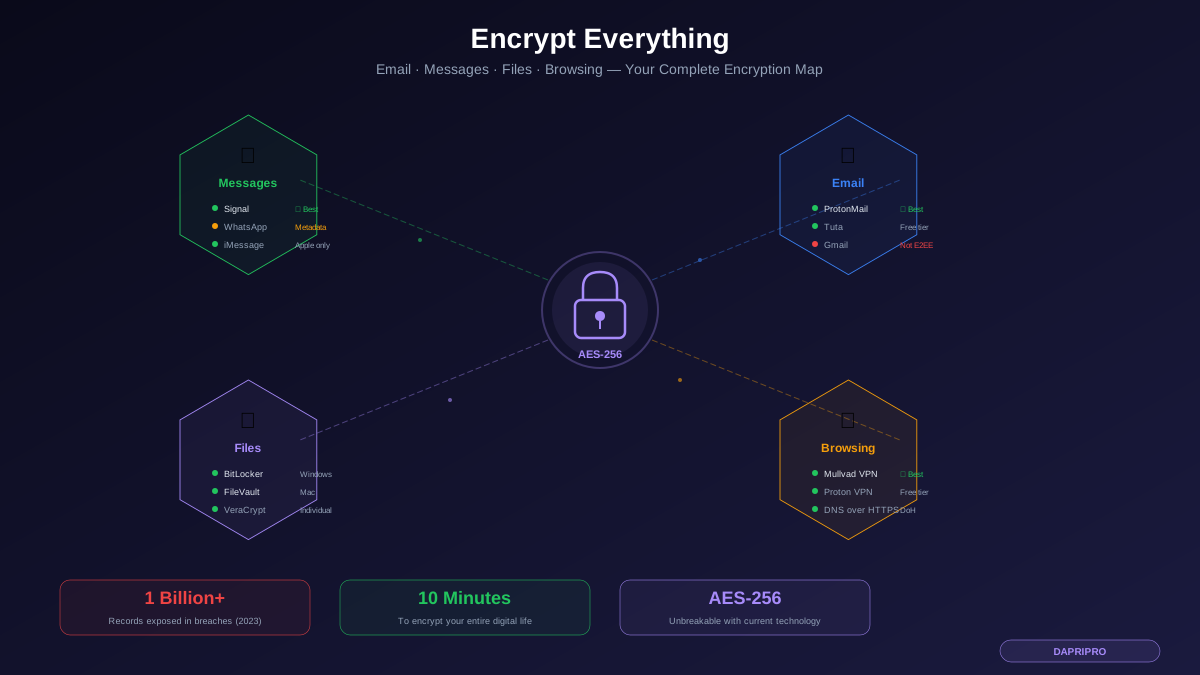
Signal is the most trusted encrypted messaging app, used by journalists, whistleblowers, security researchers, and privacy advocates. Every message, call, video call, and file transfer is end-to-end encrypted by default. Signal cannot read your messages even if compelled by law enforcement — when subpoenaed by a grand jury in 2021, the only data Signal could provide was the date an account was created and the date it last connected.
Signal is free, open-source, and funded by a nonprofit foundation. There are no ads, no tracking, and no data mining. The Signal Protocol (the encryption technology) is so well-designed that it has been adopted by WhatsApp, Google Messages, and Facebook Messenger for their own encryption implementations.
How to switch: Download Signal from signal.org on your phone. It will detect which of your contacts already use Signal. Start conversations with those contacts on Signal instead of SMS. For contacts who do not use Signal, you can still send them SMS through Signal, though those messages will not be encrypted.
WhatsApp — Encrypted but Collects Metadata
WhatsApp uses the Signal Protocol for end-to-end encryption, which means message content is secure. However, WhatsApp collects extensive metadata: who you message, when, how often, your phone number, contacts list, device information, location data, and usage patterns. This metadata is shared with Meta (Facebook) and used for advertising across Instagram and Facebook.
WhatsApp is acceptable if your contacts refuse to switch to Signal, but understand that while message content is private, your communication patterns are not.
iMessage — Good if Everyone Has Apple
iMessage provides end-to-end encryption between Apple devices. Messages between iPhones (blue bubbles) are encrypted. Messages to Android phones (green bubbles) fall back to SMS/RCS, which may not be encrypted. Apple has expanded E2EE with Advanced Data Protection, which encrypts iCloud backups including message history.
If your entire circle uses Apple devices, iMessage with Advanced Data Protection enabled is a solid choice. The limitation is cross-platform — you cannot securely message Android users through iMessage.
Encrypting Your Email
Standard email (Gmail, Outlook, Yahoo) is not end-to-end encrypted. Google can and does read your Gmail messages to build advertising profiles. Even with TLS encryption in transit, your email provider stores your messages in readable format on their servers.
ProtonMail — Best Encrypted Email
ProtonMail is based in Switzerland (with strong privacy laws), uses end-to-end encryption for emails between ProtonMail users, and zero-access encryption for all stored emails — meaning Proton cannot read your email even if they wanted to. Emails to non-ProtonMail users can be protected with password-encrypted links.
The free tier includes 1 GB of storage and one email address. Paid plans start at $4 per month for 15 GB storage and custom domain support. ProtonMail also offers a calendar, cloud storage (Proton Drive), and VPN (Proton VPN) — all encrypted.
Tuta (formerly Tutanota) — Best Free Encrypted Email
Tuta is based in Germany, provides end-to-end encrypted email with a generous free tier (1 GB storage), and encrypts the entire mailbox including subject lines (which ProtonMail does not encrypt for non-Proton recipients). Tuta also encrypts contacts and calendar entries.
The main limitation is that Tuta uses its own encryption protocol rather than PGP, which means you cannot use external PGP tools. For most personal users this does not matter, but it is worth noting for technical users.
Encrypting Your Files
Full-Disk Encryption: Protect Everything on Your Device
Full-disk encryption should be the first encryption you enable because it protects everything on your device with zero effort after setup.
Windows — BitLocker: Available on Windows Pro and Enterprise editions. Open Settings → Privacy & Security → Device Encryption → turn it on. If you have Windows Home, enable Device Encryption in the same location (it uses a simplified version of BitLocker). Save your recovery key to your Microsoft account or print it. That is it — every file on your drive is now encrypted at rest.
Mac — FileVault: Open System Settings → Privacy & Security → FileVault → Turn On FileVault. Your Mac will encrypt the entire drive. Save the recovery key. Performance impact is essentially zero because modern Macs have hardware-accelerated encryption.
Linux — LUKS: Most Linux distributions offer full-disk encryption during installation. If you did not enable it during install, you can encrypt your home directory with eCryptfs or use LUKS for full-disk encryption (requires reinstallation).
Phone — Already Encrypted: All iPhones running iOS 8+ and Android phones running Android 10+ have full-disk encryption enabled by default. Your phone data is already encrypted at rest as long as you have a lock screen password set.
File-Level Encryption: Protect Specific Files
VeraCrypt is the best free tool for encrypting individual files or creating encrypted containers. You can create an encrypted volume (like a virtual USB drive) that requires a password to open. Anything stored inside the volume is encrypted with AES-256. VeraCrypt also supports hidden volumes — a volume inside a volume that is invisible and unprovable, designed for situations where you might be forced to reveal your password.
Cryptomator is designed specifically for encrypting files before uploading to cloud storage. It creates an encrypted vault on your Google Drive, Dropbox, or iCloud that only you can access. Your cloud provider sees only encrypted files — they cannot read file names, contents, or folder structure. Cryptomator is open-source and available on all platforms including mobile.
Encrypting Your Browsing
HTTPS — The Baseline
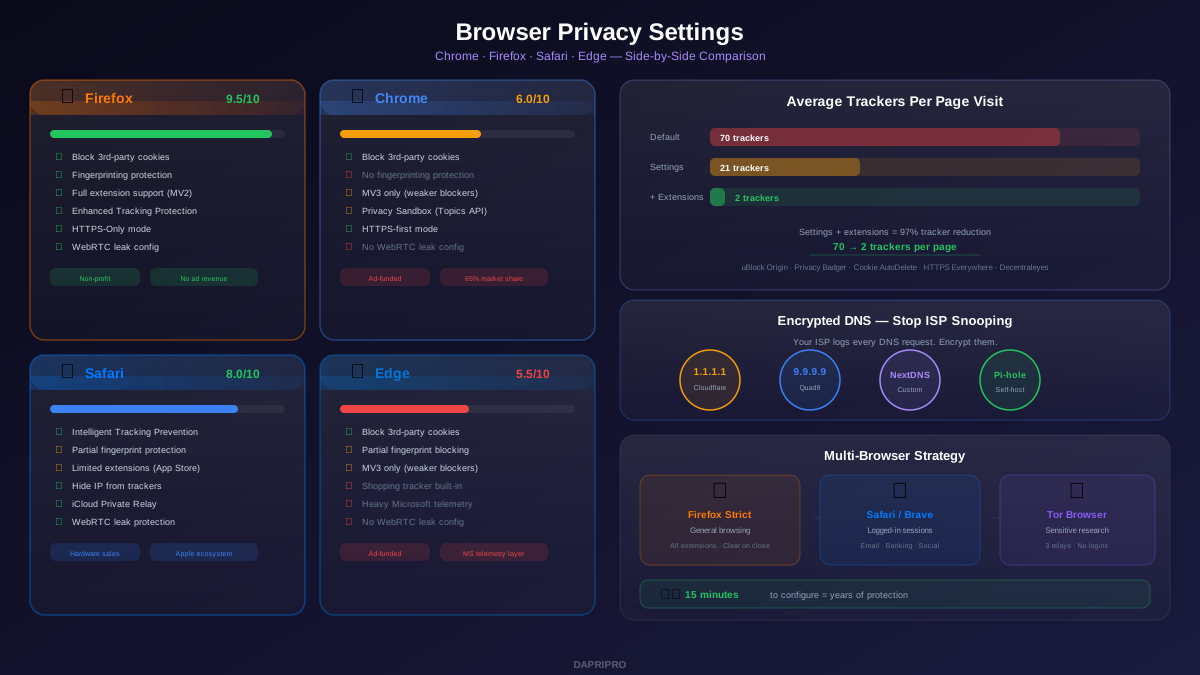
HTTPS encrypts traffic between your browser and the website you are visiting. Over 95% of web traffic now uses HTTPS. Enable HTTPS-Only mode in your browser to ensure you never accidentally connect to an unencrypted site: Firefox Settings → Privacy & Security → HTTPS-Only Mode → Enable in all windows. Brave enables this by default.
HTTPS protects the content of your browsing but does not hide which websites you visit. Your ISP can still see the domain names you connect to.
VPN — Hide Your Browsing from Your ISP
A VPN encrypts all traffic between your device and the VPN server, preventing your ISP from seeing which websites you visit. This is particularly important since US ISPs can legally sell your browsing history to advertisers.
Mullvad VPN ($5/month): The most privacy-focused VPN. No email required to sign up — you get an anonymous account number. Accepts cash payments by mail. No-logs policy independently audited. Based in Sweden with strong privacy laws. Uses WireGuard protocol for fast speeds.
Proton VPN (Free tier available, $5/month for Plus): Run by the same team behind ProtonMail. Swiss-based, open-source, independently audited. The free tier includes servers in 5 countries with no data caps — one of the only trustworthy free VPN options.
IVPN ($6/month): Small, transparent company. Open-source apps, no-logs policy, supports anonymous payments. Publishes a transparency report.
Avoid free VPNs from unknown companies. If a VPN is free and no one knows who runs it, you are the product. Several free VPNs have been caught logging and selling user data.
Encrypted DNS
Even with HTTPS and a VPN, your DNS queries (the lookups that translate domain names to IP addresses) may be unencrypted. Enable DNS over HTTPS (DoH) to encrypt these lookups. In Firefox: Settings → Privacy & Security → DNS over HTTPS → Max Protection → Cloudflare (1.1.1.1). In Brave: Settings → Security → Use secure DNS → Cloudflare.
What About Cloud Storage?
Standard cloud storage services (Google Drive, Dropbox, OneDrive) encrypt your files in transit and at rest on their servers — but they hold the decryption key. This means the company can access your files, and if they are breached, attackers can read your data.
Proton Drive: End-to-end encrypted cloud storage from the ProtonMail team. 5 GB free, paid plans from $4/month. Files are encrypted before leaving your device — Proton cannot access them.
Tresorit: Swiss-based E2EE cloud storage designed for businesses and professionals. Excellent for sharing encrypted files with clients. More expensive ($11/month) but feature-rich.
Cryptomator + Any Cloud: If you want to keep using Google Drive or Dropbox, add Cryptomator ($15 one-time for mobile, free on desktop) as a layer on top. It creates an encrypted vault inside your cloud folder. You interact with files normally, but they are encrypted before syncing to the cloud.
Common Encryption Mistakes
Mistake 1: Encrypting files but backing them up unencrypted. If you enable BitLocker but back up to an unencrypted external drive, your backup is the weak point. Encrypt your backup drives too.
Mistake 2: Using encrypted messaging but syncing to unencrypted cloud. If you use Signal but your phone backs up to Google Drive without encryption, your messages may be included in the backup. In Signal: Settings → Chats → Chat backups → use Signal's own encrypted backup feature.
Mistake 3: Using weak passwords for encryption. AES-256 is unbreakable, but if your password is "password123," the encryption is irrelevant. Use a 16+ character passphrase or a password manager-generated password for any encryption key.
Mistake 4: Forgetting about metadata. Even with encrypted email content, email headers (sender, recipient, subject, timestamp) may not be encrypted. ProtonMail encrypts subject lines between ProtonMail users but not when sending to Gmail users. Be aware of what metadata is exposed.
Mistake 5: Assuming encrypted means anonymous. Encryption protects content, not identity. Your ISP can see you connected to ProtonMail even if they cannot read your emails. For anonymity, you need encryption plus Tor or a VPN.
Your Encryption Action Plan
From highest impact to lowest effort:
Today (10 minutes): Enable full-disk encryption — BitLocker on Windows, FileVault on Mac. Enable HTTPS-Only mode in your browser. Enable DNS over HTTPS in your browser settings.
This week (30 minutes): Install Signal and message your top contacts there. Sign up for ProtonMail for sensitive emails. Install a VPN (Proton VPN's free tier if you are testing the waters).
This month: Set up Cryptomator for cloud storage encryption. Switch your primary email to ProtonMail. Configure automated encrypted backups. Review which messaging apps you use and consolidate on Signal where possible.
You do not need to do everything at once. Each step adds a layer of protection. Full-disk encryption and Signal alone eliminate the two biggest privacy gaps most people have.