Spyware Is More Common Than You Think
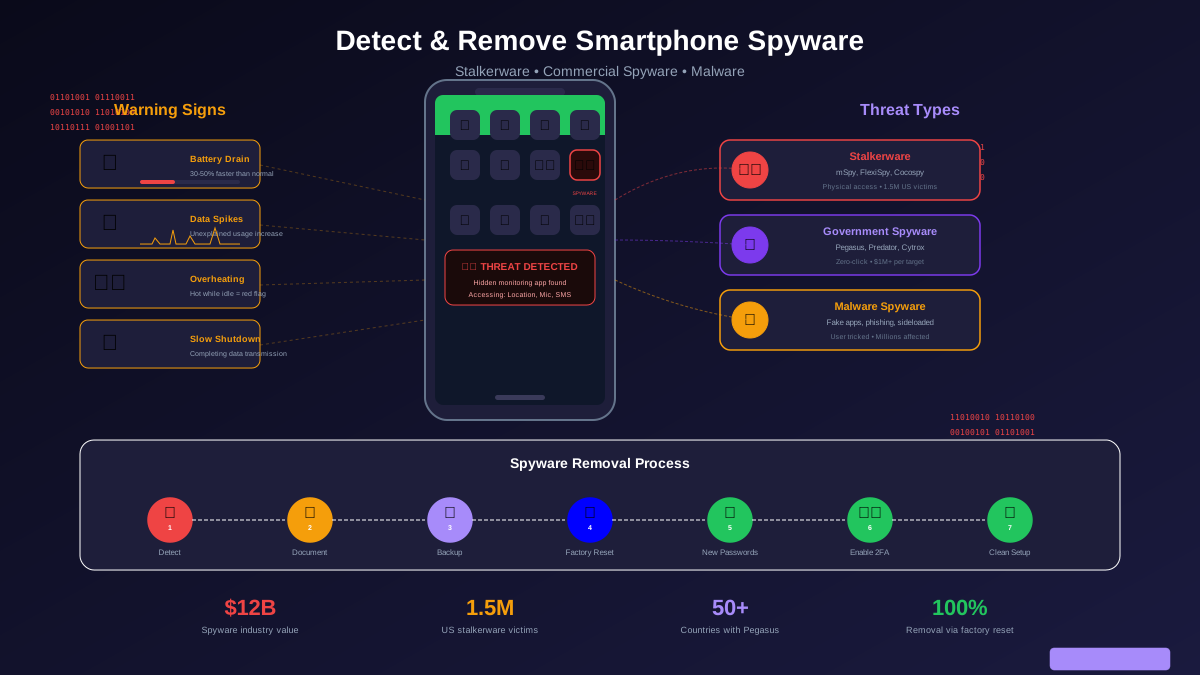
Spyware is not just a problem for political dissidents and investigative journalists. An estimated 1.5 million Americans have stalkerware — a category of spyware designed for intimate partner surveillance — installed on their phones right now. Beyond stalkerware, commercial spyware companies sell monitoring tools to employers, abusive parents, and anyone willing to pay. And state-level spyware like Pegasus has been found targeting thousands of phones across 50+ countries.
The spyware industry is worth an estimated $12 billion annually. That number exists because the data your phone contains — your messages, calls, location history, photos, browsing activity, banking apps, and passwords — is extraordinarily valuable. A single compromised phone gives an attacker a near-complete picture of your life.
The good news: most spyware leaves traces. Battery drain, data usage patterns, and system behaviors create detectable signals if you know what to look for. This guide teaches you exactly how to find those signals, identify the type of spyware, and remove it completely.
The Three Types of Phone Spyware
Not all spyware is the same. Understanding the type you are dealing with determines how to find and remove it.
Stalkerware (Consumer-Grade)
Stalkerware is commercial software marketed for "parental monitoring" or "employee tracking" but widely used for intimate partner surveillance. Apps like mSpy, FlexiSpy, and Cocospy are legal to sell (marketed for monitoring children) but illegal to install on another adult's device without consent. They typically require physical access to the target phone for installation.
What it can do: Read all text messages and social media DMs, track real-time GPS location, access call logs and record calls, view photos and videos, read emails, log keystrokes, activate the camera and microphone remotely.
How it gets installed: Someone picks up your unlocked phone, opens a browser, downloads the stalkerware app, installs it, configures it, then hides the app icon. The entire process takes 5 to 10 minutes.
Commercial Spyware (Government-Grade)
Companies like NSO Group (Pegasus), Intellexa (Predator), and Cytrox sell advanced spyware to governments and law enforcement agencies. This spyware is far more sophisticated than stalkerware.
What it can do: Everything stalkerware can do, plus access encrypted messages from Signal, WhatsApp, and iMessage before encryption is applied, activate the camera and microphone without any visible indicator, extract passwords and authentication tokens, and access cloud accounts synced to the device.
How it gets installed: Zero-click exploits — no user interaction needed. Pegasus has been delivered through iMessage, WhatsApp calls, and even Apple Music. The victim receives no visible notification or link.
Malware Spyware (Criminal)
Standard malware that includes spyware capabilities, typically distributed through fake apps, phishing links, or malicious APK files sideloaded on Android devices.
What it can do: Steal banking credentials, harvest passwords, read messages, track location, display fake login screens to steal credentials (overlay attacks).
How it gets installed: User downloads a fake app from an unofficial source, clicks a phishing link, or installs an APK sent via message.
Warning Signs Your Phone Has Spyware
No single symptom confirms spyware, but two or more of these together should trigger an investigation.
Battery Drain
Spyware runs continuously in the background, monitoring your activity, recording data, and transmitting it to a remote server. This constant activity drains your battery 30 to 50% faster than normal. If your phone used to last all day and now dies by 3 PM without any change in your usage, spyware could be the reason. Check your battery usage in settings: unknown apps consuming significant battery or "System Services" using far more than usual are red flags.
Unusual Data Usage
Spyware has to send collected data somewhere. This creates data usage that does not match your normal patterns. Check your data usage breakdown in settings (Settings → Cellular on iPhone, Settings → Network → Data Usage on Android). Look for apps you do not recognize using large amounts of data, or your overall data usage increasing significantly without any change in your behavior.
Phone Overheating While Idle
Your phone getting warm during heavy use (gaming, video streaming, GPS navigation) is normal. Your phone getting hot while sitting on your desk doing nothing is not. Spyware actively recording, processing, and transmitting data generates heat. If your phone is warm to the touch when you pick it up after not using it, investigate immediately.
Slow Shutdown or Restart
Spyware often needs to complete data transmissions before the phone can fully shut down. If your phone takes noticeably longer than usual to power off or restart, this could indicate background processes finishing their work before allowing the shutdown to complete.
Strange Sounds During Calls
While call quality issues are often network-related, consistent clicking, static, or echo sounds during calls that were not present before can indicate call monitoring. Modern spyware is sophisticated enough to avoid obvious audio artifacts, but cheaper stalkerware apps sometimes create detectable interference.
Unexpected Screen Activity
Your screen lighting up, apps opening on their own, or notification sounds with no visible notification can indicate spyware or remote access activity. If your phone appears to be doing things autonomously, especially at night, that is a serious red flag.
How to Check for Spyware: Step-by-Step
Android Detection
Step 1: Check Device Admin Apps. Go to Settings → Security → Device Admin Apps (the exact path varies by manufacturer). Legitimate device admin apps include Google Find My Device and your employer's MDM (if you have a work phone). Any unknown app with device admin rights is suspicious — spyware uses admin privileges to prevent uninstallation.
Step 2: Review Accessibility Services. Settings → Accessibility → Downloaded/Installed Services. Stalkerware abuses accessibility features to read screen content, log keystrokes, and monitor your activity. If you see accessibility services you did not enable, investigate immediately.
Step 3: Check for Unknown Apps. Go to Settings → Apps → Show All Apps. Sort by installation date. Look for apps you do not recognize, especially those with generic names ("System Service," "Phone Health," "Sync Manager") or no icon. Tap each suspicious app to see its permissions — spyware apps typically have extensive permissions including location, camera, microphone, contacts, storage, and SMS.
Step 4: Check for Sideloaded Apps. Settings → Security → Install Unknown Apps. See which apps have permission to install other apps. If random apps have this permission enabled, someone may have used them to sideload spyware.
Step 5: Run a Security Scan. Install Malwarebytes or Bitdefender from the Play Store and run a full scan. These apps detect most common stalkerware.
iPhone Detection
Step 1: Check for Configuration Profiles. Go to Settings → General → VPN & Device Management (or Profiles & Device Management). Legitimate profiles come from your employer or school. An unknown profile could indicate spyware — it may have been installed when someone had access to your phone. Remove any profile you do not recognize.
Step 2: Check for Jailbreak. Look for the Cydia or Sileo app on your phone. If you find either and you did not jailbreak your phone, someone else did — likely to install spyware that bypasses Apple's security restrictions. Also try typing "cydia://" in Safari. If it opens something, your phone is jailbroken.
Step 3: Review App List. Go to Settings → General → iPhone Storage. Scroll through your entire app list looking for apps you do not recognize. Pay attention to apps with small storage sizes (stalkerware is often lightweight).
Step 4: Check Screen Time Passcode. If your Screen Time settings are locked with a passcode you did not set, someone may have configured restrictions on your phone to prevent you from removing monitoring tools or changing security settings.
Step 5: Verify iCloud. Settings → [Your Name] → check that no unfamiliar devices are listed under your Apple ID. Also check Settings → [Your Name] → Find My → Share My Location — make sure location sharing is only with people you trust.
How to Remove Spyware
For Stalkerware (Consumer-Grade)
Safety first: If you suspect the spyware was installed by an abusive partner, removing it may alert them and escalate the situation. Contact the National Domestic Violence Hotline (1-800-799-7233) before taking action. They have technology safety counselors who can help you create a safe plan.
If safe to proceed:
1. Android: Go to Settings → Security → Device Admin Apps and revoke admin rights for the suspicious app. Then go to Settings → Apps, find the app, and uninstall it. If it refuses to uninstall, boot into Safe Mode (hold the power button, then long-press "Power Off" until "Reboot to Safe Mode" appears), then uninstall. 2. iPhone: Delete the suspicious configuration profile under Settings → General → VPN & Device Management. If the phone was jailbroken, update to the latest iOS version — this removes the jailbreak and any jailbreak-dependent spyware.
For Advanced Spyware or Unknown Threat
If you suspect advanced spyware or cannot identify the specific app, a factory reset is the only reliable removal method.
1. Back up essential data (photos, contacts) to a clean cloud account — NOT your existing cloud account, as the spyware may have access to it. Create a new Google or iCloud account specifically for this backup. 2. Write down important information manually (account names, two-factor recovery codes). 3. Perform a factory reset: Android (Settings → System → Reset → Erase All Data), iPhone (Settings → General → Transfer or Reset iPhone → Erase All Content and Settings). 4. Set up your phone as a new device — do NOT restore from backup, as the spyware could persist in backup data. 5. Change ALL passwords from a different trusted device BEFORE signing back into accounts on your reset phone. 6. Enable two-factor authentication on all important accounts. 7. Reinstall apps manually from the official app store only.
Preventing Future Spyware Infection
Removal solves today's problem. Prevention stops it from happening again.
Lock your phone with a strong PIN or biometric. Use a 6-digit PIN minimum (not your birthday or 123456). Enable biometric authentication (fingerprint or face). Do not share your passcode with anyone. This prevents the most common stalkerware installation method — someone picking up your unlocked phone.
Keep your OS updated. OS updates patch the vulnerabilities that advanced spyware exploits. Apple and Google regularly release security patches specifically targeting spyware exploit chains. Enable automatic updates and install them as soon as they are available. Pegasus exploits have been neutralized within days by iOS security patches.
Do not jailbreak or root your device. Jailbreaking (iPhone) and rooting (Android) disable critical security protections that prevent unauthorized software installation. A jailbroken iPhone is dramatically more vulnerable to spyware than a stock device.
Review installed apps monthly. Spend two minutes scrolling through your app list. If you see something you do not recognize, investigate it. Search the app name online — many stalkerware apps are well-documented.
Enable Lockdown Mode (iPhone). If you are at high risk (journalist, activist, public figure), enable Apple's Lockdown Mode (Settings → Privacy & Security → Lockdown Mode). It blocks most zero-click attack vectors by disabling complex message attachments, certain web technologies, and incoming FaceTime calls from unknown contacts.
Use a Mobile Threat Detection app. Install Lookout or iVerify to continuously monitor for spyware indicators. iVerify specifically checks for indicators of Pegasus and similar advanced spyware.
What to Do if You Find Spyware
Beyond the technical removal steps, take these protective actions:
1. Document everything. Take screenshots of the spyware app, its permissions, and any evidence of monitoring before removing it. This documentation may be important if you pursue legal action. 2. Change all passwords. From a different trusted device, change passwords for email, banking, social media, and any other important accounts. The spyware likely captured your existing passwords. 3. Enable two-factor authentication everywhere. Use an authenticator app (not SMS — your phone number may be compromised). 4. Report it. If stalkerware was installed by someone, it is a federal crime under the Computer Fraud and Abuse Act. File a report with local law enforcement and the FTC (reportfraud.ftc.gov). 5. Monitor your accounts. Watch for unauthorized access attempts for several weeks after removal. The attacker may have harvested enough credentials to access your accounts even after the spyware is gone.