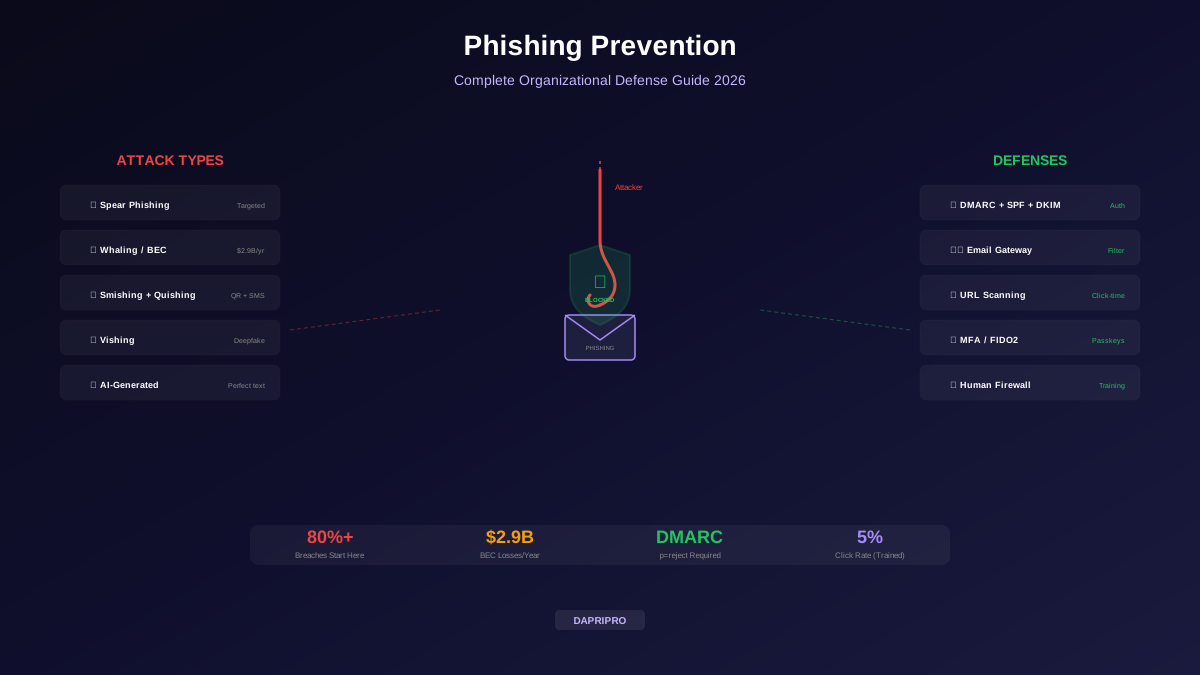
Phishing remains the #1 way attackers breach organizations. Over 80% of reported security incidents start with a phishing email, text message, phone call, or QR code. Despite billions spent on email security, phishing works because it targets humans — and humans make mistakes.
In 2026, phishing attacks are more sophisticated than ever. AI generates grammatically perfect emails personalized with details scraped from LinkedIn and social media. QR code phishing bypasses traditional email scanners. Voice phishing uses deepfake audio to impersonate CEOs. And Business Email Compromise (BEC) causes billions of dollars in losses every year.
This guide covers the full spectrum of phishing threats and defenses — from technical controls to building a phishing-resistant organization culture.
The Phishing Threat Landscape in 2026
Spear Phishing and Whaling
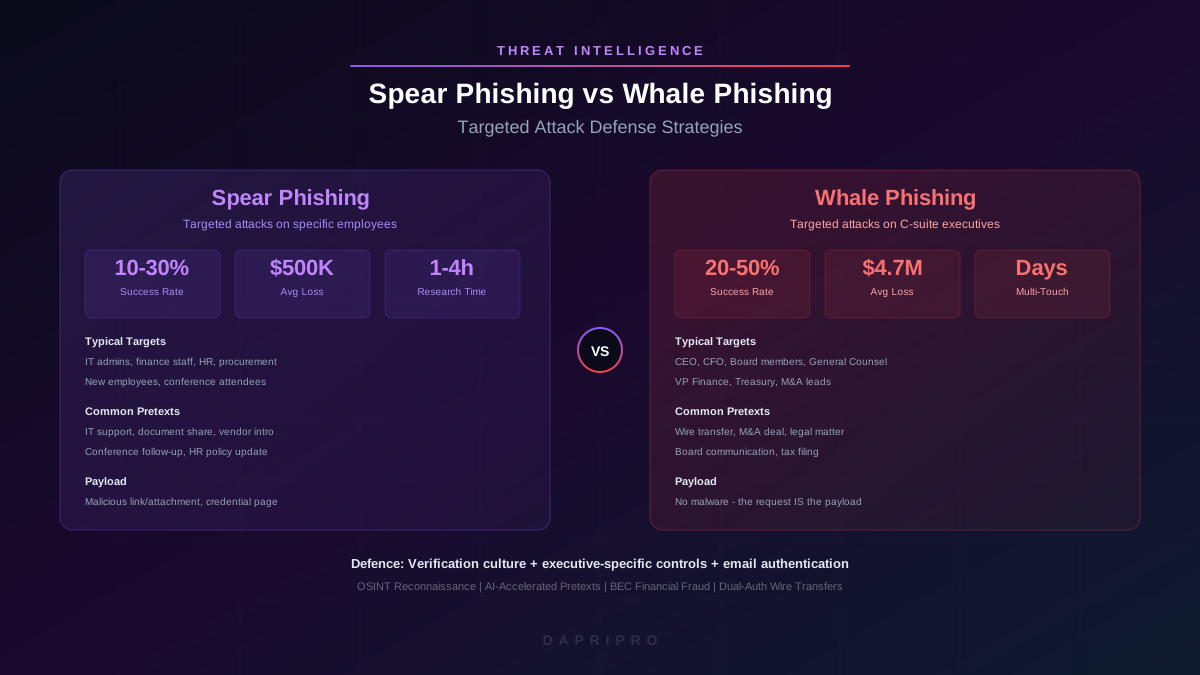
Spear phishing and whaling are the most dangerous phishing variants because they are personalized. Instead of generic "Dear Customer" messages, attackers research their targets and craft emails that reference real projects, real colleagues, and real events:
How Spear Phishing Works
- Reconnaissance — The attacker studies the target's LinkedIn profile, company website, social media, and news articles. They learn their role, projects, colleagues, writing style, and interests.
- Pretexting — They create a believable scenario. "Hi David, I noticed you presented at the Cloud Security Summit last week — great talk! I wanted to share my research on container security that supports your findings."
- Delivery — The email comes from a convincing address (spoofed or a compromised account) with a malicious attachment or link that looks completely legitimate.
- Exploitation — When the target clicks, they either download malware, enter credentials on a fake login page, or unknowingly grant OAuth access to their account.
Business Email Compromise (BEC)
BEC is the most financially devastating phishing variant. The FBI reports $2.9 billion in BEC losses annually — more than ransomware. BEC attacks typically follow one of these patterns:
- CEO impersonation — "This is urgent. Wire $150,000 to this account for the acquisition deal. Do not discuss with anyone — this is confidential until the announcement."
- Vendor invoice fraud — Attackers compromise a real vendor's email and change bank account details on legitimate invoices.
- Payroll diversion — "Hi HR, I changed banks. Please update my direct deposit to this new account number."
- Attorney impersonation — "I represent [real law firm]. Please wire the settlement payment to this escrow account immediately."
Emerging Phishing Threats
QR Code Phishing (Quishing)
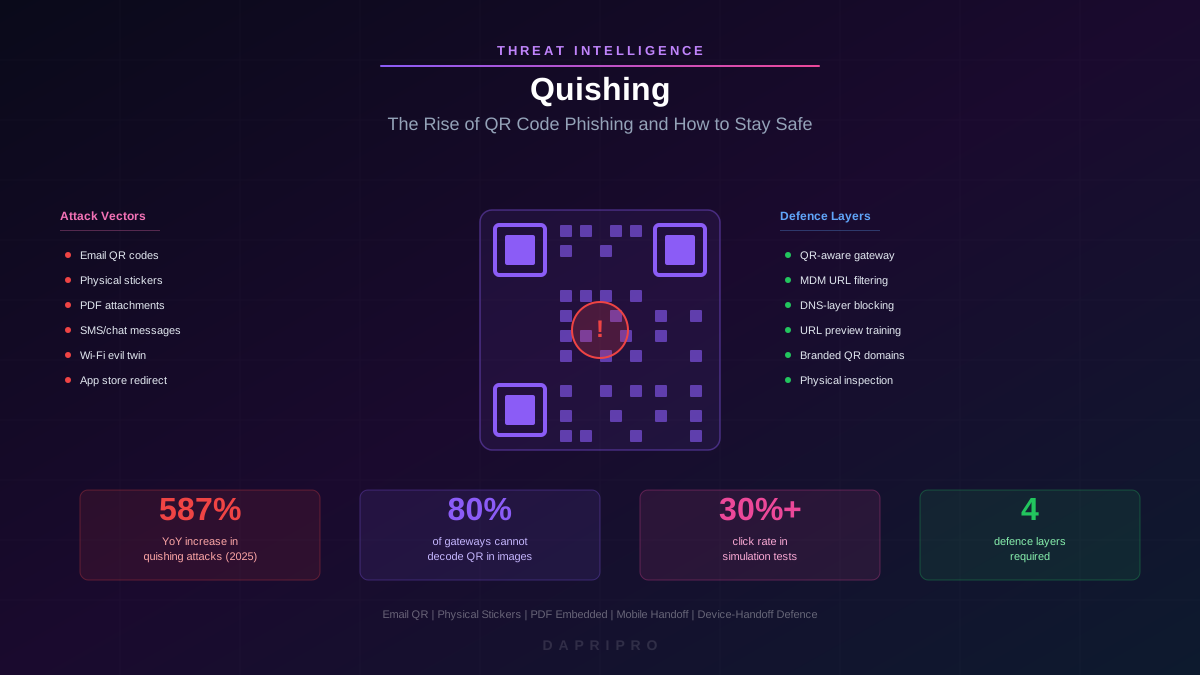
Quishing is the fastest-growing phishing variant in 2026. Attackers embed malicious URLs inside QR codes sent via email, printed on flyers, or placed over legitimate QR codes in public spaces.
Why quishing works: traditional email security scanners analyze text and URLs in the email body, but they do not decode and analyze QR code images. The malicious link is hidden inside a picture. When you scan the QR code with your phone, it opens the phishing site on your mobile device — which typically has fewer security controls than your work computer.
Voice Phishing (Vishing)
Vishing uses phone calls instead of emails. In 2026, attackers combine AI deepfake voice technology with social engineering to impersonate executives, IT support, or bank representatives. Notable examples include the $25 million deepfake video call fraud where attackers used AI-generated video of a company's CFO in a fake conference call.
Email Authentication: SPF, DKIM, and DMARC
Email authentication protocols prevent attackers from sending emails that appear to come from your domain:
| Protocol | What It Does | Analogy |
|---|---|---|
| SPF | Lists which mail servers are authorized to send email for your domain | A guest list at a building entrance — only listed senders get through |
| DKIM | Adds a digital signature to every email proving it was not modified in transit | A tamper-proof seal on a package — if the seal is broken, the email was altered |
| DMARC | Tells receiving servers what to do if SPF or DKIM fails (quarantine or reject) | Instructions for the security guard — "If someone is not on the list, turn them away" |
Without DMARC set to p=reject, anyone can send emails that appear to come from your domain. This means attackers can send phishing emails to your customers, partners, and employees that look perfectly legitimate because they come from your actual domain name.
Anti-Phishing Technology Stack
Anti-phishing tools work in layers. No single tool catches everything — each layer catches threats the previous layer missed:
Identifying Phishing URLs
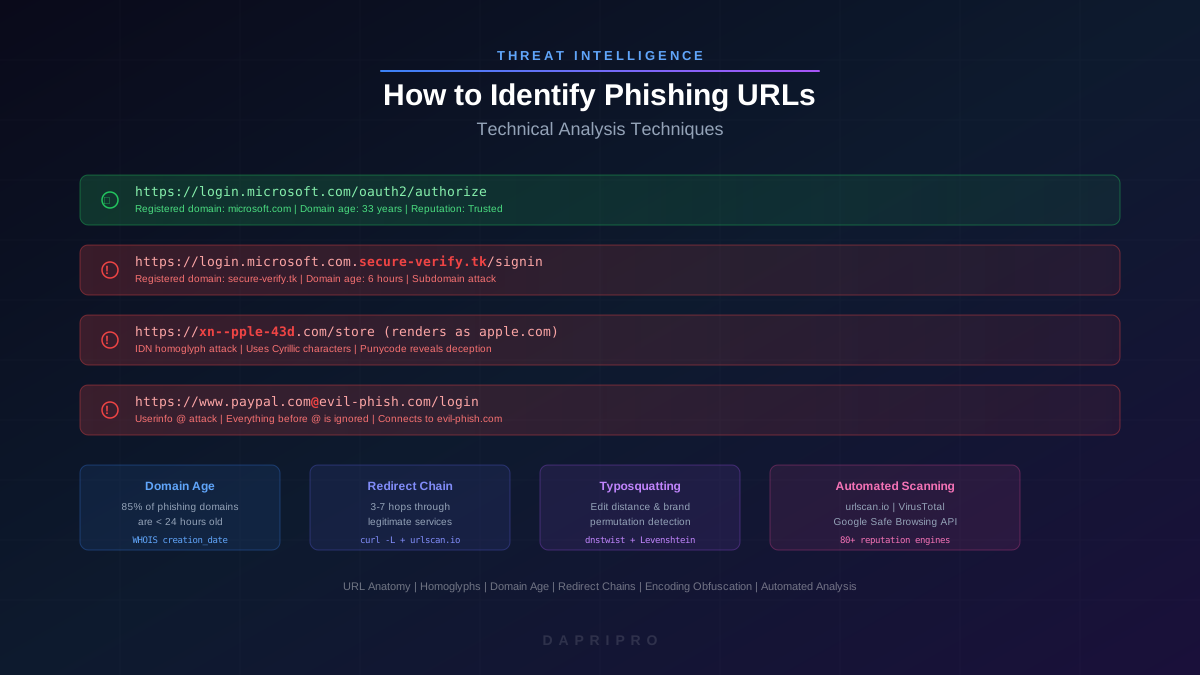
Phishing URL analysis is a critical skill. Attackers use techniques like:
- Typosquatting —
micros0ft.com,gooogle.com,arnazon.com(subtle character substitutions) - Subdomain abuse —
login.microsoft.com.evil-site.ru(the real domain is evil-site.ru) - URL shorteners — bit.ly and other shorteners hide the real destination
- Homograph attacks — using Unicode characters that look identical to Latin letters (Cyrillic "а" vs Latin "a")
- Legitimate service abuse — hosting phishing pages on Google Sites, SharePoint, or Cloudflare Workers to inherit the trusted domain's reputation
Building a Human Firewall
Building a phishing-resistant culture is the most effective long-term defense because no technology catches 100% of phishing attacks. The emails that reach inboxes are the most sophisticated — they passed every automated filter.
Effective Training Program Elements
- Simulated phishing campaigns — send realistic (but safe) phishing emails monthly. Track click rates, report rates, and improvement over time. Tools like KnowBe4, Cofense, and Proofpoint make this easy.
- Just-in-time training — when someone clicks a simulated phish, immediately show them what they missed. This "teachable moment" is far more effective than annual training presentations.
- One-click reporting — add a "Report Phishing" button to the email client. Make reporting easier than deleting. When employees report suspicious emails, the security team can investigate and warn others.
- Positive reinforcement — publicly recognize employees who report phishing (with their permission). Never punish people for clicking — shame creates fear of reporting, which is far more dangerous.
- Role-specific training — finance teams need BEC/wire fraud training. Executives need whaling awareness. IT staff need credential harvesting and OAuth abuse training. HR needs payroll diversion awareness.
Phishing Incident Response
When a phishing attack succeeds, speed matters. Follow these steps:
- Contain — immediately change compromised credentials, revoke session tokens, and isolate affected systems from the network.
- Investigate — determine what the attacker accessed. Check email forwarding rules (attackers often add hidden rules to maintain access). Review login logs for the compromised account.
- Eradicate — remove any malware, backdoors, or persistence mechanisms the attacker installed.
- Recover — restore any modified data or configurations from backups. Re-enable accounts with new, strong credentials and MFA.
- Communicate — notify affected parties. If customer data was exposed, follow your regulatory notification requirements (GDPR: 72 hours, HIPAA: 60 days).
- Learn — conduct a blameless post-incident review. Update your email filters, training, and playbooks based on what you learned.
Building Your Anti-Phishing Strategy
Phishing defense is a continuous process, not a one-time project. Start with the highest-impact technical controls: deploy DMARC with p=reject for your domain, implement a secure email gateway, and enable MFA (preferably FIDO2/passkeys) on all accounts. Then build your human firewall with monthly simulated phishing campaigns and one-click reporting.
The goal is not to achieve zero phishing clicks — that is impossible. The goal is to make your organization so difficult to phish that attackers move on to easier targets, and when an attack does slip through, your people report it immediately so your security team can respond before damage is done.