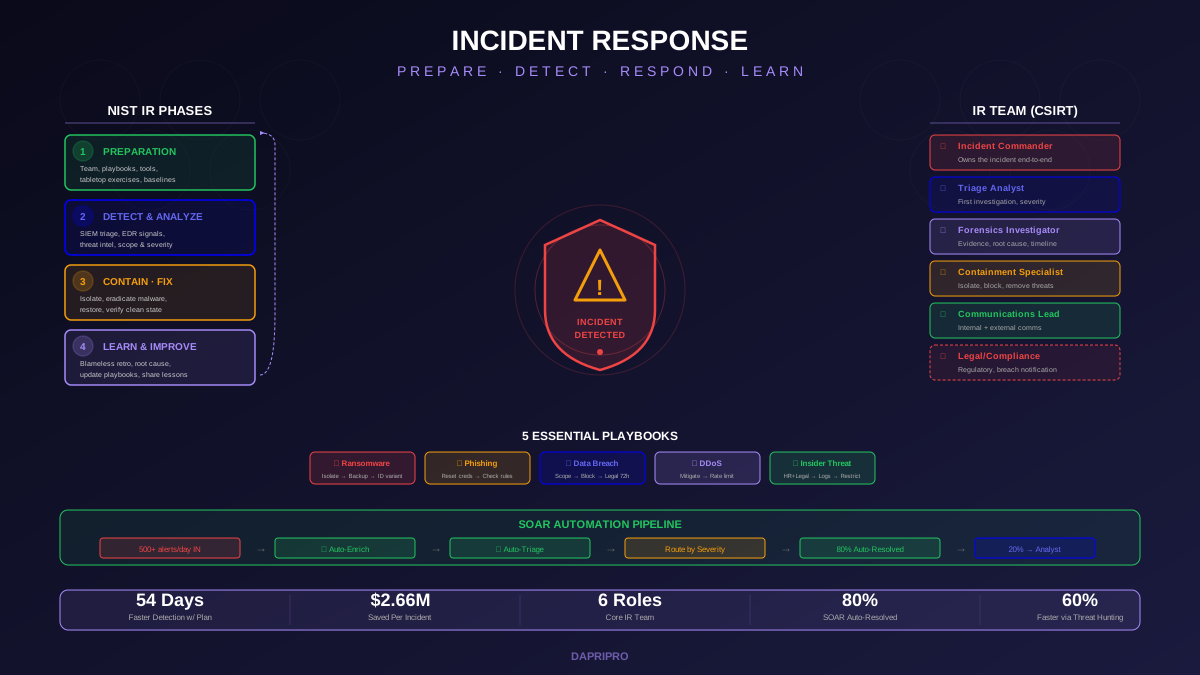
The average data breach takes 277 days to identify and contain. Organizations with a tested incident response (IR) plan cut that time by 54 days and save an average of $2.66 million per incident. The difference between a manageable security event and a catastrophic breach often comes down to whether your team has a plan and has practiced it.
This guide covers everything you need to build, test, and improve an incident response program — from team structure and NIST-aligned phases to pre-built playbooks, SOAR automation, and the post-incident reviews that turn every breach into a lesson.
The NIST Incident Response Framework
The NIST SP 800-61 framework organizes incident response into four phases. Most organizations focus almost entirely on Phase 3 (the actual response) while neglecting Phase 1 (preparation) and Phase 4 (learning from incidents). This is backwards — the organizations that handle incidents well are the ones that invested in preparation and that improve after every event.
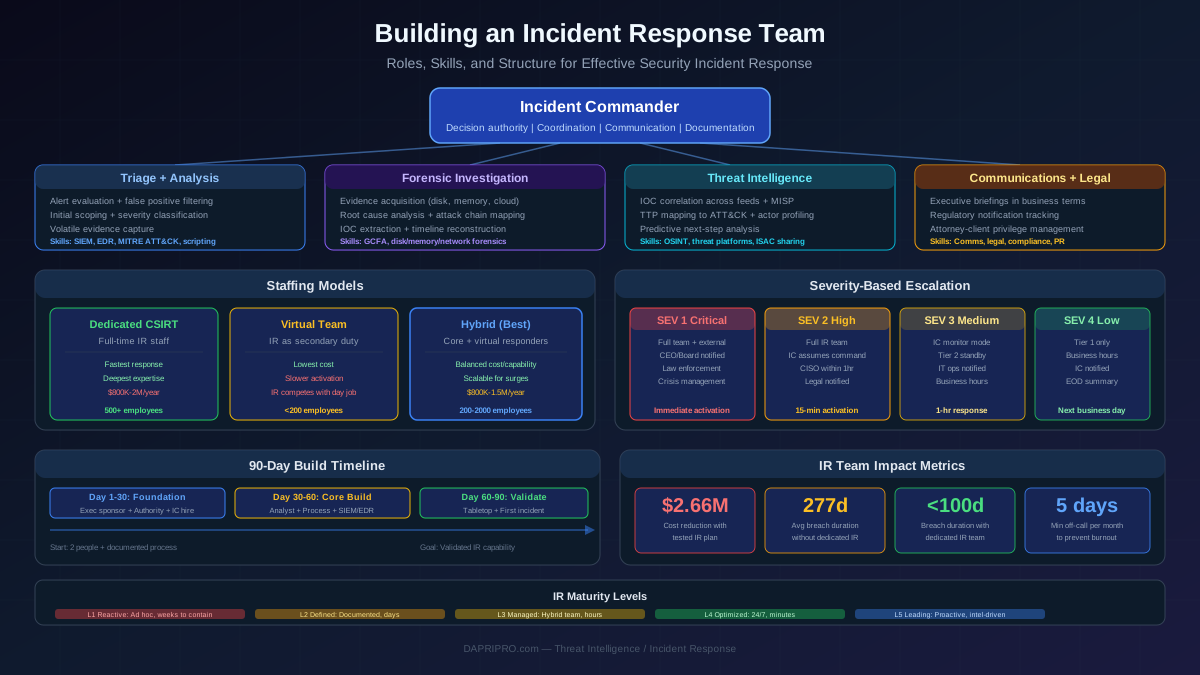
Building Your Incident Response Team
An incident response team (CSIRT) needs six core roles. Small organizations can have one person cover multiple roles, but every function must be assigned to someone:
| Role | Responsibility | Skills Needed |
|---|---|---|
| Incident Commander | Owns the incident end-to-end. Makes escalation decisions, coordinates team, manages timeline. | Leadership, communication, decision-making under pressure |
| Triage Analyst | First to investigate alerts. Determines if an event is a real incident, classifies severity, gathers initial evidence. | SIEM/EDR proficiency, log analysis, threat intelligence |
| Forensics Investigator | Preserves and analyzes digital evidence. Determines root cause, timeline of attack, and full scope of compromise. | Disk/memory forensics, chain of custody, evidence handling |
| Containment Specialist | Isolates affected systems, blocks attacker access, implements firewall rules, and removes malware/backdoors. | Network engineering, system administration, endpoint security |
| Communications Lead | Manages internal comms (executives, employees) and external comms (customers, media, regulators). | Crisis communication, stakeholder management, media relations |
| Legal/Compliance Advisor | Advises on regulatory notification requirements (GDPR 72-hour rule, state breach laws), coordinates with outside counsel. | Data privacy law, regulatory compliance, contract review |
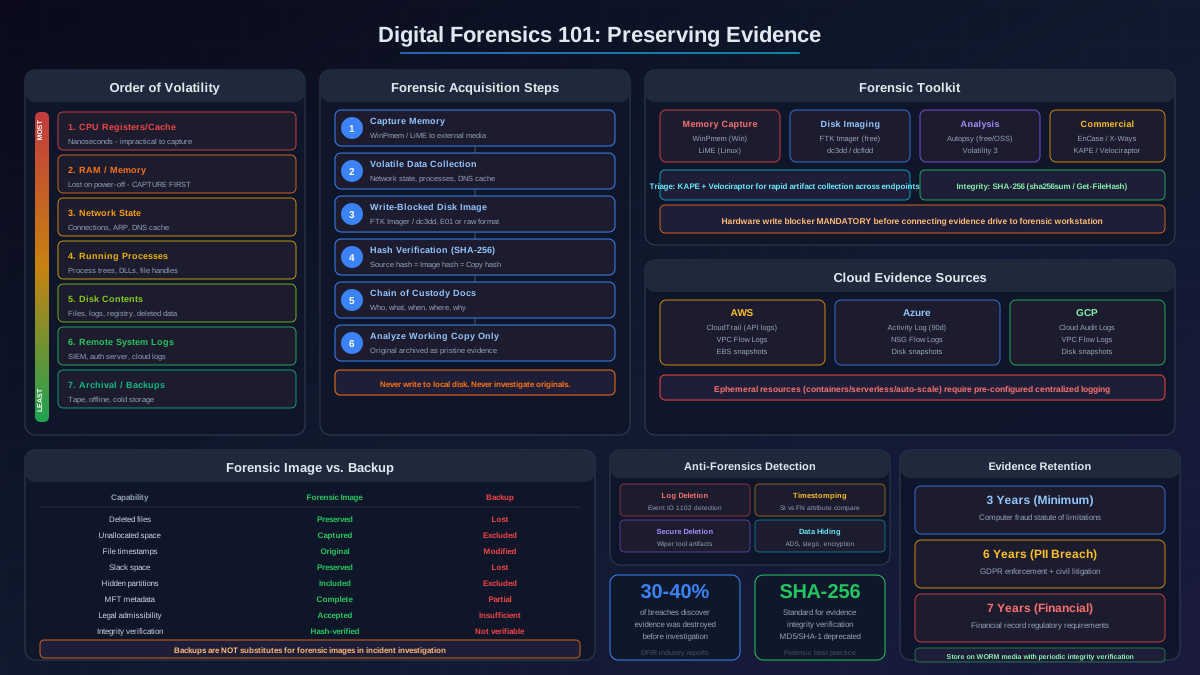
Digital Forensics: Preserving Evidence
Digital forensics is the process of collecting, preserving, and analyzing evidence from compromised systems. The key principle: never modify the original evidence.
Evidence Collection Order of Volatility
Collect evidence from most volatile (disappears first) to least volatile:
- CPU registers and cache — gone in milliseconds.
- Memory (RAM) — contains running processes, network connections, encryption keys. Capture with tools like
Magnet RAM CaptureorWinPmem. - Network connections — active connections, ARP cache, routing tables. Capture with
netstat,TCPView. - Running processes — what is executing on the system. Capture with
Volatility,Process Monitor. - Disk/storage — files, logs, registry, deleted files. Create forensic disk images with
FTK Imagerordd. - External logs — SIEM logs, firewall logs, cloud audit trails. These persist longer but should be exported early.
Always calculate cryptographic hashes (SHA-256) of evidence before and after collection to prove it was not tampered with.
Incident Response Playbooks
Pre-built playbooks for common attack types cut response time by 50% because responders follow tested steps instead of improvising under pressure. Every playbook should include: detection criteria, severity classification, step-by-step response actions, escalation triggers, and communication templates.
The 5 Essential Playbooks
| Playbook | Trigger | First 3 Actions |
|---|---|---|
| Ransomware | Encrypted files detected, ransom note found | 1. Isolate affected systems from network 2. Check backup integrity 3. Identify ransomware variant |
| Phishing Compromise | User clicked link/opened attachment, credential harvest confirmed | 1. Reset compromised credentials 2. Check email rules for forwarding 3. Scan device with EDR |
| Data Breach | Unauthorized data access/exfiltration detected | 1. Identify what data was accessed 2. Block exfiltration channel 3. Notify legal (72-hour clock starts) |
| DDoS Attack | Service degradation, traffic spike from many sources | 1. Activate DDoS mitigation (Cloudflare/AWS Shield) 2. Implement rate limiting 3. Communicate status to stakeholders |
| Insider Threat | Unusual data access by employee, after-hours activity, policy violation | 1. Involve HR and legal BEFORE confronting 2. Preserve audit logs 3. Restrict access without alerting |
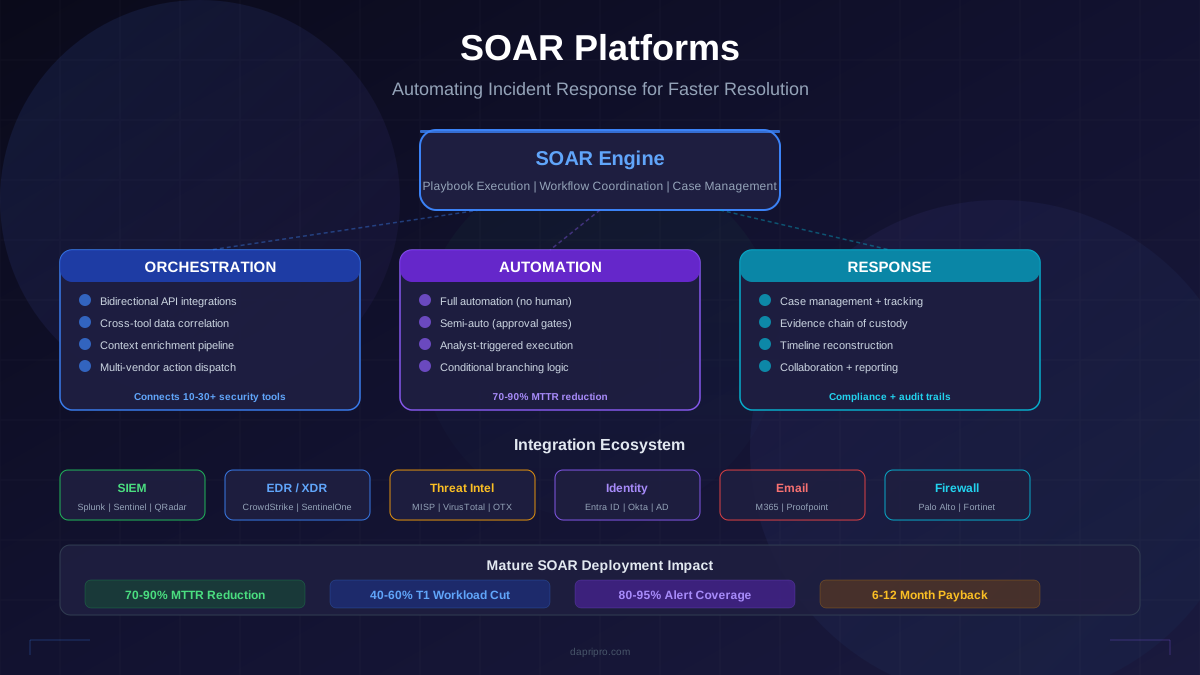
SOAR: Automating Incident Response
SOAR platforms automate the repetitive parts of incident response so your analysts can focus on the tasks that require human judgment:
Top SOAR Platforms
| Platform | Best For | Key Strength |
|---|---|---|
| Splunk SOAR | Existing Splunk customers | Deep SIEM integration, 300+ app integrations |
| Palo Alto XSOAR | Enterprise SOCs | War room collaboration, marketplace of playbooks |
| IBM QRadar SOAR | Compliance-heavy industries | Privacy breach module, regulatory workflows |
| Shuffle (Open Source) | Budget-conscious teams | Free, drag-and-drop workflow builder |
Proactive Threat Hunting
Threat hunting flips incident response on its head. Instead of waiting for an alert, you assume attackers are already inside your network and actively search for evidence of compromise. Organizations that actively threat hunt detect breaches 60% faster.
The Threat Hunting Loop
- Form a hypothesis — "An attacker may be using PowerShell to download malware on endpoints," based on MITRE ATT&CK technique T1059.001.
- Investigate — search endpoint logs for unusual PowerShell execution: encoded commands, download cradles (
Invoke-WebRequest), execution policies bypassed. - Discover patterns — identify normal vs. abnormal PowerShell usage across your environment (baseline comparison).
- Automate detection — if you find a useful pattern, create a SIEM detection rule or EDR alert so future instances are caught automatically.
Post-Incident Reviews (Retrospectives)
Blameless post-incident reviews are the highest-ROI activity in your entire incident response program. Every incident is a free lesson — the only cost is the time spent learning from it.
Running an Effective Retrospective
- Timeline reconstruction — build a minute-by-minute timeline of the incident from first detection to full recovery. Use logs, not memory.
- What went well — what detection, response, or recovery actions worked as expected? Reinforce these.
- What could be improved — where did the response stall, miscommunicate, or miss something? Focus on systems and processes, not individuals.
- Root cause analysis — what was the underlying cause, not just the immediate trigger? Use the "5 Whys" technique.
- Action items with owners — every improvement must have a specific owner and a deadline. No action items = the retro was wasted.
Hold the retrospective within 5 business days of incident closure while details are still fresh. Include everyone who participated — not just senior staff.
Measuring IR Program Effectiveness
- Mean Time to Detect (MTTD) — how quickly do you identify incidents? Target: under 24 hours for critical incidents.
- Mean Time to Respond (MTTR) — how quickly do you contain the threat after detection? Target: under 4 hours for critical incidents.
- Mean Time to Recover (MTTRec) — how quickly do you restore normal operations? Tracks business impact.
- False positive rate — percentage of alerts that are not real incidents. A rate above 90% indicates your detection rules need tuning.
- Playbook coverage — percentage of incidents that had a pre-built playbook. Target: 80%+ of incident types covered.
- Retrospective completion rate — percentage of incidents that received a post-incident review. Target: 100% for Severity 1-2 incidents.
Build Your IR Program Today
You do not need a massive budget or a 20-person SOC to have effective incident response. Start with the basics: document your plan, assign the six core roles, create playbooks for the five most common attack types, and run a tabletop exercise quarterly. As you mature, add SOAR automation for high-volume alerts and begin proactive threat hunting.
The single most important step? Test your plan before you need it. An untested plan is the same as no plan. Run a tabletop exercise this month — pick a ransomware scenario, gather your team, and walk through your response step by step. The gaps you discover in a calm conference room are far better than discovering them during a real incident at 2 AM.