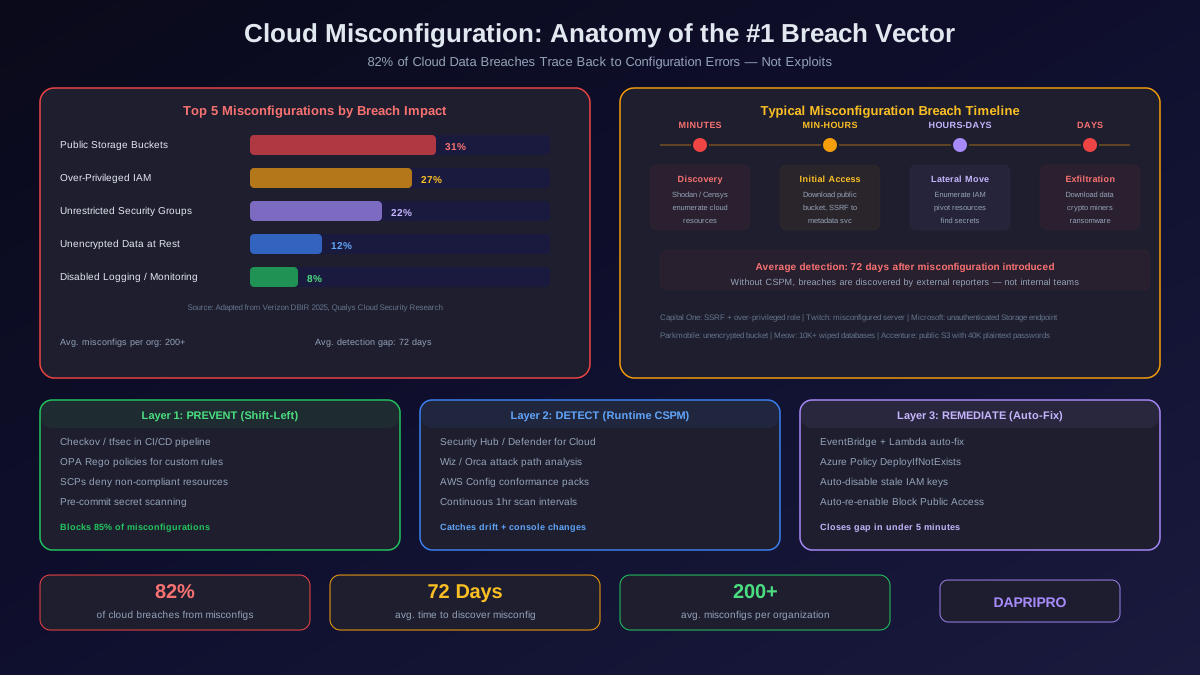
Every major cloud data breach in the last five years traces back to a misconfiguration, not a zero-day exploit. Capital One: an overly permissive IAM role on a WAF instance allowed SSRF-based access to S3 buckets containing 100 million customer records. Twitch: a misconfigured server configuration exposed the entire source code repository and streamer payout data. Microsoft: a Storage Explorer endpoint without authentication leaked 65,000 entities including customer emails, project details, and SOW documents. Parkmobile: an unencrypted cloud storage bucket exposed 21 million user records including license plate numbers and email addresses.
These were not sophisticated attacks. They were configuration errors that any automated scanner could discover — and eventually did. Cloud misconfigurations accounted for 82 percent of data breaches involving cloud infrastructure in 2025, according to the Verizon Data Breach Investigations Report. The average organization has 200+ misconfigurations across their cloud accounts at any given time, according to Qualys Cloud Security research. And the average time between a misconfiguration being introduced and being discovered is 72 days — more than enough time for an attacker to find it first.
This guide catalogs the most common and most dangerous cloud misconfigurations, explains exactly how attackers exploit each one, and provides the specific detection and prevention mechanisms that close the gap between deployment and discovery.
Why Misconfigurations Are Systemic, Not Accidental
Cloud misconfigurations are not caused by careless engineers. They are caused by systemic failures in how organizations deploy and manage cloud resources. Understanding the root causes is essential for prevention because fixing individual misconfigurations without addressing the underlying process failures guarantees recurrence.
Root Cause 1: Console-Based Deployments Without Guardrails
Developers and operations teams deploy resources through the cloud console (AWS Console, Azure Portal, GCP Console) because it is fast and intuitive. The console does not enforce organizational security policies. It does not check whether a security group rule violates your standards. It does not warn you that the storage bucket you just created has default encryption disabled. Every click is an undocumented, unreviewed configuration change that exists outside your infrastructure-as-code repository and cannot be audited against policy.
Root Cause 2: Insecure Defaults
Cloud providers design defaults for developer convenience, not security. AWS launched all EC2 instances with IMDSv1 (vulnerable to SSRF credential theft) by default until organizations started enforcing IMDSv2 through SCPs. Azure SQL Database allowed public network access by default. GCP Cloud Storage buckets could be created with uniform bucket-level access disabled, requiring ACL management that most teams got wrong. While providers have gradually tightened defaults over the last three years, legacy resources deployed under old defaults remain misconfigured unless specifically remediated.
Root Cause 3: Insufficient IaC Review
Organizations that use Terraform, CloudFormation, or CDK for infrastructure deployments still introduce misconfigurations because they treat IaC code reviews differently from application code reviews. A Terraform module creating an RDS instance without specifying storage_encrypted = true passes code review because the reviewer is looking at functional correctness, not security configuration. Without policy-as-code tools (Checkov, tfsec, OPA) integrated into the CI/CD pipeline as blocking gates, security misconfigurations in IaC templates reach production through the standard deployment process.
Root Cause 4: Permission Accumulation
IAM permissions accumulate over time and are rarely pruned. A developer receives AdministratorAccess during a production incident for debugging, and the permission is never revoked. A service role gets s3:* because the team could not figure out the specific S3 actions needed, and nobody revisits the policy after the feature ships. An SCP exception is granted for a one-time migration task and remains in place for two years. The result is a sprawl of over-privileged identities where the average IAM role has 95 percent more permissions than it actually uses.
The 10 Most Dangerous Cloud Misconfigurations
Not all misconfigurations carry equal risk. The following ten misconfigurations are responsible for the vast majority of cloud data breaches and appear consistently across every major CSPM vendor's findings reports.
1. Public Storage Buckets
What goes wrong: An S3 bucket, Azure Blob container, or GCP Cloud Storage bucket is configured to allow public read access — either through a bucket policy with a wildcard principal, an ACL granting AllUsers read permission, or the container's public access level set to blob or container instead of private. The data inside — customer records, backups, log files, database dumps — becomes downloadable by anyone with the URL.
How attackers exploit it: Automated tools enumerate bucket names using common patterns (companyname-backup, companyname-prod, companyname-logs) and check each for public listability. AWS S3 buckets can be probed at scale via the S3 API without authentication. Once a public bucket is discovered, the attacker downloads the contents, searches for credentials (database connection strings, API keys, SSH private keys embedded in backup files), and pivots to deeper access.
Prevention: Enable S3 Block Public Access at the account level (not just the bucket level). In Azure, disable anonymous access at the storage account level. In GCP, use uniform bucket-level access and disable public access prevention at the organization level through an organization policy constraint.
2. Over-Privileged IAM Roles and Users
What goes wrong: IAM roles and users are granted broad permissions — AdministratorAccess, PowerUserAccess, *:* actions, or resource wildcards — instead of scoped policies limited to the specific actions and resources the identity needs. When one of these identities is compromised, the attacker inherits full-account privileges.
How attackers exploit it: The Capital One breach illustrates this perfectly. A misconfigured WAF instance had an IAM role with s3:* permissions. The attacker exploited an SSRF vulnerability in the WAF to reach the instance metadata service, extracted temporary credentials from the IAM role, and used those credentials to list and download objects from every S3 bucket in the account — 100+ million records.
Prevention: Use IAM Access Analyzer to generate least-privilege policies from actual usage. Enforce SCPs that deny iam:CreateUser and iam:CreateAccessKey in production accounts. Run Prowler or Steampipe CIS benchmark checks to identify roles with wildcard actions or resource patterns.
3. Unrestricted Security Group / NSG Rules
What goes wrong: Inbound security group rules allow traffic from 0.0.0.0/0 (the entire internet) on management ports like SSH (22), RDP (3389), or database ports (3306, 5432, 1433, 27017). This exposes the service directly to brute-force attacks, automated exploitation, and unauthorized access.
How attackers exploit it: Shodan and Censys continuously scan the internet for open ports. A MongoDB instance on port 27017 exposed to the internet will be found within hours and attacked within minutes. The Meow attack campaign (2020-2023) automated the discovery and destruction of unsecured databases — over 10,000 databases wiped in a single campaign. In 2025, automated cloud attackers target open RDP ports with credential stuffing within 4 minutes of exposure.
Prevention: Use Security Hub (AWS) or Defender for Cloud (Azure) to detect and alert on unrestricted inbound rules. Deploy Checkov policies to block security groups with 0.0.0.0/0 on management or database ports in IaC pipelines. Implement JIT access (Azure) or Systems Manager Session Manager (AWS) for administrative connections.
4. Unencrypted Data at Rest
What goes wrong: EBS volumes, RDS instances, S3 buckets, Azure Managed Disks, and GCP persistent disks store data without encryption at rest. If an attacker gains access to the storage layer (through a snapshot copy, a backup exposure, or a compromised service), the data is immediately readable.
Prevention: Enable default encryption on every storage service. Use SCPs to deny resource creation without encryption parameters. Enforce encryption through Azure Policy initiatives. In GCP, enable organization-level CMEK policies.
5. Disabled Logging and Monitoring
What goes wrong: CloudTrail is not enabled in all regions (or has data events disabled), GuardDuty is not activated, VPC Flow Logs are not deployed, and Azure diagnostic settings are not configured. Without logging, you have no visibility into API calls, network connections, or access patterns — and no forensic evidence to investigate when something goes wrong.
Prevention: Enable CloudTrail (organization trail, all regions, all event types) and GuardDuty (all regions, all accounts) on day one. Deploy VPC Flow Logs in ALL mode. Use SCPs to deny cloudtrail:StopLogging and guardduty:DeleteDetector in all member accounts.
6. Instance Metadata Service v1 (IMDSv1)
What goes wrong: EC2 instances running IMDSv1 are vulnerable to Server-Side Request Forgery (SSRF) attacks. An attacker who can make the application send HTTP requests to http://169.254.169.254/latest/meta-data/iam/security-credentials/ retrieves the temporary credentials of the instance IAM role — without any authentication.
Prevention: Enforce IMDSv2 via SCP: deny ec2:RunInstances unless ec2:MetadataHttpTokens equals required. Retrofit existing instances with aws ec2 modify-instance-metadata-options --http-tokens required.
7. Publicly Accessible Databases
What goes wrong: RDS instances, Azure SQL databases, or GCP Cloud SQL instances are deployed with public accessibility enabled and weak or default credentials. The database endpoint is reachable from the internet, and authentication is the only barrier.
Prevention: Deploy databases in private subnets with no internet route. Disable public accessibility at the instance level. Use IAM database authentication (AWS) or Entra ID authentication (Azure) instead of password-based auth. Enforce private endpoint connectivity through Azure Policy.
8. Cross-Account Trust Misconfiguration
What goes wrong: IAM roles with overly broad trust policies — trusting entire AWS accounts instead of specific roles, or trusting * as a principal — allow any identity in the trusted account (or any account) to assume the role. If the trusted account is compromised, the attacker gains cross-account access.
Prevention: Use IAM Access Analyzer external access findings to identify roles with cross-account trust. Scope trust policies to specific principal ARNs, not entire accounts. Add sts:ExternalId conditions to prevent confused deputy attacks.
9. Missing Network Segmentation
What goes wrong: All workloads — web servers, application servers, databases, management tools — run in a single subnet or flat VPC with permissive security groups allowing all internal traffic. A compromised web server can directly access the database, the key management service, and every other workload in the VPC.
Prevention: Implement tiered VPC architecture: public subnets for load balancers only, private subnets for applications, isolated subnets for data stores with no internet route. Use VPC endpoints for AWS service access to avoid NAT Gateway routing.
10. Exposed Secrets in Code and Configuration
What goes wrong: Database passwords, API keys, and cloud credentials are hardcoded in application code, committed to Git repositories, embedded in Docker images, passed as environment variables in task definitions, or stored in plaintext in configuration files on S3.
Prevention: Use Secrets Manager (AWS), Key Vault (Azure), or Secret Manager (GCP) for all secrets. Deploy pre-commit hooks with tools like git-secrets or truffleHog to scan for credentials before they reach the repository. Rotate all secrets on a 90-day maximum cycle.
Anatomy of a Misconfiguration-Based Cloud Breach
Understanding how attackers chain misconfigurations together reveals why fixing individual issues without addressing the underlying architecture fails. Here is how a typical cloud breach unfolds when misconfigurations provide the initial access:
Phase 1: Discovery (Minutes)
The attacker scans for low-hanging fruit: public S3 buckets, open database ports on Shodan, leaked credentials on GitHub, or accessible cloud metadata endpoints. No sophisticated tools are needed — open-source scanners like Prowler, ScoutSuite, and Pacu enumerate cloud resources and check for common misconfigurations automatically.
Phase 2: Initial Access (Minutes to Hours)
The attacker exploits the discovered misconfiguration: downloads objects from a public bucket, authenticates to an exposed database with default credentials, uses leaked access keys to call cloud APIs, or exploits an SSRF vulnerability to reach the instance metadata endpoint and extract IAM role credentials.
Phase 3: Enumeration and Lateral Movement (Hours to Days)
With initial access established, the attacker enumerates the environment: what other buckets exist, what IAM permissions the compromised identity has, what other instances are reachable from the current network position, what secrets are stored in environment variables or parameter stores. Over-privileged IAM roles and flat network architectures amplify this phase dramatically — a single compromised identity with broad permissions provides a complete map of the environment.
Phase 4: Data Exfiltration or Persistence (Days)
The attacker achieves their objective: downloading sensitive data from S3 or databases, deploying cryptocurrency miners on compromised instances, creating backdoor IAM users or roles for persistent access, or encrypting data for ransomware. Disabled logging means the organization has no record of these activities until the breach is reported externally — by a customer who discovers their data online, or by a threat intelligence service that finds the data on a dark web marketplace.
Detection and Response Tools
Detecting misconfigurations requires different tools at different stages of the resource lifecycle:
Pre-Deployment (IaC Pipeline)
| Tool | What It Scans | Integration |
|---|---|---|
| Checkov | Terraform, CloudFormation, Kubernetes, Helm, ARM templates | GitHub Actions, GitLab CI, Jenkins, pre-commit hooks |
| tfsec / Trivy | Terraform HCL, misconfiguration + vulnerability scanning | GitHub Actions, pre-commit, VS Code extension |
| OPA (Open Policy Agent) | Any JSON/YAML input against Rego policies | Terraform plan output, Kubernetes admission control, CI pipelines |
| CloudFormation Guard | CloudFormation templates against rule conditions | AWS CodePipeline, CloudFormation hooks |
| Semgrep | IaC templates + application code patterns | CI/CD, pre-commit, IDE plugins |
Runtime (CSPM)
| Tool | Cloud Coverage | Differentiator |
|---|---|---|
| AWS Security Hub | AWS only | Native integration with AWS services, free FSBP standard, Config rule automation |
| Microsoft Defender for Cloud | Azure + AWS + GCP | Free CSPM tier, Sentinel SIEM integration, Azure Policy enforcement |
| Wiz | AWS + Azure + GCP + OCI | Agentless scanning, attack path analysis, identity-to-data mapping |
| Orca Security | AWS + Azure + GCP + Alibaba | SideScanning (no agents), combined CSPM + CWPP + DSPM |
| Prisma Cloud (Palo Alto) | AWS + Azure + GCP + OCI | Broadest feature set (CSPM + CWPP + CIEM + CAS), Code Security for IaC |
| Prowler | AWS + Azure + GCP | Open source, CIS benchmark automation, CLI-first, no vendor lock-in |
Building a Misconfiguration Prevention Program
Tools alone do not prevent misconfigurations. You need a program that combines technology with process and governance:
Step 1: Establish a Configuration Baseline
Define your organization's acceptable configuration standards, codified as policy. Start with the CIS Benchmarks for each cloud provider — they are prescriptive, auditable, and mapped to compliance frameworks. Translate CIS controls into Checkov policies, OPA rules, Azure Policy initiatives, and AWS Config conformance packs.
Step 2: Enforce at Every Deployment Path
You have three deployment paths: IaC pipelines, cloud console, and CLI/API. Each needs controls:
- IaC pipelines — Checkov/tfsec as blocking CI gates. A Terraform plan that creates an unencrypted RDS instance fails the pipeline.
- Cloud console — SCPs (AWS) and Azure Policy deny effects prevent the creation of non-compliant resources through the console. If a developer tries to create a public S3 bucket, the API call is denied.
- CLI/API — same SCPs and policies apply because the console, CLI, and SDKs all hit the same API.
Step 3: Continuous Monitoring
Deploy CSPM with scanning intervals of one hour or less. Configuration drift — resources that were deployed correctly but changed later — is a major source of misconfigurations that shift-left tools cannot catch. CSPM tools detect drift and trigger alerts or automated remediation.
Step 4: Automated Remediation
For well-understood misconfigurations with safe automated fixes, deploy auto-remediation:
- An S3 bucket becomes public — Lambda function triggered by EventBridge automatically re-applies Block Public Access
- A security group gets a 0.0.0.0/0 rule on port 22 — Lambda removes the rule and notifies the team
- An EBS volume is created without encryption — tag it for manual remediation (cannot encrypt in-place) and notify
- An IAM access key exceeds 90 days — automatically disable the key and create a ticket
Step 5: Metrics and Reporting
Track these metrics monthly to measure program effectiveness:
- Mean time to remediate (MTTR) — how quickly are detected misconfigurations fixed? Target: under 24 hours for critical, under 7 days for high
- Misconfiguration density — total misconfigurations per 100 cloud resources. Track trend over time — it should decrease as prevention controls mature
- Recurrence rate — percentage of remediated misconfigurations that reappear. A high recurrence rate indicates process failures (manual console changes overriding IaC state)
- Pipeline block rate — percentage of IaC deployments blocked by policy-as-code gates. Track what types of misconfigurations are being caught to inform developer training
- Compliance score trend — Security Hub score, Defender for Cloud secure score, or CSPM compliance percentage tracked weekly
Present these metrics to leadership quarterly. Misconfigurations are a quantifiable risk — connecting misconfiguration density to breach probability and breach cost creates a clear ROI story for security investment.