You use your face or fingerprint dozens of times per day without thinking about it. Unlocking your phone, approving a payment, logging into your banking app. It feels seamless and secure. But do you actually understand what happens when you press your thumb to that sensor? How easily can it be fooled? And what happens to that data if something goes wrong?
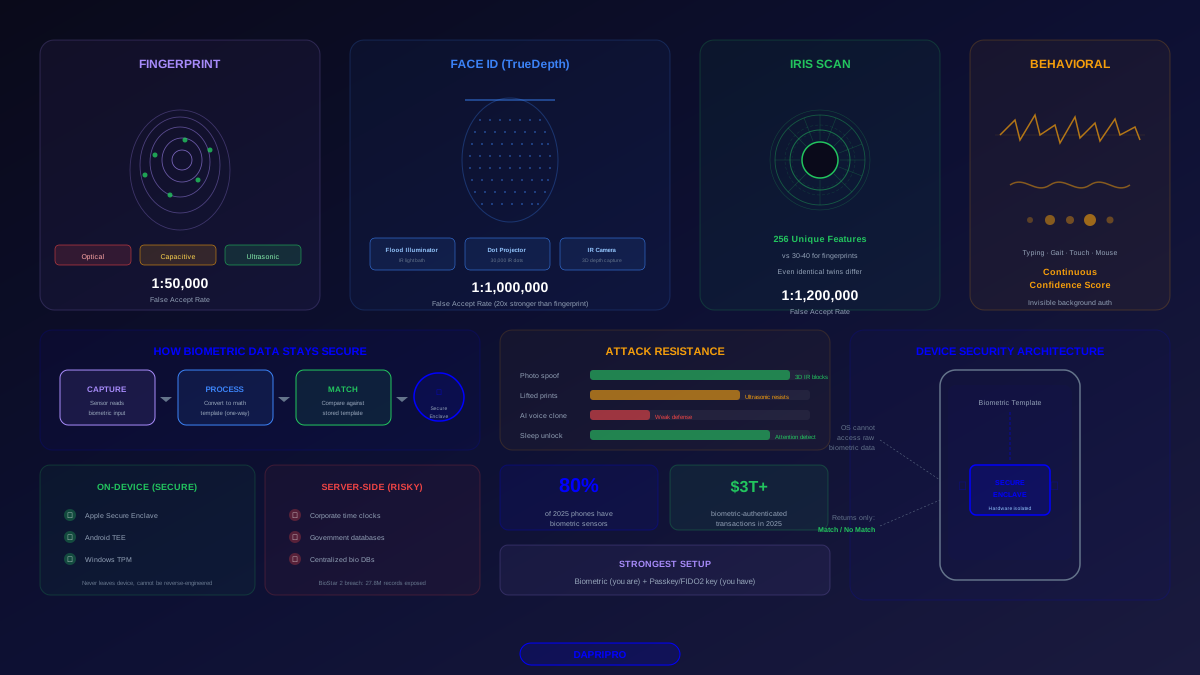
Biometric authentication has replaced passwords as the primary way most people access their most sensitive devices and accounts. Over 80% of smartphones shipped in 2025 include biometric sensors, and biometric-authenticated transactions exceeded $3 trillion. But not all biometric systems are created equal, and the gap between the best and worst implementations is enormous.
How Biometric Authentication Actually Works
Every biometric system follows three steps: capture, process, and match. Understanding each step reveals where security is strong and where it can fail.
Step 1: Capture
A sensor captures your biometric input — a fingerprint image, a 3D face scan, an iris pattern, or behavioral data like your typing rhythm. The quality and type of sensor fundamentally determines security:
- Capacitive fingerprint sensors — use electrical current to map the ridges and valleys of your fingerprint. More secure than optical sensors because they measure the actual 3D structure of skin, making them resistant to flat photo spoofing
- Ultrasonic fingerprint sensors — emit high-frequency sound pulses that create a 3D map of your fingerprint including subsurface features like blood flow. Used in Samsung Galaxy S series. Hardest fingerprint sensor to fool
- Structured light face scanning — projects a known pattern (Apple uses 30,000 infrared dots) onto your face and measures how the pattern distorts to create a precise 3D depth map. Cannot be fooled by photos
- 2D camera face recognition — uses a standard front camera to capture a flat image and match facial features. Significantly less secure and can be spoofed with high-resolution photos on some implementations
Step 2: Process
The raw biometric is converted into a mathematical template — a numerical representation of your biometric features. This is critical for privacy:
- Your actual fingerprint image is never stored on properly implemented systems
- The mathematical template is a one-way transformation. It cannot be reversed back into your fingerprint or face
- Templates are stored in hardware-isolated secure enclaves: Apple's Secure Enclave (a dedicated chip) or Android's Trusted Execution Environment
- The operating system itself cannot access the raw biometric data — it only receives a "match" or "no match" response
Step 3: Match
When you authenticate, your live biometric is captured, processed into a template, and compared against the stored template. The system uses a match threshold to balance security against usability:
| Biometric Type | False Accept Rate | False Reject Rate | Spoof Resistance |
|---|---|---|---|
| Apple Face ID (TrueDepth) | 1 in 1,000,000 | ~2-3% | Excellent (3D depth + IR) |
| Fingerprint (ultrasonic) | 1 in 50,000 | ~1-2% | Strong (3D + subsurface) |
| Fingerprint (capacitive) | 1 in 50,000 | ~2-4% | Good (3D ridges) |
| Iris scanning | 1 in 1,200,000 | ~0.5-1% | Excellent (256 unique features) |
| 2D face recognition | 1 in 50,000* | ~5-8% | Weak (photo spoofable) |
| Voice recognition | ~2-5% | ~5-10% | Weak (AI voice cloning) |
*Android 2D face recognition varies significantly by manufacturer. Some devices use additional IR sensors that perform better.
Fingerprint Authentication: The Technology You Touch Every Day
How Fingerprint Scanners Actually Work
Modern fingerprint sensors do not store an image of your fingerprint. They extract minutiae points — the unique intersections, endpoints, and ridge patterns that make your print unique. A typical fingerprint has 30-40 minutiae points, and modern sensors capture 50-80 of them for higher accuracy.
The three sensor types in 2026:
- Capacitive (most common) — tiny capacitors measure the electrical difference between ridges (which touch the sensor) and valleys (which do not). Found in most phones' side-mounted buttons and laptop readers. Good security but sensitive to wet or dirty fingers
- Optical (budget devices) — essentially takes a photograph of your fingerprint through a prism. Found in some under-display sensors. More vulnerable to spoofing with printed fingerprints
- Ultrasonic (premium) — sends sound waves through your finger and measures the echo, creating a detailed 3D map including subsurface features like blood vessel patterns. Samsung Galaxy S24 Ultra uses Qualcomm's 3D Sonic Gen 2. Hardest to fool because it detects liveness
Known Fingerprint Attack Methods
- Lifted prints — researchers have demonstrated unlocking phones using fingerprints lifted from glass surfaces and recreated with gelatin or silicone. This requires physical access, skill, and time — not a casual attack
- Masterprint attacks — small fingerprint sensors (like side-mounted buttons) only capture a partial print. Researchers found that synthetic "masterprints" can match partial prints at a 65% success rate on sensors that use less than 30 minutiae points
- 3D-printed fingers — high-resolution 3D printers can create fingerprint replicas that fool optical and some capacitive sensors. Ultrasonic sensors resist this because they detect subsurface features
Hardening Your Fingerprint Setup
- Register fewer fingers — each registered fingerprint reduces security proportionally. Register 2-3 fingers maximum, not all 10
- Use max security mode — Samsung devices offer an "increased touch protection" option that raises the match threshold. Enable it
- Require passcode after timeout — configure your device to require a PIN/passcode after 4-8 hours of inactivity, not just after restart
- Know your lockdown trigger — on iPhone, holding side + volume disables Face ID/Touch ID. On most Android devices, power menu has a "Lockdown" option. Practice it
Face ID and Facial Recognition: The Technology That Watches You
Apple Face ID: The Gold Standard
Face ID is not a camera taking a picture of your face. It is a sophisticated system with three components working together:
- Flood illuminator — bathes your face in infrared light invisible to you, ensuring the system works in complete darkness
- Dot projector — projects 30,000 infrared dots onto your face to create a precise 3D depth map of your facial geometry
- Infrared camera — captures the dot pattern as it conforms to your facial contours, measuring depth at 30,000 points
This 3D depth map is why Face ID cannot be fooled by photos, videos, or even realistic masks in most cases. The system also includes attention detection — it verifies you are looking at the phone with your eyes open, preventing unlock while sleeping or under coercion.
Face ID Limitations
- Identical twins — Face ID has a known vulnerability with identical twins. Apple's own documentation acknowledges this. If you have an identical twin, use a strong passcode instead
- Children under 13 — facial features are less distinctive in young children, increasing the false accept rate. Apple recommends passcode-only for children
- Extreme angles — Face ID requires you to be roughly facing the device. The TrueDepth camera has a ~45-degree cone of operation
- Masks and face coverings — Face ID with mask support (added in iOS 15.4) works by focusing on the periocular region (eyes and forehead), which reduces security slightly
Android Facial Recognition: The Wide Spectrum
Android facial recognition quality varies dramatically by manufacturer:
- Google Pixel 9 Pro — uses a dual camera system with an IR sensor for improved depth detection. Better than basic 2D but not at Face ID level
- Samsung Galaxy S24 — uses the front camera with AI-based anti-spoof detection. Samsung explicitly states it is less secure than fingerprint and recommends fingerprint for sensitive apps
- Budget Android devices — many use simple 2D photo matching that can be defeated with a printed photograph. Many of these devices warn users during setup that face unlock is not secure
Rule of thumb: if your Android phone did not specifically advertise hardware-based facial recognition with IR sensors, treat face unlock as a convenience feature, not a security feature. Use fingerprint or PIN for banking and payment apps.
Iris Scanning: The Most Unique Biometric
Your iris has 256 unique measurable features compared to 30-40 for fingerprints — making it the most individually distinctive biometric. Even identical twins have different iris patterns.
Iris scanning captures the colored ring around your pupil using near-infrared imaging. The complex patterns of rings, furrows, and crypts are unique to each eye and remain stable throughout your lifetime after age one.
Current Iris Scanning Implementations
- Samsung Galaxy S24 series — iris recognition is available through Samsung's biometric options, though Samsung pushes fingerprint as the primary biometric
- Windows Hello IR cameras — many enterprise laptops (Dell, Lenovo ThinkPad, HP EliteBook) include IR cameras that support iris-based Windows Hello authentication
- Worldcoin Orb — uses iris scanning for identity verification in the cryptocurrency space, though this raises significant privacy concerns about centralized biometric databases
Iris Scanning Limitations
- Contact lenses and glasses — some patterned contact lenses can interfere with iris recognition. Standard glasses may cause reflections that reduce accuracy
- Medical conditions — conditions that change iris appearance (certain medications that dilate pupils permanently, eye surgeries) can cause recognition failures
- Distance and alignment — iris scanning requires precise alignment at a specific distance. Less convenient than fingerprint or face scanning for quick unlocks
Behavioral Biometrics: The Invisible Layer
Behavioral biometrics authenticate you based on how you interact with your device rather than a physical characteristic. These work continuously in the background and are very difficult to spoof because the attacker would need to perfectly mimic behaviors they cannot observe.
- Typing patterns — your unique keystroke dynamics: how long you hold each key, the timing between key presses, and your error patterns. Used by banks like HSBC and Barclays for continuous authentication during online banking sessions
- Gait analysis — accelerometer data from your phone creates a unique walking pattern. Used as a passive continuous authentication layer by some mobile security platforms
- Touch patterns — finger pressure, swipe speed, touch area, and scrolling behavior create a behavioral profile. Used in fraud detection for mobile banking
- Mouse dynamics — cursor movement speed, click patterns, and scrolling behavior on desktop. Used by services like BioCatch for corporate banking fraud prevention
Behavioral biometrics are best understood as a continuous confidence score rather than a binary authentication method. If your behavioral patterns shift suddenly (someone else is using your device), the system can trigger step-up authentication — requiring a fingerprint or PIN to continue.
The Privacy Reality of Biometric Data
The critical question with any biometric system: where does your biometric data go?
On-Device Storage (Secure)
- Apple Face ID / Touch ID — biometric templates are stored in the Secure Enclave, a dedicated hardware chip isolated from the main processor. Apple cannot access this data, and it is never included in backups or synced to iCloud
- Android fingerprint / face — templates are stored in the Trusted Execution Environment (TEE) or a dedicated security chip (Google Tensor Security Core on Pixel devices). Google cannot access biometric data stored on-device
- Windows Hello — biometric templates are stored on the device using TPM (Trusted Platform Module) hardware encryption. Not sent to Microsoft's servers
Server-Side Storage (Risky)
- Workplace biometric systems — some time-clock and access control systems store biometric data on central servers. The 2019 Suprema BioStar 2 breach exposed 27.8 million biometric records including fingerprints
- Government databases — the FBI's NGI database contains over 150 million fingerprint records. India's Aadhaar system holds 1.3 billion iris and fingerprint records
- Dark web marketplace — stolen biometric datasets are available on dark web markets, though they have limited value because most consumer systems use local matching
Legal Protections
Biometric data has specific legal protections in several jurisdictions:
- Illinois BIPA — requires explicit consent before collecting biometric data and has generated massive settlements (Meta paid $650 million, BNSF Railway paid $228 million)
- GDPR — classifies biometric data as "special category" data requiring explicit consent and specific legal basis for processing
- Texas CUBI — Texas Capture or Use of Biometric Identifier law requires informed consent and secure storage
Your 2026 Biometric Security Setup Guide
iPhone Users
- Enable Face ID with attention detection ON — go to Settings > Face ID & Passcode > Require Attention for Face ID. This ensures the phone only unlocks when you are actively looking at it
- Use a strong alphanumeric passcode — your passcode is the fallback authentication. Use at least 8 characters with letters and numbers, not a 4-digit PIN
- Enable Stolen Device Protection — requires Face ID (not passcode) for sensitive actions like changing Apple ID password when away from familiar locations
- Practice lockdown mode activation — press and hold side button + volume button to disable Face ID instantly
Android Users
- Prefer fingerprint over face unlock — unless your device has hardware-based IR face scanning, fingerprint is more secure for sensitive actions
- Enable extra security options — Samsung: Settings > Biometrics > Fingerprints > Added Security. Pixel: enable "enhanced PIN privacy"
- Set lockdown mode in power menu — Settings > Lock Screen > Secure Lock Settings > Show Lockdown Option. This adds a "Lockdown" button to your power menu
- Use separate biometric verification for banking — configure banking apps to use their own biometric check, not just device unlock status
For All Devices
- Combine biometrics with a hardware key — for your most critical accounts (email, banking, cloud storage), use biometrics as the device unlock layer and a passkey or FIDO2 hardware key as the account authentication layer
- Never use biometrics as the only factor — biometrics should complement other authentication methods, not replace them entirely
- Review app biometric permissions — check which apps have permission to use biometrics. Revoke access for apps that do not need it
- Understand your threat model — if your primary concern is a random thief, biometrics are excellent. If your concern is law enforcement or border agents, know that in many jurisdictions you can be compelled to use your fingerprint or face but cannot be compelled to reveal a passcode
Biometric authentication has made devices dramatically more secure for everyday use by replacing the 4-digit PINs and pattern locks that most people used before. But the technology is not magic, and understanding its limitations is what separates informed use from false confidence. Use biometrics as your daily convenience layer. Back them up with strong passcodes and hardware keys for your most important accounts. And know how to disable them instantly when you need to.