Google Knows Every Question You Have Ever Asked
Think about every search you have made in the past year. Medical symptoms you worried about. Financial questions about your salary or debt. Relationship problems. Embarrassing curiosities. Political opinions. Google has all of it — linked to your name, email address, and advertising profile.
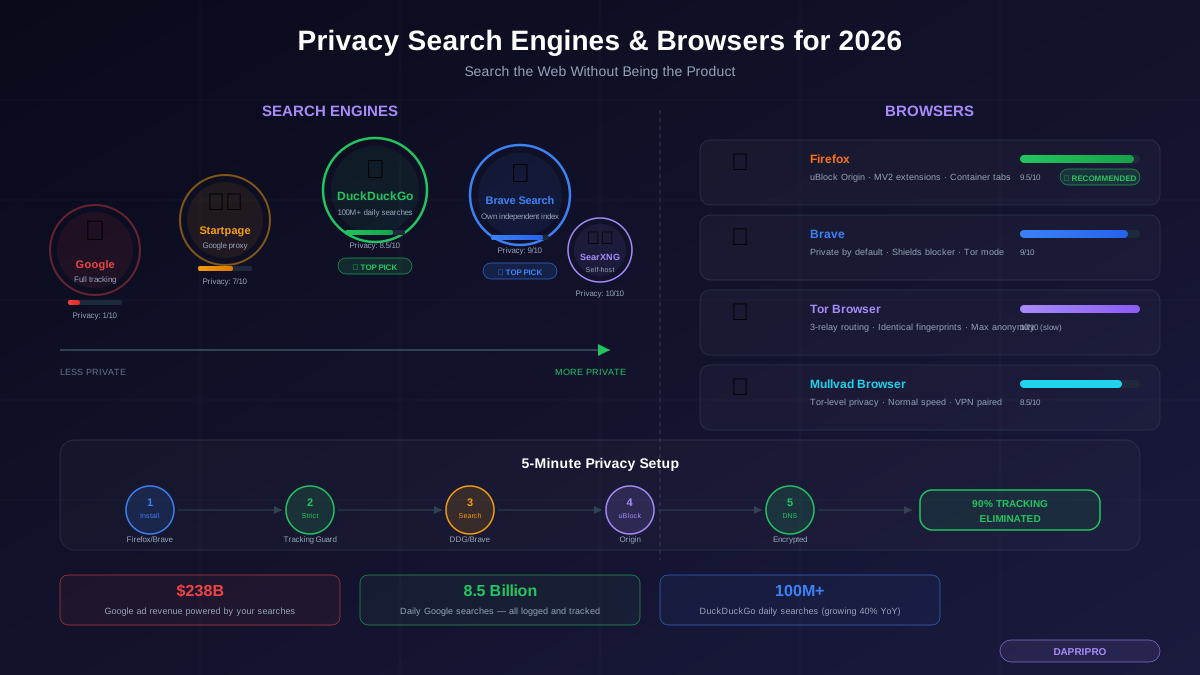
Google processes over 8.5 billion searches per day and logs every single one. Each search query is added to your advertising profile, which Google sells access to across a network of over 2 million websites. Your searches are not just saved — they are actively monetized. Google made $238 billion in ad revenue in 2023, with search ads as its primary income source.
The alternative is not sacrifice. Privacy-focused search engines have reached a level of quality where switching costs you almost nothing in terms of results. This guide compares the best options and shows you how to set up a complete privacy stack in five minutes.
Privacy Search Engines Ranked
I tested each search engine across 200 queries spanning general knowledge, current events, technical topics, local searches, and shopping. Here is how they rank in 2026:
1. DuckDuckGo — Best Overall Privacy Search
DuckDuckGo is the most popular privacy search engine with over 100 million daily searches. It does not track you, does not create advertising profiles, and does not store personal information. Revenue comes from contextual ads based only on the current search query — if you search "running shoes," you see a shoe ad, but DuckDuckGo forgets the search immediately after.
Pros: Excellent result quality for most queries, instant answers and knowledge panels, bangs (shortcuts like !w for Wikipedia, !yt for YouTube), available on all platforms, browser extensions and mobile app available.
Cons: Uses Bing as its primary index, which means Microsoft processes your query (without identifying information). Local search results are not as strong as Google. Some niche or highly technical queries return weaker results.
Best for: Most people switching from Google who want strong privacy with minimal sacrifice in search quality.
2. Brave Search — Best Independent Index
Brave Search is unique because it is the only major privacy search engine that uses its own independent search index. It does not rely on Bing or Google for results, which means no data flows to Microsoft or Google even indirectly. Brave Search indexes the web itself using its own crawler.
Pros: Fully independent index (no Google or Bing dependency), excellent result quality that rivals DuckDuckGo, integrated with Brave browser for seamless experience, Goggles feature lets you customize your own ranking rules, Discussion feature surfaces Reddit and forum results.
Cons: Newer than DuckDuckGo with a smaller index, local search can lag behind Google, some very specific queries may miss results that Google would find, part of the Brave ecosystem which includes cryptocurrency features some users dislike.
Best for: Users who want zero data dependency on Google or Microsoft and value an independent search index.
3. Startpage — Google Results Without Google Tracking
Startpage acts as a privacy proxy for Google Search. It sends your query to Google, receives the results, strips out all tracking parameters, and displays them to you. You get Google's full result quality without Google knowing who searched.
Pros: Identical result quality to Google (because results literally come from Google), Anonymous View feature lets you visit any result through a proxy, clean interface.
Cons: Relies entirely on Google — if Google degrades results for non-tracked users, Startpage is affected. Was acquired by System1 (an ad tech company) in 2019, which raised privacy concerns, though they maintain a privacy-first policy. Slower than direct Google searches due to proxy layer.
Best for: Users who are not willing to sacrifice any result quality and want Google results without Google tracking.
4. SearXNG — Maximum Privacy (Self-Hostable)
SearXNG is an open-source meta-search engine that aggregates results from 70+ sources including Google, Bing, DuckDuckGo, and specialized databases. You can self-host it on your own server for maximum control, or use a public instance.
Pros: Fully open-source, self-hostable, aggregates from dozens of sources, highly customizable, no tracking by design, community-maintained.
Cons: Requires technical knowledge to self-host, public instances vary in reliability and speed, result quality depends on which sources you enable, no commercial support.
Best for: Technical users who want maximum control over their search infrastructure.
5. Mojeek — Fully Independent UK-Based
Mojeek is a small independent search engine based in the UK that has built its own search index from scratch. It is the only search engine that has never tracked users and has no advertising tracking business. Its index is smaller than Google or Bing but growing.
Pros: Completely independent index, zero tracking since inception, based in UK/EU with GDPR protections, no ad tech partnerships.
Cons: Noticeably weaker results than Google, DuckDuckGo, or Brave Search — especially for current events and niche queries. Very small team and limited resources.
Best for: Users who prioritize supporting a fully independent search engine even with some result quality trade-offs.
Privacy Browsers Ranked
Your browser matters as much as your search engine. Here is how the privacy-focused options compare:
1. Firefox — Best Mainstream Privacy Browser
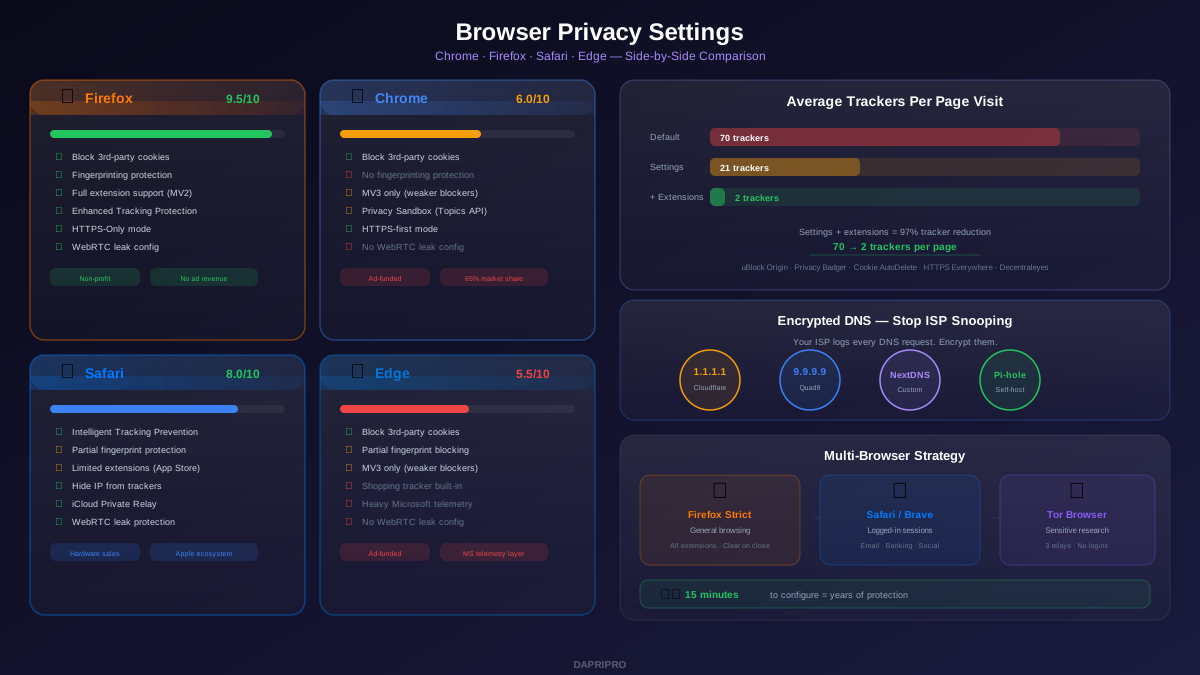
Firefox is developed by Mozilla, a nonprofit organization. It offers the strongest privacy configuration among mainstream browsers with Enhanced Tracking Protection (set it to Strict), full support for uBlock Origin and other privacy extensions through MV2 architecture, built-in fingerprinting protection, HTTPS-only mode, and configurable privacy through about:config.
Firefox requires manual configuration for maximum privacy — out of the box its settings are moderate. But once configured, it offers stronger protection than any other mainstream browser. It also supports container tabs through the Multi-Account Containers extension, which lets you isolate different activities (work, personal, banking) in separate containers that cannot share cookies or data.
2. Brave Browser — Best Privacy Defaults
Brave ships with aggressive privacy settings enabled by default. It blocks ads, trackers, fingerprinting scripts, and third-party cookies without any configuration. It includes a built-in Tor mode for occasional anonymous browsing, HTTPS Everywhere is enabled by default, and it strips tracking parameters from URLs automatically.
Brave is Chromium-based, so it is compatible with the Chrome Web Store extensions. However, it also supports Manifest V3 extensions, which means it has the same ad-blocker limitations as Chrome for extensions — though its built-in blocker (Brave Shields) compensates for this since it operates at the browser level, not the extension level.
The main controversy around Brave is its cryptocurrency integration (Basic Attention Token) and its past affiliate link controversy. You can disable all crypto features in settings if you do not want them.
3. Tor Browser — Maximum Anonymity
Tor Browser routes your traffic through three encrypted relays operated by volunteers worldwide. Neither your ISP, the websites you visit, nor any individual relay operator can determine both who you are and what you are accessing. It is the gold standard for anonymity.
Every Tor Browser user has an identical fingerprint — same screen size, same fonts, same user agent — making browser fingerprinting ineffective. Tor also blocks all scripts by default (NoScript is pre-installed) and isolates cookies per site.
Significant trade-offs: browsing speeds are 3-10x slower than normal, many websites block Tor exit nodes, and streaming services do not work well. You should never log into personal accounts through Tor. It is a specialized tool for specific anonymity needs, not a daily driver.
4. Mullvad Browser — Tor-Level Privacy Without Tor Routing
Mullvad Browser is a collaboration between the Tor Project and Mullvad VPN. It provides Tor Browser's fingerprinting protections and privacy configuration but without routing through the Tor network. Instead, you pair it with a VPN (preferably Mullvad VPN) for normal-speed browsing with Tor-level browser privacy.
This is an excellent choice if you want Tor-style fingerprinting protection at normal browsing speeds. The downside is a very small user base, which means your fingerprint — while standardized — is shared with fewer people than Tor Browser's much larger network.
The Five-Minute Privacy Setup
Here is the exact configuration for maximum privacy with minimum effort:
Step 1 (1 minute): Download Firefox from mozilla.org or Brave from brave.com. Install and set as your default browser.
Step 2 (1 minute): In Firefox: Settings → Privacy & Security → set Enhanced Tracking Protection to "Strict." In Brave: it is already configured — just verify Brave Shields is enabled by clicking the lion icon in the address bar.
Step 3 (1 minute): Change your default search engine to DuckDuckGo or Brave Search. In Firefox: Settings → Search → Default Search Engine. In Brave: it defaults to Brave Search.
Step 4 (1 minute): Install uBlock Origin from your browser's extension store. It works immediately with no configuration needed.
Step 5 (1 minute): Enable encrypted DNS. In Firefox: Settings → Privacy & Security → DNS over HTTPS → select "Max Protection" → choose Cloudflare. In Brave: Settings → Privacy and security → Security → "Use secure DNS" → Cloudflare.
That is five minutes. You have now eliminated about 90% of the tracking you were previously exposed to with Google Chrome and Google Search.
Google Search Features You Will Miss (and Alternatives)
Switching from Google means losing some features. Here are the main ones and their alternatives:
| Google Feature | Alternative | Quality Comparison |
|---|---|---|
| Google Maps integration | Use Apple Maps or OpenStreetMap directly | Apple Maps is comparable; OSM is community-driven |
| AI Overviews | DuckDuckGo AI Chat (uses multiple AI models) | DDG AI Chat is competitive and private |
| Shopping results | Search directly on retailer sites | Often better prices by going direct |
| Local business info | Apple Maps, Yelp, or search with location name | Slightly less integrated but adequate |
| Google Scholar | Use Semantic Scholar or Google Scholar directly | Scholar has no privacy alternative yet |
| Image search | DuckDuckGo and Brave have good image search | Google still has the largest image index |
| Instant answers/calculators | DuckDuckGo has excellent instant answers | Comparable for most queries |
DuckDuckGo Bangs: The Power User Feature
One feature that makes DuckDuckGo arguably more efficient than Google is bangs — keyboard shortcuts that let you search directly on specific websites. Type a bang shortcut before or after your query:
!w topic — searches Wikipedia directly. !yt video — searches YouTube. !a product — searches Amazon. !r subreddit topic — searches Reddit. !g query — searches Google (for the rare cases you need it). !gh code — searches GitHub. !so question — searches Stack Overflow.
There are over 13,000 bangs covering virtually every website. Once you learn the five or ten bangs you use most, searching becomes faster than Google because you skip the intermediary results page and go directly to the source.
What About AI Search?
Google is integrating AI Overviews into search results, and several AI-powered search engines have launched. Here is how they compare on privacy:
DuckDuckGo AI Chat: Offers access to GPT, Claude, Llama, and Mistral models directly from search. DuckDuckGo strips identifying information before forwarding your query to AI providers, and no chat data is used for training. This is the most private AI search option available.
Perplexity: AI-first search engine with strong source citations. Privacy policy is moderate — it collects some usage data but does not sell to advertisers. Not as private as DuckDuckGo AI Chat but better than Google.
Google AI Overviews: AI summaries appear directly in search results. All data is linked to your Google profile and used for advertising. No privacy benefit.
If you want AI-assisted search with privacy, DuckDuckGo AI Chat is the clear winner. Access it by typing a question on DuckDuckGo and clicking "Chat" in the tabs, or visit duck.ai directly.
Switching Strategy: How to Transition from Google
Going cold turkey rarely works. Here is a practical transition plan:
Week 1: Set DuckDuckGo or Brave Search as your default search engine but keep Google bookmarked. Use the privacy search engine for all initial searches. Only fall back to Google if you cannot find what you need.
Week 2: Track how often you fall back to Google. Most people find they use it less than 10% of the time — usually for local business searches or very niche queries.
Week 3: Learn five DuckDuckGo bangs for your most-used sites. This eliminates most remaining reasons to use Google.
Week 4: Switch your mobile browser's default search engine as well. At this point, Google should feel unnecessary for everyday use.
The transition is easier than most people expect. After a month, most users report no meaningful difference in their ability to find information, while gaining significant privacy protection.