

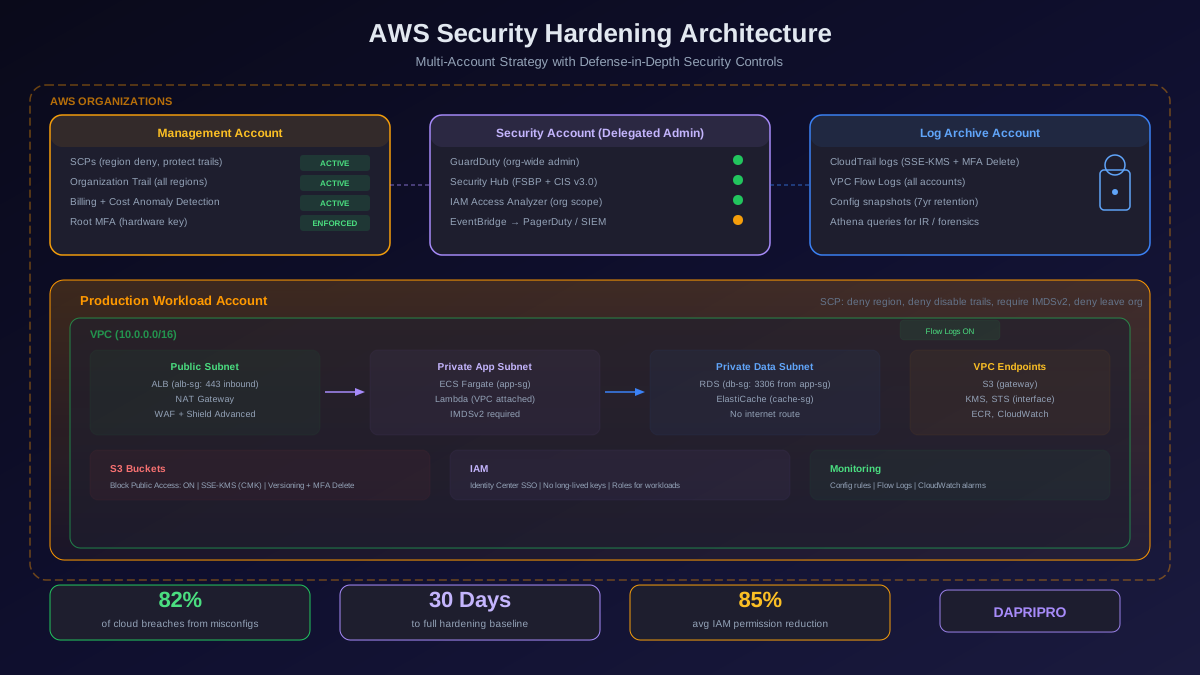
Here is the uncomfortable truth about AWS security: the default settings will get you breached. A brand new AWS account has no CloudTrail logging enabled beyond the 90-day management events lookback, no GuardDuty threat detection running, no Security Hub compliance checks active, and a root account with full administrative privileges and no MFA requirement. Every EC2 instance you launch gets a public IP by default unless you explicitly configure otherwise. Every S3 bucket with the wrong policy can expose terabytes of customer data to the entire internet.
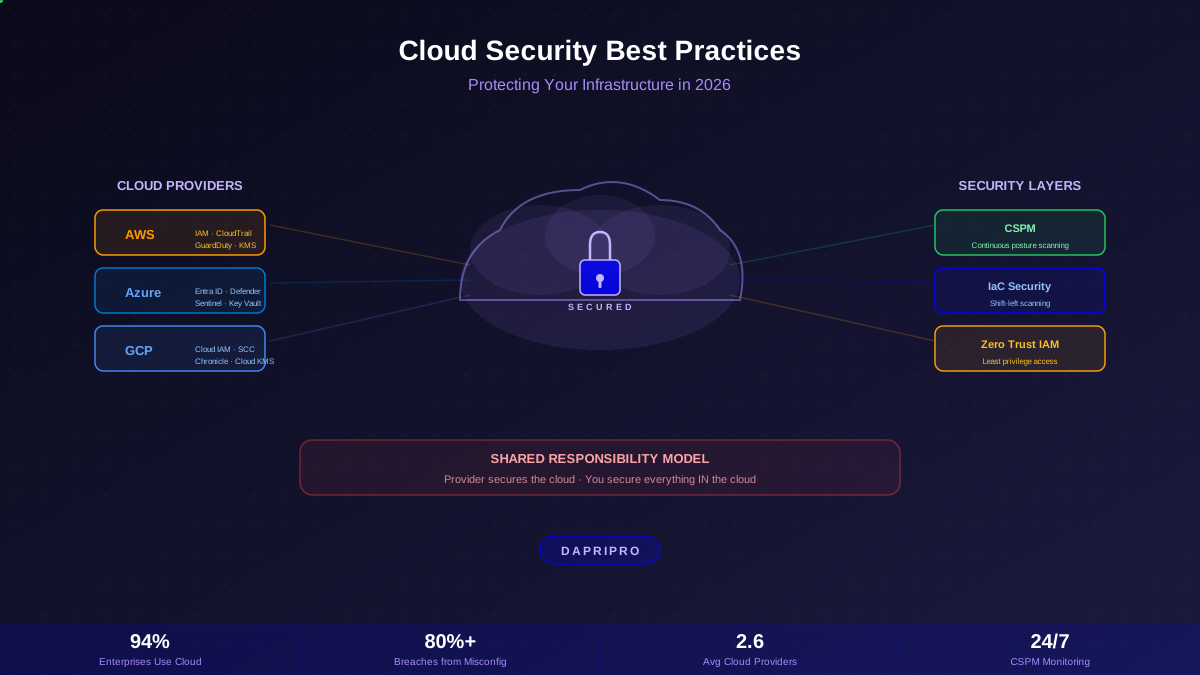
AWS does not ship insecure infrastructure. The compute, storage, and networking layers are hardened to levels that exceed what any on-premises data center can achieve. But AWS operates on a shared responsibility model: they secure the infrastructure, and you secure everything you build on top of it. The gap between what AWS secures and what you are responsible for is where 82 percent of cloud breaches happen, according to the 2025 Verizon Data Breach Investigations Report.
This guide is not a list of high-level recommendations. It is a technical playbook for hardening every layer of your AWS environment — IAM, networking, storage, logging, threat detection, and compliance automation — with the specific services, configurations, and architecture patterns that reduce your attack surface to the smallest possible target.
The Shared Responsibility Model You Are Probably Misunderstanding
The shared responsibility model is the most cited and most misunderstood concept in cloud security. Teams read the diagram on the AWS documentation page, nod, and proceed to misconfigure their environments because they assumed AWS was handling more than it actually does.
What AWS secures (security of the cloud):
- Physical data center access, hardware lifecycle, network infrastructure
- Hypervisor isolation between EC2 instances (Nitro System since 2017)
- Managed service infrastructure — the underlying servers running RDS, Lambda, DynamoDB
- Global backbone network — private fiber between regions and availability zones
- Hardware security modules (HSMs) for CloudHSM and KMS key storage
What you secure (security in the cloud):
- IAM policies, roles, and federated access configurations
- Security group rules, NACLs, and VPC routing
- S3 bucket policies, ACLs, and Block Public Access settings
- Encryption at rest and in transit for every service
- Operating system patches and application dependencies on EC2
- CloudTrail, GuardDuty, Config, and Security Hub activation
- Data classification and access controls
The critical nuance: even when you use a managed service like RDS, you are still responsible for configuring network access (which VPCs and security groups can reach the database), authentication (IAM database authentication versus password-based), encryption (enabling encryption at rest with KMS, enforcing SSL for connections), and backup retention. AWS manages the database engine patches and host OS, but everything above the engine layer is on you.
IAM Hardening: The Single Most Important Investment
IAM misconfigurations are responsible for more AWS breaches than every other attack vector combined. An over-privileged IAM role attached to a compromised EC2 instance gives an attacker access to every service in your account. A leaked long-lived access key in a GitHub repository can be exploited within seconds — automated bots scan public repos and attempt to use discovered credentials within five minutes of exposure.
Root Account Lockdown
The root account has unrestricted access to every service and every resource in your AWS account. No IAM policy can restrict it. No SCP (Service Control Policy) can limit it. It should be used for exactly two purposes: initial account setup and break-glass emergency recovery.
| Root Account Security Control | How to Implement | Why It Matters |
|---|---|---|
| Hardware MFA | Use a YubiKey or Titan Security Key (not a virtual TOTP app) | Hardware MFA cannot be phished through SIM swapping or TOTP interception — the physical key must be present |
| No access keys | Delete any existing root access keys immediately | Root access keys bypass MFA and provide permanent full-admin API access — the most dangerous credential possible |
| Contact info | Set root email to a shared security alias (security@company.com), not a personal email | If a person leaves the company, you lose access to the root account recovery email |
| CloudTrail monitoring | Create a CloudWatch alarm for root account API calls: filter pattern { $.userIdentity.type = "Root" && $.userIdentity.invokedBy NOT EXISTS && $.eventType != "AwsServiceEvent" } | Any root account usage should trigger an immediate security investigation |
Least-Privilege IAM Architecture
Every IAM policy should answer one question: what is the minimum set of permissions this identity needs to perform its function? Start with zero permissions and add only what is required. Never start with AdministratorAccess and plan to scope down later — that plan never materializes.
Use IAM Access Analyzer to achieve least-privilege systematically:
- Generate policies from activity — Access Analyzer monitors CloudTrail logs and generates IAM policies that include only the actions and resources the identity actually used during the monitoring period. Run this for 90 days on production roles, then replace the broad policy with the generated one.
- Validate policies against best practices — Access Analyzer checks for overly permissive conditions, missing resource constraints, and actions that grant escalation paths. Policy validation runs on every policy change and flags issues before deployment.
- Find unused access — Access Analyzer identifies roles, users, access keys, and permissions that have not been used in 90+ days. These stale identities are attack surface waiting to be exploited. Remove or disable them.
- Detect external sharing — Access Analyzer scans S3 buckets, KMS keys, Lambda functions, SQS queues, SNS topics, and IAM roles for policies that grant access to external AWS accounts or the public. Any external sharing finding should trigger a review.
Stop Using Long-Lived Access Keys
Long-lived IAM access keys are the cloud equivalent of writing your password on a sticky note. They do not expire, they cannot enforce MFA per-API-call, and they get embedded in CI/CD pipelines, Docker images, and environment variables where they persist indefinitely.
The replacement strategy depends on where the code runs:
- EC2 instances — use instance profiles with IAM roles. The instance metadata service (IMDSv2) provides temporary credentials that rotate automatically every six hours. Require IMDSv2 (disable IMDSv1) to prevent SSRF-based credential theft.
- Lambda functions — execution roles provide temporary credentials injected through environment variables. No configuration needed beyond attaching the correct role.
- ECS/EKS — use task roles (ECS) or IAM Roles for Service Accounts (IRSA for EKS). Each container gets its own scoped credentials via the task metadata endpoint.
- CI/CD pipelines (GitHub Actions, GitLab CI) — use OIDC federation. GitHub Actions can assume an IAM role directly using the
aws-actions/configure-aws-credentialsaction with an OIDC provider — no static credentials stored as secrets. - Local development — use
aws sso loginwith IAM Identity Center. Developers authenticate through the SSO portal and receive short-lived credentials that expire in 1 to 12 hours depending on the session duration setting.
Service Control Policies for Multi-Account Environments
If you are running more than three AWS accounts — and you should be, because account-level isolation is the strongest blast-radius control AWS provides — use AWS Organizations with Service Control Policies (SCPs) to enforce guardrails that no IAM policy in any member account can override.
Essential SCPs every organization should deploy:
| SCP Guardrail | What It Prevents | Implementation |
|---|---|---|
| Deny region outside approved list | Attackers launching crypto miners in us-west-1 when you only operate in eu-west-1 | Deny all actions where aws:RequestedRegion is not in your approved list. Exclude global services (IAM, CloudFront, Route 53) |
| Deny disabling CloudTrail | Attackers covering their tracks by stopping logging | Deny cloudtrail:StopLogging, cloudtrail:DeleteTrail, cloudtrail:UpdateTrail in all member accounts |
| Deny disabling GuardDuty | Attackers disabling threat detection before executing their attack | Deny guardduty:DisableOrganizationAdminAccount, guardduty:DeleteDetector |
| Deny leaving the organization | A compromised admin removing an account from org-level controls | Deny organizations:LeaveOrganization on all member accounts |
| Require IMDSv2 | SSRF attacks harvesting EC2 instance credentials via IMDSv1 | Deny ec2:RunInstances unless ec2:MetadataHttpTokens equals required |
VPC and Network Security Architecture
Your VPC design determines how much lateral movement an attacker can achieve after initial compromise. A flat VPC with a single subnet and permissive security groups gives an attacker the same reach as a compromised host on a flat corporate LAN. A properly segmented VPC with private subnets, restrictive security groups, and VPC Flow Logs makes lateral movement visible and containable.
The Reference VPC Architecture
Every production workload should deploy into a VPC with this subnet structure:
- Public subnets — ALB (Application Load Balancer) and NAT Gateways only. No EC2 instances, no RDS endpoints, no Lambda functions. The only resources with public IPs should be load balancers and NAT Gateways. Each availability zone gets its own public subnet.
- Private application subnets — EC2 instances, ECS tasks, Lambda functions (VPC-attached), and application services. No internet-facing access. Outbound internet traffic routes through NAT Gateways in the public subnets.
- Private data subnets — RDS instances, ElastiCache clusters, Elasticsearch/OpenSearch domains, and any data stores. These subnets have no route to the internet — not even through a NAT Gateway. Access to AWS services (S3, DynamoDB, KMS) uses VPC Endpoints to keep traffic on the AWS private backbone.
- Management subnets — bastion hosts (or better, Systems Manager Session Manager endpoints), CI/CD runners, and monitoring infrastructure. Isolated from both application and data subnets with dedicated security groups.
Security Groups: The Micro-Segmentation Layer
Security groups are your primary micro-segmentation control. Every security group should follow these rules:
- Never use
0.0.0.0/0in an inbound rule unless the resource is explicitly internet-facing (ALB, CloudFront origin). Any inbound rule referencing0.0.0.0/0should trigger a Security Hub finding. - Reference other security groups instead of CIDR ranges. Instead of allowing
10.0.1.0/24to access your database on port 3306, allow theapp-tier-sgsecurity group. This way, permissions follow the identity of the resource, not its IP address. - One security group per function:
alb-sg,app-sg,db-sg,cache-sg. Never reuse the same security group across different tiers. - Remove the default
allow-all-outboundrule on sensitive workloads. Restrict egress to only the ports and destinations the application needs — this blocks a compromised instance from establishing command-and-control connections.
VPC Flow Logs for Threat Detection
VPC Flow Logs capture metadata about every network connection in your VPC — source IP, destination IP, port, protocol, bytes transferred, and acceptance or rejection status. They are essential for detecting lateral movement, data exfiltration, and port scanning.
Deploy flow logs in ALL traffic mode (not just REJECTED) to a centralized S3 bucket or CloudWatch Logs group. Use Athena queries or a SIEM integration to detect anomalies: unusually large data transfers from data subnets, connections to known malicious IP ranges, and traffic between subnets that should not communicate.
S3 Security: The Most Breached Service
S3 is involved in more public cloud breaches than any other AWS service. The Capital One breach (2019), the Twitch source code leak (2021), and dozens of smaller exposures trace back to misconfigured S3 bucket policies or overly permissive ACLs.
Enable S3 Block Public Access at the Account Level
This is a one-command operation that prevents any bucket in the account from being made publicly accessible, regardless of individual bucket policies:
aws s3control put-public-access-block --account-id YOUR_ACCOUNT_ID --public-access-block-configuration BlockPublicAcls=true,IgnorePublicAcls=true,BlockPublicPolicy=true,RestrictPublicBuckets=true
Enable this in every account on day one. If a specific bucket genuinely needs public access (a static website hosted on S3), create a dedicated account for it with separate security controls and explicit documentation of why public access is required.
S3 Encryption Strategy
Every S3 bucket should have default encryption enabled. The question is which key management approach to use:
| Encryption Option | Key Management | Cost | Use Case |
|---|---|---|---|
| SSE-S3 (AES-256) | AWS manages keys entirely | Free | Default for non-sensitive data. No compliance requirement for customer-managed keys |
| SSE-KMS (aws/s3 managed key) | AWS KMS manages key, you control policy | Low (KMS API calls) | When you need audit trail of key usage via CloudTrail, or IAM-based access control on the key |
| SSE-KMS (customer-managed CMK) | You create and manage key in KMS | Moderate | Compliance requirements, key rotation control, cross-account access, ability to revoke key and render data unreadable |
| SSE-C | You provide and manage keys externally | Free (your key infra cost) | You need key material stored outside AWS entirely (regulatory requirement) |
For most organizations, SSE-KMS with a customer-managed CMK and automatic annual rotation is the right balance of security, compliance, and operational simplicity. Enforce encryption in transit by adding a bucket policy condition that denies any request where aws:SecureTransport is false.
S3 Versioning and MFA Delete
Enable versioning on every bucket that stores critical data. Versioning protects against accidental deletion and ransomware — if an attacker encrypts your objects, you can restore previous versions. Combine versioning with MFA Delete, which requires a hardware MFA device to permanently delete object versions or disable versioning. This prevents an attacker with compromised admin credentials from destroying your backups.
GuardDuty: Intelligent Threat Detection
GuardDuty is the AWS threat detection service that should be enabled in every region of every account with zero exceptions. It analyzes CloudTrail management and data events, VPC Flow Logs, and DNS query logs using machine learning and threat intelligence feeds to detect malicious activity — and it requires no infrastructure, no agents, and no configuration beyond clicking "Enable."
What GuardDuty Detects
GuardDuty findings fall into several categories that map to real attack patterns:
- Reconnaissance — unusual API calls from a principal, port probing against EC2 instances, failed login attempts against IAM accounts
- Instance compromise — EC2 instance communicating with known command-and-control servers, cryptocurrency mining detected (CPU anomaly + known pool DNS queries), instance querying threat-listed domains
- Account compromise — API calls from Tor exit nodes, CloudTrail logging disabled, API calls from IP addresses associated with known credential compromises
- Data exfiltration — anomalous data transfer volumes from S3, DNS tunneling via abnormally long DNS queries, S3 public access configuration changes
- Malware — (GuardDuty Malware Protection) scans EBS volumes attached to flagged instances for known malware and trojans
Tuning GuardDuty for Production
GuardDuty generates findings with severity levels from 1 (informational) to 9 (critical). Out of the box it will generate noise — especially in environments with legitimate security scanning tools, penetration testing, or DevOps automation that triggers reconnaissance-type findings.
Create suppression rules for known false positives: your vulnerability scanning infrastructure (Nessus, Qualys) triggering port scan findings, your CI/CD pipeline's IAM role generating high API call volumes, and your security team's IP ranges triggering geographic anomaly findings. Never suppress entire finding types globally — scope suppression rules to specific resources and source IPs.
Route all unsuppressed findings to Security Hub for centralized triage, and create EventBridge rules to push high-severity findings (7+) to PagerDuty, Slack, or your SIEM for immediate investigation. Critical findings like cryptocurrency mining or CloudTrail disabled should page your on-call engineer within minutes.
CloudTrail: Your AWS Black Box Recorder
CloudTrail records every API call made in your AWS account — who made the call, when, from which IP, with which parameters, and whether it succeeded. It is the single most important data source for incident response and forensic investigation in AWS.
CloudTrail Configuration for Security
The default CloudTrail setup is inadequate for security. Here is what you need:
- Create an organization trail — a single trail that captures management events from every account in your AWS Organization. Store the logs in a dedicated log archive account that no regular administrator can access.
- Enable data events for S3 and Lambda — management events capture control-plane actions (creating a bucket, modifying an IAM policy), but data events capture data-plane actions (reading an S3 object, invoking a Lambda function). Data events cost more but are essential for detecting data exfiltration and unauthorized access.
- Enable CloudTrail Insights — Insights automatically detects anomalous volumes of management API calls. If someone suddenly calls
ec2:RunInstances500 times in an account that normally launches 10 instances per day, Insights flags it. - Protect the trail from tampering — enable log file validation (integrity hashes), deliver logs to a bucket with MFA Delete enabled, and use an SCP to deny
cloudtrail:StopLoggingandcloudtrail:DeleteTrailin all member accounts. - Retain logs for compliance — most compliance frameworks require 1 year of accessible logs and 7 years of archived storage. Use S3 lifecycle policies to transition logs from S3 Standard to S3 Glacier Deep Archive after 90 days.
CloudTrail Athena Queries for Incident Response
When you are investigating a security incident, the fastest path to answers is AWS Athena querying CloudTrail logs stored in S3. Create an Athena table pointing to your CloudTrail S3 bucket and run queries like:
- All API calls made by a compromised IAM user in the last 24 hours
- All
s3:GetObjectevents for a specific bucket to identify data exfiltration - All
iam:CreateAccessKeyevents to find persistence mechanisms created by an attacker - All API calls from a specific source IP to map the full scope of a compromised credential
- All console sign-in events without MFA to find accounts lacking multi-factor authentication
Security Hub: Continuous Compliance Monitoring
Security Hub aggregates findings from GuardDuty, Inspector, Macie, Firewall Manager, IAM Access Analyzer, and third-party tools into a single dashboard with compliance scoring against industry frameworks.
Enable These Standards on Day One
- AWS Foundational Security Best Practices (FSBP) — AWS-curated controls covering IAM, EC2, S3, RDS, Lambda, ECS, and 30+ other services. Free to use. This is the baseline every AWS account should measure against.
- CIS AWS Foundations Benchmark v3.0 — the Center for Internet Security benchmark with specific technical controls for identity, logging, networking, and monitoring. Required by many compliance frameworks.
- PCI DSS v4.0 — if you process payment card data. Maps PCI requirements to specific AWS controls.
- NIST 800-53 Rev 5 — if you serve US government agencies or need FedRAMP compliance.
Security Hub generates a compliance score (0-100%) for each enabled standard. Treat anything below 90% as a priority remediation project. Common findings that drag scores down: S3 buckets without default encryption, security groups with unrestricted SSH access, IAM users without MFA, CloudTrail not enabled in all regions, and EBS volumes without encryption.
Automated Remediation with Security Hub
Security Hub integrates with EventBridge and Systems Manager to automatically remediate specific findings. Use this sparingly and only for well-understood findings where automated remediation will not break production:
- S3 bucket without encryption — automatically enable SSE-S3 default encryption
- Security group with 0.0.0.0/0 on SSH (port 22) — automatically remove the rule and notify the team
- EBS volume without encryption — tag the volume for manual remediation (cannot encrypt in-place)
- IAM user with unused credentials (90+ days) — automatically disable the access key and create a ServiceNow ticket
Encryption and KMS Strategy
Encryption at rest should be the default for every AWS service. Most services now support encryption at rest — the question is whether to use AWS-managed keys (convenient but limited control) or customer-managed KMS keys (more operational overhead but full audit trail and revocation capability).
Use customer-managed KMS keys for:
- Any data subject to compliance requirements (PCI, HIPAA, GDPR)
- Cross-account data access (KMS key policies control which accounts can decrypt)
- Data you might need to render permanently inaccessible (schedule key deletion to crypto-shred data)
- Services where you need CloudTrail visibility into every encrypt and decrypt operation
Enable automatic key rotation for all customer-managed symmetric keys. AWS rotates the backing key annually while maintaining the key ID and ARN — your applications require no code changes.
Enforce encryption in transit everywhere. Use TLS 1.2 or later for all API calls (AWS SDKs enforce this by default). Configure ALB and CloudFront to use security policies that disable TLS 1.0 and 1.1. Set the aws:SecureTransport condition on S3 bucket policies and SQS queue policies to reject plaintext HTTP requests.
AWS Organizations: The Multi-Account Security Foundation
The single most impactful architectural decision for AWS security is adopting a multi-account strategy. Account boundaries in AWS are the strongest isolation primitive available — stronger than VPCs, stronger than IAM policies, stronger than any other logical boundary. A compromised IAM role in one account cannot access resources in another account unless you explicitly configure cross-account access.
The AWS Landing Zone Account Structure
Organize your accounts by function and environment:
- Management account — AWS Organizations management, billing, SCPs. No workloads run here.
- Security account — centralized GuardDuty administrator, Security Hub delegated admin, CloudTrail organization trail, Macie administrator. Your security team operates from this account.
- Log archive account — centralized storage for CloudTrail logs, VPC Flow Logs, Config snapshots, and GuardDuty findings. Locked down with bucket policies and SCPs that prevent anyone — including account administrators — from deleting or modifying log data.
- Network account — Transit Gateway, shared VPCs, Direct Connect, VPN connections, and centralized DNS resolution (Route 53 Resolver). All network infrastructure lives here.
- Development accounts — one per team or per application. Developers have broad permissions in their dev accounts but SCPs prevent them from disabling security controls.
- Staging and production accounts — separate accounts per environment per application. Production accounts have the tightest SCPs and require infrastructure-as-code deployment through a CI/CD pipeline — no console access for changes.
Automating Security with Infrastructure as Code
Manual console changes are the enemy of security. Every click in the AWS Console is an undocumented, unreviewed, unreproducible configuration change that creates drift between your intended state and your actual state. Infrastructure as code — Terraform, CloudFormation, or CDK — eliminates this by making every change reviewable in a pull request, auditable in version control, and reproducible across accounts.
Embed security checks directly in your IaC pipeline:
- Checkov — scans Terraform, CloudFormation, and Kubernetes manifests for security misconfigurations against CIS benchmarks and custom policies
- tfsec / Trivy — static analysis for Terraform HCL files, catching issues like unrestricted security groups, unencrypted resources, and public access configurations
- OPA (Open Policy Agent) — policy-as-code engine that evaluates Terraform plans against custom Rego policies. Use it to enforce organizational rules like "no public S3 buckets" and "all EC2 instances must use IMDSv2"
- AWS CloudFormation Guard — rule-based evaluation for CloudFormation templates using a domain-specific language. Native to AWS and integrates with CodePipeline
Run these tools as gates in your CI/CD pipeline. A Terraform plan that creates an unencrypted RDS instance or a security group with unrestricted SSH should fail the pipeline before it ever reaches terraform apply.
Building Your AWS Incident Response Playbook
When a GuardDuty finding triggers a critical alert at 2 AM, your team needs to know exactly what to do. Document incident response procedures for these common AWS attack scenarios:
Compromised IAM Credentials
- Identify the affected principal from the GuardDuty finding or CloudTrail event
- Immediately disable or delete the access key (do not just rotate — the attacker will see and use the new key before you finish responding)
- Revoke all active sessions by attaching an inline deny-all policy with an
aws:TokenIssueTimecondition that denies all actions for sessions issued before the current time - Query CloudTrail via Athena for all API calls from the compromised principal in the last 7 days to determine scope
- Check for persistence: new IAM users, new access keys on other users, new roles with trust policies, new Lambda functions, modified EC2 instance profiles
- Remediate any resources the attacker created or modified. Terminate unauthorized instances, delete unauthorized resources, and rotate any secrets the attacker could have accessed
Compromised EC2 Instance
- Do not terminate the instance — you need it for forensic analysis
- Remove the instance from its current security group and place it in an isolated forensic security group that allows no inbound or outbound traffic
- Create EBS snapshots of all attached volumes for offline analysis
- Check the instance profile role for any API calls made during the compromise period
- Analyze VPC Flow Logs for data exfiltration — large outbound transfers to unknown IP addresses
- If GuardDuty Malware Protection is enabled, review the malware scan findings for the instance volumes
- After forensic analysis, terminate the instance and deploy a clean replacement from your IaC templates
What This Actually Costs
A common objection to comprehensive AWS security is cost. Here is the reality: most of the security services described in this guide are either free or have costs measured in single-digit dollars per month for small environments:
- CloudTrail (management events) — first trail is free. Data events cost per 100,000 events logged
- GuardDuty — per million events analyzed. A typical account with moderate activity costs around 10 to 30 dollars per month
- Security Hub — FSBP standard is free. Additional standards cost per security check per month
- Config — per configuration item recorded and per conformance pack evaluation
- IAM Access Analyzer — free for external access findings. Unused access and policy validation have per-finding costs
- KMS — one dollar per month per customer-managed key, plus per-10,000 API requests
The total cost for a complete security stack across a small AWS environment (5-10 accounts) typically ranges from 100 to 500 dollars per month. Compare that to the average cost of a cloud data breach — 4.88 million dollars according to IBM Cost of a Data Breach 2025. The ROI calculation is not even close.
The 30-Day AWS Security Hardening Plan
If you are starting from scratch, here is a prioritized 30-day roadmap:
Week 1 — Identity and Logging
- Enable MFA on all root accounts (hardware key preferred)
- Set up IAM Identity Center for human user access
- Create organization trail in CloudTrail (all regions, management + S3 data events)
- Enable GuardDuty in all regions across all accounts
Week 2 — Network and Storage
- Audit all security groups — remove any 0.0.0.0/0 rules that are not load balancers
- Enable S3 Block Public Access at the account level in every account
- Enable default encryption on all S3 buckets and EBS volumes
- Deploy VPC Flow Logs to centralized S3 bucket
Week 3 — Compliance and Detection
- Enable Security Hub with FSBP and CIS Benchmarks
- Remediate critical and high severity findings
- Set up EventBridge rules for high-severity GuardDuty findings to your alerting system
- Enable AWS Config with conformance packs
Week 4 — Automation and Resilience
- Deploy SCPs for guardrails (region restriction, prevent security service disabling)
- Integrate Checkov or tfsec into your CI/CD pipeline
- Create automated remediation for common Security Hub findings
- Document incident response procedures for compromised credentials and compromised instances
After week 4, shift to continuous improvement: review IAM Access Analyzer findings monthly, run CIS benchmark scans quarterly, update SCPs as new services are adopted, and practice incident response tabletop exercises semi-annually.
![CSPM Tools Compared: Best Cloud Security Posture Management Solutions [2026]](/images/sections/network-cloud-security/cloud-security-posture/cspm-tools-compared-best-cloud-security-posture-management-solutions.svg)