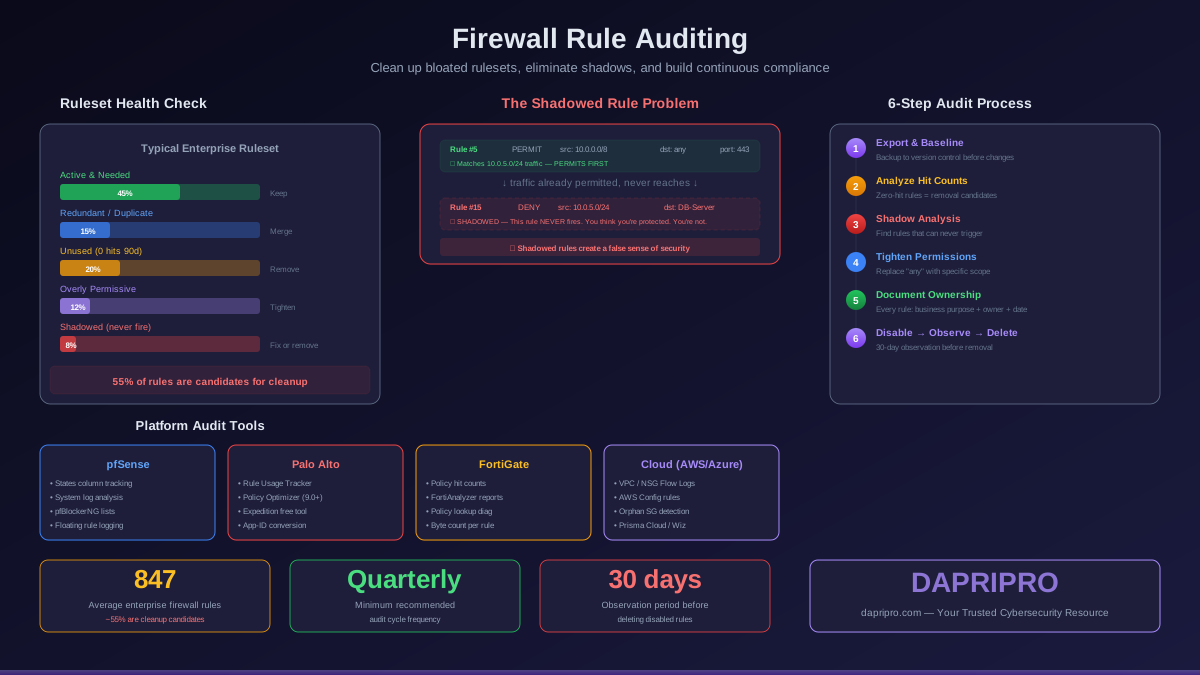
Your firewall has 847 rules. Can you explain what each one does? If you are like most network administrators, the honest answer is no — and that is exactly the problem. Firewall rulesets grow organically over years of change requests, emergency additions, vendor requirements, and application deployments. Rules get added but rarely removed. The result is a ruleset where nobody knows which rules are critical, which are redundant, and which are actively creating security gaps.
A bloated ruleset is not just a management headache. Every unnecessary rule is a potential attack surface, a source of performance degradation, and a compliance risk. Here is how to systematically audit your firewall rules and bring your ruleset under control.
Why Firewall Rulesets Decay
Ruleset bloat follows a predictable pattern in every organization:
- The "add but never remove" cycle: A new application launches, rules get added to allow its traffic. The application is decommissioned two years later, but the rules remain because nobody is certain they are safe to remove
- Emergency rules: An outage occurs, a broad allow rule gets added at 2 AM to restore service. The intention was to tighten it later, but "later" never arrives and the overly permissive rule becomes permanent
- Duplicate rules: Different administrators add rules for the same traffic flow without checking if one already exists. The ruleset accumulates multiple rules that do the same thing
- Vendor requirements: A vendor says "open ports 1024-65535" for their application. The rule gets added as instructed without questioning whether such a broad range is actually necessary (it almost never is)
- Organizational turnover: The person who understood the original rule design leaves the organization. Their successors add new rules on top rather than modifying existing ones because they do not understand the original intent
Categories of Problem Rules
Unused Rules (Zero Hit Count)
Rules that have never matched any traffic — or have not matched in 90+ days — are candidates for removal. Check hit counts and last-match timestamps. Common causes: decommissioned applications, changed network topology, migrated services. Remove these after a 30-day disabled observation period.
Shadowed Rules
A shadowed rule is one that can never trigger because a broader rule earlier in the list already matches the same traffic. This is the most dangerous category because the shadowed rule creates a false sense of security — you think you have a deny rule protecting a resource, but a permit rule higher in the list already allowed that traffic. Detection requires comparing every rule against rules above it in the list.
Redundant Rules
Multiple rules that match the same traffic with the same action. Unlike shadowed rules (which have conflicting actions), redundant rules are duplicates. They waste processing time and complicate management. Merge redundant rules into a single comprehensive rule.
Overly Permissive Rules
Rules that allow more access than necessary. Red flags include: destination "any," source "any," port ranges broader than the application requires, protocols set to "any." Every overly permissive rule is an invitation for lateral movement if an attacker gains a foothold.
Expired or Temporary Rules
Rules added with an implicit expiration — vendor access during an implementation, temporary access for a contractor, test environment connectivity. These rules frequently become permanent because there is no automated mechanism to flag them for removal when the business need ends.
The Audit Process: Step by Step
Step 1: Export and Baseline Your Current Ruleset
Before touching anything, export your complete ruleset with hit counts, timestamps, and comments. This is your rollback reference. On pfSense, export via Diagnostics > Backup & Restore. On Palo Alto, use show running security-policy. On Fortinet, use show full-configuration firewall policy. Store this export in version control — not just a file share.
Step 2: Analyze Hit Counts
Hit count analysis is the fastest way to identify audit candidates. Pull hit counts for every rule and sort by total hits. Focus on three groups:
- Zero hits (90+ days): Strong removal candidates. Verify the rule was not added recently or intended for seasonal/DR use before disabling
- Low hit counts: Rules with only a few hits over months may indicate misconfigured source/destination ranges or applications that moved to different ports
- Abnormally high hits: A rule matching millions of times per day may indicate a misconfiguration (too broad), active scanning, or application behavior that should be investigated
Step 3: Shadow and Overlap Analysis
This is the most critical and most tedious step. For each deny rule, verify that no permit rule above it is broad enough to match the same traffic and prevent the deny from being reached. Tools like Tufin Orchestration Suite and AlgoSec FireFlow automate this analysis, but you can also do it manually for smaller rulesets by examining the source, destination, service, and action of consecutive rules.
Step 4: Check for Overly Permissive Rules
Flag and review any rule containing:
- Source: any / 0.0.0.0/0
- Destination: any / 0.0.0.0/0
- Service/port: any, or port ranges exceeding what the application actually uses
- Protocol: "any" (should specify TCP, UDP, or ICMP explicitly)
For each flagged rule, determine the minimum required access by checking application documentation, traffic logs, and the application team. Tighten the rule to the smallest necessary scope.
Step 5: Verify Documentation and Ownership
Every rule should have a comment that includes: the business purpose (not just "allow HTTPS"), the ticket/change request number, the rule owner (team or individual), and the next review date. Rules without this documentation should be flagged for immediate investigation — if nobody owns it and nobody knows why it exists, it is a liability.
Step 6: Disable, Observe, Remove
Never delete rules directly from a production firewall without an observation period:
- Disable the rule and add a comment with the date and reason
- Monitor for 30 days (shorter for non-critical rules, longer for production-facing rules)
- If no alerts or issues arise, delete the disabled rule
- Document the removal in your change management system
Platform-Specific Procedures
pfSense
pfSense does not track hit counts natively in the GUI by default, but you can enable rule tracking:
- Navigate to Firewall > Rules and review each interface tab
- Use the States column to see active connections matching each rule
- For historical hit counts, configure pfSense logging and analyze firewall logs via Status > System Logs > Firewall
- Enable floating rules with logging for critical deny rules to track blocked traffic
- Use the pfBlockerNG package for automated IP/DNS blocklists that reduce the number of manual rules needed
Palo Alto Networks
Palo Alto has built-in rule analysis tools:
- Rule Usage Tracker: Policies > Security > Rule Usage shows hit counts and last-hit timestamps for every rule. Filter by "unused" to see rules with zero hits in the selected time period
- Policy Optimizer: (PAN-OS 9.0+) Automatically identifies unused rules, unused applications within rules, and rules where port-based policies can be converted to App-ID policies. This is one of the best built-in audit tools on any firewall platform
- Expedition tool: Free migration and optimization tool from Palo Alto that can analyze rulesets for shadowing, redundancy, and permissiveness
Fortinet FortiGate
- Policy hit counts: Policy & Objects > Firewall Policy shows hit counts and byte counts per rule. Sort by hit count to identify unused policies
- FortiAnalyzer integration: For historical analysis, FortiAnalyzer provides detailed policy usage reports including top used/unused policies and policy matching trends over time
- Policy lookup: Use the "Policy Lookup" diagnostic to test whether specific traffic matches the expected rule — useful for verifying shadow analysis results
AWS Security Groups / Azure NSGs
- Enable VPC Flow Logs (AWS) or NSG Flow Logs (Azure) to identify security group rules with no matching traffic
- Use AWS Config to flag security groups with 0.0.0.0/0 on non-standard ports
- Check for security groups attached to no resources — these are orphaned and should be removed
- Audit security group references (groups that reference other groups) to ensure referenced groups still exist and are correctly configured
Automation and Continuous Monitoring
Commercial Rule Analysis Tools
- Tufin Orchestration Suite: Industry leader for multi-vendor firewall policy management. Automatically detects shadowed, redundant, and unused rules across complex environments with multiple firewall vendors. Provides change management workflows and compliance checking against regulatory frameworks
- AlgoSec FireFlow: Focuses on business-application-to-firewall-rule mapping. Automatically processes access requests and can verify that proposed rule changes do not create security policy violations before they are implemented
- FireMon: Real-time rule monitoring with continuous compliance assessment. Particularly strong at identifying rule complexity and providing risk scores for individual rules and the overall ruleset
- ManageEngine Firewall Analyzer: Budget-friendly option for smaller organizations. Provides basic rule analysis, log management, and change detection for pfSense, Fortinet, and other popular platforms
Building Continuous Audit Into Change Management
The best audit program prevents rule decay rather than just detecting it. Integrate these practices into your change management process:
- Every rule addition requires a documented business justification, an owner, and a review date
- Temporary rules get an automatic expiration date — the firewall removes them or alerts when the date passes
- Monthly automated reports flagging rules with zero hits in the past 30 days
- Quarterly manual review comparing the ruleset against the documented security policy
- Annual comprehensive audit with shadow analysis, permissiveness review, and documentation verification
The Bottom Line
A firewall is only as strong as its ruleset, and rulesets degrade over time without active maintenance. Start your audit by exporting the current ruleset and analyzing hit counts — this alone will likely reveal that 20-40 percent of your rules can be safely removed. Then work through shadow analysis and permissiveness checks to address the rules that actively undermine your security posture. Build periodic auditing into your change management process so the ruleset stays clean going forward rather than accumulating the same debt again.