You open your laptop at a coffee shop, your hotel lobby, or an airport terminal. Your device automatically connects to the Wi-Fi network it recognizes — the same name it connected to last time. Except this time, the network is not the real one. It is a rogue access point controlled by an attacker sitting twenty feet away, and every byte of your traffic is now flowing through their machine.
This is an evil twin attack, and it is one of the oldest, simplest, and most effective wireless attacks still in active use. The hardware to execute it costs under 100, fits in a pocket, and requires minimal technical skill. Here is exactly how these attacks work, what makes them so difficult to detect, and the defenses that render them ineffective.
How Evil Twin Attacks Work
An evil twin attack exploits a fundamental weakness in how Wi-Fi clients select networks: they trust the SSID (network name) rather than verifying the identity of the access point. If two networks broadcast the same SSID, your device has no reliable way to determine which is legitimate.
The Basic Attack Flow
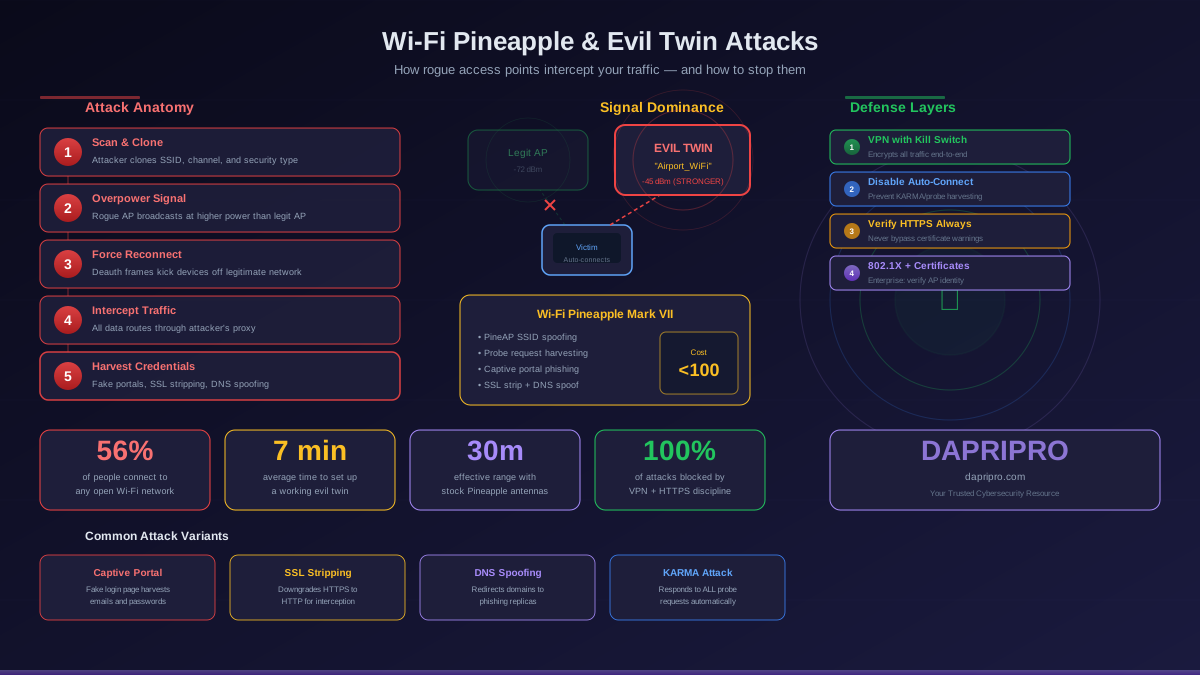
- Reconnaissance: The attacker scans the area for existing Wi-Fi networks, noting their SSIDs, channels, MAC addresses (BSSIDs), and encryption types. In a targeted attack against a specific organization, the attacker may survey the building exterior to identify corporate SSIDs
- Access point creation: The attacker creates a rogue access point broadcasting the same SSID as the target network. For open networks (like coffee shop Wi-Fi), this is trivial — just broadcast the same name with no encryption. For encrypted networks, the attacker creates an open version of the SSID that many devices will still connect to if the signal is stronger
- Signal dominance: Wi-Fi clients generally prefer the access point with the strongest signal. The attacker positions their rogue AP closer to targets or uses a higher-gain antenna to overpower the legitimate AP's signal. Devices will automatically roam to the stronger signal
- Deauthentication (optional): To force clients off the legitimate network faster, the attacker sends deauthentication frames that disconnect devices from the real AP. The disconnected devices then automatically reconnect — and if the evil twin has a stronger signal, they connect to the fake network instead
- Traffic interception: Once connected, all client traffic flows through the attacker's machine. The attacker can passively monitor traffic, actively modify it (injecting malicious content), or present fake login pages to harvest credentials
The Wi-Fi Pineapple: Evil Twin in a Box
The Wi-Fi Pineapple, made by Hak5, is a dedicated hardware platform designed specifically for wireless auditing — and evil twin attacks are its primary capability. It is important to understand this tool because it dramatically lowers the skill barrier for executing these attacks.
What the Pineapple Does
- Automated evil twin creation: Configure the target SSID through a web interface and the Pineapple begins broadcasting immediately. No command-line knowledge required
- Probe request harvesting: Your device constantly broadcasts probe requests for networks it has previously connected to. The Pineapple captures these probes and can automatically create matching evil twin networks for every SSID your device is looking for
- PineAP suite: The built-in PineAP module allows the Pineapple to respond to any probe request, effectively impersonating every network every nearby device has ever connected to simultaneously
- Man-in-the-middle modules: Built-in modules for DNS spoofing, SSL stripping, credential capture, and traffic logging. These run automatically once a client connects
- Captive portal phishing: Present victims with a convincing login page that mimics hotel Wi-Fi portals, airline logins, or corporate authentication pages to harvest credentials
- Remote management: The attacker can control the Pineapple remotely over cellular or a separate Wi-Fi connection, meaning the device can be planted and operated from a distance
Form Factors and Deployment
Modern Wi-Fi Pineapples come in two primary form factors:
- Pineapple Mark VII: A compact device slightly larger than a smartphone. Battery-powered, fits in a backpack or can be hidden in a planter, ceiling tile, or under a table. Effective range of approximately 30-50 meters with stock antennas, extendable with external antennas
- Enterprise variant: Larger unit with more powerful radios and enterprise-grade antenna connections. Used in professional penetration testing. Effective range of 100+ meters
The accessibility is the concern. A determined attacker needs under 100, a YouTube tutorial, and an afternoon of practice to execute convincing evil twin attacks in public spaces. The barrier to entry is not technical skill — it is willingness.
Evil Twin Attack Variations
Captive Portal Phishing
The most common attack in public spaces. The evil twin presents a fake login page when the victim connects — mimicking a hotel Wi-Fi portal, coffee shop terms of service page, or airport internet gateway. The page asks for an email address and password (which many people reuse across accounts), credit card information for "premium access," or social media login to "authenticate." The victim submits credentials thinking they are logging into Wi-Fi. The attacker captures everything.
SSL Stripping
When a victim tries to visit an HTTPS site, the attacker's proxy intercepts the request, connects to the real site over HTTPS on the victim's behalf, and serves the content back to the victim over HTTP. The victim sees an unencrypted connection but may not notice the missing padlock or "https" prefix. HSTS (HTTP Strict Transport Security) largely defeats this technique for major websites that implement it, but many smaller sites remain vulnerable.
DNS Spoofing
The evil twin runs its own DNS server that resolves domain names to attacker-controlled IP addresses. When the victim types "bank.com," the DNS response points to a phishing server hosting a pixel-perfect copy of the bank's login page. Combined with an SSL certificate for a look-alike domain, this can be convincing.
KARMA / Known Network Attack
Your device's Wi-Fi radio constantly broadcasts probe requests for networks it remembers — "Is HomeNetwork here? Is OfficeWiFi here? Is Hilton_Guest here?" A KARMA attack responds to every probe: "Yes, I am HomeNetwork. Yes, I am OfficeWiFi." Your device connects automatically because it believes it found a trusted network. The Pineapple's PineAP module automates this completely.
Targeted Corporate Attacks
The attacker sets up an evil twin of a corporate SSID outside the office building or in the parking garage. Employees' devices, configured to auto-connect to the corporate network, connect to the evil twin instead. This is particularly effective against networks using WPA2-Personal (shared password) because the attacker can set up an identical authentication flow. Enterprise networks using 802.1X with certificate verification are resistant to this.
How to Detect an Evil Twin
Direct detection from a client device is difficult by design — that is what makes these attacks effective. However, several indirect indicators can alert you:
- Unexpected captive portal: If a network you use regularly suddenly asks you to log in through a web portal when it never did before, be suspicious
- Certificate warnings: HTTPS certificate errors on sites you visit regularly indicate possible MITM interception. Never click through certificate warnings
- Multiple SSIDs with the same name: Some devices show duplicate network names in the Wi-Fi list. If you see two instances of the same SSID with different signal strengths, one may be rogue
- VPN connection failures: Some evil twin setups block VPN protocols to force traffic through the proxy. If your VPN suddenly cannot connect on a network where it previously worked, disconnect
- MAC address mismatch: If you know the legitimate AP's BSSID (MAC address), you can compare it to the connected AP's BSSID in your network settings. A mismatch confirms a rogue AP. However, sophisticated attackers clone the legitimate AP's MAC address
- Performance degradation: Evil twin setups relay traffic through additional hardware, adding latency. Noticeably slower speeds on a familiar network can indicate interception
Defending Against Evil Twin Attacks
Use a VPN (Most Important Single Defense)
A VPN encrypts all traffic before it leaves your device. Even if connected to an evil twin, the attacker sees only encrypted tunnel traffic and cannot read, modify, or inject content. Requirements for effective VPN defense:
- Connect the VPN immediately after joining any Wi-Fi network — before opening browsers or apps
- Use a VPN with a kill switch that blocks all traffic if the VPN connection drops
- Use a VPN provider that supports modern protocols (WireGuard or IKEv2) that are harder to block
- Ensure DNS leak protection is enabled so DNS queries also route through the VPN tunnel
Disable Auto-Connect and Forget Networks
- Turn off automatic connection to open networks on all devices
- Regularly clear your saved/preferred network list — every saved network is a potential KARMA attack target
- On iOS: Settings > Wi-Fi > Ask to Join Networks > Ask. On Android: Settings > Network > Wi-Fi > Wi-Fi preferences > Disable auto-connect to open networks
- Manually select networks rather than relying on auto-connect, especially in public spaces
Verify HTTPS and Watch for Certificate Warnings
- Check for the padlock icon and "https://" in the URL bar before entering any credentials
- Never click through certificate warnings — they may indicate an active MITM attack
- Use browser extensions like HTTPS Everywhere (now built into most modern browsers) to force HTTPS connections
- Be suspicious of sites that suddenly load over HTTP when they previously used HTTPS
Prefer Cellular Over Public Wi-Fi
For sensitive activities — banking, email, entering passwords — use your cellular data connection or a personal hotspot instead of public Wi-Fi. Cellular connections are encrypted and cannot be intercepted with Wi-Fi attack tools. Modern cellular plans with large data allowances make this practical for most users.
Enterprise-Level Defenses
For organizations protecting corporate networks:
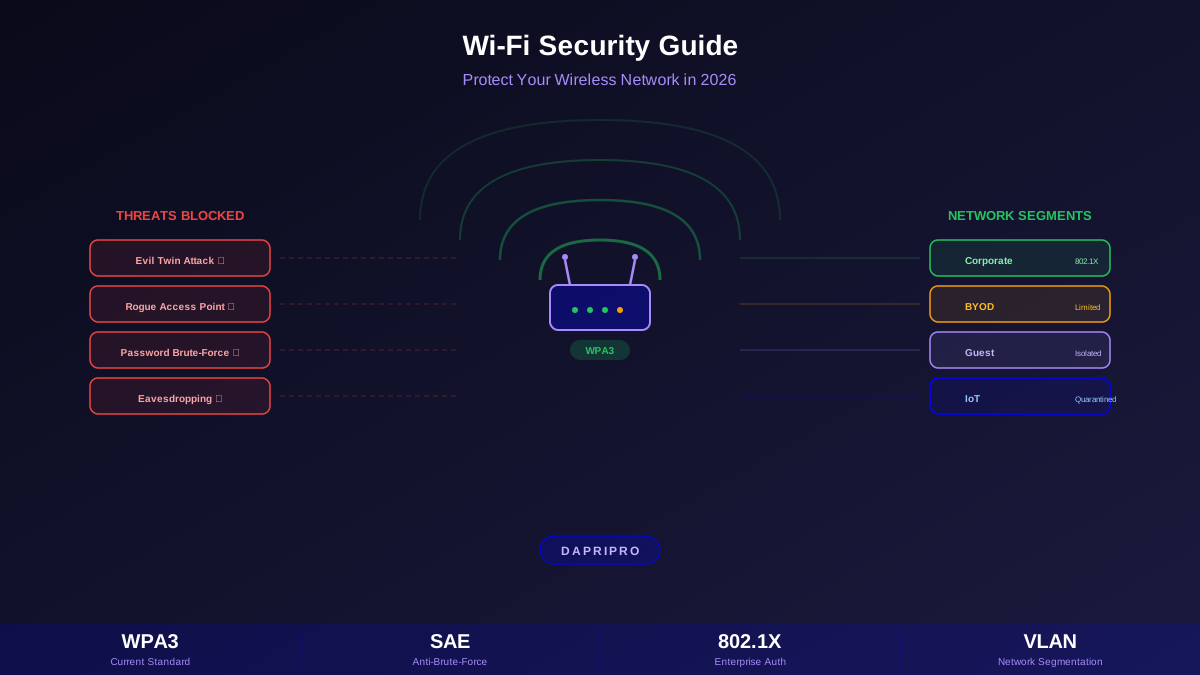
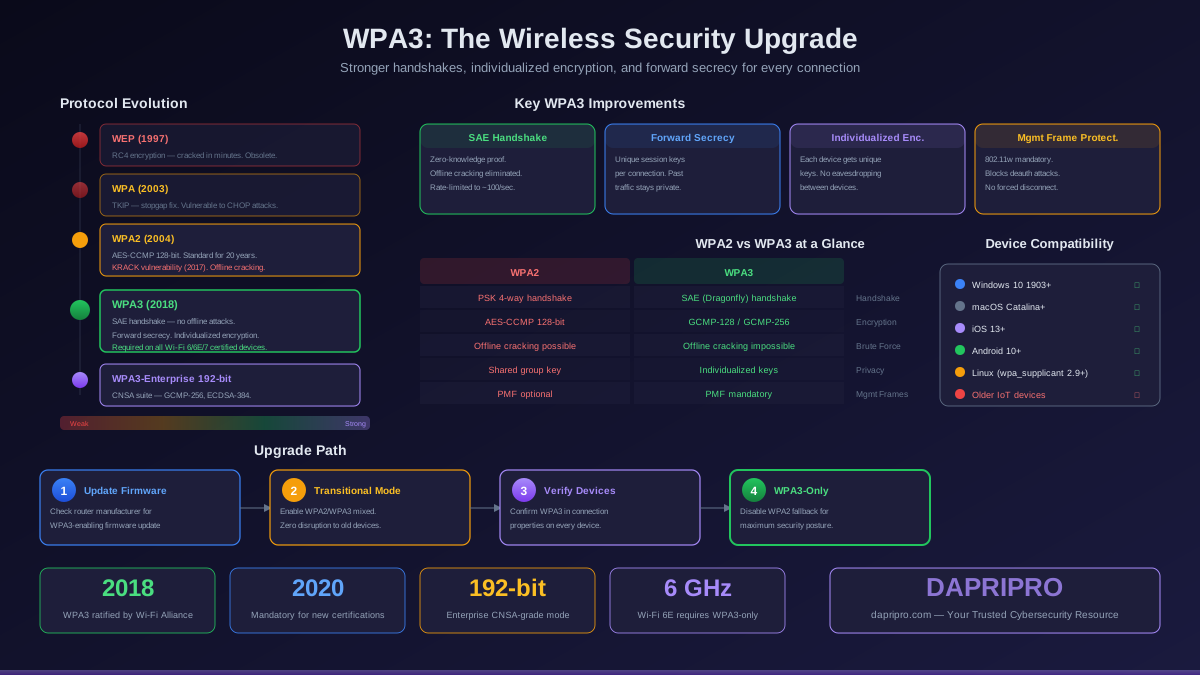
- Deploy WPA3-Enterprise with 802.1X: Certificate-based authentication (EAP-TLS) verifies the server's identity before the client sends credentials. Evil twins cannot present the correct certificate and the connection is refused
- Pin certificates in client profiles: Configure managed devices to only accept connections from access points presenting your organization's specific RADIUS server certificate. This eliminates trust-on-first-use vulnerabilities
- WIDS/WIPS deployment: Wireless Intrusion Detection and Prevention Systems monitor the radio environment for rogue access points, deauthentication floods, and SSID spoofing. Enterprise solutions from Cisco, Aruba, and Juniper include this capability
- 802.11w (Management Frame Protection): Prevents attackers from sending forged deauthentication frames, removing one of the primary techniques used to force clients onto evil twin networks
- Network Access Control (NAC): Verify device posture (VPN status, updated OS, compliant configuration) before allowing network access, even on legitimate networks
Real-World Attack Scenarios
The Coffee Shop
An attacker sits in a busy coffee shop with a Wi-Fi Pineapple in their backpack. They clone the shop's open Wi-Fi SSID. Customers' devices auto-connect to the stronger signal. The attacker runs a captive portal that looks like the coffee shop's terms-of-service page, requiring email and a password to access the internet. Most users enter credentials they reuse across services. The attacker harvests these credentials and later tests them against email providers, social media, and banking sites.
The Hotel
A Pineapple planted in a conference room broadcasts the hotel's guest Wi-Fi SSID. Business travelers connect and begin working. The attacker intercepts DNS requests and redirects a popular SaaS login page to a phishing copy. Victims enter their corporate credentials, giving the attacker access to company systems.
The Corporate Parking Garage
An attacker parks in a company's garage and broadcasts the corporate SSID. Employees arriving for work have devices that auto-connect. On a WPA2-Personal network, the evil twin can capture the four-way handshake for offline cracking. On an open or poorly configured network, the attacker immediately captures traffic. WPA3-Enterprise with pinned certificates would prevent this entirely.
The Bottom Line
Evil twin attacks remain effective because they exploit human behavior (trusting familiar network names) and protocol design limitations (no AP identity verification in most configurations). The defenses are straightforward: always use a VPN on untrusted networks, never click through certificate warnings, disable auto-connect to open networks, and clear your saved network list regularly. For enterprises, WPA3-Enterprise with certificate-based 802.1X authentication makes evil twin attacks technically impossible.