Someone is posting from your Instagram. Your Facebook profile picture changed to something you have never seen. Your friends are receiving DMs from "you" asking them to click suspicious links. Your password does not work anymore.
You have been hacked.
What you do in the next 60 minutes determines whether you get your account back or lose it permanently. Attackers move fast — changing recovery emails, enabling their own 2FA, and locking you out completely — often within the first hour of gaining access. This is not the time to panic. It is the time to follow a precise, platform-specific recovery process.
This guide covers the exact steps for every major platform, what to do when standard recovery fails, and how to bulletproof your accounts so this never happens again.
The First 60 Minutes: Universal Emergency Steps
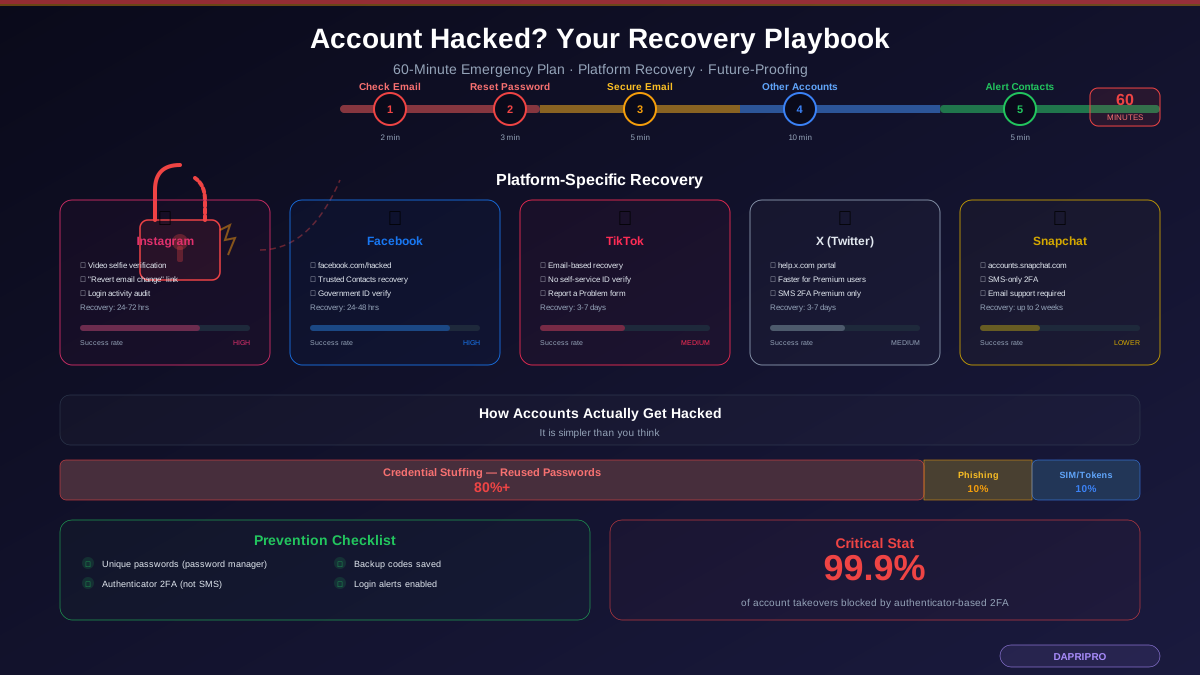
Regardless of which platform was compromised, do these things immediately — in this order:
Step 1: Check Your Email (2 minutes)
Look for emails from the platform about changes you did not make. Most platforms send notifications when:
- Your password is changed
- A new device logs in
- Your email address or phone number is updated
- Two-factor authentication is modified
These emails often contain a "If this was not you" link that lets you immediately reverse the change. This is the fastest recovery method, but it only works if the hacker has not yet changed your email address on the account. Act immediately if you see these notifications.
Step 2: Attempt a Password Reset (3 minutes)
Go to the platform login page and use "Forgot password." If the recovery email or phone number has not been changed, you can reset your password and regain access immediately. Use a strong, unique password that you have never used anywhere else.
Step 3: Secure Your Email Account (5 minutes)
If your social media was hacked, your email may also be compromised. Immediately:
- Change your email password
- Enable 2FA on your email if not already active
- Check for email forwarding rules — hackers often set up forwarding to silently receive your recovery emails
- Review recent email login activity for unfamiliar locations
Your email is the master key to every account. If the hacker controls your email, they can intercept every recovery attempt you make.
Step 4: Check Other Accounts Using the Same Password (10 minutes)
If you reused the compromised password anywhere else — and statistically, you probably did — those accounts are also at risk. Change passwords on:
- Banking and financial accounts (highest priority)
- Other social media platforms
- Shopping accounts (Amazon, eBay, etc.)
- Cloud storage (Google Drive, Dropbox, iCloud)
- Any account using the same email address
Step 5: Alert Your Contacts (5 minutes)
The hacker is likely using your account to message your friends and followers with phishing links or scam messages. Alert people through another channel (text, different social platform, email) that your account is compromised and to ignore any messages from it.
Instagram Account Recovery
If You Can Still Log In
- Change your password immediately (Settings > Security > Password)
- Enable two-factor authentication (Settings > Security > Two-factor authentication > Authentication app)
- Revoke all sessions (Settings > Security > Login activity > Log out of all sessions except current)
- Check Settings > Security > Apps and websites — remove any apps you do not recognize
- Review Settings > Security > Emails from Instagram — compare against your email inbox to identify phishing attempts
- Check your bio, profile photo, and linked Facebook for unauthorized changes
If You Are Locked Out
- Go to the Instagram login page and tap "Get help logging in"
- Enter your username, email, or phone number
- If the hacker changed your email: tap "Need more help?" and follow the identity verification flow
- Video selfie verification — Instagram will ask you to record a short video turning your head in different directions. Their AI compares this against photos on your profile. This only works if your account has photos of your face
- Check the email that was originally associated with the account — Instagram sends a notification when the email is changed with a "revert this change" link that works for a limited time
Instagram-specific gotcha: If the hacker enabled their own 2FA, your recovery will require the video selfie process. There is no way to bypass 2FA without identity verification, which is actually a security feature protecting you as well.
Facebook Account Recovery
If You Can Still Log In
- Change password (Settings > Security and login > Change password)
- Enable 2FA (Settings > Security and login > Two-factor authentication)
- Review "Where you are logged in" and end all unfamiliar sessions
- Check Settings > Apps and websites — remove unknown connected apps
- Review Settings > General > Contact — verify your email and phone have not been changed
- Check for created Pages or Groups you did not make — hackers sometimes create spam pages under your account
If You Are Locked Out
- Go to facebook.com/hacked — Facebook dedicated recovery page
- Click "My account is compromised"
- Enter your email, phone number, full name, or username
- Facebook will try to verify your identity through:
- Recovery codes sent to your email or phone
- Trusted Contacts — if you previously set up 3-5 friends as trusted contacts, they can provide recovery codes
- Government ID verification — upload a photo of your ID for Facebook to review (takes 24-48 hours)
Facebook-specific tip: If you have access to a device that was previously logged into your Facebook, open it — you may still be logged in on old sessions even after a password change.
TikTok Account Recovery
If You Can Still Log In
- Change password (Profile > Settings > Manage account > Password)
- Enable 2-step verification (Settings > Security > 2-step verification)
- Check Settings > Security > Manage devices — remove all devices except your current one
- Review Settings > Security > Security alerts for unusual login activity
- Check authorized third-party apps and remove unknowns
If You Are Locked Out
- On the login page, tap "Use phone / email / username" then select "Log in with email"
- Enter your email and request a verification code
- If the email was changed: use TikTok in-app "Report a problem" from the login screen (tap the three lines > Report a problem)
- Select "Account and profile" > "Logging in" > describe your situation
- TikTok will respond within 3-7 business days — include your username, the email originally linked, and approximate account creation date
TikTok limitation: TikTok does not have a self-service identity verification system comparable to Instagram or Facebook. Recovery relies heavily on proving ownership of the original email address. If you no longer have access to that email, recovery can take 2+ weeks and is not guaranteed.
X (Twitter) Account Recovery
If You Can Still Log In
- Change password (Settings > Security and account access > Change your password)
- Enable 2FA (Settings > Security > Two-factor authentication > Authentication app). Note: SMS-based 2FA is now restricted to X Premium subscribers
- Revoke all sessions (Settings > Security and account access > Apps and sessions > Sessions > Log out of all other sessions)
- Review connected apps (Settings > Security and account access > Apps and sessions > Connected apps)
- Check Settings > Privacy and safety > Direct messages for messages sent by the hacker
If You Are Locked Out
- Go to help.x.com and navigate to "Hacked accounts"
- Submit a support request with your username and the email originally associated
- X will email a password reset link if the original email is still on file
- For accounts with X Premium: response times are faster, typically 24-48 hours
- For free accounts: expect 3-7 business days for a response
Snapchat Account Recovery
Recovery Process
- Go to accounts.snapchat.com and use the "Forgot your password?" option
- Choose recovery via email or SMS
- If both have been changed: use the "I still need help" option
- Snapchat will verify your identity through your original email, phone number, and the email confirmation you received when you first created the account
- For stubborn cases: email support@snapchat.com with your username, the original email, and your device information
Snapchat-specific issue: Snapchat does not support authenticator-app-based 2FA (SMS only), which makes accounts more vulnerable to SIM-swapping attacks. After recovery, consider using an email-only recovery method rather than phone-based.
Post-Recovery Security Audit: 7 Things Hackers Leave Behind
Getting your password back is not the end. Hackers often leave backdoors that let them regain access. After recovering any account, check these seven things:
- Connected apps and services — Remove every third-party app you do not recognize or actively use. Hackers often connect their own apps that retain access tokens even after a password change
- Email forwarding rules — Check your email settings for forwarding rules that silently send copies of your mail to an unknown address. This is how hackers intercept recovery emails
- Recovery email and phone number — Verify that these are your own. Hackers sometimes add a secondary recovery email that gives them a way back in
- Active sessions and devices — After changing your password, force-logout every session. Some platforms maintain login tokens that survive password changes
- Profile changes — Check bio, profile photo, display name, and linked accounts for subtle changes. Some hackers alter your profile slightly to redirect your followers to scam pages
- Sent messages — Review your DMs and sent messages. The hacker likely sent phishing links to your contacts from your account
- Created content — Check for posts, stories, reels, or comments made during the compromise period. Delete anything you did not create
How Accounts Actually Get Hacked (It Is Simpler Than You Think)
Most social media account takeovers are not sophisticated. They exploit predictable human behavior:
Credential Stuffing (>80% of Hacks)
You used the same password on a random shopping site that got breached four years ago. Attackers buy massive lists of email-password combinations and automatically try them against every major platform. If you reused a password, they are in.
Check if your credentials are exposed: Visit haveibeenpwned.com and enter your email address. If it appears in any breaches, change your password on every account that used that password.
Phishing Messages (~10% of Hacks)
You receive a message that appears to be from the platform — "Your account will be deactivated" or "Verify your identity to keep your verified badge." The link leads to a convincing fake login page that captures your credentials in real time.
Session Hijacking and Token Theft (~5%)
Malware on your device steals browser cookies or session tokens. The attacker does not need your password — they clone your active session and are instantly logged in as you. This is why malware scans are essential after any compromise.
SIM Swapping (~3%)
An attacker convinces your mobile carrier to transfer your phone number to their SIM card. They then receive your SMS 2FA codes and password reset texts. This is why SMS-based 2FA is less secure than authenticator apps.
Third-Party App Compromise (~2%)
That "What zodiac personality are you?" quiz app you authorized three years ago gets breached, and the attackers use its OAuth tokens to access your account without needing your password.
Bulletproofing Your Accounts Against Future Attacks
After recovery, implement every one of these measures. No exceptions:
- Unique password for every account — Use a password manager (Bitwarden, 1Password, or the built-in Apple/Google options). If you remember your password, it is not strong enough
- Authenticator-based 2FA on every platform — Not SMS. Use Google Authenticator, Microsoft Authenticator, or Authy. SMS codes can be intercepted through SIM swapping
- Save backup codes — Every platform that offers 2FA also generates backup codes. Save them in your password manager or print them and store physically. These are your emergency access if you lose your phone
- Set up login alerts — Enable notifications for unrecognized logins on every platform. This gives you the early warning to act before the hacker changes your recovery information
- Audit connected apps quarterly — Review and remove third-party apps you no longer use. Each connected app is a potential entry point
- Review active sessions monthly — Check where you are logged in and remove sessions from old devices
- Use a dedicated email for social media — Separate your social media accounts from your primary email. If one is compromised, the other remains secure
When Recovery Fails: What to Do Next
If standard recovery processes do not work after 7-10 days:
- File an FTC Identity Theft Report at IdentityTheft.gov if the hacker is impersonating you or conducting fraud
- File a report with the FBI IC3 at ic3.gov if financial loss occurred
- Contact the platform through alternative channels — Some platforms have dedicated law enforcement portals or special forms for identity theft victims
- Consult an attorney if the hack involves financial loss exceeding 5,000 dollars, stalking or harassment, or business account compromise affecting revenue
- Document everything — Keep records of all communication with the platform, screenshots of the compromised account, and any financial transactions made by the hacker
The Bottom Line
Getting hacked is not a technology problem — it is a speed problem. The attacker who changed your password five minutes ago is already changing your recovery email, enabling their own 2FA, and messaging your contacts. Every minute you spend googling "what to do when hacked" is a minute the attacker uses to lock you out further.
Bookmark this page. Save the universal emergency steps somewhere you can access without your social media accounts. And implement the prevention measures now — because recovery is always harder, slower, and less certain than protection.