Whether you are working from a coffee shop, connecting branch offices across the globe, or just trying to keep your ISP from tracking every website you visit — VPN technology is the solution. VPNs create encrypted tunnels that protect your data and hide your activity from anyone watching.
But VPN technology has evolved dramatically. The old model of routing all remote workers through a single VPN concentrator in headquarters is being replaced by modern approaches like WireGuard, SASE, and Zero Trust Network Access (ZTNA). This guide covers everything from choosing the right VPN protocol to securing remote desktop access and understanding where VPN technology is heading.
How a VPN Works
A VPN works in three steps:
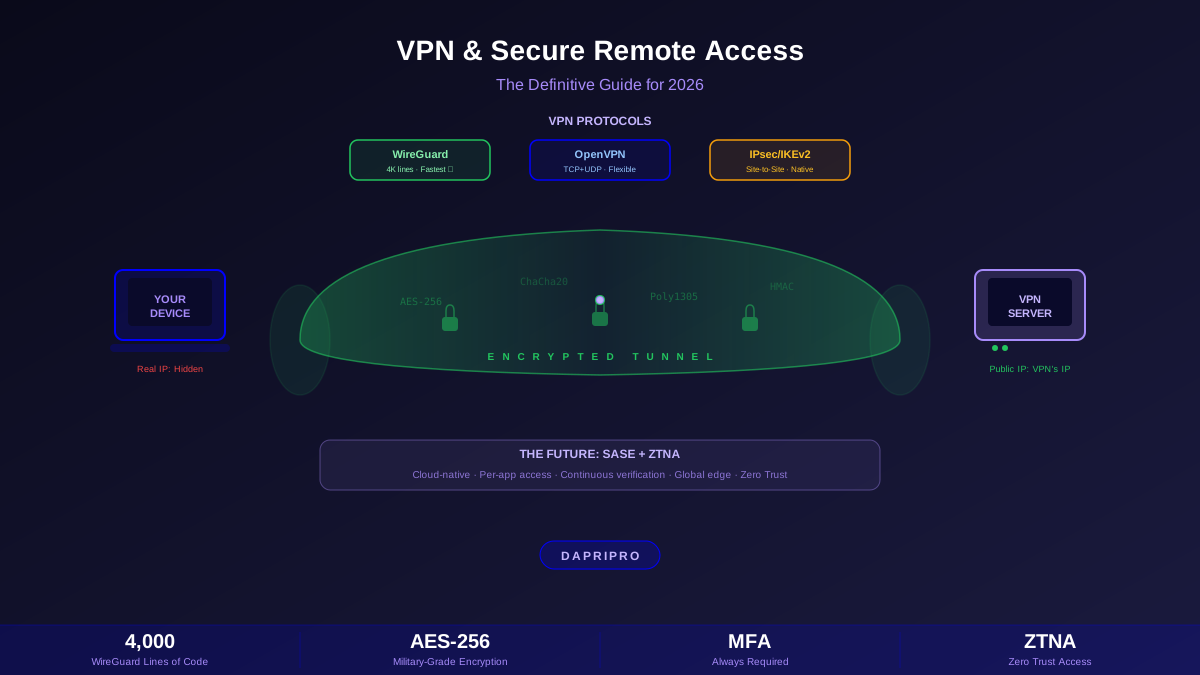
- Tunnel creation — Your device establishes an encrypted connection to a VPN server using a protocol like WireGuard, OpenVPN, or IPsec.
- Encryption — All traffic between your device and the VPN server is encrypted. Anyone intercepting it sees only encrypted data.
- IP masking — The VPN server forwards your traffic to the internet using its own IP address. Websites see the server's IP, not yours.
Think of it like this: imagine you are sending a letter, but instead of putting it in a regular envelope anyone can read, you put it inside a locked box, give it to a trusted courier, and the courier delivers it from their address instead of yours. Nobody can read the letter, and nobody knows it came from you.
VPN Protocols Compared
The VPN protocol is the set of rules that determine how your encrypted tunnel is built and maintained. The three protocols that matter in 2026 are WireGuard, OpenVPN, and IPsec:
Site-to-Site VPNs
A site-to-site VPN connects two or more office networks together over the internet. Instead of each employee connecting individually, the VPN runs between routers or firewalls — and every device on both networks can communicate as if they were on the same local network.
Common site-to-site VPN use cases:
- ✅ Connecting branch offices to headquarters
- ✅ Linking on-premises data centers to cloud VPCs (AWS VPN Gateway, Azure VPN Gateway)
- ✅ Connecting two cloud providers' networks (AWS ↔ Azure)
- ✅ Replacing expensive MPLS connections with internet-based VPN tunnels
Site-to-Site Protocol Choices
| Protocol | Speed | Compatibility | Best For |
|---|---|---|---|
| IPsec | Fast (hardware acceleration) | Universal — works with every vendor | Standard site-to-site, cloud gateways |
| WireGuard | Fastest | Growing — pfSense, Linux, MikroTik | Modern deployments, simple configs |
| OpenVPN | Moderate | Broad — most firewall platforms | When you need TCP or custom routing |
| GRE + IPsec | Fast | Cisco, Juniper, enterprise routers | Dynamic routing protocol support |
SASE and Zero Trust Network Access (ZTNA)
SASE (Secure Access Service Edge) is changing how organizations provide remote access. Instead of backhauling all traffic through a VPN concentrator in headquarters, SASE moves security enforcement to the cloud:
- SD-WAN — Intelligent routing that chooses the best path for each application (internet, MPLS, LTE)
- ZTNA — Zero Trust Network Access replaces full network VPN access with per-application access. Users only see the specific applications they are authorized to use.
- CASB — Cloud Access Security Broker monitors and controls SaaS application usage
- SWG — Secure Web Gateway filters web traffic for malware and policy enforcement
- FWaaS — Firewall as a Service provides cloud-based firewall functions
Why SASE is replacing traditional VPNs for enterprises:
| Traditional VPN | SASE / ZTNA |
|---|---|
| All traffic routes through HQ | Traffic goes to nearest cloud edge |
| Full network access once connected | Access to specific apps only |
| One-time authentication | Continuous verification |
| Hardware appliance (capacity limits) | Cloud-native (infinite scale) |
| Latency for remote users | Low latency via global edge network |
Leading SASE vendors include Zscaler, Cloudflare One, Palo Alto Prisma Access, Netskope, and Cisco Umbrella.
Split Tunneling: Performance vs. Security
Split tunneling lets you route some traffic through the VPN and some directly to the internet. This is one of the most debated VPN features:
When to Use Split Tunneling
- Use it when: You need better performance for video calls (Zoom/Teams), your VPN has bandwidth limits, or users need access to local network devices (printers, NAS).
- Avoid it when: You are on an untrusted network (public Wi-Fi), you handle sensitive data that must always be encrypted, or your organization requires full traffic inspection.
- Compromise: Use inverse split tunneling — send everything through the VPN EXCEPT specific trusted services (Microsoft 365, Zoom, known SaaS apps).
Remote Desktop Security (RDP)
Remote Desktop Protocol (RDP) is one of the most attacked services on the internet. Port 3389 is constantly scanned by automated bots, and weak RDP security has been the entry point for countless ransomware attacks.
How to secure RDP:
- ✅ Never expose RDP directly to the internet — always require VPN or ZTNA access first
- ✅ Enable Network Level Authentication (NLA) — requires authentication before the session starts
- ✅ Enforce MFA — use Duo, Azure MFA, or similar for every RDP login
- ✅ Use strong passwords or certificate authentication — automated brute-force attacks try common passwords
- ✅ Enable account lockout — lock accounts after 5 failed attempts
- ✅ Restrict access by IP — only allow RDP from known IP ranges or VPN subnets
- ✅ Keep systems patched — RDP vulnerabilities like BlueKeep (CVE-2019-0708) allow remote code execution
- ✅ Consider alternatives — tools like Tailscale, Cloudflare Tunnel, or Apache Guacamole provide safer remote access
VPN Kill Switch
A VPN kill switch is your safety net. If your VPN connection drops unexpectedly, the kill switch immediately blocks all internet traffic to prevent your real IP address and unencrypted data from leaking.
Without a kill switch, every VPN disconnection (Wi-Fi switching, server overload, brief network outage) exposes your real traffic for seconds or minutes — enough for your ISP to log sites or for data to leak on a hostile network.
Types of Kill Switches
| Type | How It Works | Protection Level |
|---|---|---|
| Application-level | Kills specific apps when VPN drops | Moderate — other apps may still leak |
| System-level | Blocks ALL internet traffic if VPN drops | Strong — nothing leaks |
| Firewall-based | OS firewall rules only allow VPN traffic | Strongest — survives app crashes |
Every serious VPN provider includes a kill switch. If yours does not have one, switch providers. For manual setups (WireGuard, OpenVPN), configure OS firewall rules to only allow traffic through the VPN interface.
Building Your Secure Access Strategy
The right remote access solution depends on your needs: a personal WireGuard server for privacy, a managed VPN provider for convenience, a site-to-site IPsec tunnel for office connectivity, or a full SASE platform for enterprise zero trust.
Whatever you choose, remember the fundamentals: encrypt everything in transit, authenticate every user with MFA, use a kill switch, never expose RDP directly, and consider ZTNA for granular application-level access. The VPN is one piece of your security stack — pair it with strong endpoint security and network monitoring for defense in depth.