Every website you visit, every search query you type, every link you click creates a trail that leads back to your real IP address — and through your IP address, to your physical location, your ISP account, your name, and your browsing history. Your ISP logs every domain you visit. Advertising networks track you across millions of websites using cookies, fingerprinting, and behavioral analysis. Government surveillance programs collect metadata on internet traffic at scale.
Tor Browser exists to break that chain. It is the most battle-tested anonymity tool available to ordinary users — developed by a US Navy research laboratory, maintained by a nonprofit, and used daily by millions of people ranging from journalists in authoritarian countries to privacy-conscious individuals who simply do not want their ISP building a profile of their internet activity. This guide explains how Tor actually works, what it protects against, where it falls short, and how to use it correctly.
How Tor Works: Onion Routing Explained
The three-relay circuit
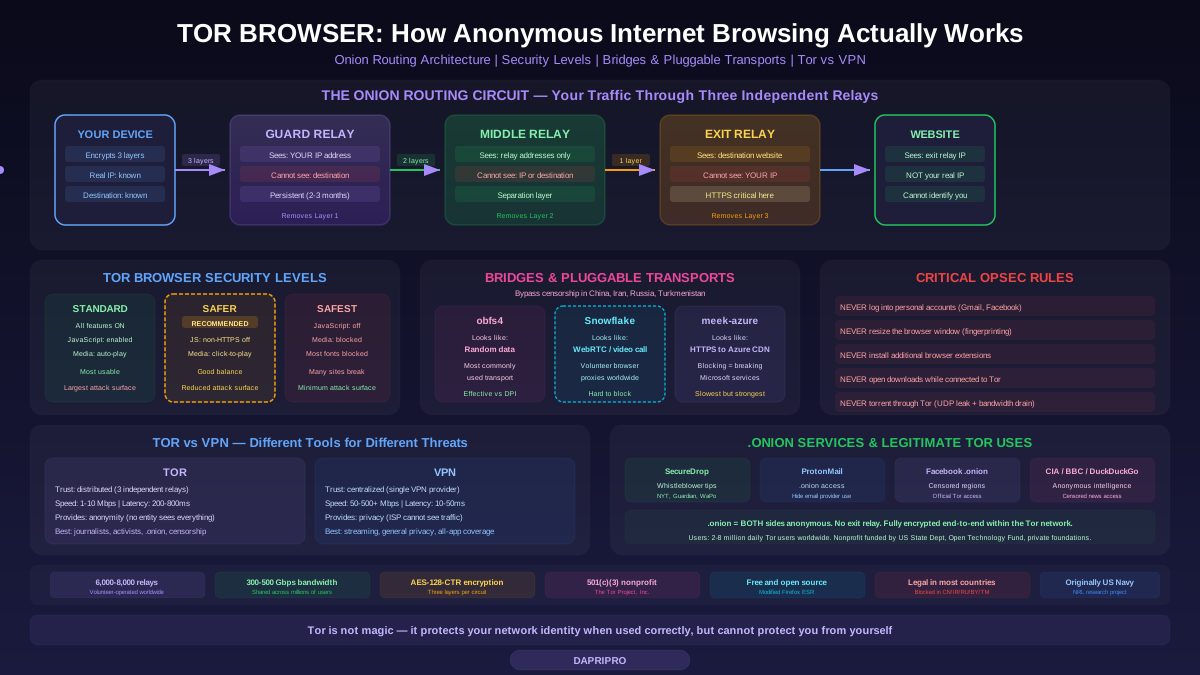
When you open Tor Browser and visit a website, your traffic does not travel directly from your computer to the destination. Instead, it is routed through three volunteer-operated relay nodes, each operated by a different organization or individual in a different geographic location. This three-hop architecture is the core of Tor's anonymity guarantee:
Guard relay (entry node): The first relay in the circuit. It sees your real IP address (because your connection originates from your device), but it does NOT see what website you are visiting — it only sees the address of the middle relay. The guard relay encrypts and forwards your traffic to the middle relay. Tor uses persistent guard relays (you keep the same guard for 2-3 months) to resist certain attacks where a malicious actor operates both the entry and exit relays.
Middle relay: The second relay. It knows neither your real IP address (it only sees the guard relay's address) nor your destination website (it only sees the exit relay's address). The middle relay exists solely to separate the guard from the exit, ensuring no single relay has both pieces of identifying information.
Exit relay: The final relay. It connects to the destination website on your behalf. The exit relay sees the destination website and the content of your request (if the connection is not HTTPS), but it does NOT see your real IP address — it only sees the middle relay's address. The destination website sees the exit relay's IP address as the source of the connection, not yours.
Layered encryption (onion encryption)
The name "onion routing" comes from the layered encryption applied to your traffic. Before your data leaves your computer, Tor Browser encrypts it three times — once for each relay, using each relay's public key. As the data passes through each relay, that relay removes (decrypts) one layer of encryption, revealing the address of the next relay. No individual relay can see the complete picture:
Your computer encrypts: Layer 3 (for exit) wrapped in Layer 2 (for middle) wrapped in Layer 1 (for guard). The guard relay decrypts Layer 1, sees the middle relay address, forwards. The middle relay decrypts Layer 2, sees the exit relay address, forwards. The exit relay decrypts Layer 3, sees the destination URL, forwards your request to the website. The response travels back through the same circuit in reverse.
This layered encryption means even if a relay is compromised or operated by an adversary, it cannot reconstruct the full connection. A malicious guard relay knows who you are but not what you are accessing. A malicious exit relay knows what you are accessing but not who you are. Only by controlling both the guard and exit relays simultaneously (and performing traffic correlation analysis) can an adversary potentially deanonymize a Tor user — and the Tor network actively guards against this.
What Tor Browser Protects Against (and What It Does Not)
What Tor effectively defends against
ISP surveillance: Your Internet Service Provider cannot see what websites you visit through Tor. They see that you are connecting to the Tor network (specifically, to your guard relay's IP address), but they cannot see the destination or content of your browsing. With bridges and pluggable transports, even the fact that you are using Tor can be hidden from your ISP.
Website tracking: Websites see the IP address of the Tor exit relay, not your real IP address. Combined with Tor Browser's anti-fingerprinting measures (uniform window size, blocked Canvas API, blocked WebGL, spoofed timezone and locale), websites cannot identify you across sessions or correlate your activity with your real identity.
Network-level surveillance: Anyone monitoring your local network (coffee shop Wi-Fi, corporate network, university network) sees encrypted Tor traffic to a guard relay IP, nothing more. They cannot determine what you are browsing or identify the content of your traffic.
IP-based censorship: Tor circumvents IP-based website blocks because the connection to the destination website comes from the exit relay's IP address, not yours. If your ISP or government blocks a website by IP or DNS, Tor bypasses the block by routing through a relay in a country without the block.
What Tor does NOT protect against
Global passive adversaries: An entity that can monitor large portions of internet traffic (NSA, GCHQ, and similar agencies) can potentially perform traffic correlation attacks — observing the timing and volume of traffic entering the Tor network at the guard relay and exiting at the exit relay to match the two. This is the largest theoretical weakness of Tor. The Tor network uses padding and traffic shaping to mitigate this, but it remains an inherent limitation of low-latency onion routing.
Exit relay snooping (non-HTTPS): If you visit a website using plain HTTP (not HTTPS) through Tor, the exit relay can see the full content of your traffic — URLs, form submissions, credentials, everything. Tor encrypts relay-to-relay traffic, but the exit relay to destination connection uses whatever protocol the destination supports. Tor Browser defaults to HTTPS-Only mode, but if you bypass this, you are exposed. For .onion sites, there is no exit relay — traffic stays entirely within the Tor network — so this risk does not apply.
Browser exploits: Tor Browser is hardened Firefox, but it is still a browser running JavaScript (in "Safer" mode) or other active content. A zero-day browser vulnerability could execute code on your machine, revealing your real IP address directly. This has happened: in 2013, the FBI used a Firefox exploit to deanonymize users of a child exploitation .onion site. Keep Tor Browser updated — the Tor Project releases security patches rapidly.
User behavior: The most common cause of Tor deanonymization is user error. Logging into personal accounts (Google, Facebook, email) links your Tor session to your real identity. Downloading files that open in external applications (PDFs, Office documents) can make network requests outside Tor, revealing your real IP. Providing personal information in forms, using the same username across Tor and non-Tor browsing, and installing browser extensions all compromise anonymity.
Using Tor Browser Safely: Practical Configuration
Installation and first launch
Download Tor Browser exclusively from the official Tor Project website (torproject.org). Verify the download using the PGP signature provided on the download page (instructions are provided on the Tor Project website). Do not download Tor Browser from third-party websites, app stores (except the official Google Play listing), or file-sharing sites — tampered versions exist that strip anonymity or inject malware.
On first launch, Tor Browser connects to the Tor network automatically. The connection process takes 5-30 seconds as the browser establishes a circuit through three relays. You should see "Connected to the Tor network" in the browser. If you are in a country that censors Tor, click "Configure Connection" and select a bridge (covered in the bridges section below).
Security levels
Tor Browser has three security levels (accessible via the shield icon in the toolbar):
Standard: All browser features enabled, including JavaScript. This provides the most usable browsing experience but the largest attack surface. Use for general anonymous browsing of trusted websites.
Safer: JavaScript disabled on non-HTTPS sites, some fonts and math symbols disabled, audio and video (HTML5) require click-to-play. This is the recommended level for most privacy-conscious users — it significantly reduces the attack surface while maintaining reasonable usability.
Safest: JavaScript disabled on all sites, most fonts blocked, media blocked, many rendering features disabled. Many websites will not function correctly. Use this level when accessing untrusted websites, .onion sites of unknown provenance, or when your threat model includes targeted browser exploitation.
Critical operational security rules
Never log into personal accounts through Tor. Logging into Gmail, Facebook, Twitter, or any account linked to your real identity through Tor immediately links your Tor session to your identity. If you need anonymous accounts, create them through Tor using anonymous email (ProtonMail .onion, Tuta) and never access them outside Tor.
Never resize the Tor Browser window. Tor Browser launches with a standard window size to prevent browser fingerprinting based on screen resolution. Resizing the window creates a more unique fingerprint. Maximize is acceptable (many users maximize), but custom sizes are identifying.
Do not install additional extensions. Tor Browser includes exactly the extensions needed for anonymity (NoScript, HTTPS-Only). Additional extensions modify your browser fingerprint, potentially introduce vulnerabilities, and may leak data outside Tor. The Tor Project explicitly warns against adding extensions.
Do not open downloaded files while connected to Tor. PDF readers, Office applications, and media players can make network connections outside the Tor Browser, using your real IP address. Download files through Tor, disconnect from the internet, then open them. Or use a disposable VM (Whonix, Tails) where all traffic is forced through Tor regardless of application.
Do not torrent through Tor. BitTorrent traffic is UDP-based; Tor only supports TCP. Most torrent clients leak your real IP address through UDP connections, DHT requests, and tracker announcements even when configured to use Tor as a SOCKS proxy. Additionally, torrenting consumes significant bandwidth, degrading the Tor network for all users. For anonymous torrenting, use a no-logs VPN instead.
Bridges and Pluggable Transports: Bypassing Censorship
Standard Tor connections are detectable because the list of Tor relay IP addresses is public (by design — the network needs to be accessible). Government censors in China (Great Firewall), Iran, Russia, and Turkmenistan block traffic to known Tor relay IP addresses. Bridges solve this problem.
Bridges are unlisted Tor relays whose IP addresses are not published in the public Tor directory. Since censors do not know bridge addresses, they cannot block them by IP. You can obtain bridge addresses from the Tor Project website (bridges.torproject.org), via email (send an email to bridges@torproject.org from a Gmail, Yahoo, or Riseup address), or by requesting them within Tor Browser's connection settings.
Pluggable transports go further by disguising Tor traffic so it does not look like Tor traffic at all:
obfs4: Obfuscates Tor traffic to look like random data. Effective against censors that identify Tor by protocol fingerprint rather than IP address. This is the most commonly used pluggable transport.
Snowflake: Routes Tor traffic through volunteer-operated WebRTC proxies. Each connection looks like normal WebRTC traffic (the same protocol used by video conferencing tools like Zoom, Google Meet, and Jitsi). Since blocking WebRTC would break video conferencing, censors are reluctant to block it. Snowflake volunteers run a simple browser extension that turns their browser into a temporary proxy.
meek-azure: Tunnels Tor traffic through Microsoft Azure's CDN (Content Delivery Network). Traffic appears to be normal HTTPS connections to Microsoft Azure — blocking it would require blocking Azure, which would break many legitimate business services. This is the most censorship-resistant transport but the slowest.
Tor vs VPN: Which Should You Use?
Tor and VPNs are often compared as if they are interchangeable privacy tools. They are not — they solve fundamentally different problems with different tradeoff profiles:
Trust model: VPNs shift your trust from your ISP to the VPN provider. The VPN sees all your traffic (destination, content if not HTTPS, timing). VPN providers claim "no logs" but you have to trust that claim — and multiple "no-logs" VPNs have been caught logging (PureVPN in 2017, IPVanish in 2016, HideMyAss in 2011). Tor distributes trust across three independent relays — no single entity sees the full picture.
Speed: VPNs add minimal latency (10-50ms) and typically achieve 50-500+ Mbps. Tor adds 200-800ms latency and typically achieves 1-10 Mbps. For streaming, gaming, large downloads, and general browsing performance, VPNs are dramatically better.
Anonymity: VPNs provide privacy (your ISP and websites cannot see your traffic), but the VPN provider can. Tor provides anonymity (no single entity, including Tor relay operators, can see the full picture). If your threat model includes the possibility that your privacy provider is compromised, colluding with adversaries, or operating under a hostile legal framework, Tor is stronger.
Censorship circumvention: Both can bypass censorship. VPNs are easier to set up and faster. Tor with bridges and pluggable transports is harder to detect and block by sophisticated censors (China partially blocks VPNs but has more difficulty with Tor bridges using Snowflake or meek).
Use a VPN when: You want general privacy from your ISP and websites, you need speed for streaming or large downloads, you want to bypass geo-restrictions (Netflix, BBC iPlayer), or you need privacy for all traffic including non-browser applications (torrenting, gaming, app traffic).
Use Tor when: You need anonymity (not just privacy), you are in a high-risk situation (journalist, activist, whistleblower in an authoritarian country), you are accessing .onion services (SecureDrop, for example), or you cannot trust any single privacy provider with your traffic.
Understanding .onion Sites (Onion Services)
Standard Tor browsing protects the user — you are anonymous, but the website you visit is a normal website that knows your connection comes from a Tor exit relay. Onion services (formerly "hidden services") protect both sides: the user is anonymous AND the website's server location is hidden.
Onion services use .onion addresses — long strings of characters (v3 addresses are 56 characters) that are derived from the service's cryptographic public key. When you access a .onion site, the connection never exits the Tor network. Your traffic goes from your device through Tor relays to a rendezvous point, and the .onion server connects to the same rendezvous point through its own Tor circuit. Neither side reveals their IP address, and there is no exit relay — eliminating the exit relay snooping risk entirely.
Legitimate .onion sites include: SecureDrop (used by The New York Times, The Guardian, The Washington Post, and 50+ news organizations for receiving anonymous tips from sources), ProtonMail (.onion access for users who want to hide even the fact that they use ProtonMail), Facebook (facebookwkhpilnemxj7asaniu7vnjjbiltxjqhye3mhbshg7kx5tfyd.onion — yes, Facebook has an official .onion site for users in censored countries), DuckDuckGo, the CIA (official .onion site for anonymous intelligence tips), and BBC News (for access in countries where BBC is censored).
Who Should (and Should Not) Use Tor
Tor is the right tool for: Journalists communicating with sources in authoritarian countries. Human rights activists in countries with internet surveillance. Whistleblowers submitting documents through SecureDrop. Researchers studying censorship, surveillance, or extremism who need to browse without attribution. Privacy-conscious individuals who want to prevent ISP browsing logs. Anyone accessing the internet from countries with heavy censorship (China, Iran, Russia, Syria, Turkmenistan).
Tor is NOT the right tool for: Speedy general web browsing (use a VPN instead). Streaming video (bandwidth is insufficient). Downloading large files or torrenting (use a VPN, torrenting through Tor is both ineffective and harmful to the network). Bypassing paywalls or geo-restrictions for streaming services (most streaming services detect and block Tor exit relays). For privacy without the speed penalty (use a reputable VPN like Mullvad, IVPN, or Proton VPN).
Tor is a powerful anonymity tool — arguably the most accessible one available — but it is not magic. It protects your network identity from most adversaries when used correctly, but it cannot protect you from yourself. Do not log into personal accounts, do not download and open files carelessly, do not resize the window, do not install extensions, and do not assume Tor makes any activity untraceable by a sufficiently motivated and resourced adversary. Use Tor as one layer in a broader privacy strategy that includes encrypted communications, secure operating systems, and thoughtful operational security.