Imagine locking every door in your house but leaving the windows wide open. That is what most businesses do with their endpoint security. They buy expensive tools — EDR platforms, antivirus software, firewalls — but then misconfigure them, ignore updates, or skip critical settings. The tools are installed, but they are not actually protecting anything.
We analyzed breach reports from 2024 and 2025 to identify the 10 most common endpoint security failures that actually lead to successful attacks. These are not theoretical risks. Every mistake on this list has caused real breaches at real companies.
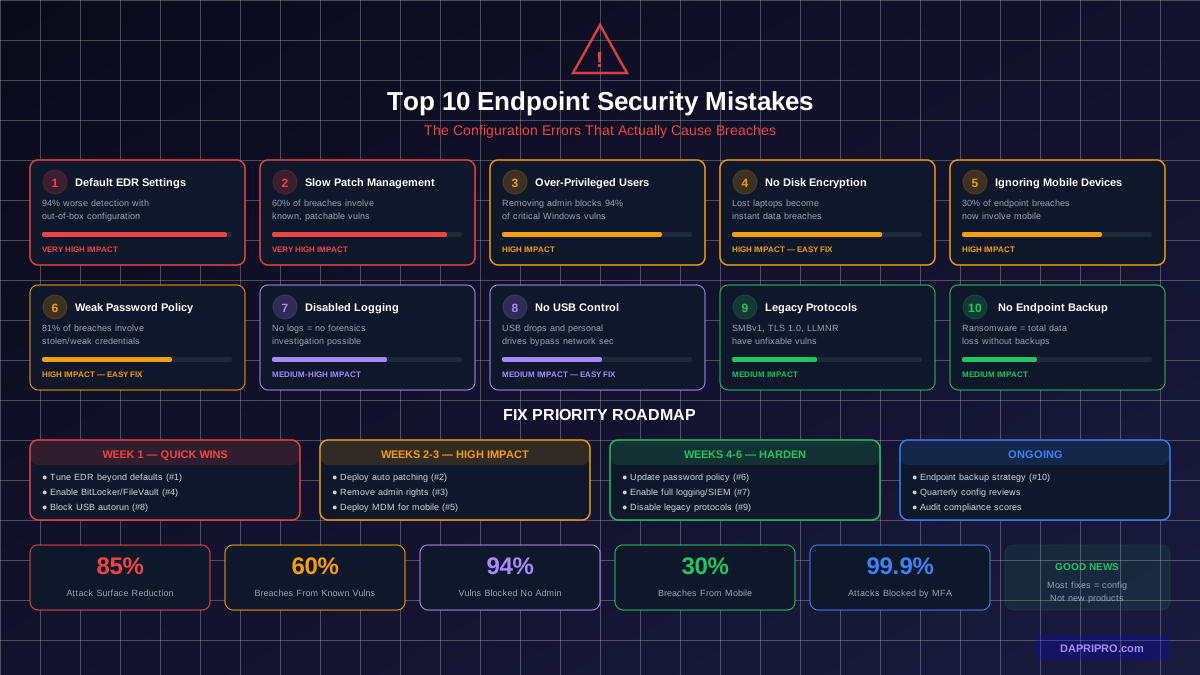
The 10 Mistakes at a Glance
| # | Mistake | Breach Contribution | Fix Difficulty |
|---|---|---|---|
| 1 | Default EDR settings | Very High | Easy (config only) |
| 2 | Slow patch management | Very High | Moderate |
| 3 | Over-privileged accounts | High | Moderate |
| 4 | No disk encryption | High | Easy |
| 5 | Ignoring mobile devices | High | Moderate |
| 6 | Weak password policies | High | Easy |
| 7 | Disabled logging | Medium-High | Easy |
| 8 | No USB/removable media control | Medium | Easy |
| 9 | Legacy protocol support | Medium | Moderate |
| 10 | No endpoint backup strategy | Medium | Moderate |
Mistake 1: Running EDR With Default Settings
This is the biggest one. Organizations spend $5-18 per device per month on endpoint detection and response tools like CrowdStrike Falcon, Microsoft Defender for Endpoint, or SentinelOne — then leave every advanced feature turned off.
What Gets Left Off by Default
- Attack Surface Reduction (ASR) rules — Block macro malware, script attacks, and credential theft. Turned off by default in Microsoft Defender because they can cause false positives.
- Tamper protection — Prevents malware from disabling your security tools. Some organizations disable it because it complicates IT troubleshooting.
- Cloud-delivered protection (maximum level) — Sends suspicious files to the vendor cloud for AI analysis. Often set to standard instead of high.
- Automated investigation and response — Lets the EDR automatically contain threats without waiting for a human analyst. Left in manual mode because teams do not trust it.
The Fix
Schedule a quarterly EDR configuration review. Compare your settings against the vendor's recommended security baseline. For Microsoft Defender, use Microsoft Secure Score — it tells you exactly which features you have not enabled. CrowdStrike has Prevention Policies — set them to "Aggressive" on servers and "Moderate" on workstations.
Mistake 2: Slow or Missing Patch Management
The stat: 60% of breaches in 2025 involved a vulnerability that had a patch available for more than 30 days. The patch existed. It simply was not applied.
Attackers watch for patch announcements because they reveal exactly what the vulnerability is and how to exploit it. Within hours of a patch release, exploit code appears on hacker forums. Within days, automated attack tools incorporate it.
The Patch Timeline That Attackers Follow
| Time After Patch Release | What Attackers Do | Your Risk Level |
|---|---|---|
| 0-24 hours | Reverse-engineer the patch to find the vulnerability | Moderate |
| 1-7 days | Proof-of-concept exploits published | High |
| 7-30 days | Automated scanning for unpatched systems begins | Very High |
| 30+ days | Exploit weaponized in ransomware kits | Critical |
The Fix
Implement automated patch management:
- Critical patches: 72 hours or less
- High-severity: 7 days
- Medium-severity: 30 days
- Use tools like Microsoft Intune, WSUS, SCCM, or third-party solutions like Automox or ManageEngine Patch Manager Plus
- Measure your Mean Time to Patch (MTTP) — target under 14 days for all severity levels
Mistake 3: Giving Everyone Admin Rights
When employees complain they cannot install software, the lazy fix is giving them local administrator access. This is one of the most dangerous things you can do to endpoint security.
The stat: Microsoft found that removing admin rights from standard Windows users blocks 94% of critical vulnerabilities from being exploited — even before patches are applied. The malware simply cannot install because it needs elevated permissions that the user does not have.
Why Admin Rights Are So Dangerous
- Malware that lands via phishing runs with the user's permission level. If that user is an admin, the malware can disable antivirus, install rootkits, and spread to other devices.
- Ransomware needs admin rights to encrypt system files and shadow copies. Without admin access, it can only encrypt files in the user's profile — limiting damage dramatically.
- Credential theft tools like Mimikatz require admin rights to access the LSASS process. No admin rights means no credential dumping.
The Fix
Remove local admin rights from all standard user accounts. Use a Privileged Access Management (PAM) solution like CyberArk, BeyondTrust, or the built-in Windows LAPS (Local Administrator Password Solution) to provide temporary, audited admin access when someone genuinely needs it. Set up a self-service elevation process so users do not have to call IT for every software installation.
Mistake 4: Not Encrypting Hard Drives
A laptop without disk encryption is a data breach waiting to happen. Every year, hundreds of thousands of laptops are lost or stolen. Without encryption, anyone who finds that laptop can pull the hard drive, plug it into another computer, and read every file — emails, customer data, financial records, passwords saved in browsers.
The Fix
- Windows: Enable BitLocker through Group Policy or Intune. It is included in Windows Pro and Enterprise at no extra cost.
- macOS: Enable FileVault through your MDM. Also free and built into macOS.
- Linux: Use LUKS (Linux Unified Key Setup) during OS installation.
- Store recovery keys in Azure AD (for BitLocker) or your MDM (for FileVault). Never let individual users keep recovery keys.
- Verify encryption status with compliance policies that block unencrypted devices from accessing company resources.
Mistake 5: Ignoring Mobile Devices
Your employees access company email, Teams, SharePoint, and cloud storage from their phones every day. Those phones connect to public Wi-Fi at coffee shops and airports. They download apps from stores with minimal security review. And most organizations apply zero security policies to them.
The stat: 30% of endpoint-related breaches now involve mobile devices. Attackers know that phones are the least-protected entry point into corporate networks.
The Fix
- Deploy a Mobile Device Management (MDM) solution — Microsoft Intune, Jamf, or VMware Workspace ONE
- Add a Mobile Threat Defense (MTD) layer — Lookout, Zimperium, or Microsoft Defender for mobile
- Enforce minimum OS versions (block devices running iOS/Android versions more than 2 years old)
- Require screen lock with 6+ digit PIN or biometric authentication
- Enable remote wipe capability for all corporate-accessed devices
Mistake 6: Weak or Outdated Password Policies
Many organizations still enforce password rotation every 90 days with complexity requirements (uppercase, lowercase, number, special character). This approach, recommended in the early 2000s, actually makes security worse because users respond by creating predictable patterns like "Summer2026!" or writing passwords on sticky notes.
The Fix
- Follow the updated NIST 800-63B guidelines:
- Minimum 12 characters (longer is better)
- No forced rotation unless there is evidence of compromise
- Check passwords against known breach databases (Azure AD Password Protection does this automatically)
- No complexity requirements (length matters more than symbols)
- Deploy multi-factor authentication (MFA) on every account. MFA alone blocks 99.9% of automated credential attacks.
- Use a password manager for unique passwords on every service
Mistake 7: Disabled or Underused Logging
When a breach happens, the first thing investigators look for is logs — login attempts, process execution, file access, network connections. If logging is disabled or set to minimal, there is no way to determine what the attacker did, what data they accessed, or how they got in.
The Fix
- Enable Windows Event Logging for: logon events (Success and Failure), process creation with command line, PowerShell script block logging, and object access auditing
- Send logs to a central SIEM (Security Information and Event Management) system — Microsoft Sentinel, Splunk, or Elastic Security
- Set log retention to at least 90 days locally and 1 year in SIEM
- Enable Sysmon on Windows endpoints for detailed process and network logging beyond what Windows Event Logs capture
Mistake 8: No USB or Removable Media Control
USB drives remain a proven attack vector. Hackers drop infected USB drives in parking lots, lobbies, and conference rooms. Curious employees plug them in. Even without social engineering, employees accidentally bring malware from home on personal USB drives.
The Fix
- Disable USB autorun across all endpoints via Group Policy
- Use Device Control in Microsoft Defender for Endpoint to allow only approved USB devices (by vendor ID or serial number)
- Block USB storage devices entirely on sensitive systems (finance, HR, executive laptops)
- If USB drives are needed for legitimate work, provide company-issued encrypted drives and block all others
Mistake 9: Keeping Legacy Protocols Enabled
Old network protocols like SMBv1, TLS 1.0, NTLMv1, and LLMNR have known, unfixable vulnerabilities. Attackers use tools like Responder and Impacket to exploit these protocols for credential theft and lateral movement. But IT teams leave them enabled because "something might break."
The Fix
| Protocol | Risk | Disable How | Replacement |
|---|---|---|---|
| SMBv1 | EternalBlue/WannaCry exploit | Remove Windows feature | SMBv3 |
| TLS 1.0/1.1 | POODLE, BEAST attacks | Registry/GPO | TLS 1.2/1.3 |
| NTLMv1 | Pass-the-hash attacks | GPO security settings | Kerberos/NTLMv2 |
| LLMNR/NBT-NS | Responder credential relay | GPO/registry | DNS |
Audit first: Before disabling any protocol, monitor for 2-4 weeks to identify what applications still use it. Disabling SMBv1 without checking first can break legacy printers, scanners, and old file shares.
Mistake 10: No Endpoint Backup Strategy
When ransomware encrypts every file on a device, the only options are: pay the ransom, restore from backup, or lose the data. If there is no backup, your options shrink to two — and paying the ransom does not guarantee you get the data back (only 65% of organizations that pay actually recover all their data).
The Fix
- Enable OneDrive Known Folder Move (Windows) — automatically backs up Desktop, Documents, and Pictures to OneDrive cloud storage
- For macOS, enable Time Machine backups to network storage or use cloud-based backup
- For critical data, use the 3-2-1 backup rule: 3 copies of data, on 2 different media types, with 1 copy offsite/cloud
- Test restoration quarterly — a backup you have never tested is not really a backup
- Enable ransomware protection in OneDrive/SharePoint — it detects mass encryption and lets you roll back to pre-attack versions
How to Audit Your Endpoint Security Right Now
Here is a quick checklist to score your organization against these 10 mistakes:
- Is your EDR configured beyond defaults? Check your vendor's security score or baseline assessment.
- What is your average time to patch? Measure critical patch deployment in days, not weeks.
- How many users have local admin rights? The answer should be under 5% of your total user base.
- What percentage of devices have disk encryption enabled? Target 100%.
- Are mobile devices enrolled in MDM with security policies? Every device that accesses email should be managed.
- Does your password policy follow NIST 800-63B? Check minimum length and rotation requirements.
- Are security logs being collected and retained for at least 90 days?
- Is USB storage controlled or blocked on endpoints?
- Are legacy protocols (SMBv1, TLS 1.0, LLMNR) disabled?
- Can you restore an endpoint from backup within 4 hours?
Score 8 or more "yes" answers and your endpoint security is strong. Score 5-7 and you have meaningful gaps. Score below 5 and endpoint compromise is likely a matter of when, not if. The good news: most of these fixes are configuration changes that use tools you already own. You do not need to buy new products — you need to use the ones you have properly.