Wi-Fi is everywhere — homes, offices, coffee shops, airports, hospitals, schools. We depend on wireless connections for almost everything we do online. But Wi-Fi is also one of the easiest things to attack if it is not set up correctly.
Unlike wired networks where an attacker needs physical access to a cable, anyone within range of your Wi-Fi signal can try to connect, intercept your traffic, or launch attacks. That range can extend well beyond your walls — a directional antenna can pick up Wi-Fi signals from hundreds of meters away.
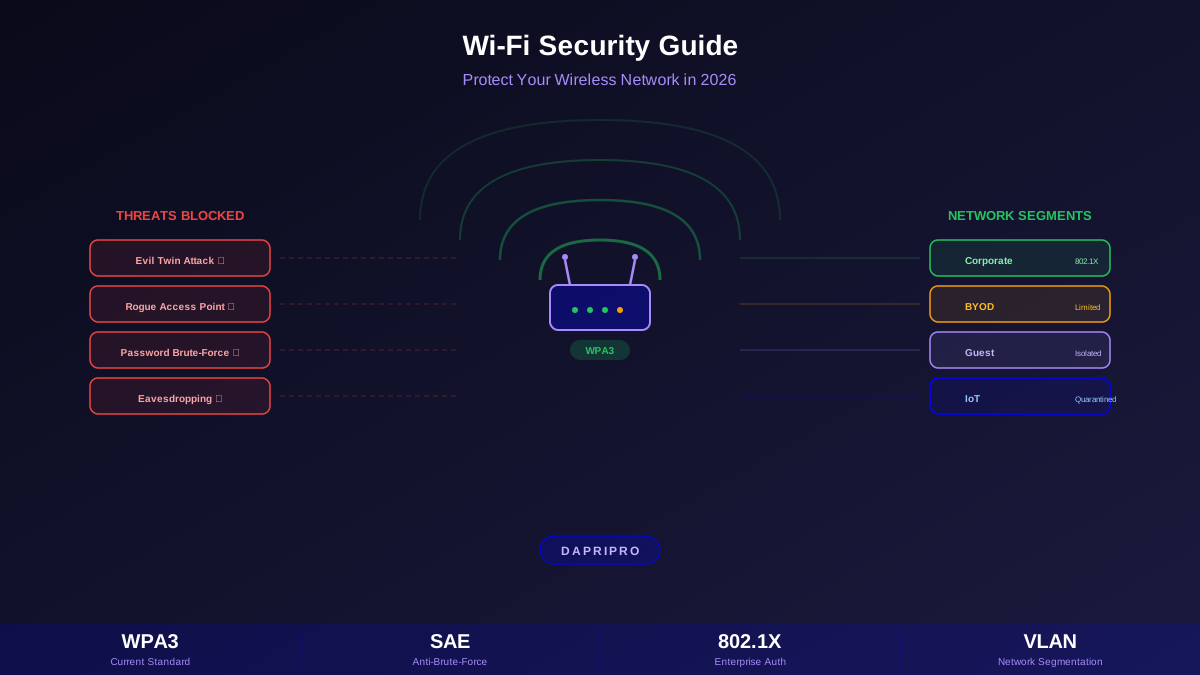
This guide covers everything you need to know about securing wireless networks in 2026, from upgrading to WPA3 and detecting rogue access points to hardening home and enterprise Wi-Fi and defending against evil twin attacks.
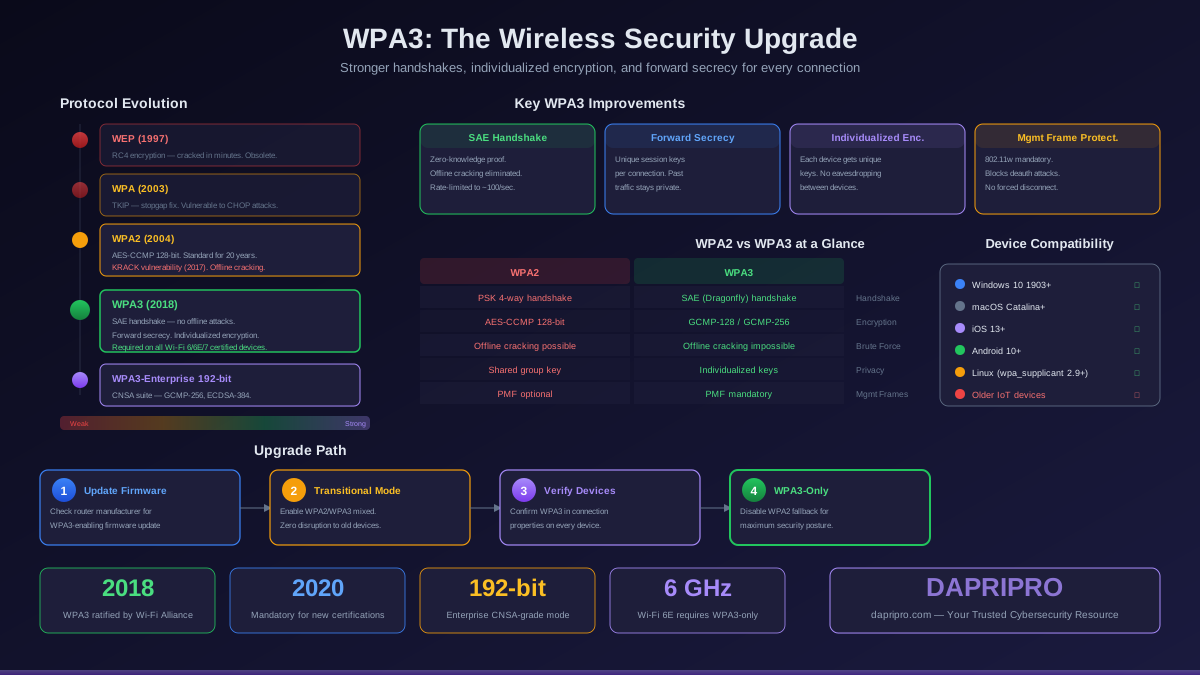
WPA3: The Current Standard
WPA3 is the latest generation of Wi-Fi security, replacing WPA2 which had been the standard since 2004. Here is why upgrading to WPA3 matters:
WPA3 Modes
| Mode | Authentication | Best For |
|---|---|---|
| WPA3-Personal | SAE (password-based, resistant to offline brute-force) | Home networks, small offices |
| WPA3-Enterprise | 802.1X with RADIUS, 192-bit minimum security | Businesses, government, healthcare |
| Enhanced Open (OWE) | Encrypts traffic on open networks without a password | Public Wi-Fi (cafes, airports, hotels) |
| WPA3-Personal Transition | Accepts both WPA2 and WPA3 clients | Mixed environments during upgrade |
Evil Twin and Rogue Access Point Attacks
An evil twin attack is when an attacker creates a fake Wi-Fi network with the same name (SSID) as a legitimate network. Your device connects to the attacker's network because it has a stronger signal or because your device automatically reconnects to known network names.
Once you are connected to an evil twin:
- The attacker can see all your unencrypted traffic
- They can redirect you to fake login pages (phishing)
- They can inject malware into HTTP downloads
- They can perform man-in-the-middle attacks on HTTPS if you ignore certificate warnings
How to protect against evil twin attacks:
- ✅ Always use a VPN on public Wi-Fi — encrypts everything even if the network is hostile
- ✅ Verify the network — ask staff for the exact network name and check for duplicates
- ✅ Disable auto-connect — do not let your device automatically join known networks
- ✅ Use cellular data when in doubt — your phone's data connection is much harder to intercept
- ✅ Watch for certificate warnings — never click "proceed anyway" on untrusted certificates
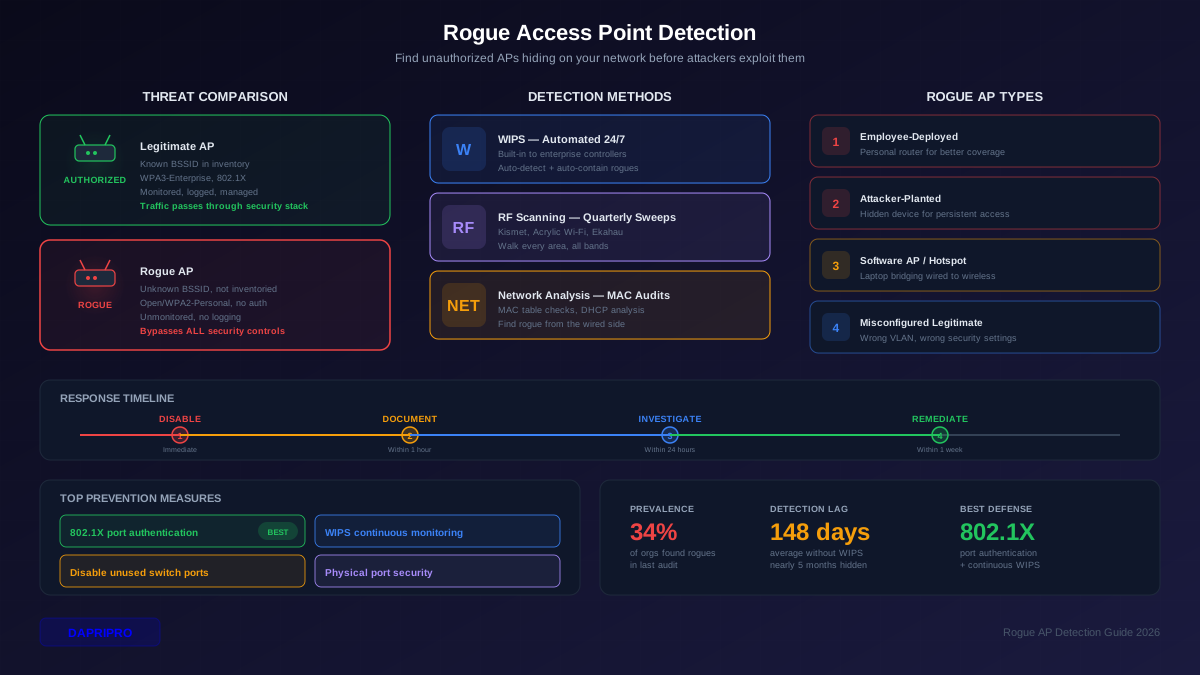
Detecting Rogue Access Points
Rogue access points are unauthorized wireless access points connected to your network — either by malicious actors or by employees who plugged in their own router for convenience. Both are serious security risks.
Detection methods:
- Wireless IDS (WIDS) — enterprise tools that continuously scan the airspace for unauthorized SSIDs and BSSIDs (Aruba, Cisco, Meraki)
- Network scanning — tools like Nmap that detect unknown devices on your wired network
- Wi-Fi analyzer apps — free apps that show all nearby access points with signal strength, channel, and encryption type
- 802.1X port security — only allow authorized devices to connect to wired switch ports, preventing rogue APs from being plugged in
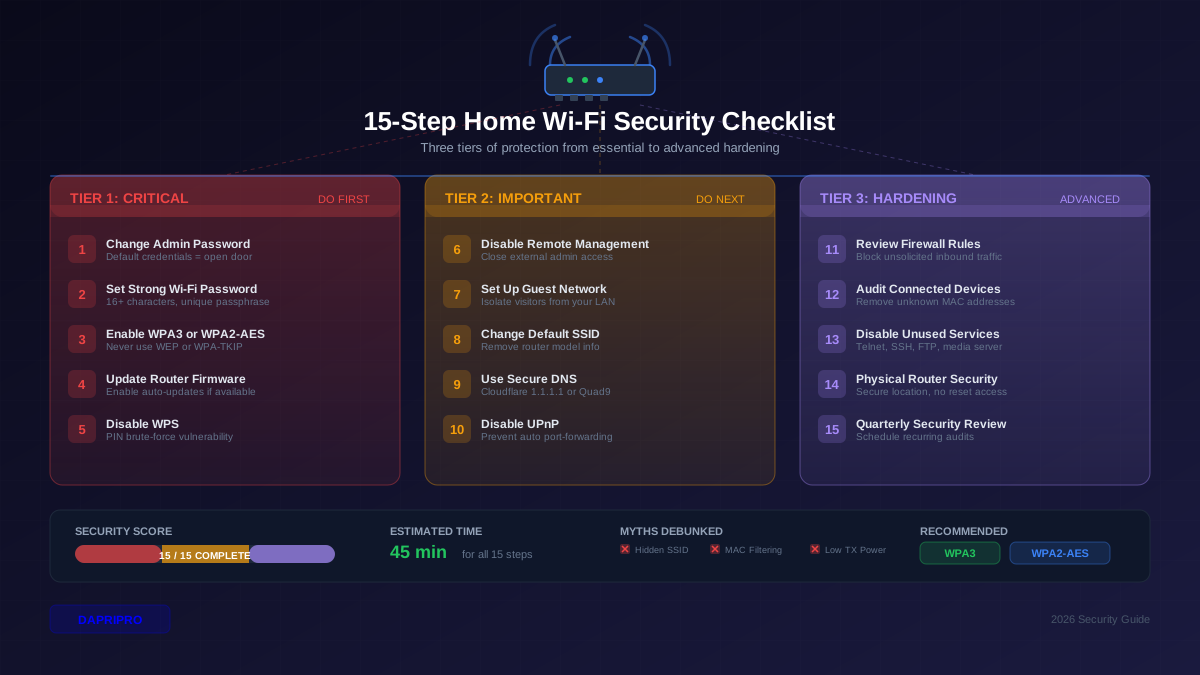
Home Wi-Fi Security Checklist
Your home Wi-Fi security checklist — follow every step:
- ☐ Change default admin credentials — "admin/admin" or "admin/password" are the first thing attackers try on your router
- ☐ Use WPA3 (or WPA2-AES minimum) — never WEP, never WPA-TKIP
- ☐ Set a strong Wi-Fi password — at least 16 characters, mix of letters, numbers, and symbols. Avoid dictionary words.
- ☐ Disable WPS — Wi-Fi Protected Setup has a known vulnerability that allows PIN brute-forcing in hours
- ☐ Update router firmware — check for updates monthly. Router vulnerabilities are common targets.
- ☐ Enable the router firewall — usually enabled by default, verify it is on
- ☐ Disable remote management — prevent your router's admin panel from being accessible from the internet
- ☐ Set up a guest network — isolated from your main network for visitors
- ☐ Disable UPnP — Universal Plug and Play automatically opens ports and is frequently exploited
- ☐ Consider changing your SSID — do not use your name, address, or router model as the network name
Enterprise Wireless Security
Enterprise wireless networks need much more than a strong password. Here is how to architect secure corporate Wi-Fi:
Enterprise Wi-Fi Architecture
802.1X Authentication
802.1X is the gold standard for enterprise wireless authentication. Instead of everyone sharing one Wi-Fi password, each user authenticates with their own credentials:
- How it works: When a device connects, the access point sends the authentication request to a RADIUS server (Microsoft NPS, FreeRADIUS, Cisco ISE). The server checks credentials against Active Directory or LDAP.
- Benefits: Individual accountability (you know WHO connected), easy revocation (disable one account without changing the password for everyone), stronger security (per-session encryption keys).
- Certificate-based: For the highest security, deploy device certificates so that only managed devices with valid certificates can join the corporate network — no username/password needed.
Guest Wi-Fi Best Practices
Guest Wi-Fi is a must-have for any organization — visitors, contractors, and customers need internet access without being able to access your internal network:
- ✅ Separate VLAN — guest traffic should be on a completely different network segment with no route to internal resources
- ✅ Captive portal — require guests to accept terms of use before connecting
- ✅ Client isolation — prevent guest devices from seeing or communicating with each other
- ✅ Bandwidth limiting — prevent a single guest from consuming all available bandwidth
- ✅ Content filtering — block malicious, illegal, and inappropriate content
- ✅ Time limits — automatically disconnect sessions after a set period (4–8 hours typical)
- ✅ Logging — maintain connection logs for legal compliance and incident response
Lock Down Your Wireless Network
Wi-Fi security starts with the basics: upgrade to WPA3, change default passwords, disable WPS, and keep firmware updated. For businesses, segment your network into corporate, BYOD, and guest tiers with 802.1X authentication and RADIUS.
The invisible nature of wireless signals makes Wi-Fi a tempting target. Unlike wired networks, attackers do not need physical access — they just need to be within range. Take wireless security seriously, scan for rogue access points regularly, and always use a VPN on any Wi-Fi network you do not fully control.