Every time you send a message on WhatsApp, buy something online, or log into your email, encryption is working behind the scenes to protect you. It is the invisible force field that keeps your private data safe from hackers, spies, and criminals.
But what exactly is encryption? How does it work? And with quantum computers on the horizon, is our current encryption about to become obsolete?
This guide breaks down everything you need to know about data encryption in plain language — from the basic concepts to the cutting-edge technologies that will shape the future of privacy and security.
What Is Encryption?
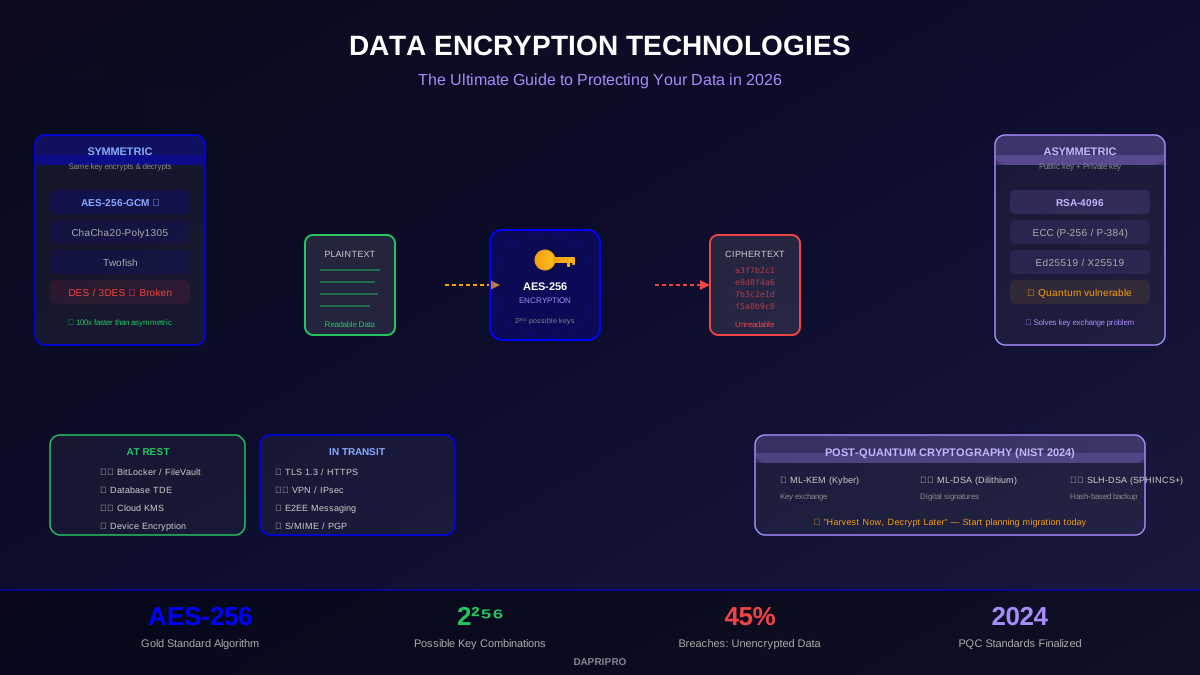
Encryption is the process of converting readable data (called plaintext) into scrambled, unreadable code (called ciphertext) using a mathematical algorithm and a key. Only someone with the correct key can convert it back to readable form (called decryption).
Think of it like this: encryption is like putting your message in a locked safe. The algorithm is the design of the safe (how complicated the lock is), and the key is the combination to open it. Without the right combination, the safe's contents are completely inaccessible.
There are two main types of encryption:
AES: The Gold Standard of Encryption
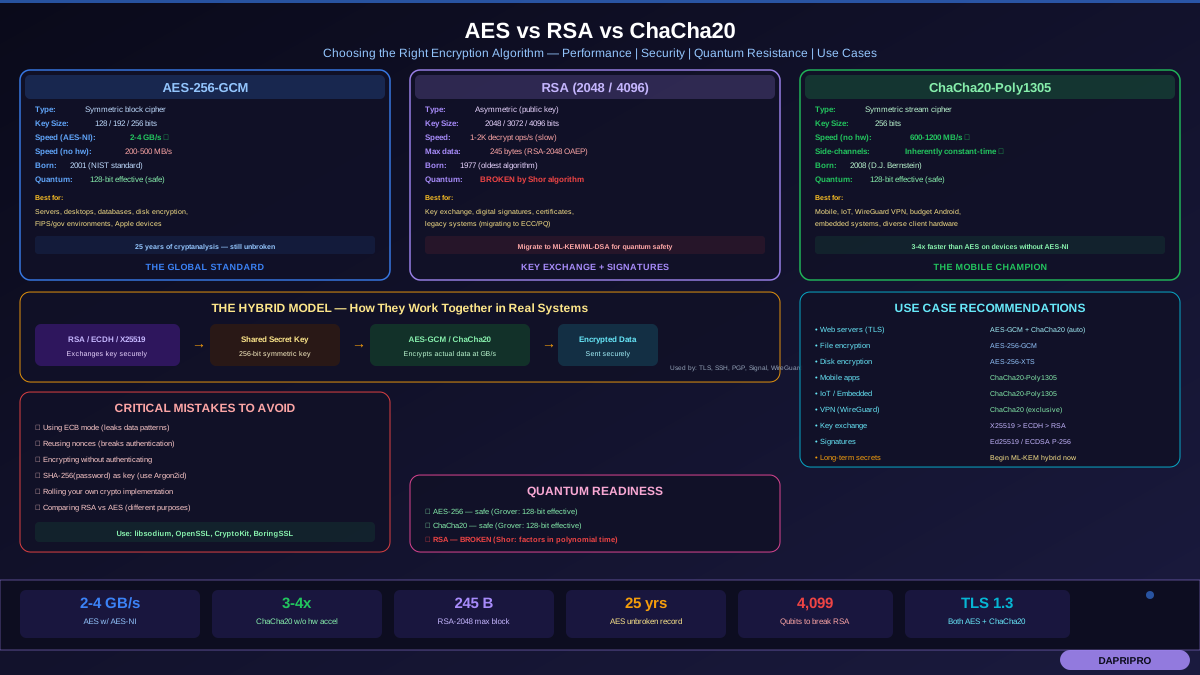
AES (Advanced Encryption Standard) is the most widely used encryption algorithm in the world. It was adopted by the US government in 2001 and is now used everywhere — from banking and healthcare to your phone's lock screen.
AES Key Sizes
| Key Size | Possible Keys | Time to Brute Force | Used For |
|---|---|---|---|
| AES-128 | 2^128 (3.4 × 10^38) | ~1 billion billion years | Standard protection, Wi-Fi (WPA3), consumer apps |
| AES-192 | 2^192 (6.2 × 10^57) | Even longer | Government classified data |
| AES-256 | 2^256 (1.1 × 10^77) | Essentially forever | Top secret data, financial, quantum-resistant applications |
AES-256 is considered quantum-resistant — even future quantum computers would need 2^128 operations to crack it using Grover's algorithm, which is still impossibly large.
How AES Modes Work
AES doesn't just encrypt data in one block — it uses different modes that determine how blocks of data are processed:
- GCM (Galois/Counter Mode) — The gold standard. Provides both encryption AND authentication (verifies data hasn't been tampered with). Used in TLS 1.3, HTTPS, and most modern applications.
- CBC (Cipher Block Chaining) — Each block depends on the previous one. Still widely used but being replaced by GCM.
- CTR (Counter Mode) — Turns AES into a stream cipher. Fast and parallelizable.
- ECB (Electronic Codebook) — ❌ Never use this. Encrypts each block independently, creating patterns that leak information.
End-to-End Encryption (E2EE)
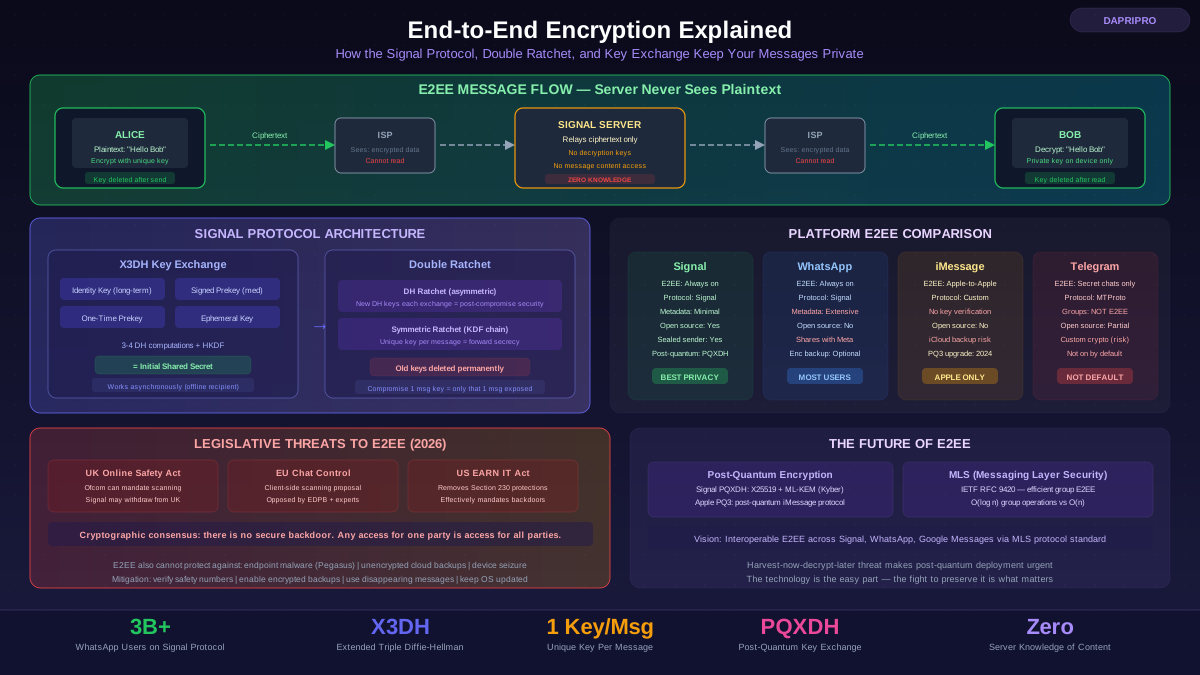
End-to-end encryption means your data is encrypted on your device before it leaves, and only the intended recipient's device can decrypt it. The company running the service — even if ordered by a court — cannot read your data because they never have the keys.
Apps That Use End-to-End Encryption
| App | E2EE by Default? | Protocol | Metadata Protected? |
|---|---|---|---|
| Signal | ✅ Yes, always | Signal Protocol | ✅ Minimal metadata |
| ✅ Yes, always | Signal Protocol | ❌ Collects metadata | |
| iMessage | ✅ Yes (between Apple devices) | Apple's custom protocol | Partial |
| Telegram | ❌ Only "Secret Chats" | MTProto | ❌ No |
| Facebook Messenger | ✅ Yes (since Dec 2023) | Signal Protocol | ❌ No |
| Google Messages | ✅ Yes (RCS between Android) | Signal Protocol | Partial |
The critical difference: an app that offers encryption "in transit" but stores your messages on their servers unencrypted does NOT provide end-to-end encryption. With true E2EE, even a data breach at the company's servers would only reveal encrypted data that cannot be read.
Full Disk Encryption: Protecting Your Devices
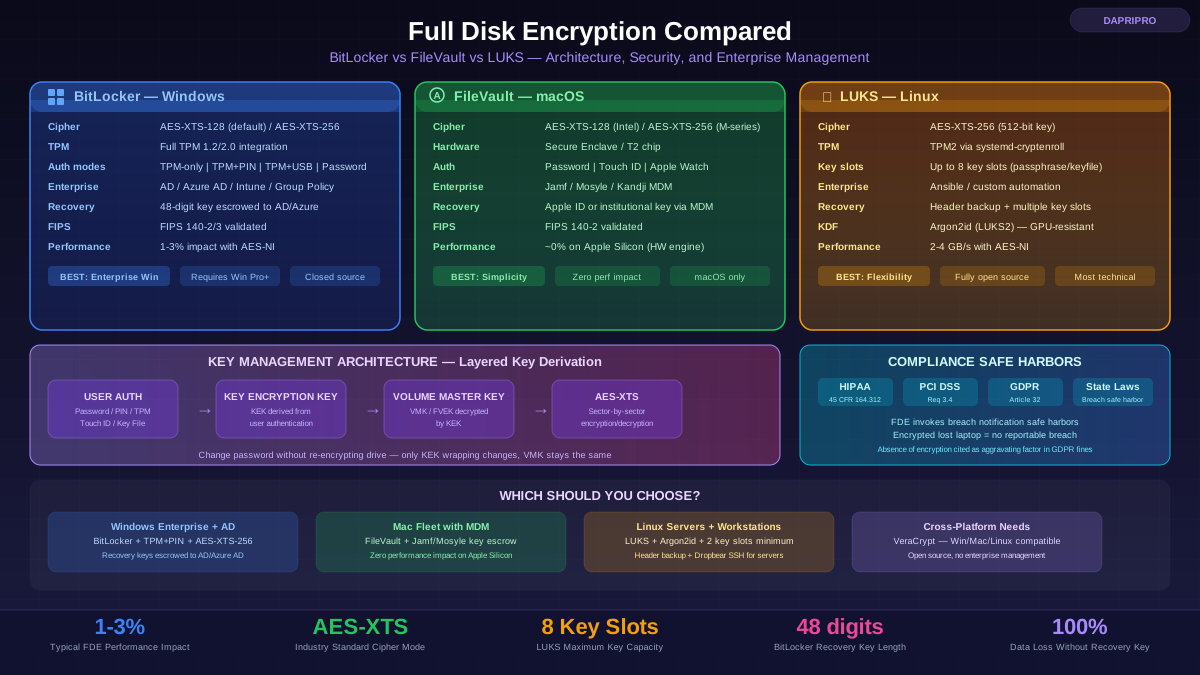
Full disk encryption (FDE) encrypts everything on your device's storage — the operating system, applications, and all your files. If someone steals your device, they cannot access anything without your password or key.
Which FDE Should You Use?
- Windows users → BitLocker (built into W11 Pro/Enterprise; W11 Home users can use Device Encryption if TPM 2.0 is present)
- Mac users → FileVault (built into all macOS versions, practically zero performance impact on Apple Silicon)
- Linux users → LUKS (set up during installation, most distros offer it as a checkbox option)
- Cross-platform needs → VeraCrypt (open source, works on Windows/Mac/Linux, excellent for encrypted containers and USB drives)
Mobile devices: iPhones encrypt automatically when you set a passcode. Android phones encrypt by default since Android 10. Make sure you have a strong passcode — a 6-digit PIN is far more secure than a 4-digit one, and an alphanumeric password is strongest.
Database Encryption
Database encryption protects stored data from unauthorized access. There are several approaches:
- Transparent Data Encryption (TDE) — Encrypts the entire database at the storage level. The database engine handles encryption and decryption automatically. Used by SQL Server, Oracle, and PostgreSQL. Great for protecting against physical theft of storage media.
- Column-Level Encryption — Encrypts specific sensitive columns (like SSNs, credit card numbers). More granular control but adds complexity and impacts query performance.
- Application-Level Encryption — The application encrypts data before sending it to the database. The database never sees plaintext. Strongest protection but requires careful key management.
Encryption at Rest vs. In Transit
| Type | What It Protects | Common Standards | Analogy |
|---|---|---|---|
| At Rest | Data stored on disks, drives, databases | AES-256, TDE, FDE | Locking valuables in a safe |
| In Transit | Data moving across networks | TLS 1.3, HTTPS, IPsec | Sending mail in a sealed armored truck |
| In Use | Data being processed in memory | Confidential Computing, TEEs | Working in a locked, soundproof room |
True comprehensive data protection requires all three — but encryption at rest and in transit are the minimum standard for any organization handling sensitive data.
Encrypting Your Cloud Storage
Major cloud providers encrypt your data at rest by default, but there is a critical difference between server-side encryption (the provider holds the keys) and client-side encryption (you hold the keys):
- Google Drive / OneDrive / Dropbox — Encrypt data at rest with AES-256, but the provider has the keys. They can comply with government requests to access your data.
- iCloud Advanced Data Protection — Apple's opt-in E2EE for iCloud. When enabled, Apple cannot access most of your data even if compelled by law enforcement.
- Tresorit / SpiderOak / Proton Drive — Zero-knowledge encryption as the default. The service provider never has access to your unencrypted files.
- Cryptomator / Boxcryptor — Add client-side encryption to any cloud service. You encrypt files locally before they sync to the cloud.
Post-Quantum Cryptography: The Future of Encryption
Quantum computers threaten to break the asymmetric encryption (RSA, ECC) that secures most of the internet. A sufficiently powerful quantum computer running Shor's algorithm could factor large numbers exponentially faster than classical computers — breaking RSA-2048 in hours instead of billions of years.
The "harvest now, decrypt later" threat is real: adversaries are already collecting encrypted data today, planning to decrypt it once quantum computers mature. This means sensitive data with a long shelf life (government secrets, medical records, financial data) is already at risk.
NIST Post-Quantum Standards (Finalized 2024)
- ML-KEM (CRYSTALS-Kyber) — Key encapsulation mechanism for secure key exchange. Already being integrated into TLS and browsers.
- ML-DSA (CRYSTALS-Dilithium) — Digital signature algorithm for authentication and code signing.
- SLH-DSA (SPHINCS+) — Hash-based signature scheme as a backup in case lattice-based algorithms face unexpected vulnerabilities.
Google Chrome, Apple's iMessage, and Signal have already begun implementing post-quantum cryptography in 2024-2025. The transition will take years, but organizations should start their crypto inventory now — cataloging where and how encryption is used so they can plan the migration.
Common Encryption Mistakes to Avoid
- Not encrypting at all — 45% of breaches involve unencrypted data. Encryption is the easiest way to make stolen data worthless.
- Using outdated algorithms — DES, 3DES, RC4, and MD5 are broken. Use AES-256-GCM for symmetric, RSA-2048+ or ECC P-256+ for asymmetric.
- Poor key management — Storing encryption keys next to the encrypted data is like hiding a house key under the doormat. Use hardware security modules (HSMs) or dedicated key management services.
- Weak passwords on encryption — AES-256 is useless if the password protecting the key is "password123." Use long, random passphrases.
- Using ECB mode — Electronic Codebook mode creates visible patterns in encrypted data. Always use GCM or CBC with proper initialization vectors.
- Implementing your own encryption — Never write your own encryption algorithm. Use well-tested libraries like OpenSSL, libsodium, or the Web Crypto API.
Your Encryption Checklist for 2026
Here is what you should be doing right now to protect your data with encryption:
For Individuals
- ✅ Enable full disk encryption on your laptop (BitLocker/FileVault/LUKS)
- ✅ Set a strong passcode on your phone (iPhone and Android encrypt by default when passcode is set)
- ✅ Use a messaging app with E2EE (Signal is the gold standard)
- ✅ Look for HTTPS on every website before entering personal data
- ✅ Use a VPN on public Wi-Fi to encrypt your internet traffic
- ✅ Enable iCloud Advanced Data Protection or use zero-knowledge cloud storage
- ✅ Use a password manager (they use AES-256 to encrypt your vault)
For Organizations
- ✅ Encrypt all data at rest — databases, backups, file servers, endpoints
- ✅ Enforce TLS 1.3 for all data in transit
- ✅ Implement proper key management with HSMs or cloud KMS
- ✅ Catalog all encryption usage (crypto inventory) for PQC migration planning
- ✅ Require E2EE for sensitive internal communications
- ✅ Test encryption recovery procedures regularly
- ✅ Begin evaluating post-quantum algorithms for long-lived sensitive data
Encryption Is Your Most Powerful Privacy Tool
Encryption is the single most effective technology for protecting data. It turns your sensitive information into meaningless gibberish for anyone who does not have the key — whether that is a hacker who breaches a database, a thief who steals your laptop, or even a government demanding access to your data.
The math behind AES-256 is so strong that cracking it would take longer than the age of the universe. And with post-quantum cryptography standards now finalized, the future of encryption is already being built to withstand threats that do not even exist yet.
The only encryption that fails is encryption that is not used. Start protecting your data today.