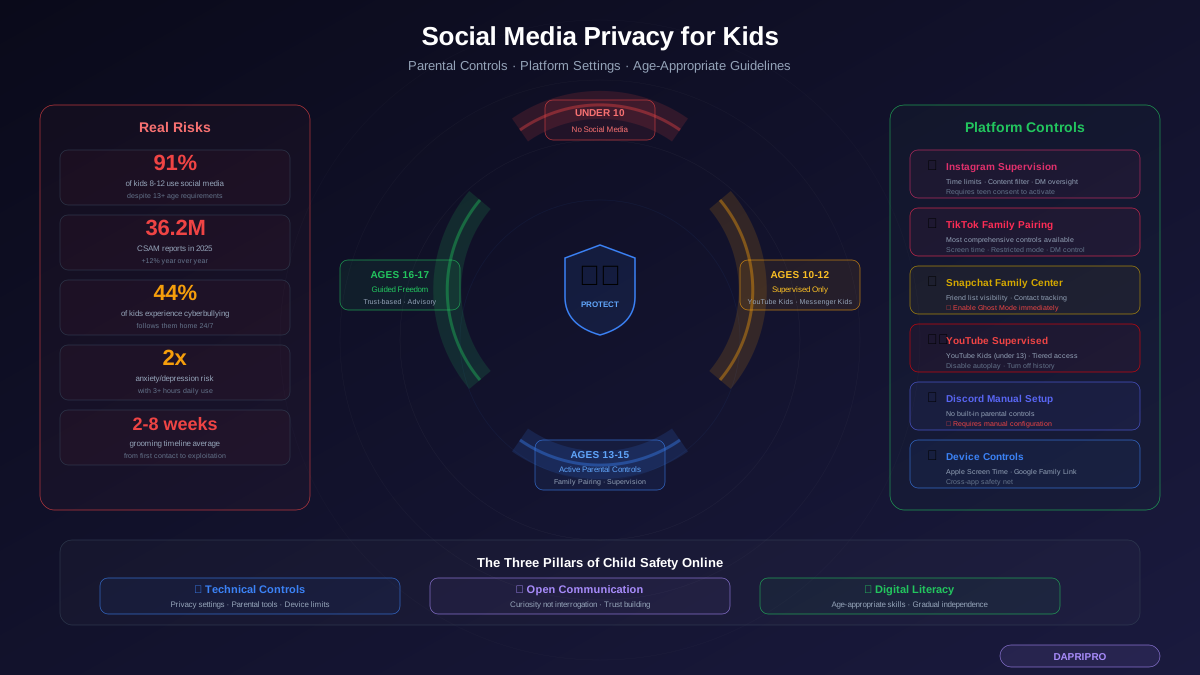
Here is the reality: your child is already on social media. A 2026 Common Sense Media study found that 91% of children aged 8 to 12 actively use at least one social media platform, despite every major platform requiring users to be at least 13. By the time kids are 10, more than half have created accounts using a fake birth date.
The question is not whether your child will use social media. It is whether they will use it with any protection at all.
Default settings on every platform are designed to maximize engagement, not protect children. Public profiles, open DMs, location sharing, algorithmic content recommendations — all of it is turned on out of the box, and none of it is safe for a minor. This guide shows you exactly which settings to change on every major platform, which parental controls actually work, and how to have the conversations that build real digital literacy instead of just creating sneaky kids who find workarounds.
The Real Risks Kids Face on Social Media in 2026
Social media risks for children go far beyond "too much screen time." Here is what actually happens when a child uses social media with default settings:
Predatory Contact
A public profile with a visible age, school name, or location makes a child easy to find for bad actors. In 2025, the National Center for Missing and Exploited Children received 36.2 million reports of child sexual abuse material online — a 12% increase from 2024. Predators use public posts and comments to identify targets, then initiate contact through DMs, gaming platforms, or alternate accounts.
The most common grooming pattern on social media starts with compliments on posts, progresses to daily messaging, and escalates to requests for personal photos within 2-8 weeks.
Algorithmic Content Exposure
Platform algorithms do not know your child is 11. They serve content based on engagement patterns. A child who watches one video about weight loss will receive a relentless stream of eating disorder content. One video about sadness leads to an avalanche of depression and self-harm content. Research from the US Surgeon General found that adolescents spending more than 3 hours daily on social media face double the risk of anxiety and depression symptoms.
Data Collection and Profiling
Social media platforms collect extensive behavioral data even from underage users. This data is used for ad targeting and can be exposed in breaches. Under COPPA, platforms cannot knowingly collect data from children under 13 without parental consent, but enforcement is minimal when kids lie about their age during signup.
Cyberbullying and Social Pressure
44% of children aged 8-12 report experiencing cyberbullying. Unlike in-person bullying, cyberbullying follows children home, operates 24/7, and creates permanent digital records. Features like Snapchat "Snap Maps," Instagram close friends lists, and TikTok duets create new vectors for exclusion, harassment, and emotional manipulation.
Location and Identity Exposure
Kids routinely share their location without understanding the implications. Geotagged photos reveal home addresses. School uniform photos identify which school they attend. "First day of school" posts with visible building numbers and street signs provide exact locations. Stories and posts visible to the public broadcast a child routine and whereabouts in real time.
Platform-Specific Parental Controls: Complete Setup Guide
Instagram Supervision (Ages 13+)
Instagram Supervision is Meta built-in parental oversight tool. It requires your teen consent to activate — which means having the conversation about why before you set it up.
How to enable:
- Open Instagram > Settings > Supervision
- Send an invitation to your teen account (or have them initiate from their end)
- Once accepted, you can access the Family Center dashboard from your own Instagram account
What you can control:
- Daily time limits — Set maximum daily usage. When the limit is reached, your teen sees a notification (they can request more time, which you approve or deny)
- Scheduled breaks — Block Instagram during specific hours like bedtime or school
- Content sensitivity — Restrict Explore and Reels content to the least sensitive option
- Message controls — See who your teen has messaged (not message content) and block specific accounts from contacting them
- New follower notifications — Receive alerts when your teen gains new followers
Critical setting changes (do these regardless of Supervision):
- Switch account to Private (Settings > Account privacy > Private account)
- Disable Activity Status (Settings > Privacy > Activity status)
- Turn off "Allow others to reshare your stories" and "Allow sharing to messages"
- Set "Close Friends" story sharing as default
- Remove phone number and email from the profile bio
TikTok Family Pairing (Ages 13+)
TikTok Family Pairing gives parents the most comprehensive controls of any major platform. It links a parent TikTok account to their teen account via QR code.
How to enable:
- Both parent and teen open TikTok > Settings > Family Pairing
- Parent selects "Parent," teen selects "Teen"
- Teen scans the QR code displayed on the parent phone
What you can control:
- Screen time management — Daily limits with customizable schedules. Dashboard shows actual usage time
- Restricted mode — Filters content not appropriate for younger audiences (not perfect, but catches most egregious content)
- Direct messages — Disable entirely, or limit to "Friends only." For under-16 accounts, DMs are off by default in 2026
- Discoverability — Prevent the account from appearing in search results or "Suggested Users"
- Video downloads — Disable downloads so content cannot be saved and shared outside TikTok
- Like and comment visibility — Restrict who can see liked videos and control comment permissions
TikTok under-13 protections: TikTok officially does not allow users under 13. If an account is reported and confirmed as underage, it is deleted. However, the platform also offers "TikTok for Younger Users" — a walled-garden experience with curated content and no commenting, messaging, or profile sharing.
Snapchat Family Center (Ages 13+)
How to enable:
- Parent opens Snapchat > Profile > Settings > Family Center
- Send invitation to teen. Teen must accept from their end
What you can see:
- Who your teen has been messaging (not content) in the past 7 days
- Their friend list
- Content sensitivity settings
- Who they have reported or blocked
Critical Snapchat settings:
- Ghost Mode — Enable permanently. Snap Maps broadcasts your child exact location and is the single most dangerous default on Snapchat
- Contact permissions — Set to "Friends only" for stories, location, and contact
- Quick Add — Disable. This feature suggests your child account to strangers based on mutual contacts, phone numbers, or location
- My AI — Review and restrict Snapchat AI chatbot, which has generated inappropriate content for minors in documented cases
YouTube Parental Controls
For under-13: Use YouTube Kids. It provides a curated, age-appropriate experience with content filtering, search restrictions, and timer controls. Set up through Google Family Link.
For 13+: Use YouTube Supervised Experiences through Google Family Link:
- Explore (age 9+) — Content suitable for ages 9 and older
- Explore More (age 13+) — Broader content, still filtered
- Most of YouTube (age 13+) — Nearly everything except age-restricted content
Essential YouTube settings:
- Disable autoplay (stops the algorithmic rabbit hole)
- Turn off watch and search history (stops the profile building)
- Set reminders for breaks every 30-60 minutes
- Disable notifications to reduce compulsive checking
Discord Parental Setup
Discord is often overlooked by parents but is where many kids spend the most unmonitored time. There are no built-in parental controls, so you must configure safety settings manually:
- Enable "Keep Me Safe" DM filter — Scans and deletes messages containing explicit media from non-friends
- Set "Who can add you as a friend" to "Server members" only — Prevents random friend requests
- Disable "Allow direct messages from server members" for any public servers
- Review server memberships together — Discord servers range from perfectly safe to extremely dangerous, and there is no rating system
Device-Level Parental Controls
Platform-specific controls only work on that platform. Device-level controls provide a safety net covering all apps:
Apple Screen Time (iPhone/iPad)
- Settings > Screen Time > Content & Privacy Restrictions
- Set app limits for social media categories
- Disable in-app purchases
- Restrict explicit content in web, music, and podcasts
- Prevent changes to privacy settings (so your child cannot undo your work)
- Use "Communication Safety" to blur explicit images in Messages
Google Family Link (Android)
- Approve or block app downloads before installation
- Set daily screen time limits with bedtime lockout
- See app activity reports (time spent, apps opened)
- Location tracking (shows your child device location)
- Filter Google Search and Chrome browsing
Age-Appropriate Social Media Guidelines
Under 10: No Social Media Accounts
Children under 10 lack the cognitive development to understand privacy implications, recognize manipulation, or manage social pressure. There are zero social media platforms designed for this age group that are genuinely safe. Use messaging apps with family-only contact lists (like Apple Messages or Google Chat Family Groups) for communication with relatives.
Ages 10-12: Supervised Entry Points Only
If your child is in this age range and socially pressured to participate, consider:
- YouTube Kids or supervised YouTube — Curated video content with parental controls
- Messenger Kids — Facebook messaging app where parents control the contact list entirely
- Shared family accounts — Some families create a shared account that the child uses only with a parent present. This teaches platform mechanics before independent use
Ages 13-15: Controlled Access with Active Oversight
This is when most kids will create their own accounts (or already have). Your role shifts from prevention to configuration:
- Set up platform-specific parental controls (Instagram Supervision, TikTok Family Pairing, etc.)
- All accounts must be set to Private
- Location sharing disabled on every platform
- DMs restricted to friends/followers only
- Weekly check-ins about online experiences (not interrogations — conversations)
- Agree on what is acceptable to post (no school name, home location, or identifying details)
Ages 16-17: Trust-Based Independence
Gradually reduce monitoring as your teen demonstrates responsible behavior:
- Maintain privacy settings but step back from activity monitoring
- Shift to advisory conversations rather than oversight
- Discuss real-world consequences of digital actions (college admissions screening, employer searches)
- Encourage them to teach younger siblings about digital safety (teaching reinforces learning)
Conversations That Actually Work
Technical controls without communication create kids who find workarounds. Communication without technical controls creates kids who are vulnerable. You need both. Here is how to approach the conversations:
Start with Curiosity, Not Interrogation
Instead of "Show me your phone" or "Who are you talking to," try:
- "What is the funniest thing you saw online today?"
- "Has anyone you do not know tried to message you?"
- "Is there anything you have seen that made you uncomfortable or confused?"
- "What would you do if someone sent you something inappropriate?"
The goal is to become the person your child wants to tell about problems, not the person they hide things from.
Explain the Why Behind Every Rule
"Because I said so" does not work for digital safety. Kids need to understand:
- Why private accounts matter — "When your profile is public, anyone in the world can see your photos, find your school, and know where you hang out. A private account means only people you approve can see your posts."
- Why location sharing is dangerous — "Snap Maps shows your exact location in real time. Someone could use that to find out where you live, where you go after school, and when you are home alone."
- Why strangers messaging you is a red flag — "Adults who want to be friends with kids online are not normal. A real adult would never try to be best friends with someone your age through an app."
Establish a Digital Agreement (Not Rules)
Frame it as a mutual agreement rather than imposed rules. Both parties have commitments:
Child commits to:
- Keeping their account private
- Not sharing personal information (school, address, phone number)
- Telling a parent if someone makes them uncomfortable
- Not meeting people they only know online
- Following agreed screen time limits
Parent commits to:
- Not reading private messages without cause
- Discussing concerns before taking action (like deleting an account)
- Respecting screen time boundaries (not constantly extending rules)
- Learning about the platforms the child uses
- Not using information shared in trust as ammunition during arguments
Warning Signs Your Child May Be in Danger Online
Watch for these behavioral changes that may indicate problematic online interactions:
- Hiding their screen when you walk by — occasional privacy is normal, but consistent hiding is not
- New gifts or money with vague explanations about where they came from
- Emotional changes after device use — anxiety, anger, sadness, or withdrawal
- Secondary accounts you did not know about (check app folders, recently deleted apps, and browser bookmarks)
- Older friends that only exist online and that your child is reluctant to tell you about
- Using devices at unusual hours — after bedtime, during school, sneaking a device into the bathroom
- Switching apps quickly when you approach — this suggests they are using something they know you would not approve of
If you notice multiple warning signs, do not panic and do not immediately confiscate devices. That will shut down communication. Instead, have a calm conversation expressing specific concerns without accusations.
How to Respond When Something Goes Wrong
If Your Child Receives Inappropriate Content
- Stay calm. Your reaction determines whether they come to you next time
- Tell them they are not in trouble
- Screenshot the content and sender information
- Block and report the sender through the platform
- If the content is illegal (child exploitation material), report to NCMEC CyberTipline and local law enforcement. Do not forward or save the content beyond what is needed for reporting
If Your Child Is Being Cyberbullied
- Document everything with screenshots
- Do not tell your child to "just ignore it" — validate their feelings
- Report through the platform built-in tools
- Contact the school if the bullying involves classmates
- If threats of violence are involved, contact law enforcement
- Consider temporary breaks from the platform, but frame it as protective, not punitive
If You Suspect Predatory Contact
- Do not alert the predator or confront them directly
- Preserve all evidence — do not delete messages or accounts
- Report to NCMEC CyberTipline (1-800-843-5678 or CyberTipline.org)
- Contact local law enforcement
- Report through the platform safety tools
- Seek professional support for your child — even if they do not think they need it
The Bottom Line
Your child is going to use social media. Banning it entirely does not work — it just pushes usage underground and eliminates your ability to guide them. The evidence consistently shows that the most effective approach combines three things: properly configured privacy settings on every platform, age-appropriate parental controls that are transparent (not covert), and ongoing conversations that build trust and digital literacy.
Start with the technical protections in this guide — they take about 30 minutes per platform to configure. Then invest in the conversations. The privacy settings protect your child from strangers. The conversations protect them from their own developing judgment. You need both.