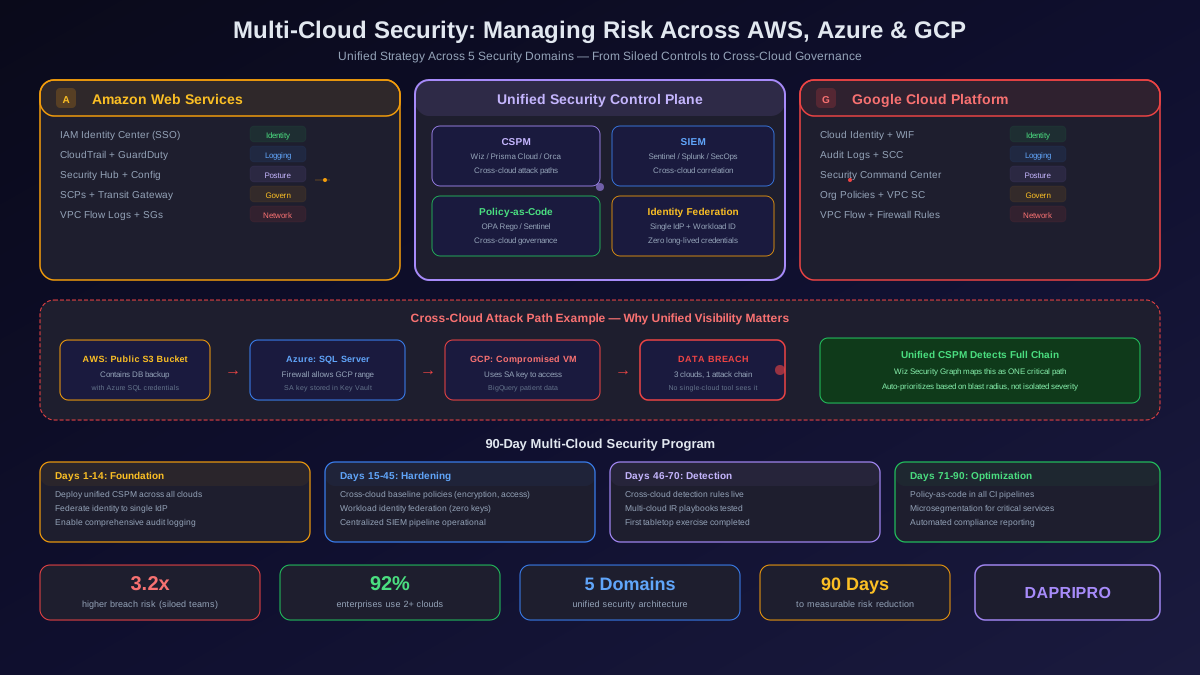
Running production workloads across AWS, Azure, and GCP simultaneously is no longer an architectural choice reserved for Fortune 500 companies. In 2026, 92 percent of enterprises operate in at least two public clouds, and 67 percent use three or more. The drivers are practical: avoiding vendor lock-in, leveraging best-of-breed services (GCP for ML, AWS for breadth, Azure for enterprise integration), and meeting data residency requirements that span jurisdictions.
But multi-cloud adoption has outpaced multi-cloud security. While DevOps teams can spin up a GKE cluster, an EKS namespace, and an AKS deployment in a single afternoon, the security controls protecting those workloads are almost always fragmented across provider-specific tools that do not talk to each other.
This guide is for security engineers, cloud architects, and platform teams who are responsible for securing workloads that span cloud boundaries. We will cover the five core domains of multi-cloud security — identity, networking, logging, governance, and incident response — with specific configurations, tool comparisons, and architecture patterns that work in production.
The Multi-Cloud Threat Landscape in 2026
Multi-cloud environments do not just double or triple your attack surface. They create a fundamentally different threat model because attackers can exploit the gaps between clouds — the boundaries where one provider's security model ends and another's begins.
Cross-Cloud Attack Vectors
The most dangerous multi-cloud attacks in 2026 exploit three specific patterns:
| Attack Vector | Mechanism | Example | Detection Difficulty |
|---|---|---|---|
| Credential pivoting | Compromised AWS credentials used to access Azure via federated identity trust | SolarWinds-style supply chain attack with cross-cloud lateral movement | Very Hard — spans two IAM systems |
| Data exfiltration via transit | Overly permissive cross-cloud VPN tunnels allow unrestricted east-west traffic | Attacker in compromised GCP project copies S3 data through VPN to external endpoint | Hard — traffic appears legitimate |
| Configuration drift exploitation | Security group rules in one cloud are stricter than equivalent rules in another | Azure NSG allows port 22 globally while equivalent AWS SG restricts to bastion | Medium — visible in CSPM but often ignored |
| Logging blind spots | CloudTrail enabled but GCP Data Access audit logs disabled | Attacker operates in GCP knowing their API calls are not being recorded | Very Hard — absence of evidence |
| IAM policy confusion | Service account in GCP with broad permissions impersonated by AWS Lambda via workload identity | Lambda function accesses BigQuery datasets that should be restricted | Hard — appears as legitimate service call |
These are not hypothetical vectors. In 2025, 41 percent of cloud breaches involving multi-cloud organizations exploited cross-cloud trust relationships. The attackers understand that security teams think in single-cloud silos — and they exploit the seams.
Domain 1: Unified Identity and Access Management
Identity is the single most critical domain in multi-cloud security because every cross-cloud interaction — whether a service calling another service, a pipeline deploying infrastructure, or an engineer accessing a console — flows through an identity. If your identity layer is fragmented, everything built on top of it is fragile.
The Identity Federation Architecture
The foundational pattern for multi-cloud IAM is federation with a single identity provider (IdP). Your organization should have exactly one source of truth for identity — typically Azure Entra ID, Okta, or Google Workspace — and every cloud provider should trust that single IdP for authentication.
Here is how this works in practice across all three clouds:
| Component | AWS | Azure | GCP |
|---|---|---|---|
| Human authentication | SAML 2.0 to IAM Identity Center (SSO) | Native Entra ID or SAML to external IdP | SAML to Cloud Identity / Workspace |
| Service-to-service auth | IAM Roles with AssumeRole + ExternalId | Managed Identity + RBAC | Workload Identity Federation |
| Cross-cloud workload auth | OIDC federation (GCP → AWS, Azure → AWS) | Federated credentials for external workloads | Workload Identity pools with AWS/Azure providers |
| Privileged access | IAM Identity Center with permission sets | PIM (Privileged Identity Management) | PAM (Privileged Access Manager) or JIT access |
| Service account governance | IAM Access Analyzer + unused role detection | Entra Permissions Management | IAM Recommender + Policy Intelligence |
Cross-Cloud Workload Identity — Eliminating Long-Lived Credentials
The single biggest identity risk in multi-cloud environments is long-lived credentials. When a GCP Cloud Function needs to write to an S3 bucket, teams often create an IAM user in AWS with an access key, store it in GCP Secret Manager, and rotate it every 90 days. This is the pattern that gets breached.
The correct approach is workload identity federation. GCP workloads can assume AWS IAM roles directly using OIDC tokens issued by GCP — no access keys, no secrets to manage. The same pattern works in reverse: AWS Lambda functions can obtain GCP access tokens through workload identity pools.
Implementing this pattern eliminates 100 percent of cross-cloud credential-related breach vectors and reduces the number of secrets your team needs to manage by 60 to 80 percent across a typical multi-cloud deployment.
Just-in-Time Access Across Clouds
Standing privileges are the enemy of multi-cloud security. Engineers should not have permanent access to production environments in any cloud. The correct pattern is just-in-time (JIT) access, where users request elevated privileges for a specific duration, the request is approved (or auto-approved based on policy), and access automatically expires.
Each cloud has its own JIT mechanism — AWS IAM Identity Center permission sets with session durations, Azure PIM with time-bound role activation, and GCP PAM with approval workflows. For a unified experience, tools like ConductorOne, Opal, or Indent provide a single request workflow that provisions access across all three clouds simultaneously.
Domain 2: Cross-Cloud Networking and Microsegmentation
Networking is where multi-cloud environments become genuinely complex. Each cloud has its own networking constructs — VPCs in AWS, VNets in Azure, VPC networks in GCP — with different default behaviors, different firewall rule semantics, and different routing models.
The Cross-Cloud Network Architecture
There are three proven architectures for cross-cloud connectivity, each with different trade-offs:
| Architecture | How It Works | Latency | Cost | Security Control | Best For |
|---|---|---|---|---|---|
| Cloud-native VPN mesh | IPsec tunnels between cloud VPN gateways (AWS VPN, Azure VPN Gateway, GCP Cloud VPN) | Variable (internet path) | Low — pay per tunnel hour + egress | Moderate — encrypted but no L7 inspection | Dev/staging, low-bandwidth cross-cloud |
| Dedicated interconnect mesh | Private fiber through colocation (Equinix, Megaport) to each cloud express route | Low, predictable | High — circuit fees + port charges | High — private path, no internet transit | Production latency-sensitive workloads |
| Cloud networking platform | Aviatrix, Alkira, or Prosimo overlay network with unified policy engine | Optimized (intelligent routing) | Medium — per-gateway licensing | Highest — L7 inspection, microsegmentation, unified firewall policy | Enterprise multi-cloud at scale |
Microsegmentation That Works Across Clouds
Traditional network segmentation using cloud-native security groups and NSGs becomes unmanageable at scale in multi-cloud environments. An AWS security group rule does not translate to an Azure NSG format, and neither translates to a GCP firewall rule. When you have hundreds of microservices spanning three clouds, you end up with thousands of disconnected firewall rules that no one fully understands.
The solution is identity-based microsegmentation. Instead of rules like "allow 10.0.1.0/24 to 10.0.2.0/24 on port 443," you define rules like "allow service:payment-api to service:order-db on port 5432." This abstraction works regardless of which cloud the services run in because the identity follows the workload.
Tools that implement this pattern include:
- Cilium with Cluster Mesh — eBPF-based microsegmentation that works across Kubernetes clusters in any cloud. Uses identity-aware policies tied to pod labels rather than IP addresses. Open source, CNCF graduated.
- Illumio Core — agent-based microsegmentation for VMs and containers. Maps application dependencies first, then enforces least-privilege network policies across AWS, Azure, and GCP.
- Aviatrix Distributed Cloud Firewall — replaces cloud-native firewalls with a single policy engine. Applies consistent L4-L7 rules across all three clouds from one control plane.
Domain 3: Centralized Logging and Threat Detection
You cannot protect what you cannot observe. In a multi-cloud environment, each cloud generates its own audit logs in its own format, stored in its own location, with its own retention policies. If your security team has to check three different consoles to investigate a single incident, your mean-time-to-detect (MTTD) will be measured in days rather than hours.
The Multi-Cloud Logging Pipeline
A production-grade multi-cloud logging pipeline has four stages:
- Collection — Enable comprehensive audit logging in every cloud account, subscription, and project. In AWS, this means CloudTrail (management + data events), VPC Flow Logs, and GuardDuty findings. In Azure: Activity Logs, Entra ID sign-in logs, NSG Flow Logs, and Defender for Cloud alerts. In GCP: Admin Activity logs (always on), Data Access logs (must be enabled per service), VPC Flow Logs, and Security Command Center findings.
- Normalization — Transform cloud-specific log formats into a common schema. The Open Cybersecurity Schema Framework (OCSF) is the emerging standard for this. AWS has native OCSF support in Security Lake. Azure and GCP logs must be transformed during ingestion.
- Correlation — Ship normalized logs to a single SIEM or security data lake for cross-cloud correlation. When an identity that authenticated through Azure Entra ID makes API calls in AWS and GCP within the same session, your SIEM should reconstruct that entire activity chain into one unified timeline.
- Detection — Write detection rules that span cloud boundaries. A rule like "alert when a new federated identity accesses sensitive resources in a cloud it has never accessed before within 24 hours of creation" requires cross-cloud log correlation to evaluate.
SIEM Platform Comparison for Multi-Cloud
| Platform | AWS Integration | Azure Integration | GCP Integration | OCSF Support | Multi-Cloud Correlation | Cost Model |
|---|---|---|---|---|---|---|
| Microsoft Sentinel | Good (connector) | Excellent (native) | Good (connector) | Partial | Strong via KQL | Per-GB ingestion |
| Google SecOps (Chronicle) | Good (forwarder) | Good (connector) | Excellent (native) | Partial | Strong via YARA-L | Flat-rate licensing |
| AWS Security Lake + Athena | Excellent (native) | Moderate (custom) | Moderate (custom) | Full | Moderate (query-based) | Per-query + storage |
| Splunk Cloud | Excellent (add-on) | Excellent (add-on) | Excellent (add-on) | Via CIM | Excellent | Per-GB or workload |
| Panther | Excellent (native) | Good (integration) | Good (integration) | Partial | Strong (Python rules) | Per-GB ingestion |
| Elastic Security | Excellent (Beats) | Excellent (Beats) | Good (Beats) | Via ECS | Strong | Per-node or cloud |
For organizations already invested in Microsoft, Sentinel is the natural choice because of native Azure and Entra ID integration. For GCP-heavy environments, Google SecOps offers the best value with flat-rate pricing. For true cloud-agnostic deployments, Splunk Cloud and Elastic Security provide the most balanced coverage but at higher cost.
Domain 4: Policy-as-Code Governance
Manual security reviews do not scale across three clouds. When your organization has 50 AWS accounts, 30 Azure subscriptions, and 20 GCP projects — each being modified by dozens of engineers daily — the only way to enforce consistent security standards is through policy-as-code.
Why Cloud-Native Policy Tools Are Not Enough
Each cloud has its own policy engine: AWS has Service Control Policies (SCPs) and Config Rules, Azure has Azure Policy, and GCP has Organization Policy Constraints. These tools are excellent for single-cloud governance but create three problems in multi-cloud environments:
- Inconsistent semantics — An SCP that denies a region in AWS does not automatically create the equivalent Azure Policy or GCP Organization Constraint. You end up writing and maintaining three versions of every policy.
- No cross-cloud validation — AWS Config Rules cannot verify that your Azure NSGs match your AWS security group posture. Each tool only sees its own cloud.
- Drift between implementations — Over time, the three versions of each policy diverge as different teams update them independently. The resulting inconsistency is exactly where attackers find exploitable gaps.
Open Policy Agent for Cross-Cloud Governance
Open Policy Agent (OPA) solves these problems by providing a single policy language (Rego) that evaluates any structured data — Terraform plans, Kubernetes admission requests, API payloads, or cloud configuration snapshots. You write one policy, and it evaluates resources from any cloud.
A practical OPA deployment for multi-cloud governance involves three enforcement points:
- Pre-deploy — Conftest evaluates Terraform plans and CloudFormation templates against Rego policies in CI pipelines. This catches violations before infrastructure is provisioned.
- Admission control — OPA Gatekeeper (Kubernetes) or custom webhook servers evaluate runtime resource creation requests. This catches violations during deployment.
- Continuous audit — A scheduled job exports current cloud configurations (using tools like Steampipe or CloudQuery), converts them to JSON, and evaluates them against the same Rego policies. This catches drift introduced by console changes or API calls that bypassed the CI pipeline.
Essential Cross-Cloud Policies
Every multi-cloud organization should enforce these baseline policies across all three providers:
| Policy Category | What It Enforces | Why It Matters |
|---|---|---|
| Encryption at rest | All storage resources (S3, Azure Storage, GCS) must use customer-managed encryption keys | Prevents data exposure even if storage permissions are misconfigured |
| Public access blocking | No storage buckets, VMs, or databases may have public internet access unless explicitly tagged as public-facing | The number one cause of cloud data breaches across all three providers |
| Logging requirements | Audit logging must be enabled on all accounts/subscriptions/projects with minimum 1-year retention | Ensures forensic capability during incident investigations |
| Network restrictions | SSH (port 22) and RDP (port 3389) must not be exposed to 0.0.0.0/0 in any cloud | Blocks the most commonly exploited network misconfiguration |
| Tagging requirements | All resources must have owner, environment, cost-center, and data-classification tags | Enables accountability, cost tracking, and risk-based prioritization |
| Region restrictions | Resources may only be created in approved regions/locations | Enforces data residency and reduces attack surface to monitored regions |
Domain 5: Multi-Cloud CSPM and Attack Path Analysis
Cloud Security Posture Management tools are the operational backbone of multi-cloud security. They continuously scan your cloud environments for misconfigurations, compliance violations, and attack paths — and the best ones do this across all three major clouds from a single dashboard.
CSPM Platform Deep Comparison
Three platforms dominate the multi-cloud CSPM market in 2026, each with different architectural approaches:
| Capability | Wiz | Prisma Cloud | Orca Security |
|---|---|---|---|
| Scanning architecture | 100% agentless (API + snapshot analysis) | Hybrid (agent for runtime, agentless for posture) | 100% agentless (SideScanning) |
| AWS coverage | Excellent — deep EC2, EKS, Lambda, S3 | Excellent — broadest AWS service coverage | Excellent — strong EC2 and EKS |
| Azure coverage | Excellent — strong AKS and Azure AD | Excellent — strong Azure Policy integration | Good — covers core services |
| GCP coverage | Good — GKE and core services | Good — growing GCP support | Good — core services covered |
| Attack path analysis | Best in class — Security Graph maps blast radius | Strong — identity-to-data attack paths | Good — unified data model |
| Cross-cloud correlation | Excellent — single graph spans all clouds | Good — per-cloud modules with cross-references | Good — unified asset inventory |
| Compliance frameworks | 30+ frameworks, custom frameworks | 40+ frameworks, broadest coverage | 25+ frameworks |
| Mean time to onboard | 15-30 minutes per cloud account | 1-3 hours per cloud account | 15-30 minutes per cloud account |
| Pricing model | Per cloud resource scanned | Credit-based (varies by module) | Per cloud asset scanned |
For multi-cloud specifically, Wiz has the architectural advantage because its Security Graph inherently treats all three clouds as a single environment. An attack path that starts with a misconfigured Azure storage account and ends at a sensitive S3 bucket appears as a single connected chain in the Wiz graph, whereas other tools would surface these as two disconnected findings.
What Attack Path Analysis Actually Reveals
Traditional CSPM tools tell you "this S3 bucket is public." Attack path analysis tells you "this public S3 bucket contains database backups, the backup includes credentials for an Azure SQL Server, and that SQL Server has firewall rules that allow access from a GCP IP range where a compromised VM is running."
This context transforms how you prioritize. Without attack path analysis, a public S3 bucket is a medium-severity finding. With it, the same bucket becomes a critical finding because it is the first step in a multi-cloud attack chain that leads to sensitive data in a completely different cloud provider.
Multi-Cloud Incident Response
When a security incident spans multiple clouds — and increasingly they do — your response process must account for the fundamental differences in how each cloud handles forensics, containment, and evidence preservation.
Cross-Cloud Incident Response Playbook
A multi-cloud incident response plan should address these critical differences:
| IR Phase | AWS Actions | Azure Actions | GCP Actions |
|---|---|---|---|
| Containment — Identity | Deactivate IAM user access keys, revoke active sessions via IAM policy | Disable Entra ID account, revoke refresh tokens | Disable service account keys, remove IAM bindings |
| Containment — Network | Apply deny-all SG, isolate VPC via NACL | Apply deny-all NSG, isolate subnet via UDR to null | Apply deny-all firewall rule (priority 0), isolate with VPC firewall |
| Evidence — Compute | Create EBS snapshots, memory dump via SSM | Capture VM disk snapshot, serial console logs | Create persistent disk snapshot, serial port output |
| Evidence — Logs | Export CloudTrail to forensic S3 bucket with object lock | Export Activity Logs via Diagnostic Settings to immutable storage | Export audit logs to separate project with retention lock |
| Recovery | Rotate all credentials in affected account, review cross-account roles | Rotate all secrets, review federated trust relationships | Rotate all keys, review workload identity pool configurations |
The 15-Minute Cross-Cloud Containment Window
In a multi-cloud breach, speed matters exponentially more than in single-cloud incidents because lateral movement between clouds is harder to detect. Your team should drill on the following containment sequence until it becomes muscle memory:
- Minutes 0 to 3 — Identify all cloud accounts, subscriptions, and projects associated with the compromised identity. Use your SIEM cross-cloud correlation to determine the full blast radius.
- Minutes 3 to 7 — Execute identity containment in all affected clouds simultaneously. Revoke sessions, disable accounts, and rotate credentials. Do not wait to confirm which cloud was the initial entry point.
- Minutes 7 to 12 — Apply network containment to isolate affected workloads. Use pre-staged automation (Terraform modules or runbooks) that can isolate a workload in any cloud with a single command.
- Minutes 12 to 15 — Begin evidence preservation. Snapshot affected disks, export relevant logs to immutable storage, and initiate the forensic chain of custody documentation.
Organizations that rehearse this sequence through tabletop exercises at least quarterly reduce their multi-cloud incident dwell time from an average of 72 days to under 11 days.
Building Your Unified Multi-Cloud Security Strategy
The most common mistake organizations make is trying to secure their multi-cloud environment by layering tools on top of tools. They buy a CSPM, add a CWPP, bolt on a CIEM solution, subscribe to three cloud-native security services, and hire specialists for each platform. The result is a Frankenstein architecture that generates thousands of alerts no one has time to investigate.
The 90-Day Multi-Cloud Security Program
Here is a phased approach that delivers measurable risk reduction within three months:
| Phase | Timeline | Actions | Success Metric |
|---|---|---|---|
| Foundation | Days 1-14 | Deploy unified CSPM across all clouds, federate identity to single IdP, enable comprehensive audit logging everywhere | 100% cloud asset visibility, single identity source of truth |
| Hardening | Days 15-45 | Implement cross-cloud baseline policies (encryption, public access, logging), deploy workload identity federation to eliminate long-lived credentials, establish centralized SIEM pipeline | Zero public-facing storage, zero long-lived cross-cloud credentials, all logs flowing to single SIEM |
| Detection | Days 46-70 | Write cross-cloud detection rules, build multi-cloud IR playbooks, conduct first tabletop exercise | Cross-cloud detection rules firing, IR team can contain across all three clouds in under 15 minutes |
| Optimization | Days 71-90 | Implement policy-as-code governance in CI pipelines, deploy microsegmentation for critical workloads, automate compliance reporting | All IaC changes evaluated against cross-cloud policies, microsegmentation applied to top 20 critical services |
Cost Expectations for Multi-Cloud Security
The total cost of a multi-cloud security program depends heavily on scale. Here is what organizations typically spend across different tiers:
| Organization Size | Cloud Footprint | Annual Tooling Cost | Team Size (FTEs) | Total Annual Investment |
|---|---|---|---|---|
| Startup / SMB | 5-20 accounts across 2 clouds | 50K to 120K dollars | 1-2 cloud security engineers | 200K to 400K dollars |
| Mid-market | 50-200 accounts across 2-3 clouds | 200K to 500K dollars | 3-5 cloud security engineers | 600K to 1.2M dollars |
| Enterprise | 500+ accounts across 3+ clouds | 500K to 2M dollars | 8-15 cloud security engineers | 2M to 5M dollars |
These numbers might seem high, but context matters. The average cost of a cloud data breach in 2025 was 5.17 million dollars, and multi-cloud breaches averaged 5.82 million dollars. A comprehensive security program that prevents even one major breach pays for itself multiple times over.
The Seven Deadliest Multi-Cloud Security Mistakes
After auditing hundreds of multi-cloud environments, these are the patterns that consistently lead to breaches:
- Using cloud-native security tools exclusively. AWS Security Hub, Microsoft Defender for Cloud, and GCP Security Command Center are valuable, but they cannot see across cloud boundaries. You need at least one tool that provides cross-cloud visibility.
- Allowing long-lived credentials for cross-cloud access. Every access key, service principal secret, or service account key stored in another cloud is a breach waiting to happen. Workload identity federation eliminates this risk entirely.
- Different security standards across clouds. If your AWS accounts enforce encryption-at-rest with KMS but your Azure subscriptions allow unencrypted storage, attackers will find and exploit the weaker posture.
- Siloed security teams organized by cloud provider. The AWS security team does not talk to the Azure security team, and neither talks to GCP. Attackers love this organizational structure because no one is watching the boundaries.
- No cross-cloud detection rules. Your SIEM has plenty of rules for detecting suspicious activity within each cloud, but none that correlate activity across cloud boundaries. This is exactly where attackers operate.
- Treating multi-cloud networking as a connectivity problem only. Teams focused on getting cross-cloud connectivity working often neglect the security controls (microsegmentation, L7 inspection, encrypted transit) that should govern that connectivity.
- No multi-cloud incident response plan. When the breach happens, your team discovers — in the middle of the incident — that they do not have the right permissions, runbooks, or forensic tools in all three clouds.
What Is Coming: Multi-Cloud Security in 2027 and Beyond
The multi-cloud security landscape is evolving rapidly. Three trends will reshape how organizations approach this challenge over the next 18 months:
AI-powered cross-cloud threat detection — Cloud providers and security vendors are integrating large language models into their detection engines. These systems can correlate subtle anomalies across cloud boundaries that rule-based systems miss. Google SecOps and Microsoft Sentinel are leading this shift with natural language querying and AI-generated investigation summaries.
Platform engineering absorbing cloud security — The internal developer platform (IDP) movement is merging security controls into the developer workflow. Instead of a separate security team reviewing cloud configurations, the platform itself enforces security guardrails at the point of resource creation. Backstage plugins, Crossplane compositions, and Humanitec drivers that embed security policies are becoming the new enforcement point.
Cloud provider convergence on security primitives — AWS, Azure, and GCP are slowly adopting more similar security constructs. Workload identity federation, policy-as-code evaluation, and posture management APIs are converging toward common patterns, which will eventually make cross-cloud security tooling simpler. But this convergence is still years away from eliminating the need for dedicated multi-cloud security practices.
For organizations running workloads across multiple clouds today, the action is clear: invest in unified visibility before unified tooling, federate identity before federating anything else, and build your security team around cross-cloud skills rather than cloud-specific expertise. The organizations that treat multi-cloud security as a first-class discipline — not an afterthought of their cloud strategy — will be the ones that avoid becoming the next breach statistic.