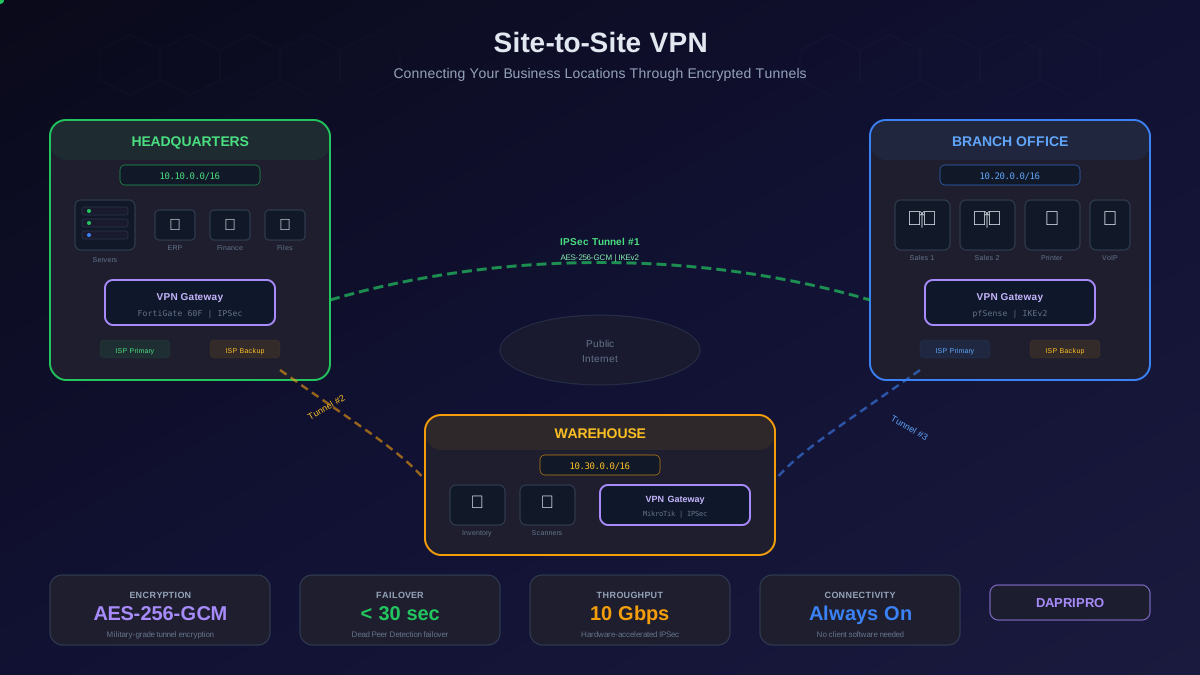
Your company has three offices. Headquarters runs the ERP system, financial databases, and primary file servers. The branch office across town houses the sales team who need real-time access to those systems. The warehouse runs inventory management that needs to sync with the ERP every few seconds. Right now, your users access everything through a remote-access VPN — each person connects individually from their device, and the experience is slow, unreliable, and frustrating.
A site-to-site VPN solves this permanently. Instead of each user managing their own VPN connection, you connect the networks themselves through an encrypted tunnel between gateway devices at each location. Every device at every site communicates transparently, as if all three offices were on the same physical network. No client software. No manual connections. Always on.
How a Site-to-Site VPN Works
A site-to-site VPN establishes an encrypted tunnel between two VPN gateway devices — one at each location. All traffic between the two networks flows through this tunnel automatically. Devices at each site do not need VPN software installed; the gateway handles all encryption and decryption transparently.
The process works like this:
- A device at Site A (192.168.10.x) sends a packet destined for a device at Site B (192.168.20.x)
- The packet reaches Site A's gateway router, which recognizes the destination as the remote site's subnet
- The gateway encrypts the entire original packet and wraps it in a new IP packet addressed to Site B's gateway public IP
- The encrypted packet travels across the public internet — it is unreadable to anyone who intercepts it
- Site B's gateway receives the packet, decrypts it, and forwards the original packet to the destination device on the local network
- The response follows the same path in reverse
Planning Your Site-to-Site VPN
IP Address Planning (The Step Everyone Skips)
The most common site-to-site VPN deployment failure is overlapping IP subnets. If your headquarters uses 192.168.1.0/24 and your branch office also uses 192.168.1.0/24, the VPN cannot route traffic between them because both networks claim the same address space.
Plan unique subnets for every site before you deploy anything:
- Headquarters: 10.10.0.0/16 (gives you 65,000+ addresses for growth)
- Branch office 1: 10.20.0.0/16
- Branch office 2: 10.30.0.0/16
- Remote workers subnet: 10.40.0.0/16
Use 10.x.x.x ranges rather than 192.168.x.x — the 10.x space gives you far more room for future expansion and is less likely to conflict with home networks (which almost universally use 192.168.x.x).
Choosing Your VPN Gateway Hardware
The VPN gateway is the device at each site that terminates the encrypted tunnel. Your options:
- Dedicated VPN appliance (Fortinet FortiGate, Cisco Meraki MX): Purpose-built hardware with dedicated crypto processors that handle encryption at line speed. FortiGate 60F handles 10 Gbps IPSec throughput. Best for sites with high-bandwidth requirements
- Firewall with VPN capability (pfSense, OPNsense): Open-source firewall platforms running on standard x86 hardware. Excellent performance on modern hardware with AES-NI acceleration. Best cost-to-performance ratio for small and mid-size businesses
- Cloud VPN gateway (AWS VPN Gateway, Azure VPN Gateway): Managed VPN endpoints in the cloud. No hardware to maintain — the cloud provider handles availability, patching, and scaling. Essential when connecting on-premise networks to cloud infrastructure
- Router with VPN support (Cisco ISR, MikroTik): Enterprise routers that include IPSec VPN capabilities. Good when you need routing + VPN in a single device and already have the router deployed
Protocol Selection
For site-to-site VPNs, the protocol choice is straightforward:
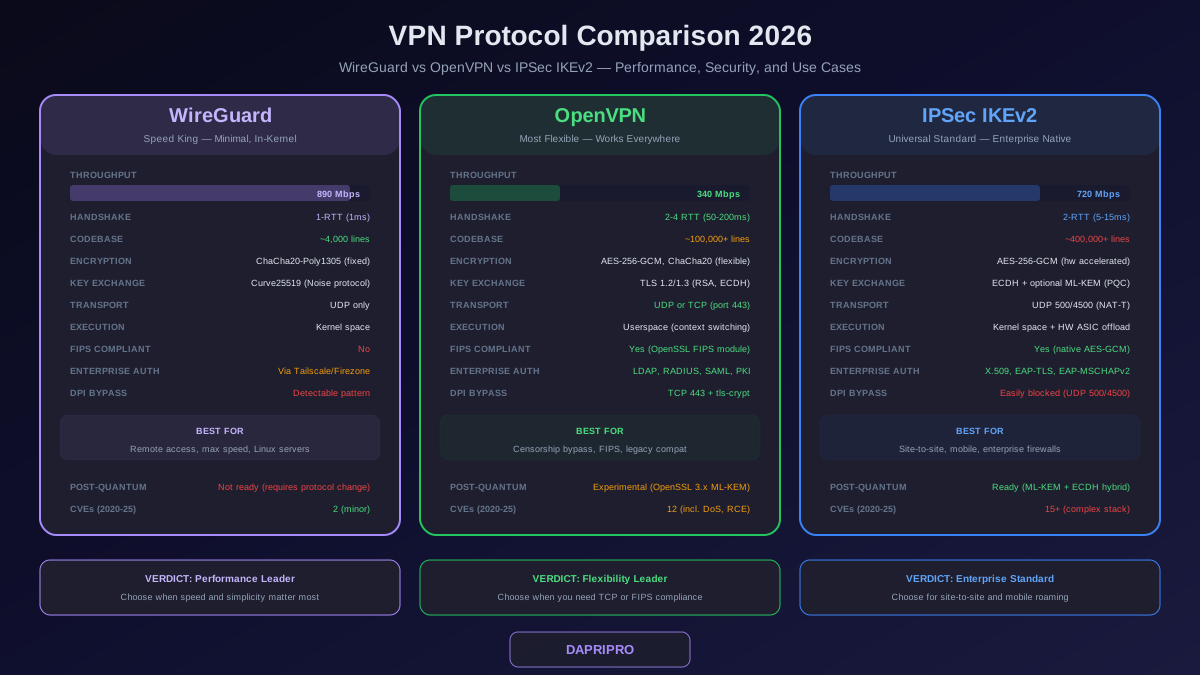
- IPSec with IKEv2: The industry standard for site-to-site VPNs. Every hardware vendor supports it. Use AES-256-GCM for encryption and SHA-384/SHA-512 for integrity. IKEv2 includes built-in dead peer detection, NAT traversal, and MOBIKE for failover
- WireGuard: Gaining traction for site-to-site use due to lower overhead and simpler configuration. Better throughput than IPSec on equivalent hardware. However, vendor support on dedicated appliances is still limited compared to IPSec
- OpenVPN: Reliable for remote-access VPNs but not ideal for site-to-site deployments. Higher CPU overhead than IPSec and WireGuard, and lacks some of the automatic failover features that IKEv2 provides
Configuration Walkthrough
Understanding IPSec Phases
IPSec tunnel establishment happens in two phases:
Phase 1 (IKE Security Association): The two gateways authenticate each other using a pre-shared key (PSK) or certificates and negotiate encryption parameters. This creates a secure management channel for Phase 2 negotiation. Configure Phase 1 with:
- Encryption: AES-256-GCM
- Hash: SHA-384 or SHA-512
- Diffie-Hellman group: 14 (2048-bit) minimum, group 20 (384-bit ECDH) preferred
- Lifetime: 28800 seconds (8 hours)
Phase 2 (IPSec Security Association): Using the secure channel from Phase 1, the gateways negotiate the actual data encryption parameters and define which traffic should flow through the tunnel (called "interesting traffic" or security policy). Configure Phase 2 with:
- Protocol: ESP (Encapsulating Security Payload)
- Encryption: AES-256-GCM (same as Phase 1, but negotiated independently)
- PFS (Perfect Forward Secrecy): Enable with DH group 14 or 20
- Lifetime: 3600 seconds (1 hour)
- Local subnet: Your site's network range
- Remote subnet: The other site's network range
Security Hardening
A site-to-site VPN is a doorway between your networks — lock it down:
- Use certificates instead of pre-shared keys: PSKs are convenient but weaker. If a PSK is compromised, an attacker can impersonate either gateway. Certificates tied to a private CA provide stronger authentication and are easier to rotate
- Restrict tunnel traffic with ACLs: Do not allow all traffic between sites unless necessary. If the branch office only needs access to the file server and ERP system, create access control lists that restrict the tunnel to only those destination IPs and ports
- Enable anti-replay protection: IPSec includes sequence number verification that prevents attackers from capturing encrypted packets and replaying them later. Ensure this is enabled (it is on by default in most implementations)
- Monitor tunnel status: Set up SNMP or syslog alerts for tunnel down events. A tunnel that goes down and comes back up repeatedly can indicate a DDoS attack targeting your VPN gateway or an ongoing brute-force attack against your pre-shared key
Redundancy and Failover
A single-tunnel site-to-site VPN is a single point of failure. If the gateway device fails, the ISP connection drops, or the remote gateway becomes unreachable, the entire branch office is disconnected from corporate resources.
Failover Strategies
- Active/passive with Dead Peer Detection (DPD): The primary tunnel carries all traffic. DPD sends periodic keepalive probes (typically every 10 seconds). If the peer does not respond after 3 consecutive probes, the gateway declares the tunnel dead and fails traffic over to the backup tunnel. Total failover time: 30-60 seconds
- Active/active with ECMP: Both tunnels carry traffic simultaneously using Equal-Cost Multi-Path routing. This doubles your effective bandwidth and provides instant failover — if one tunnel dies, traffic continues on the other with no interruption. Requires both gateways to support ECMP routing
- Dual-ISP failover: Each site connects to two different ISPs. The primary tunnel uses ISP #1, the backup uses ISP #2. This protects against ISP outages, not just gateway failures. Configure route metrics so the primary ISP is preferred, with automatic failover to the secondary
Cloud-Based Site-to-Site VPN
If your servers are in AWS, Azure, or GCP, the cloud side of your site-to-site VPN is managed by the cloud provider:
AWS Site-to-Site VPN
- AWS provides a Virtual Private Gateway (VGW) or Transit Gateway as the cloud-side endpoint
- Each VPN connection automatically creates two tunnels for redundancy (across two availability zones)
- AWS provides pre-built configuration templates for most popular on-premise gateway devices (Cisco, Fortinet, pfSense, MikroTik, Juniper)
- Pricing: approximately 0.05 per VPN connection-hour plus standard data transfer charges
Azure VPN Gateway
- Azure offers VPN Gateway in multiple SKUs (Basic, VpnGw1-5) with throughput from 100 Mbps to 10 Gbps
- Active/active mode provides two tunnel endpoints across availability zones
- Supports BGP for dynamic routing between on-premise and Azure networks
- Integrated with Azure Virtual WAN for simplified multi-site connectivity
Monitoring and Maintenance
Site-to-site VPNs require ongoing monitoring to catch issues before users notice:
- Tunnel state monitoring: Alert on any tunnel-down event. Most gateways expose tunnel status via SNMP OIDs or syslog messages. Configure your monitoring tool (Zabbix, LibreNMS, Datadog) to page your network team on tunnel failures
- Throughput monitoring: Track bandwidth utilization on each tunnel. If a tunnel consistently runs above 80 percent capacity, plan for an upgrade before it becomes a bottleneck
- Latency and packet loss: Monitor round-trip time and packet loss between sites. VoIP and video conferencing degrade noticeably above 150ms RTT or 1 percent packet loss
- Certificate expiration: If you use certificate-based authentication, monitor certificate expiration dates and renew at least 30 days before expiry. An expired certificate means a dead tunnel
- Security log review: Review VPN authentication logs weekly for failed connection attempts, unusual source IPs, or repeated Phase 1 negotiation failures that could indicate a brute-force attack
The Bottom Line
A site-to-site VPN transforms disconnected branch offices into a unified, secure network. Plan your IP address space first (no overlapping subnets), choose IPSec with IKEv2 for maximum compatibility, always deploy redundant tunnels for failover, and monitor tunnel health continuously. If you are connecting to cloud infrastructure, use the cloud provider's managed VPN gateway — it eliminates half the hardware management work. Start with a single two-site tunnel, verify performance and failover behavior, and then expand to additional locations as needed.