Social Media Is an Intelligence Goldmine for Attackers
Intelligence agencies have a term for information gathered from publicly available sources: Open-Source Intelligence, or OSINT. What used to require weeks of surveillance and investigation can now be accomplished in 30 minutes by scrolling through a target social media profiles.
Before attacking you, a hacker already knows your full name, birthday, hometown, employer, job title, coworkers, the restaurants you frequent, what you look like, your political opinions, your pet names, your children names, your favorite sports team, and where you went on vacation last summer. All of this from information you voluntarily shared with the public.
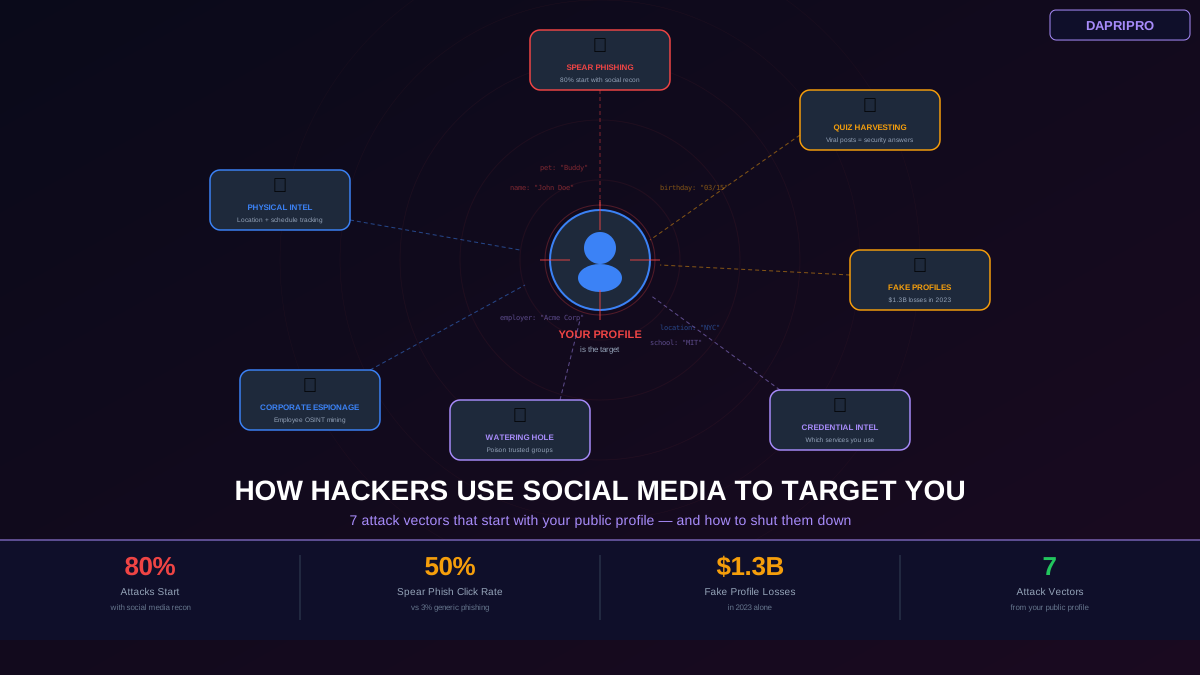
This is not about privacy for its own sake. Each piece of information is a tool that makes a specific attack more effective. Here are the seven most common ways attackers use your social media presence against you.
Attack Vector 1: Spear Phishing with Social Context
Generic phishing emails ("Dear Customer, your account has been compromised") get caught by spam filters and ignored by savvy users. Spear phishing is different — it is a targeted email crafted specifically for you using information gathered from your social media.
How it works: An attacker finds your LinkedIn profile and sees you work at Acme Corp as a marketing manager. They check your recent posts and see you attended a conference last week. They search for other people who attended the same conference. Then they send you an email: "Hey [your name], great meeting you at [conference name] last week! I wanted to follow up on our conversation about [topic your company works on]. Here is the deck I mentioned — [malicious link]."
This email passes every gut check: it references a real event you attended, a real topic you work on, and comes from someone who could plausibly be a conference contact. The click rate on spear phishing emails is 50% — compared to 3% for generic phishing. Over 80% of successful spear phishing attacks start with social media reconnaissance.
How to defend: Never share real-time event attendance (post about conferences after they end). Verify unexpected emails through a separate channel — if someone from a "conference" emails you, look them up independently rather than replying or clicking. Be especially cautious about any email containing links or attachments from someone you met briefly.
Attack Vector 2: Security Question Harvesting
You have seen the viral posts: "Your pirate name is your first pet name plus the street you grew up on!" or "Share your birth month and the last digit of your phone number to find your superhero name!" These are not innocent fun — they are engineered to harvest security question answers at scale.
The most common security questions used by banks and email providers are: What is your first pet name? What street did you grow up on? What is your mother maiden name? What city were you born in? What was the name of your first school? What is your favorite movie?
When you answer a viral quiz post, you are giving these answers to anyone who can see the post — including automated scrapers that compile the data into databases sold on the dark web for less than $1 per record.
How to defend: Never answer viral quiz posts, even privately. Use random, fake answers for security questions and store the real answers in your password manager. The answer to "What is your first pet name?" should be something like "Turquoise47" — something that cannot be found on social media because it was never real to begin with.
Attack Vector 3: Fake Profiles and Catfishing
Fake profiles are not just about romance scams (though those cost victims $1.3 billion in 2023). Attackers create fake profiles to infiltrate professional and social networks for intelligence gathering, trust building, and eventual exploitation.
LinkedIn fake recruiters: An attacker creates a polished LinkedIn profile impersonating a recruiter at a prestigious company. They connect with employees at a target company, build credibility through shared connections, then send "job opportunity" messages containing malicious links or requesting sensitive information about the target company internal systems.
Instagram brand impersonation: Fake brand accounts message followers claiming they won a giveaway, need to verify their account, or are offering exclusive deals. The links lead to credential-harvesting pages that steal usernames and passwords.
Facebook friend request infiltration: An attacker clones the profile of one of your existing friends (same name, same profile picture) and sends you a friend request. Once accepted, they have access to your Friends-only posts, your contact information, and the ability to message you convincingly as a "trusted friend."
How to defend: Verify unexpected connection requests through a separate channel (text the person directly and ask if they sent a request). Reverse image search profile pictures using Google Lens. Check account creation dates and post history — legitimate accounts have years of consistent activity. Never click links in direct messages from people you do not know well.
Attack Vector 4: Credential Stuffing with Social Media Intelligence
Credential stuffing is an automated attack where hackers use username-password pairs from one data breach to try logging into other services. Social media makes this attack dramatically more effective by revealing which services you use.
How it works: You post a screenshot of your Spotify Wrapped. You share a Venmo payment. You check in at a hotel using TripAdvisor. You connect your Instagram to Twitter. Each of these reveals an account you have, giving the attacker a shopping list of services to target with your leaked credentials. If your email is visible on your profile (even in a contact link or bio), they already have the username for all of these services.
How to defend: Use unique passwords for every service (a password manager makes this effortless). Enable two-factor authentication on all accounts. Avoid posting screenshots or content from apps that reveal your accounts on those platforms.
Attack Vector 5: Watering Hole Attacks via Social Groups
A watering hole attack is when hackers compromise a website or community that a target group frequently visits. Social media groups and pages are modern watering holes — attackers join industry groups, local community pages, or hobby forums and post malicious links disguised as helpful resources.
How it works: An attacker joins a Facebook group for small business owners. They participate genuinely for a few weeks, building credibility. Then they post: "Found this amazing free accounting template — saved me hours!" with a link to a file that installs malware when opened. The group members trust the post because the attacker has been an active, helpful member.
How to defend: Be suspicious of file downloads shared in groups, even from established members (their accounts could be compromised). Preview links before clicking. Download files only from official sources. Keep your browser and operating system updated to patch vulnerabilities that drive-by downloads exploit.
Attack Vector 6: Corporate Espionage through Employee Profiles
Your social media activity can be used to attack your employer. Attackers targeting companies routinely mine employee social media profiles for intelligence on internal systems, organizational structure, and potential entry points.
Dangerous information employees share: Photos of workspace showing monitor screens, whiteboards, or badge systems. Posts about internal tools ("Just migrated our team to Slack" or "Finally got access to Salesforce"). Comments about company frustrations that reveal internal processes. Travel posts that reveal client meetings and business relationships. Job descriptions that list specific technologies and security tools the company uses.
How to defend: Never photograph your workspace or office systems. Do not post about internal tools, clients, or projects. Review your LinkedIn headline and description to ensure it does not list specific security tools or internal platforms. Follow your company social media policy — if your company does not have one, suggest creating one.
Attack Vector 7: Physical Security Intelligence
Social media does not just endanger your digital security — it can compromise your physical safety. Posting about your location, schedule, and travel plans gives potential burglars, stalkers, and other threats a real-time map of your life.
Common mistakes: Posting vacation photos while you are still away (advertising that your home is empty). Regularly checking in at the gym, office, or favorite restaurants (revealing your routine). Geotagging photos with exact location coordinates (most phone cameras embed GPS data in photos by default). Sharing real-time stories at events or locations. Posting about expensive purchases.
How to defend: Disable geotagging in your phone camera settings (iPhone: Settings > Privacy > Location Services > Camera > Never. Android: Open Camera app > Settings > Toggle off Location tags). Share vacation photos after you return home. Avoid checking in at locations on social media. Remove location data from photos before posting by screenshotting them or using a metadata removal tool. Vary your routine posts so that patterns cannot be established.
Building Your Social Media OPSEC Habit
Operational Security (OPSEC) means controlling what information an adversary can learn about you. For social media, this means developing a habit of asking one question before every post: "Who could use this information against me, and how?"
This does not mean you should never post anything. It means being intentional about the value your posts create for you versus the risk they create. A photo with friends at a restaurant is low risk. A photo with friends at a restaurant that shows your car in the background (license plate visible), taken while you are on vacation (home is empty), tagged at a specific location (routine revealed), is high risk — and the difference is just a few seconds of thought before hitting share.