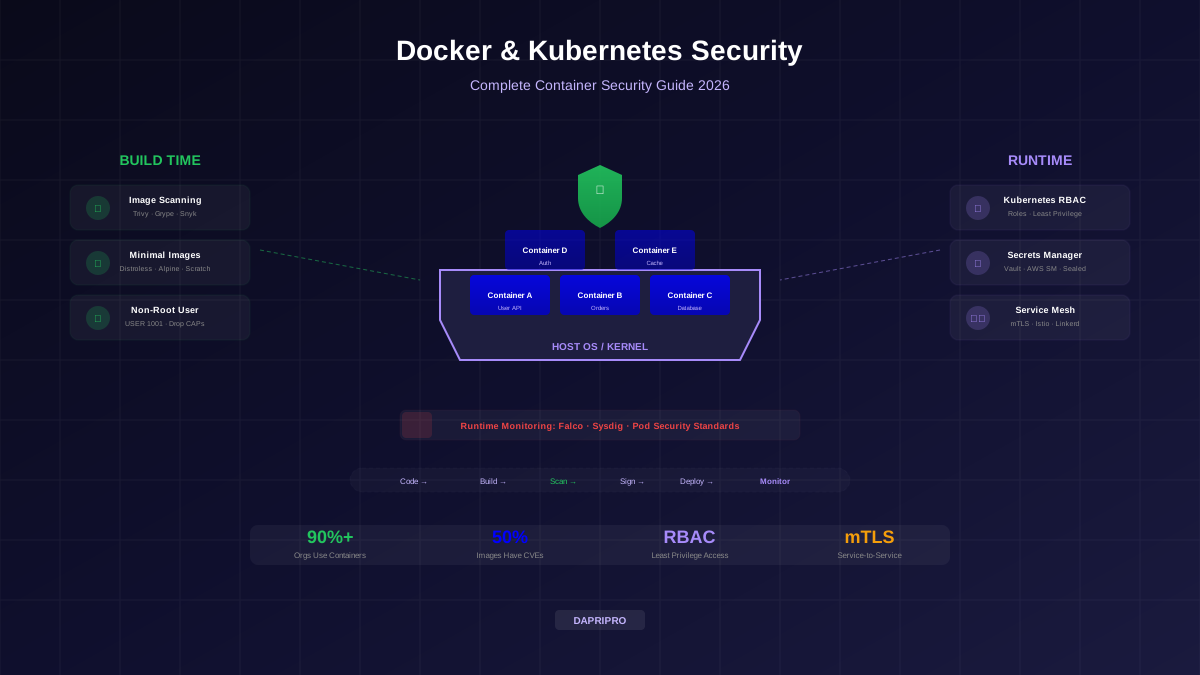
Containers have changed how we build and deploy software. Over 90% of organizations now use containers in production, and Kubernetes has become the standard platform for running them. But containerized environments introduce unique security challenges that traditional security tools were not designed to handle.
Containers are ephemeral — they can be created, destroyed, and replaced in seconds. They share the host operating system's kernel. They are often pulled from public registries where anyone can publish images. And Kubernetes adds its own layer of complexity with RBAC, network policies, secrets, and service accounts.
This guide covers the full container security lifecycle — from building secure images to protecting the runtime environment.
Docker Security Best Practices
Docker security starts at build time. The decisions you make when writing your Dockerfile determine how secure your containers will be in production:
Secure Dockerfile Practices
Essential Docker Commands for Security
- Use minimal base images —
distrolessimages contain only your application and its runtime dependencies. No shell, no package manager, no tools for attackers to use. Alpine Linux is the next best option at ~5MB. - Pin image versions — Never use
:latest. Use specific versions likenode:20.11.1-alpine3.19so you know exactly what you are running. - Run as non-root — Add
USER 1001in your Dockerfile. If an attacker escapes a non-root container, they have limited privileges on the host. - Use multi-stage builds — Build your application in a build stage, then copy only the compiled output to a clean runtime stage. This eliminates build tools, source code, and dev dependencies from your production image.
- Read-only filesystem — Run containers with
--read-onlyto prevent attackers from writing malware or modifying files inside the container. - Drop capabilities — Linux capabilities grant root-like powers. Drop all capabilities and add back only what you need:
--cap-drop=ALL --cap-add=NET_BIND_SERVICE.
Container Image Scanning
Image scanning is the single most impactful container security practice. Studies show over 50% of images on public registries contain known critical vulnerabilities.
| Scanner | Type | Speed | Best Feature |
|---|---|---|---|
| Trivy | Free (Aqua Security) | Very fast | All-in-one: images, IaC, SBOM, secrets |
| Grype | Free (Anchore) | Fast | SBOM integration with Syft |
| Snyk Container | Free tier + paid | Moderate | Base image recommendations |
| Docker Scout | Built into Docker | Fast | Integrated into Docker Desktop/CLI |
| Clair | Free (Quay) | Moderate | Registry integration |
Best practice: integrate scanning into your CI/CD pipeline and set a policy to block deployments if critical or high vulnerabilities are found. Scan both your own images AND the base images you build from.
Kubernetes RBAC
Kubernetes RBAC controls who (users and services) can perform what actions (get, list, create, delete) on which resources (pods, services, secrets, nodes) in your cluster:
RBAC Principles
- Never use cluster-admin for applications — this role can do anything in any namespace. Reserve it for operations staff only.
- Create namespace-scoped roles — use Role + RoleBinding (namespace-scoped) instead of ClusterRole + ClusterRoleBinding (cluster-wide) whenever possible.
- Restrict default service accounts — Kubernetes creates a "default" service account in every namespace with auto-mounted API tokens. Either disable auto-mounting or create purpose-specific service accounts with minimal permissions.
- Follow least privilege — if a service only needs to read ConfigMaps, grant only
getandlistfor ConfigMaps in its namespace — nothing more. - Audit regularly — use
kubectl auth can-i --listto check what permissions a user or service account has. Remove unused permissions.
Secrets Management
Secrets management is where many teams make critical mistakes. The most common (and most dangerous) patterns:
- ❌ Hardcoding secrets in source code or Dockerfiles
- ❌ Passing secrets as environment variables (visible in process listings and crash dumps)
- ❌ Storing secrets in Kubernetes Secrets without encryption (base64 is encoding, NOT encryption)
- ❌ Committing
.envfiles to git repositories
Proper Secrets Management
| Solution | Type | Integration | Key Feature |
|---|---|---|---|
| HashiCorp Vault | Self-hosted / HCP | K8s, Docker, CI/CD, cloud | Dynamic secrets, auto-rotation, audit |
| AWS Secrets Manager | AWS native | ECS, EKS, Lambda | Automatic rotation, RDS integration |
| Azure Key Vault | Azure native | AKS, App Service | HSM-backed, managed identities |
| External Secrets Operator | K8s operator | Vault, AWS, Azure, GCP | Syncs external secrets into K8s |
| Sealed Secrets | K8s native | GitOps (Flux, ArgoCD) | Encrypted secrets safe for git |
Service Mesh Security
A service mesh adds a security and networking layer between your microservices without changing application code. It works by deploying a sidecar proxy (typically Envoy) alongside each service:
Service Mesh Options
| Mesh | Complexity | Performance | Best For |
|---|---|---|---|
| Istio | High | Good (Envoy-based) | Large clusters, full feature set |
| Linkerd | Low | Excellent (Rust proxy) | Simplicity, fast adoption |
| Cilium | Medium | Best (eBPF, no sidecar) | Performance-critical, kernel-level |
| Consul Connect | Medium | Good | Multi-platform (K8s + VMs) |
Container Runtime Security
Runtime security monitors containers during execution and detects suspicious behavior in real time:
- Falco (free, by Sysdig) — cloud-native runtime security. Detects unexpected system calls, file access, network connections, and process execution. Imagine an alarm system that alerts when a container runs a shell, accesses
/etc/shadow, or makes an outbound connection to an unexpected IP. - Sysdig Secure — commercial runtime security with vulnerability management, compliance, and incident response.
- Aqua Security — full lifecycle container security platform.
- Prisma Cloud (Twistlock) — Palo Alto's container and cloud security platform.
Kubernetes Pod Security Standards
Kubernetes Pod Security Standards (replacing the deprecated PodSecurityPolicy) define three policy levels:
- Privileged — unrestricted access. Only for system-level workloads like kube-system.
- Baseline — prevents known privilege escalations. Blocks hostNetwork, hostPID, privileged containers, and most dangerous capabilities. Recommended minimum for all workloads.
- Restricted — heavily restricted. Requires non-root, read-only root filesystem, drops all capabilities. Best for sensitive workloads.
Secure Your Container Stack
Container security is not optional — it is essential. Start with the highest-impact practices: scan images in CI/CD, run as non-root, use minimal base images, and implement Kubernetes RBAC. Then layer in secrets management with Vault or your cloud provider's secrets service, network policies to control pod-to-pod communication, and runtime monitoring with Falco.
The container lifecycle is fast — images are built, deployed, and destroyed in minutes. Your security needs to move at the same speed. Automate everything: image scanning, policy enforcement, runtime detection, and incident response. Manual security processes cannot keep up with the velocity of modern container deployments.