In 2024, the average cost of a data breach involving database records reached 4.88 million dollars according to IBM's Cost of a Data Breach Report. The pattern behind most breaches is remarkably consistent: an attacker gains access to a database — through SQL injection, stolen credentials, misconfigured cloud storage, or insider access — and walks away with millions of plaintext records. Names, Social Security numbers, credit card details, medical records, all readable because the organization either did not encrypt them or encrypted them incorrectly.
Database encryption should be your last line of defense — the control that renders stolen data useless even when every other security layer has failed. But encryption done wrong provides a false sense of security. This guide covers the three levels of database encryption, key management architecture that actually works, implementation guides for major database platforms, and the common mistakes that turn encryption from a security control into security theater.
Three Levels of Database Encryption
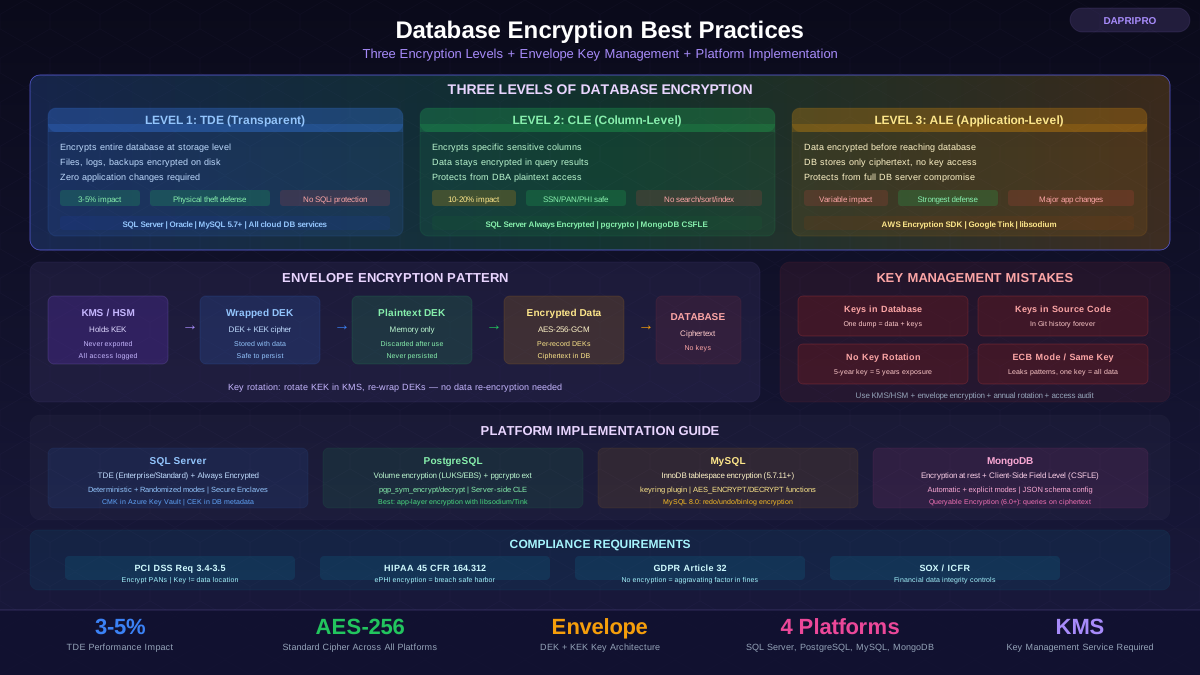
Database encryption operates at three distinct layers, each protecting against different threats. Understanding these layers is essential because most organizations need a combination — no single layer covers all attack scenarios.
Level 1: Transparent Data Encryption (TDE)
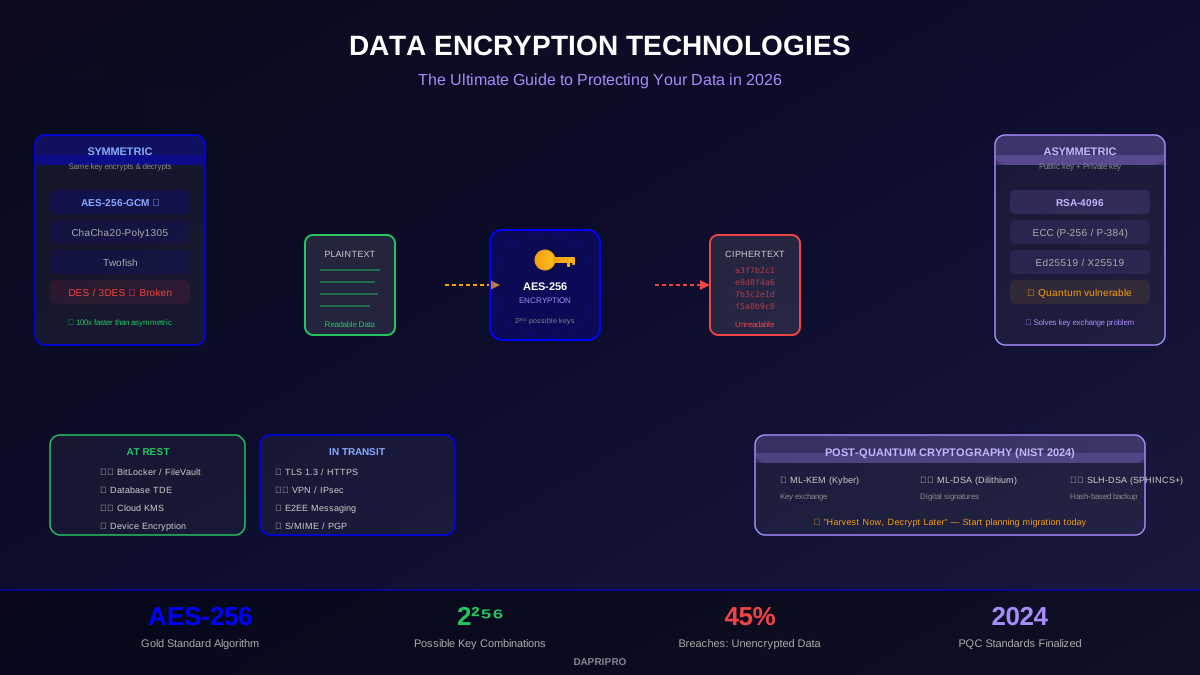
TDE encrypts the database at the storage level. Data files, temp files, transaction logs, and backups are encrypted on disk using AES-256 (or AES-128). When the database engine reads data from disk into memory, it decrypts transparently. When it writes data from memory to disk, it encrypts transparently. Applications require zero changes — queries work exactly as before because the database engine handles all encryption and decryption.
What TDE protects against: Physical theft of servers, drives, or backup tapes. Unauthorized filesystem access (someone with OS-level access but not database credentials). Stolen or discarded drives. Backup media that falls into the wrong hands.
What TDE does NOT protect against: SQL injection (the attacker queries through the database engine, which decrypts data before returning results). Compromised database credentials (same reason — valid credentials get decrypted results). Malicious DBAs with direct query access. Application-level breaches where the attacker can execute queries through the application. Any attacker who can query the database through normal channels sees plaintext.
TDE is available in: SQL Server (Enterprise and Standard since 2019), Oracle Database (Advanced Security Option), PostgreSQL (via community extensions like pg_tde or operating-system-level encryption), MySQL (InnoDB tablespace encryption since 5.7.11), and all major cloud database services (AWS RDS, Azure SQL, Google Cloud SQL — enabled by default in most cases).
Level 2: Column-Level Encryption (CLE)
Column-level encryption encrypts individual columns within the database. Unlike TDE, the data stays encrypted in memory, in query results, and in backups unless the requesting application provides the correct decryption key. This is a fundamental difference: TDE decrypts everything for anyone who can query the database, while CLE keeps specific columns encrypted even in query results.
Use CLE for: Social Security numbers, national ID numbers, credit card numbers (PANs), bank account numbers, medical record numbers, biometric data, and any field where the database administrator (DBA) should not have access to plaintext values.
CLE implementation approaches:
SQL Server Always Encrypted: The most mature CLE implementation. Encryption and decryption happen in the client driver (ADO.NET, JDBC, ODBC) — the SQL Server engine never sees plaintext or encryption keys. Supports deterministic encryption (enables equality comparisons) and randomized encryption (maximum security, no operations possible on ciphertext). Column master keys (CMKs) are stored in Azure Key Vault, Windows Certificate Store, or HSM. Column encryption keys (CEKs) are wrapped by the CMK and stored in the database as metadata.
PostgreSQL pgcrypto: Extension that provides encyrption functions (pgp_sym_encrypt, pgp_sym_decrypt) callable in SQL queries. Unlike Always Encrypted, pgcrypto runs inside the database engine — the database server has access to the keys during query execution. This protects against filesystem access but not against a compromised database process or DBA with query access. For true client-side CLE in PostgreSQL, encryption must happen in the application layer.
MySQL Enterprise Encryption: Provides encryption and key management functions callable from SQL. Similar to pgcrypto, operations happen inside the database engine. For client-side CLE, use application-layer encryption.
Level 3: Application-Level Encryption (ALE)
Application-level encryption is the strongest approach. The application encrypts sensitive data before sending it to the database and decrypts it after retrieval. The database stores and returns only ciphertext — it never has access to plaintext or encryption keys. Even a completely compromised database server reveals nothing.
ALE advantages: Protects against database compromise, DBA insider threats, cloud provider access, SQL injection (attacker gets ciphertext, not plaintext), and any other database-level attack. The database is reduced to dumb ciphertext storage — the security perimeter is the application.
ALE disadvantages: Eliminates server-side query capabilities on encrypted fields (no WHERE, ORDER BY, GROUP BY, JOIN, or indexing on encrypted columns without special techniques). Adds encryption/decryption code to the application, increasing complexity. Performance overhead depends on how many fields are encrypted and how much data flows through encryption routines. Key management must be handled at the application layer.
When to use ALE: When you handle data so sensitive that even the database administrator should never see it. When you deploy on infrastructure you do not control (multi-tenant cloud databases). When compliance requirements explicitly prohibit the database from having access to plaintext (some interpretations of PCI DSS for stored cardholder data). When your threat model includes compromised database servers.
Envelope Encryption: The Industry Standard Pattern
Envelope encryption is the key management architecture used by AWS, Azure, Google Cloud, and every serious production encryption system. Understanding it is essential because it solves the most critical problem in database encryption: how to manage keys securely and enable rotation without re-encrypting all data.
The pattern works like this: a Data Encryption Key (DEK) encrypts the actual data. The DEK is itself encrypted by a Key Encryption Key (KEK) stored in a KMS or HSM. The encrypted (wrapped) DEK is stored alongside the encrypted data or in a key metadata table. When the application needs to decrypt data, it sends the wrapped DEK to the KMS, which unwraps it and returns the plaintext DEK. The application uses the plaintext DEK to decrypt the data, then discards the plaintext DEK from memory.
Why this architecture: The KEK never leaves the KMS/HSM — it cannot be extracted, logged, or intercepted in transit. The DEK exists in plaintext only in application memory during active use. Key rotation requires only re-wrapping the DEK with a new KEK — the data itself does not need re-encryption. Different datasets can use different DEKs, so compromising one DEK exposes only the data encrypted with that specific key, not all data.
AWS KMS implementation: Create a Customer Master Key (CMK) in KMS. Call GenerateDataKey to get a plaintext DEK and an encrypted DEK. Encrypt data with the plaintext DEK. Store the encrypted DEK with the encrypted data. Discard the plaintext DEK. To decrypt: call KMS Decrypt with the encrypted DEK, get back the plaintext DEK, decrypt data. Cost: 0.03 dollars per 10,000 API calls plus 1 dollar per month per CMK — making KMS one of the highest-value, lowest-cost security controls available. Azure Key Vault and Google Cloud KMS follow the same pattern with different API calls.
Implementation Guides by Platform
SQL Server: TDE + Always Encrypted
SQL Server provides the most comprehensive built-in encryption toolkit of any database platform. For baseline protection, enable TDE on every database: create a master key in the master database, create a certificate protected by the master key, create a database encryption key (DEK) using AES-256 protected by the certificate, and enable encryption on the database. The initial encryption runs as a background process without blocking queries. Always back up the certificate and its private key immediately — without the certificate, the database is permanently inaccessible (including from backups).
For column-level protection, SQL Server Always Encrypted provides client-side encryption with deterministic and randomized modes. The setup involves creating a Column Master Key (CMK) in Azure Key Vault or Windows Certificate Store, creating a Column Encryption Key (CEK) protected by the CMK, and altering the target columns to specify the encryption type and CEK. Once configured, the ADO.NET or JDBC driver automatically encrypts parameters and decrypts results — application code changes are minimal. Always Encrypted with Secure Enclaves (introduced in SQL Server 2019) enables server-side operations on encrypted data within a hardware-protected enclave, allowing range comparisons, pattern matching, and sorting on encrypted columns.
PostgreSQL: volume encryption + pgcrypto + application-layer
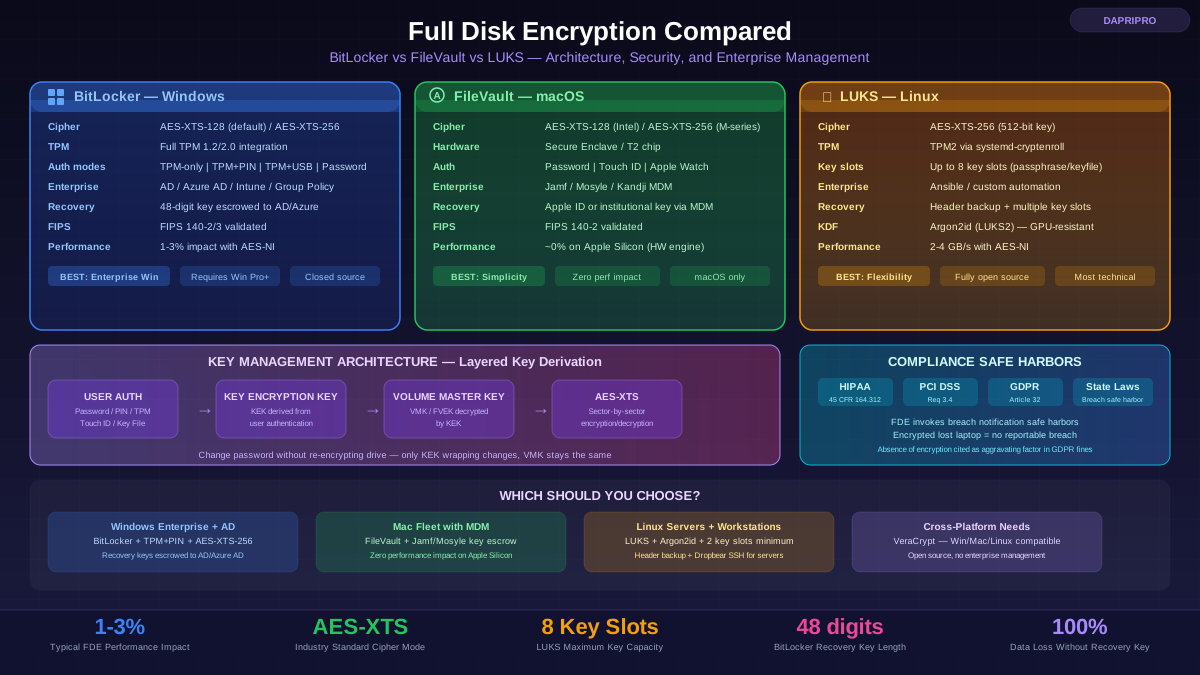
PostgreSQL does not include native TDE (as of version 17). The recommended approach is operating-system-level encryption (LUKS on Linux, BitLocker on Windows, or cloud provider volume encryption — AWS EBS encryption, Azure disk encryption). This provides equivalent protection to TDE for the physical theft threat vector.
For column-level encryption, the pgcrypto extension provides symmetric and asymmetric encryption functions. Use pgp_sym_encrypt and pgp_sym_decrypt with AES-256 for symmetric column encryption. Important: pgcrypto runs inside the PostgreSQL server process — the key is present in the server's memory during query execution and appears in query logs if logging is enabled (always use parameterized queries and set log_min_duration_statement carefully). For true client-side encryption, implement encryption in the application layer using a library like libsodium, AWS Encryption SDK, or Google Tink.
MySQL: InnoDB encryption + application-layer
MySQL 5.7.11+ supports InnoDB tablespace encryption (TDE equivalent). Enable it with the keyring plugin (keyring_file for development, keyring_encrypted_file for production, or keyring_aws for KMS integration). Create tables with ENCRYPTION='Y' or alter existing tables. MySQL 8.0 adds redo log and undo log encryption, doublewrite buffer encryption, and binary log encryption for comprehensive data-at-rest coverage.
For column-level encryption, MySQL provides AES_ENCRYPT and AES_DECRYPT functions. Like pgcrypto, these run server-side — the key is exposed to the MySQL process. For production-grade column encryption, implement encryption at the application layer. The MySQL Enterprise Edition includes MySQL Enterprise Encryption with RSA, DSA, and DH functions, and MySQL Enterprise Transparent Data Encryption with key management through Oracle Key Vault.
MongoDB: encryption at rest + Client-Side Field Level Encryption
MongoDB provides encryption at rest (AES-256 in CBC or GCM mode) starting with MongoDB Enterprise 3.2 and MongoDB Atlas (always enabled). For field-level encryption, MongoDB's Client-Side Field Level Encryption (CSFLE) is the standout feature: the driver encrypts specified fields before sending them to the server, and the server never sees plaintext. CSFLE supports automatic encryption (configure a JSON schema defining which fields to encrypt and the driver handles it) and explicit encryption (manually encrypt/decrypt in application code). MongoDB 6.0 introduced Queryable Encryption, which allows equality and range queries on encrypted fields without the server ever decrypting data — a significant advancement that addresses the traditional CLE query limitation.
Key Management: Where Encryption Succeeds or Fails
Most database encryption breaches are not caused by weak encryption algorithms — they are caused by poor key management. The encryption is AES-256, which is unbreakable. The keys are stored in a config file next to the database, which is trivially breakable.
Key management anti-patterns (what not to do)
Keys in the database: Storing encryption keys in the same database as the encrypted data defeats the purpose entirely. If an attacker dumps the database, they get both the ciphertext and the keys in one operation.
Keys in application code: Hardcoded keys in source code end up in version control systems, CI/CD logs, developer laptops, and container images. Once a key is in Git, it is effectively public — even if you delete the commit, it remains in Git history.
Keys in config files: Storing keys in environment variables, config files, or .env files on the application server is marginally better but still means anyone with access to the application server has the keys. If the server is compromised (the scenario encryption is designed to protect against), the keys are compromised too.
No key rotation: A key that has been in use for 5 years has been exposed to 5 years of potential compromise — every administrator who has left, every security incident, every time someone pasted it in a Slack message or support ticket. Without rotation, a single historical compromise exposes all data encrypted with that key, past and present.
Key management best practices
Use a KMS or HSM: AWS KMS, Azure Key Vault, Google Cloud KMS, or a physical HSM (Thales Luna, Entrust nShield) should hold all key encryption keys. These services are specifically designed for key protection: keys are generated inside tamper-resistant hardware, never exported in plaintext, all access is logged and auditable, and access is controlled through IAM policies. KMS costs are trivial compared to the cost of a breach — AWS KMS charges 1 dollar per key per month.
Implement envelope encryption: As described above — DEKs encrypt data, KEKs in KMS encrypt DEKs. This is the standard pattern used by AWS encryption SDK, Google Tink, and Azure encryption libraries.
Rotate keys on a schedule: KEKs annually (with automatic rotation enabled in KMS if available). DEKs annually or per compliance requirements. Rotate immediately when a key is suspected of compromise or when personnel with key access leave the organization.
Audit key access: Enable KMS access logging (AWS CloudTrail, Azure Monitor, Google Cloud Audit Logs) and alert on anomalous key access patterns — decryption calls from unexpected IP addresses, unusual volumes of decrypt requests, or key access outside business hours.
Separate key management roles: The person who manages encryption keys should not be the same person who manages the database. This separation of duties ensures that no single individual has both the encrypted data and the keys to decrypt it — a principle called split knowledge.
Common Mistakes That Turn Encryption Into Theater
Encrypting everything with the same key: If one key encrypts all columns in all tables, compromising that key exposes everything. Use unique DEKs for different sensitivity levels or data categories — one key for payment data, another for personal data, another for general data.
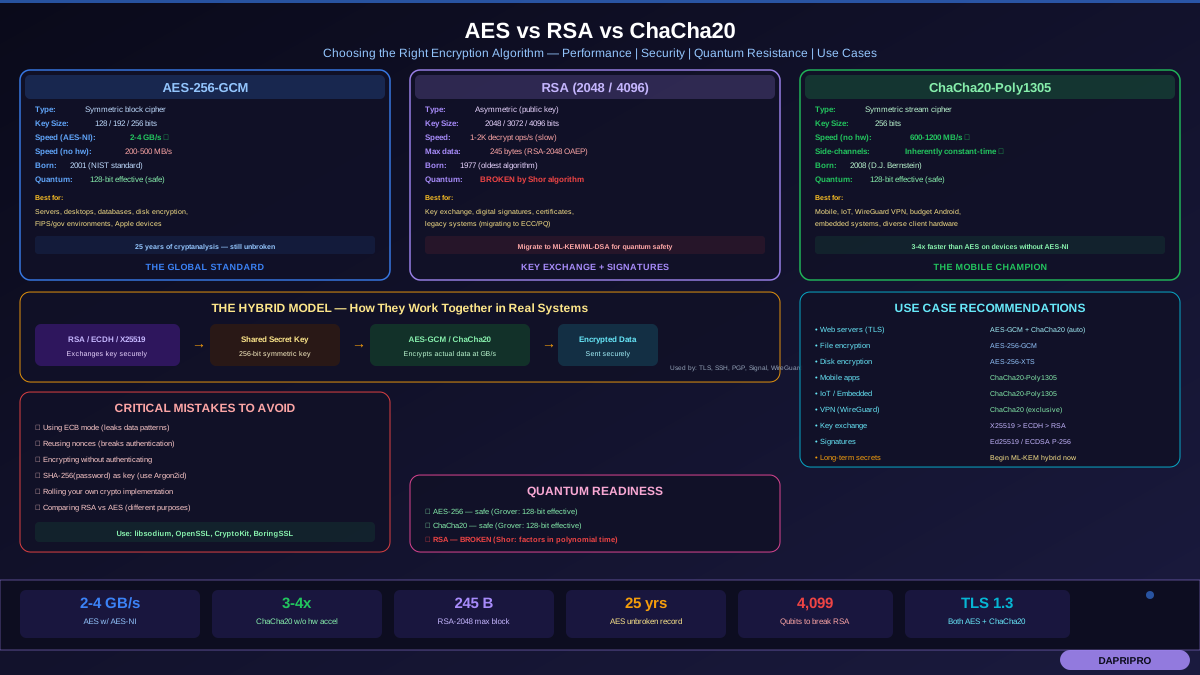
Using ECB mode: ECB (Electronic Codebook) mode encrypts each block independently with the same key, meaning identical plaintext blocks produce identical ciphertext blocks. This leaks patterns: if ten records have the same SSN, the encrypted values are identical. Always use CBC, GCM, or other modes with IVs/nonces. AES-GCM is the preferred choice — it provides authenticated encryption (confidentiality + integrity + tamper detection).
Forgetting about backups and logs: Encrypted database files do not help if the transaction logs, query logs, or backup files contain plaintext. Ensure database logs do not record plaintext values of encrypted columns (disable verbose query logging, use parameterized queries). Ensure backups are encrypted — TDE automatically encrypts backups in SQL Server and Oracle, but PostgreSQL backups require separate encryption (use pg_basebackup with compression and pipe through GPG or write to encrypted storage).
Ignoring the connection: Encrypting data at rest while transmitting it over unencrypted connections is like locking your door but leaving the window open. Require TLS on all database connections. In PostgreSQL, set ssl=on and sslmode=verify-full in connection strings. In MySQL, use require_ssl for user accounts. In SQL Server, set Force Encryption on the instance and use TrustServerCertificate=false in connection strings.
Compliance and Regulatory Requirements
PCI DSS (Requirement 3): Stored cardholder data (PAN, cardholder name, expiration date, service code) must be rendered unreadable using strong cryptography. PCI DSS explicitly requires documented key management procedures including key generation, distribution, storage, rotation, replacement, and destruction. Key custodian split knowledge and dual control are required for manual key management. Encryption must use industry-tested algorithms (AES-256, RSA 2048+). Requirement 3.5 specifically prohibits storing encryption keys in the same location as the encrypted data — this is a direct prohibition of the most common anti-pattern.
HIPAA (45 CFR 164.312): Encryption of ePHI at rest is an addressable implementation specification under the Technical Safeguards. "Addressable" does not mean optional — it means you must implement it or document why an equivalent measure is in place. In practice, encryption of ePHI databases is expected by OCR auditors and is the standard of care. Using NIST-approved encryption (AES-128 or AES-256) for ePHI at rest invokes the safe harbor provision under the breach notification rule — encrypted data that is breached does not require notification.
GDPR (Article 32): Encryption is listed as an example appropriate technical measure. While GDPR does not mandate specific algorithms or approaches, supervisory authorities consistently cite encryption as a key factor in determining administrative fines. The absence of encryption on personal data at rest is treated as an aggravating factor in penalty calculations. Data protection impact assessments (DPIAs) for high-risk processing commonly require encryption as a baseline control.
SOX (Sarbanes-Oxley): Financial data integrity and confidentiality controls implicitly require encryption for sensitive financial databases. While SOX does not specify encryption algorithms, auditors expect database encryption as part of internal controls over financial reporting (ICFR).
Decision Framework: Choosing Your Encryption Strategy
Start with TDE (or volume encryption for PostgreSQL) as your baseline — it has near-zero implementation cost, minimal performance impact, and satisfies the encryption-at-rest checkbox for all major compliance frameworks. This protects against physical threats and unauthorized filesystem access.
Add column-level or application-level encryption for your most sensitive data: SSNs, credit card PANs, health records, financial account numbers, biometric data, and any data where even authorized database users should not see plaintext without a specific business need. Use SQL Server Always Encrypted, MongoDB CSFLE, or application-layer encryption with a library like AWS Encryption SDK.
Use envelope encryption for all key management. Store KEKs in a cloud KMS or HSM. Generate unique DEKs per data category. Enable automatic key rotation. Audit all key access through cloud audit logs.
Require TLS on every database connection — no exceptions, no "we'll add it later." Test end-to-end: verify that backups are encrypted, logs do not leak plaintext, connection strings enforce TLS, and key recovery procedures work before you need them. The worst time to test your decryption recovery procedure is during an incident at 3 AM.