Cookie consent is deceptively complex. On the surface, it appears simple — show a banner, let users choose, respect their choice. In practice, getting cookie consent right requires understanding the intersection of the GDPR, the ePrivacy Directive, national DPA guidance (which varies by country), browser and platform requirements (Google Consent Mode v2), and the technical implementation to ensure no cookies fire before valid consent is obtained.
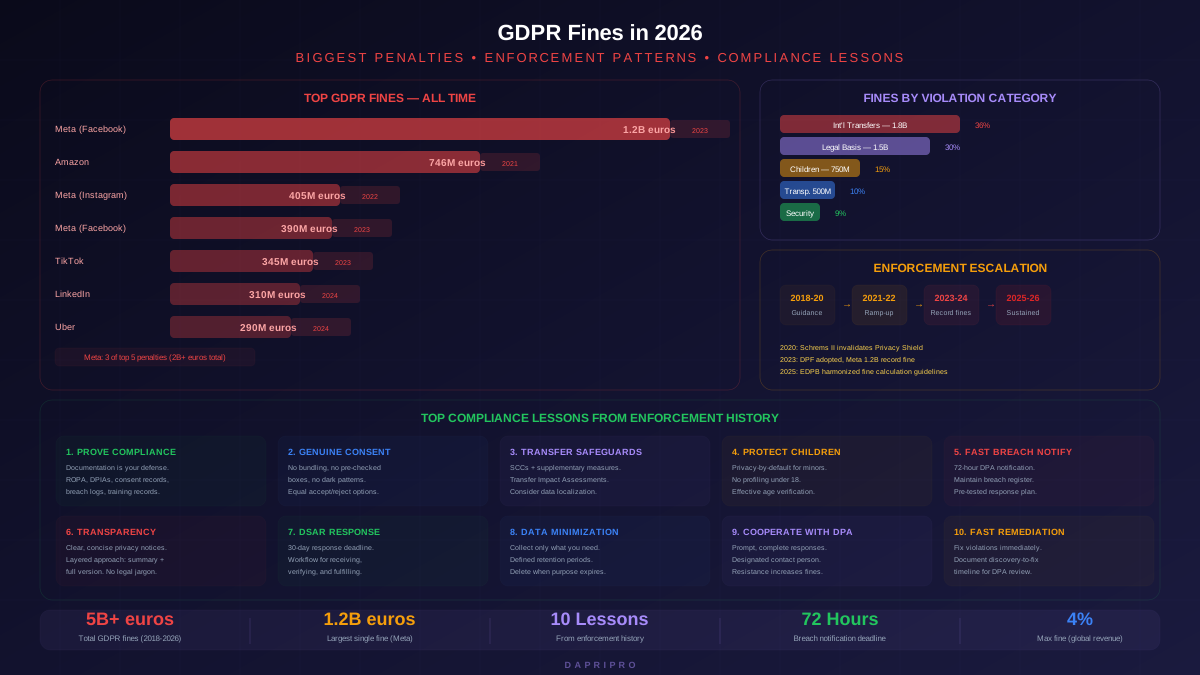
The stakes are real. The CNIL fined Google 150 million euros and Facebook 60 million euros specifically for cookie consent violations — not data breaches, not unauthorized data sharing, but for making it harder to refuse cookies than to accept them. Multiple smaller organizations have received fines ranging from 10,000 to 500,000 euros for similar violations. Cookie consent enforcement is not theoretical — it is one of the most commonly enforced areas of GDPR compliance.
The Legal Framework: GDPR Meets ePrivacy
Cookie consent requirements come from two complementary legal frameworks:
| Framework | What It Covers | Key Requirements |
|---|---|---|
| ePrivacy Directive (2002/58/EC) | Rules for storing or accessing information on a user's device (cookies, local storage, fingerprinting, tracking pixels) | Prior consent required for non-essential storage/access. Strictly necessary cookies are exempt. Each member state has its own national implementation. |
| GDPR (2016/679) | The definition of valid consent and the lawful basis for processing personal data collected through cookies | Consent must be freely given, specific, informed, and unambiguous (Article 4(11)). Must be as easy to withdraw as to give (Article 7(3)). Cannot be bundled with other consents. |
| CJEU Planet49 Ruling (2019) | Court ruling clarifying that consent requires an active opt-in — pre-checked boxes are not valid consent | Cookies require an affirmative action by the user. Pre-ticked checkboxes, continued browsing, or scrolling do not constitute valid consent. |
| National DPA Guidance | Country-specific requirements from data protection authorities | CNIL (France): 6-month consent expiry, specific banner design rules. ICO (UK): explicit consent model. AEPD (Spain): informing users about specific tracking technologies. |
The Seven Criteria for Valid Cookie Consent
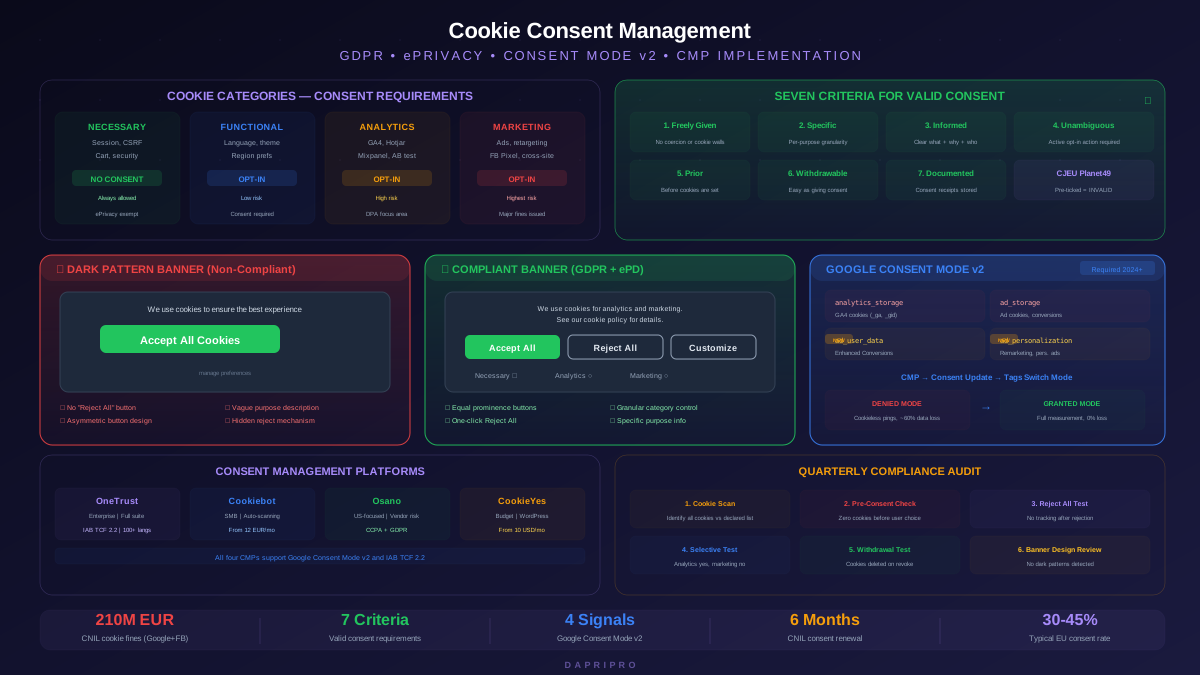
Based on GDPR Article 4(11), Article 7, and EDPB guidelines, valid cookie consent must satisfy all seven criteria simultaneously:
| Criterion | Requirement | Common Violation |
|---|---|---|
| Freely given | Users must have a genuine free choice. Denying consent must not result in denied access to the website or degraded experience | Cookie walls that block site access unless all cookies are accepted |
| Specific | Consent must be given for each specific purpose (analytics, marketing, social media). Blanket "Accept All" without granular options is insufficient | Single "I Agree" button with no category-level control |
| Informed | Users must know what they are consenting to — which cookies, what data, for what purposes, for how long, and who receives the data | Vague descriptions like "We use cookies to improve your experience" with no specifics |
| Unambiguous | Consent requires a clear affirmative action (clicking a button, toggling a switch). Silence, inactivity, or pre-checked options do not count | Treating continued browsing or scrolling as implied consent |
| Prior | Consent must be obtained before cookies are set — not after. No non-essential cookies can fire on page load before the user makes a choice | Loading Google Analytics and Facebook Pixel on page load, then showing the banner |
| Withdrawable | Users must be able to withdraw consent at any time, as easily as they gave it | No mechanism to change cookie preferences after the banner is dismissed |
| Documented | Controllers must be able to demonstrate that consent was obtained (consent receipts with timestamp, user choice, and version of the consent text shown) | No records of when and how consent was obtained for each user |
Cookie Classification: Four Categories
Every cookie on your website must be classified into one of four categories. This classification determines whether the cookie requires consent and which consent category it falls under in your CMP.
| Category | Consent Required? | Examples | Typical Cookie Names |
|---|---|---|---|
| Strictly necessary | No — exempt from consent | Session authentication, CSRF protection, load balancing, shopping cart, security cookies, cookie consent preference cookie itself | PHPSESSID, csrf_token, __stripe_sid, cookieconsent_status |
| Functional / Preferences | Yes | Language preference, region selection, font size, dark mode preference, recently viewed items | lang, locale, theme_preference |
| Analytics / Performance | Yes | Google Analytics, Hotjar, Mixpanel, page view tracking, performance monitoring, A/B testing | _ga, _gid, _gat, _hjid, mp_* |
| Marketing / Advertising | Yes | Google Ads, Facebook Pixel, LinkedIn Insight Tag, retargeting, cross-site tracking, programmatic advertising | _fbp, _gcl_au, IDE, test_cookie, li_sugr |
Dark Patterns: The Enforcement Frontier
Dark patterns in cookie banners have become the single most enforced cookie compliance issue since 2022. A dark pattern is any design technique that manipulates users into accepting cookies they would otherwise refuse. DPAs across Europe have explicitly targeted these practices:
| Dark Pattern | What It Looks Like | Why It Violates GDPR | Enforcement Example |
|---|---|---|---|
| Asymmetric buttons | "Accept All" is a large, colored button. "Manage Preferences" is a small text link | Consent is not freely given when refusal requires significantly more effort than acceptance | CNIL (France): 150 million euro fine to Google, 60 million to Facebook (2022) |
| Hidden reject option | "Reject All" is buried in a settings menu that requires two or more additional clicks | Withdrawal/refusal must be as easy as giving consent (Article 7(3)) | AEPD (Spain): fines to multiple companies for requiring extra clicks to refuse |
| Pre-selected categories | Analytics and marketing toggles are pre-enabled when the settings panel opens | Pre-ticked boxes do not constitute valid consent (Planet49 ruling) | Multiple DPAs have issued guidance explicitly prohibiting pre-checked toggles |
| Misleading language | "We use cookies to ensure the best experience" implies refusal degrades the site | Consent is not freely given if users believe refusal has negative consequences | EDPB guidelines state that consent text must be neutral, not persuasive |
| Confirm shaming | "No thanks, I prefer a worse experience" as the reject option | Emotional pressure undermines free choice requirement | Several DPAs have flagged this as non-compliant in enforcement actions |
| Repeated prompting | Showing the banner again after the user has already refused, hoping for a different answer | Consent fatigue undermines the freely given requirement. Once refused, respect the decision | ICO guidance explicitly prohibits nagging users who have refused consent |
Compliant Banner Design
Based on enforcement actions and DPA guidance, a compliant cookie banner in 2026 must include:
- Equal prominence buttons — "Accept All" and "Reject All" must be the same size, color weight, and visual prominence. Both must be visible on the first layer of the banner without scrolling or additional clicks.
- Granular control — a "Manage Preferences" or "Customize" option that allows users to enable/disable individual cookie categories (functional, analytics, marketing).
- Clear information — the banner must state what cookies are used, for what purposes, and link to the full cookie policy.
- No cookie wall — the website must be usable (at minimum, core content must be accessible) even if the user rejects all non-essential cookies.
- Persistent preference access — a floating icon or footer link must allow users to reopen the cookie settings and change their preferences at any time.
Google Consent Mode v2
Google Consent Mode v2 became mandatory for EEA traffic in March 2024. It is a mechanism that communicates user consent status from your CMP to Google tags (Analytics, Ads, Floodlight). Without proper Consent Mode integration, your Google Analytics measurement and Google Ads conversion tracking will be severely limited for EEA users.
The Four Consent Signals
| Signal | Controls | Default (Before Consent) | Granted (After Consent) |
|---|---|---|---|
| analytics_storage | Whether Google Analytics can store cookies (_ga, _gid) for measurement | Denied — GA uses cookieless pings with limited data. No user-level tracking | Granted — full GA measurement with cookies, user-level reporting, audience building |
| ad_storage | Whether Google Ads can store cookies for ad personalization and conversion tracking | Denied — no ad cookies set. Conversions modeled by Google using aggregated signals | Granted — full conversion tracking, remarketing audiences, cross-device measurement |
| ad_user_data | Whether user data (email, phone) can be sent to Google for Enhanced Conversions | Denied — no user data sent to Google for ad measurement | Granted — Enhanced Conversions data can be collected and sent |
| ad_personalization | Whether user data can be used for ad personalization and remarketing | Denied — no remarketing or personalized advertising | Granted — remarketing audiences, similar audiences, personalized ads |
Implementation Architecture
Consent Mode works by loading Google tags in a restricted mode before consent is given. The tags fire but operate with significant limitations — no cookies are set, no user identifiers are stored, and data is collected in an aggregated, anonymized form. When consent is granted, the tags switch to full mode and begin collecting granular data with cookies.
Your CMP must fire a consent update event when the user makes their choice. This event tells all Google tags to switch from denied to granted mode for the relevant categories. Most major CMPs (OneTrust, Cookiebot, Osano, CookieYes) support Consent Mode v2 integration through pre-built templates in Google Tag Manager.
Consent Management Platform Selection
A CMP automates the technical implementation of cookie consent: scanning your site for cookies, categorizing them, displaying the consent banner, blocking non-essential scripts before consent, recording consent receipts, and integrating with Google Consent Mode.
| CMP | Pricing | Key Strengths | Limitations | Best For |
|---|---|---|---|---|
| OneTrust | Enterprise pricing (custom quotes, typically five figures annually) | Most comprehensive feature set. Supports privacy program management beyond cookies. IAB TCF 2.2 certified. Automated cookie scanning and classification. 100+ language support | Complex implementation. High cost. Can be over-engineered for small sites | Large enterprises with multi-country compliance needs |
| Cookiebot (Usercentrics) | Free up to 50 subpages, paid plans from 12 euros per month | Automatic monthly cookie scanning. IAB TCF 2.2. Google Consent Mode v2 native. Easy setup (single script tag). Geolocation-based banner rules | Limited customization on lower tiers. Cookie scanning can miss dynamically loaded scripts | Small to medium businesses. Best balance of ease and compliance |
| Osano | Free tier available, business plans from several hundred dollars per month | Clean UI. Vendor risk monitoring. Regulatory change alerts. Strong US privacy law support (CCPA/CPRA). Consent Mode v2 | Less granular cookie categorization than OneTrust. Smaller cookie database | US-focused companies expanding to EU compliance |
| CookieYes | Free up to 100 pages, paid from 10 dollars per month | Lowest cost for small sites. Auto-scanning. GDPR and CCPA templates. WordPress plugin. Consent Mode v2 | Fewer enterprise features. Limited API access on lower tiers | Small websites, blogs, and startups with budget constraints |
Technical Implementation
Script Blocking Architecture
The most critical technical requirement is ensuring no non-essential cookies are set or scripts loaded before consent is obtained. There are three script blocking approaches:
| Approach | How It Works | Pros | Cons |
|---|---|---|---|
| Tag Manager integration | All third-party scripts are loaded through Google Tag Manager (or similar). CMP creates consent-based trigger conditions. Tags only fire when the relevant consent category is granted | Centralized control. No code changes needed per script. Works with Consent Mode natively | Requires all scripts to be managed through GTM. Direct script tags in HTML bypass this control |
| Script type modification | Change script tags from type="text/javascript" to type="text/plain" and add a data attribute indicating the consent category. CMP changes the type back to text/javascript after consent | Works without a tag manager. CMP handles the reactivation automatically | Requires modifying every third-party script tag. Can miss dynamically injected scripts |
| Server-side blocking | Server checks consent cookie before injecting scripts into the HTML response. Non-consented scripts are never sent to the browser | Most reliable — scripts never reach the browser without consent. No client-side race conditions | More complex implementation. Requires server-side rendering or edge function support |
Common Technical Pitfalls
- Race conditions — third-party scripts that load faster than the CMP can initialize, setting cookies before the banner appears. Solution: use a tag manager with built-in consent checks or load the CMP script synchronously before any other scripts.
- Embedded content — YouTube embeds, Google Maps, social media widgets load third-party cookies from their own domains. These must be replaced with placeholder elements until consent is granted, then loaded dynamically. Most CMPs offer content blocking features for common embeds.
- Cookie syncing — ad tech cookie syncing (where multiple ad networks share cookie IDs) can set dozens of cookies from a single pixel. Blocking the initial pixel is not sufficient if the CMP does not also block the sync chain.
- First-party vs third-party cookies — browser privacy changes (Safari ITP, Firefox ETP, Chrome third-party cookie deprecation) affect which cookies persist. Your CMP must handle both first-party cookies (set by your domain) and third-party cookies (set by other domains through scripts on your site).
Cookie Compliance Audit Process
Regular cookie audits are essential because website dependencies change over time — new marketing tools are added, plugins are updated, and third-party scripts evolve. A cookie audit should be performed quarterly and after any significant website change.
| Audit Step | What to Check | Tools |
|---|---|---|
| 1. Cookie scan | Run a full site scan to identify every cookie, its origin, purpose, and expiry. Compare against your declared cookie list | Cookiebot scanner, OneTrust ScanManager, CookieMetrix, browser DevTools |
| 2. Pre-consent check | Load the site in a fresh browser (no prior consent). Verify zero non-essential cookies are set before interacting with the banner | Browser DevTools (Application tab), Charles Proxy, CookieMetrix |
| 3. Reject All test | Click "Reject All" and verify: no analytics/marketing cookies are set, no tracking scripts are loaded, Google Consent Mode signals remain denied | Browser DevTools (Network + Application tabs), GA debug mode |
| 4. Selective consent test | Accept only analytics, reject marketing. Verify: analytics cookies are set, marketing cookies are not, ad scripts do not fire | Browser DevTools, GTM preview mode, Consent Mode debugger |
| 5. Withdrawal test | Accept all cookies, then reopen settings and withdraw consent. Verify: non-essential cookies are deleted, tracking stops | Browser DevTools, compare cookie count before and after withdrawal |
| 6. Banner design review | Verify: Accept and Reject buttons have equal prominence, no dark patterns, granular control available, clear information provided | Visual inspection, compare with CNIL and EDPB guidelines |