How much of your life is on social media right now? Your full name, birthday, school or workplace, relationship status, family members, vacation photos, location check-ins, political views, and what you had for lunch?
For most people, the answer is: way too much.
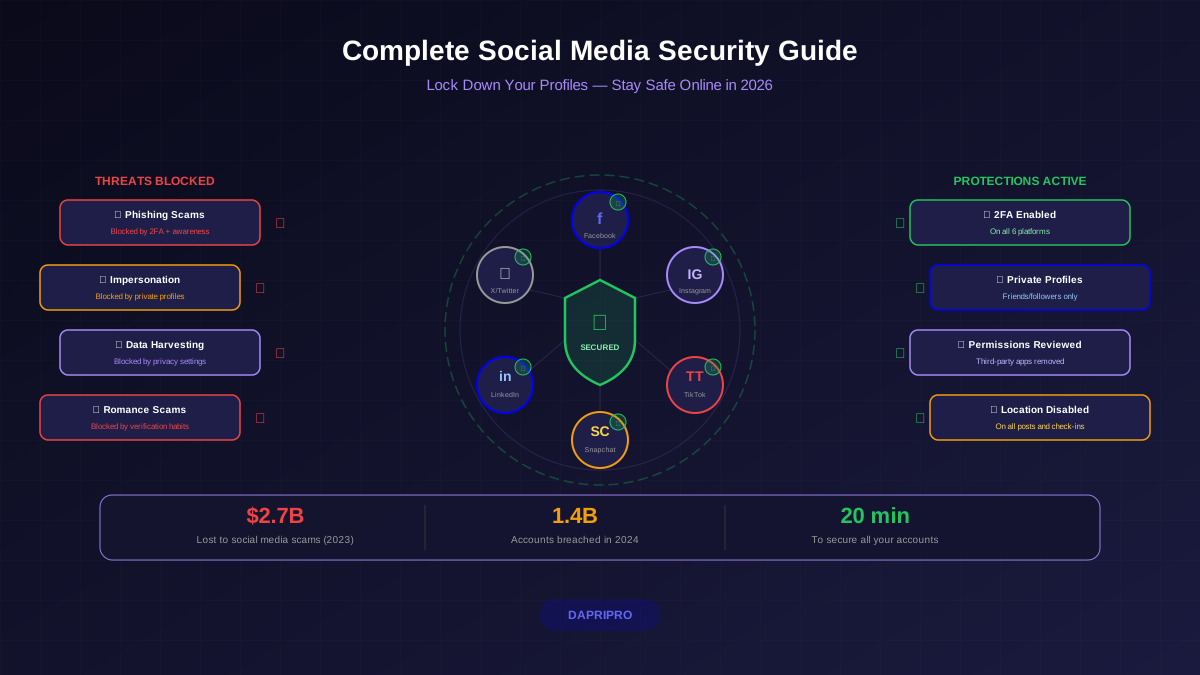
Here is the problem: every piece of information you share is a tool that hackers, scammers, and identity thieves can use against you. The FBI's Internet Crime Complaint Center (IC3) reported that social media scams cost Americans $2.7 billion in 2023. And that number only counts the people who actually reported being scammed.
This guide covers how to lock down your accounts, spot scams before they work, and protect your social media privacy across every major platform.
Why Hackers Love Social Media
Social media is a goldmine for attackers. Not because the platforms are insecure (though breaches happen), but because people voluntarily share the exact information attackers need.
Here is how hackers use social media against you:
- Password guessing. Your dog's name, birthday, anniversary, and favorite team are all common password components — and they are all on your profile.
- Security question answers. "What city were you born in?" "What's your mother's maiden name?" These answers are often public on Facebook.
- Spear phishing. Attackers study your profile to craft believable phishing emails. "Hey Sarah, great job on the Marketing Summit! Click here for the photos" works because they know you were there — you posted about it.
- Business email compromise. Hackers find employee relationships on LinkedIn to impersonate bosses, colleagues, and vendors in email scams.
- Physical stalking. Real-time location sharing and check-ins tell criminals exactly where you are — and more importantly, when you are not home.
Lock Down Your Accounts: Platform-by-Platform Guide
Each social media platform has different privacy settings. Here are the critical changes for each one.
Facebook Privacy Settings
Facebook collects more personal data than any other social platform. Here are the essential Facebook privacy settings to change:
- Set posts to "Friends Only." Settings → Privacy → Who can see your future posts → Friends
- Limit old posts. Settings → Privacy → Limit Past Posts (changes all past public posts to Friends Only)
- Turn off search engine linking. Settings → Privacy → Do you want search engines to link to your profile → No
- Review app permissions. Settings → Apps and Websites → remove any apps you do not actively use
- Disable face recognition. Settings → Face Recognition → No
- Lock your profile. Go to your profile → "..." menu → Lock Profile (limits what non-friends see)
Instagram, TikTok, and Snapchat
These platforms are popular with younger users (10-17 years old), making security especially important. Our detailed guide covers Instagram, TikTok, and Snapchat security settings in depth.
Quick essentials for each:
| Setting | TikTok | Snapchat | |
|---|---|---|---|
| Private account | Settings → Privacy → Private Account | Settings → Privacy → Private Account | On by default (Friends Only) |
| 2FA | Settings → Security → 2FA | Settings → Security → 2-Step | Settings → 2FA |
| Restrict DMs | Settings → Messages → limit who can message | Settings → Privacy → Direct Messages | Settings → Contact Me → Only Friends |
| Location | Remove location tags from posts | Turn off location access in phone settings | Disable Snap Map or use Ghost Mode |
| Download data | Settings → Your Activity → Download Data | Settings → Privacy → Download Data | Settings → My Data → Submit Request |
LinkedIn Security
LinkedIn is a top target for professional scams and social engineering. Fake recruiters, phishing job offers, and impersonation scams are rampant.
- Limit who sees your connections. Settings → Visibility → Who can see your connections → Only You
- Turn off activity broadcasts. Settings → Visibility → Share profile updates → No
- Be cautious with connection requests. If you do not recognize someone and they have a new profile with few connections, it is likely fake.
- Never share sensitive details. Do not post about upcoming deals, company security systems, or travel plans.
Social Media Scams: How to Spot Them
Scams on social media are getting more sophisticated every year. AI-generated content makes fake profiles more convincing, and deepfake technology creates realistic video scams.
Most Common Social Media Scams in 2026
| Scam Type | How It Works | Red Flags | Avg Loss |
|---|---|---|---|
| Romance scams | Fake profile builds emotional relationship, then asks for money | Never wants to video call, moves to private messaging quickly, asks for crypto or gift cards | $14,000 |
| Investment scams | "Get rich quick" crypto or forex offers from friends whose accounts were hacked | Guaranteed returns, urgency, asks you to install unfamiliar apps | $9,000 |
| Fake giveaways | "You won an iPhone!" posts that steal your login credentials | Too good to be true, requires you to "verify" by logging in on external site | Account theft |
| Job scams | Fake recruiter offers dream job, asks for personal info or upfront payment | No real company website, asks for SSN early, requires payment for "training" | $2,000 |
| Impersonation | Duplicate account of a friend messages you asking for money or codes | New account, slightly different username, urgent request for help | $500-$5,000 |
"If someone you know suddenly sends you a message asking for money, verification codes, or personal information — verify their identity through a different channel first. Call them or text them outside the platform." — CISA social media advisory
Social Media Safety for Kids (Ages 10-14)
If you are a young person reading this, or a parent of one, this section is especially for you. Kids and teens face unique risks on social media that adults often do not think about.
Our full guide on social media privacy for kids and teens covers this in detail, but here are the essentials:
Risks Specific to Young Users
- Cyberbullying. Over 46% of teens report experiencing cyberbullying on social media. Block and report — do not engage.
- Predatory contact. Adults posing as peers in DMs. Never share personal information with strangers online, no matter how friendly they seem.
- Oversharing. Posting school name, home area, daily routines, or location makes you a target. Keep profiles private and vague about personal details.
- Peer pressure and scams. "Send me your password to prove we are best friends" is manipulation, not friendship.
- Permanent digital footprint. Everything you post can be screenshotted and shared. College admissions and future employers search social media.
Rules for Young Social Media Users
- Keep accounts private. Only accept followers and friend requests from people you know in real life.
- Never share your location. Turn off location on every post and disable Snap Map or set it to Ghost Mode.
- Never share personal info in DMs. Real friends do not need your password, address, or phone number through social media.
- Talk to a trusted adult if someone makes you uncomfortable, threatens you, or asks to meet in person.
- Think before you post. Would you be okay with your parents, teachers, and future college seeing this? If no, do not post it.
What to Do If Your Account Is Hacked
If you suspect your social media account has been compromised, speed matters. Every minute the attacker has access, they can steal data, scam your contacts, and lock you out further.
Follow our complete guide on recovering a hacked social media account, but here is the quick version:
Immediate Steps (First 10 Minutes)
- Try to log in. If you can, immediately change your password to something strong and unique.
- Enable 2FA immediately if it was not already on.
- Check active sessions. All platforms show where you are logged in. Log out of every session you do not recognize.
- Revoke app access. Remove any third-party apps connected to your account — the attacker may have added one to maintain access.
If You Are Locked Out
- Use the platform's account recovery (Facebook: facebook.com/hacked, Instagram: in-app recovery, Google: accounts.google.com/signin/recovery)
- Contact the platform's support team with proof of identity
- Check your email for password change notifications — this confirms the hack and gives you a timeline
After Recovering Your Account
- Change passwords on ALL accounts that shared the same password
- Alert your contacts — the attacker may have sent scam messages from your account
- Review posted content and delete anything the attacker posted
- Check financial accounts if any payment methods were linked
- Report the incident to the platform
Ongoing Social Media Security Habits
Securing your accounts is not a one-time activity. Build these habits to stay protected:
- Weekly: Think before you share. Ask: "Could this information be used against me?"
- Monthly: Check login activity across all platforms for sessions you do not recognize
- Quarterly: Review connected apps and remove ones you no longer use
- Yearly: Download your data from each platform to see what they have collected, then delete old posts and photos you no longer want public
- Always: Verify DMs requesting money, codes, or personal info through a separate channel before responding
Social media should be fun, not dangerous. By spending 20 minutes on the settings above and adopting a few simple habits, you keep the fun while eliminating most of the risk.