If you are using Gmail for email, Chrome for browsing, and SMS for messaging, here is the reality: companies know almost everything about you. They know what you search, who you talk to, what you buy, where you go, and even what you think about buying but decide not to.
The good news? There are powerful privacy tools that can dramatically reduce how much data you leak online. Many of them are free. And switching takes minutes, not hours.
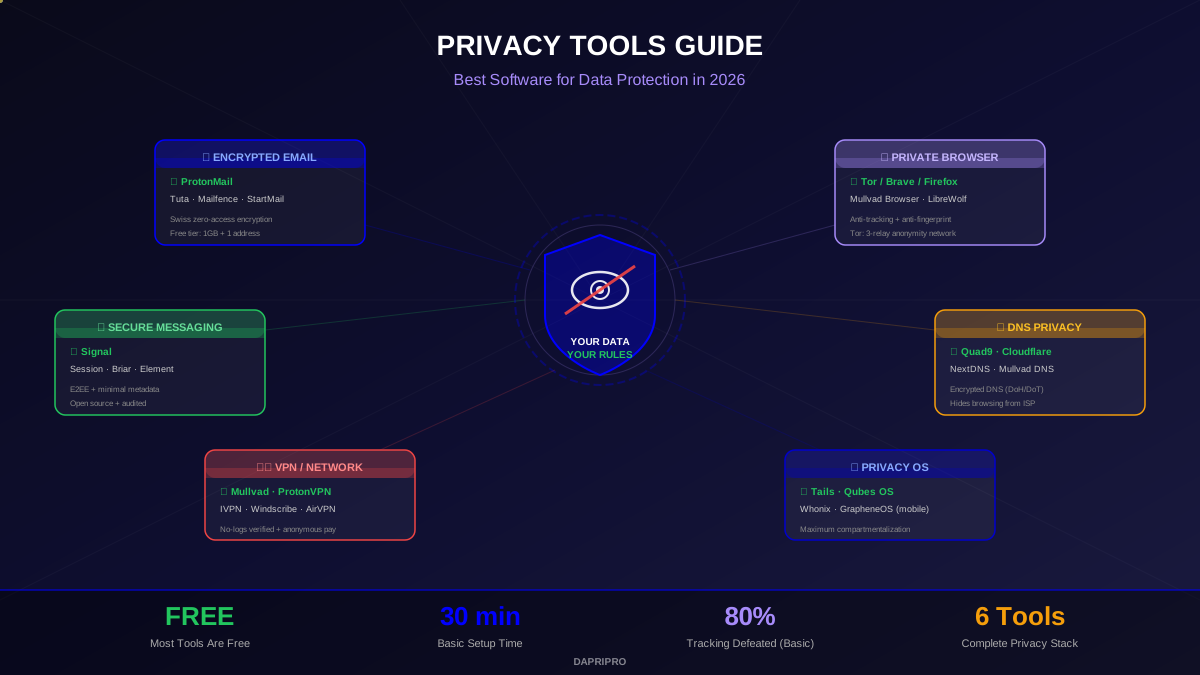
This guide covers the best privacy tools for 2026 across every category — from encrypted email and private messaging to anonymous browsing and privacy-first operating systems. Whether you want basic protection or maximum anonymity, you will find the right tools here.
Privacy-Focused Email Providers
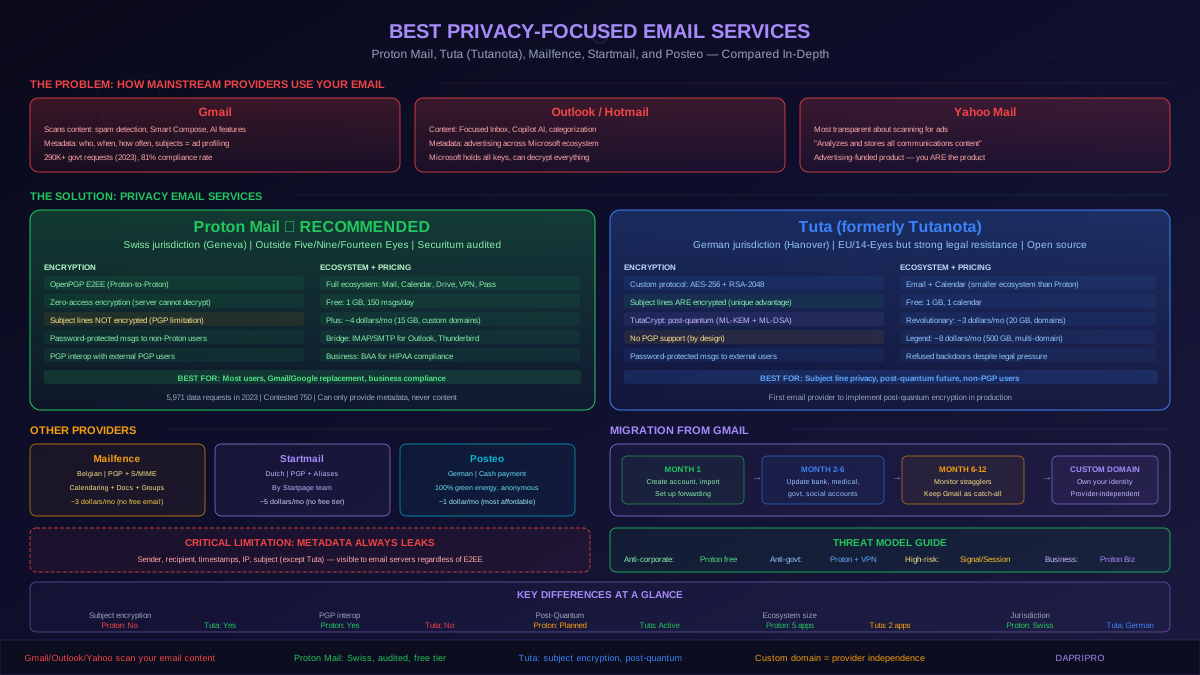
Email is one of the most privacy-invasive technologies we use daily. Standard email providers like Gmail and Outlook scan your messages, build advertising profiles, and comply with government data requests. Privacy-focused email providers change that equation completely.
| Provider | Jurisdiction | Encryption | Free Tier | Best For |
|---|---|---|---|---|
| ProtonMail | 🇨🇭 Switzerland | E2EE + zero-access | 1 GB, 1 address | Best overall privacy email |
| Tuta (Tutanota) | 🇩🇪 Germany | E2EE + encrypted contacts/calendar | 1 GB, 1 address | Fully encrypted ecosystem |
| Mailfence | 🇧🇪 Belgium | E2EE (OpenPGP) | 500 MB | PGP users, documents + calendar |
| Skiff Mail | 🇺🇸 USA (now Notion) | E2EE | 10 GB | Generous storage |
| StartMail | 🇳🇱 Netherlands | PGP + disposable aliases | ❌ Paid only ($5/mo) | Unlimited aliases |
Our top recommendation: ProtonMail. Swiss privacy laws are among the strongest in the world, ProtonMail has been tested in court and refused to hand over data, and their free tier is generous enough for personal use. For users who want the entire ecosystem encrypted (email, calendar, contacts, file storage), Proton offers a full suite.
Private Web Browsers
Your browser is arguably the most privacy-invasive app on your device. It tracks every site you visit, builds a fingerprint of your device, and feeds data to advertisers. Here are the best alternatives:
Tor Browser — Maximum Anonymity
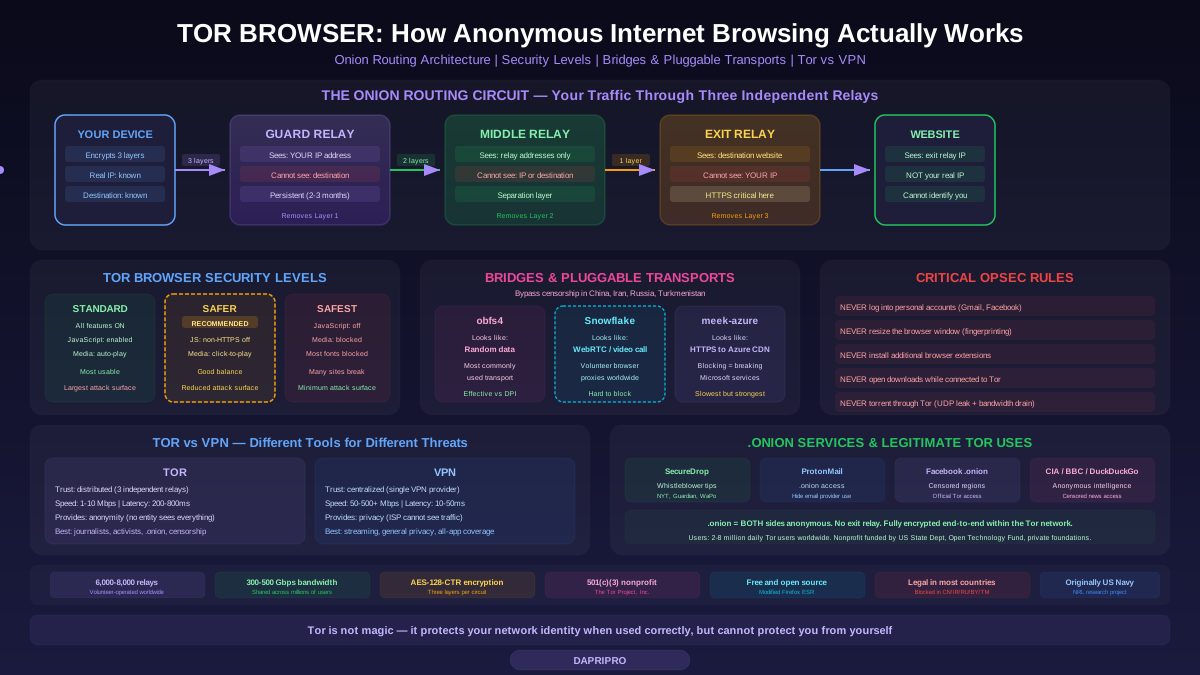
The Tor Browser provides the strongest anonymity available. It routes your traffic through three encrypted relays (nodes) so that no single point can link your identity to your activity:
- Guard node — Knows who you are (your IP) but NOT what you are accessing
- Middle relay — Knows neither who you are NOR what you are accessing
- Exit node — Knows what you are accessing but NOT who you are
Tor is essential for journalists, activists, and whistleblowers. But it has trade-offs: it is significantly slower than regular browsers, some websites block Tor traffic, and using Tor with accounts that identify you (like your personal Gmail) defeats the purpose of anonymity.
Brave and Firefox — Daily Privacy Browsers
For everyday browsing, these are the best privacy-respecting options:
- Brave — Blocks ads and trackers by default, built-in fingerprint protection, optional Tor private tabs. Based on Chromium so all Chrome extensions work. The most user-friendly privacy browser.
- Firefox — Open source, highly customizable privacy settings (Enhanced Tracking Protection, Total Cookie Protection). Use with uBlock Origin and Firefox Containers for maximum control.
- Mullvad Browser — Made by the Tor Project and Mullvad VPN. Designed to make everyone look identical (anti-fingerprinting), without the speed penalty of Tor's relay network.
Secure Messaging Apps
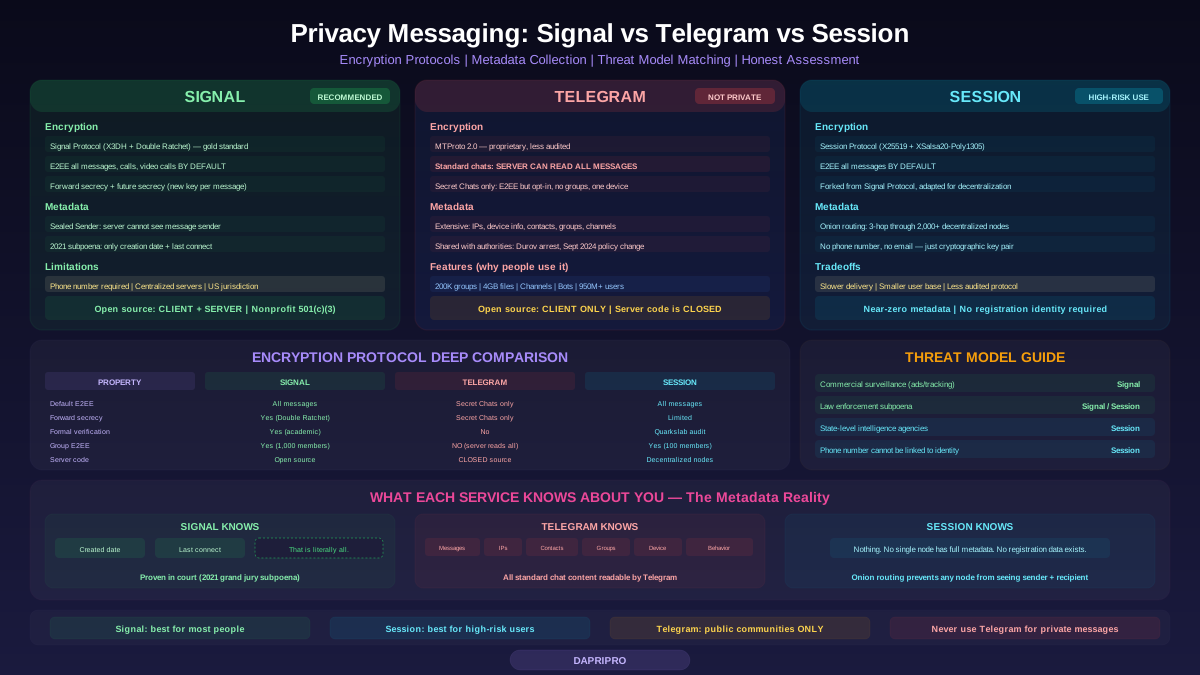
Secure messaging is the single most important privacy upgrade most people can make. Here is how the major apps compare:
| App | E2EE | Metadata | Phone # Required? | Open Source? |
|---|---|---|---|---|
| Signal ★ | ✅ Always on | Almost none collected | Yes (usernames coming) | ✅ Fully |
| Session | ✅ Always on | None (decentralized) | No | ✅ Fully |
| Briar | ✅ Always on | None (P2P + Tor) | No | ✅ Fully |
| ✅ Always on | Extensive (shared with Meta) | Yes | ❌ No | |
| Telegram | ❌ Only "Secret Chats" | Extensive | Yes | Partial (client only) |
| iMessage | ✅ Between Apple devices | Some metadata | Apple ID | ❌ No |
Our recommendation: Signal. It is free, easy to use, available on every platform, and its encryption protocol is so trusted that WhatsApp and Google adopted it. Signal collects virtually no data — when subpoenaed by a grand jury in 2021, the only data Signal could provide was the account creation date and last connection time. Nothing else.
DNS Privacy
DNS (Domain Name System) is the internet's phone book — it translates website names into IP addresses. The problem? By default, every DNS query you make is sent in plain text to your ISP, who can see and log every website you visit.
Encrypted DNS Solutions
- DNS over HTTPS (DoH) — Encrypts DNS queries inside HTTPS traffic. Supported by Firefox, Chrome, Edge, and most operating systems. Blends in with normal web traffic, making it harder to block.
- DNS over TLS (DoT) — Encrypts DNS queries using TLS on port 853. Easier for networks to identify and potentially block, but very efficient.
- DNSCrypt — An older protocol that also encrypts DNS queries. Still used but DoH has largely replaced it.
Best Private DNS Providers
| Provider | Address | Features | Best For |
|---|---|---|---|
| Quad9 | 9.9.9.9 | Malware blocking, DNSSEC, Swiss non-profit | Privacy + security combined |
| Cloudflare | 1.1.1.1 | Fastest DNS, WARP VPN option, no-log audit | Speed + privacy |
| NextDNS | Custom | Customizable filters, ad blocking, analytics | Power users, families |
| Mullvad DNS | 100.64.0.4 | No logging, ad/tracker blocking | Maximum privacy |
File Shredding and Secure Deletion
When you "delete" a file normally, it is not actually erased — the operating system just marks that space as available for reuse. Until something new is written over it, the original data can be recovered with forensic tools. File shredding tools solve this by overwriting the data multiple times with random data.
- BleachBit — Open source, works on Windows and Linux. Securely deletes files and cleans system traces (browser history, logs, temp files). Used famously in a high-profile political case.
- Eraser (Windows) — Supports multiple overwrite algorithms (Gutmann 35-pass, DoD 3-pass, random). Integrates into Windows right-click menu.
- macOS Secure Empty Trash — Apple removed this feature from recent macOS versions because SSDs make traditional file shredding less effective (due to wear leveling). On Macs with SSDs, enable FileVault instead — full disk encryption makes deleted data unrecoverable without the key.
Important note: On modern SSDs, traditional file shredding is less effective because SSDs use wear leveling (spreading writes across chips). For SSDs, the best approach is full disk encryption from the start — then all deleted data is encrypted garbage.
Privacy-Focused Operating Systems
For the highest level of privacy, specialized operating systems go far beyond what Windows, macOS, or standard Linux can offer:
Tails — The Amnesic System
Tails is a live operating system that runs from a USB drive. It routes ALL internet traffic through Tor, and when you shut it down, it leaves absolutely no trace on the computer. No files, no browsing history, no evidence it was ever used. Used by journalists like those at The Intercept and recommended by Edward Snowden.
Qubes OS — Security Through Compartmentalization
Qubes OS runs everything in isolated virtual machines (called "qubes"). Your personal browsing, work, banking, and untrusted downloads each run in separate, isolated environments. If one compartment is compromised, the others remain safe. It is the most secure desktop operating system available, but requires significant hardware and technical knowledge.
GrapheneOS — Mobile Privacy
GrapheneOS is a privacy-hardened version of Android for Google Pixel phones. It removes all Google tracking, adds hardened memory allocation, network permission controls, and sensor/camera indicators. It can run most Android apps through a sandboxed Google Play compatibility layer. The best option for mobile privacy without giving up the app ecosystem.
Privacy Tool Mistakes to Avoid
- Using a VPN but staying logged into Google — Google tracks you through your account, not your IP. A VPN does not help if you are signed into Chrome with your Google account.
- Thinking Incognito/Private mode is private — It only prevents local history storage. Your ISP, employer, and the websites you visit can still see everything.
- Using Telegram thinking it is private — Regular Telegram chats are NOT end-to-end encrypted. Only "Secret Chats" are, and even those use a non-standard protocol that has been criticized by cryptographers.
- Installing too many browser extensions — Each extension makes your browser fingerprint more unique. Stick to uBlock Origin and maybe one privacy extension. Less is more.
- Not checking VPN providers' no-log claims — Many VPNs claim "no logs" but have been caught logging. Look for independently audited providers: Mullvad, ProtonVPN, and IVPN have the strongest track records.
Getting Started: Your First 30 Minutes
You do not need to change everything at once. Here is the highest-impact 30-minute privacy upgrade:
- ✅ Install Signal (5 min) — Replace SMS for your most important conversations
- ✅ Switch DNS to Quad9 or Cloudflare (5 min) — Encrypt your DNS queries
- ✅ Install Firefox or Brave with uBlock Origin (5 min) — Block ads, trackers, and fingerprinting
- ✅ Enable full disk encryption (5 min) — BitLocker (Windows) or FileVault (Mac)
- ✅ Set up a password manager (10 min) — Bitwarden is free and open source
These five changes take 30 minutes total and will dramatically reduce your digital footprint. From there, you can gradually adopt more tools based on your threat model and privacy needs.
Take Control of Your Digital Privacy
The privacy tools available in 2026 are more powerful, more user-friendly, and more accessible than ever before. You do not need to be a technical expert to use them. Signal is as easy as WhatsApp. Brave is as fast as Chrome. ProtonMail looks just like Gmail.
The companies tracking you are counting on the fact that most people will not bother to switch. Prove them wrong. Start with the basics, build your privacy stack over time, and take back control of your personal data.
Your privacy is not something to earn — it is your right. These tools help you exercise it.