

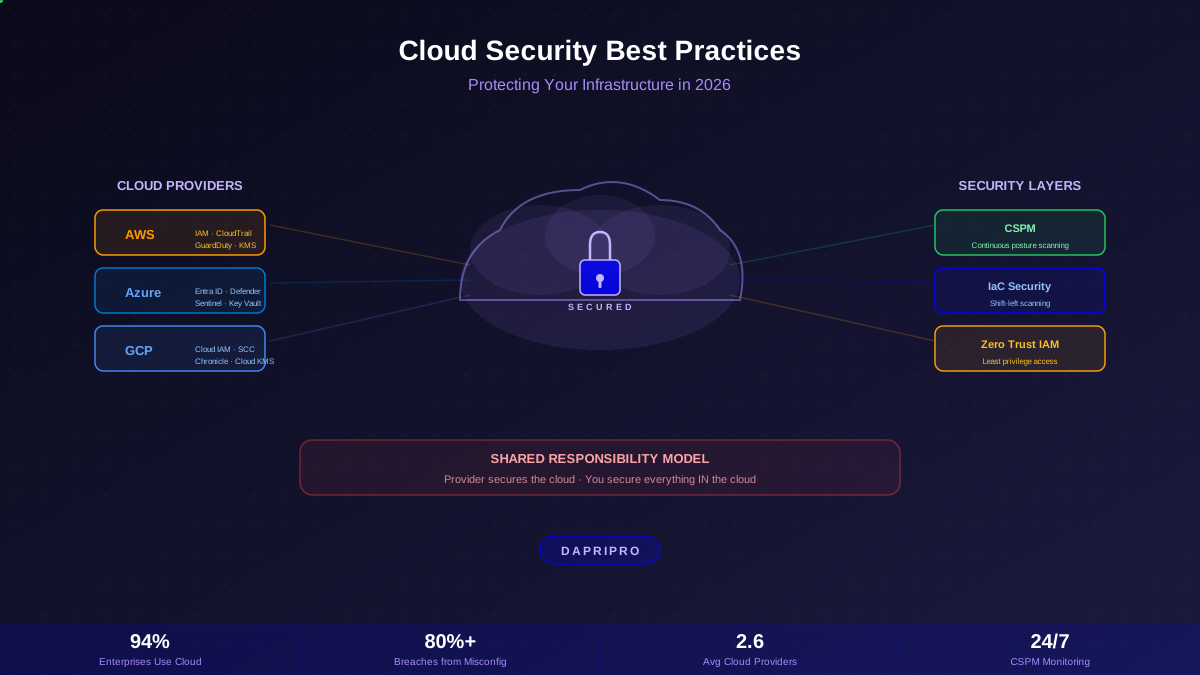
More than 94% of enterprises now use cloud services, and the average organization runs workloads across 2.6 different cloud providers. The cloud is not the future — it is the present. And cloud security breaches are growing just as fast.
Here is the uncomfortable truth: the vast majority of cloud security incidents are not caused by hackers breaking into the cloud provider's infrastructure. They are caused by misconfigurations — mistakes made by users who left a storage bucket public, forgot to enable encryption, or gave an application too many permissions.
This guide covers everything you need to secure your cloud infrastructure in 2026 — from understanding the shared responsibility model to implementing CSPM tools, securing multi-cloud environments, and catching security issues before they reach production with Infrastructure as Code scanning.
The Shared Responsibility Model
Every cloud provider operates under a shared responsibility model. This is the most important concept in cloud security, and misunderstanding it is the root cause of most breaches.
The critical insight: no matter which service model you use, you always own the security of your data and who can access it. The cloud provider will never monitor your IAM policies, check if your S3 bucket is public, or ensure you are encrypting sensitive data. That is your job.
Cloud Misconfigurations: The #1 Threat
Cloud misconfigurations are responsible for the vast majority of cloud security incidents. These are not sophisticated hacking techniques — they are simple mistakes that expose data or grant excessive access:
The Most Dangerous Misconfigurations
| Misconfiguration | Risk Level | Real-World Impact |
|---|---|---|
| Public S3 / Blob storage | 🔴 Critical | Capital One breach (106M records), Twitch source code leak |
| Wildcard IAM policies (*:*) | 🔴 Critical | Full account takeover if any credential is compromised |
| No MFA on root/admin | 🔴 Critical | Single password compromise = full environment access |
| Disabled audit logging | 🟠 High | Impossible to detect or investigate breaches |
| Unencrypted data at rest | 🟠 High | Data readable if storage is accessed by unauthorized users |
| Security groups: 0.0.0.0/0 | 🟠 High | Databases and internal services exposed to entire internet |
| Stale access keys (>90 days) | 🟡 Medium | Old keys may be leaked in repos, logs, or compromised machines |
Cloud Provider Security: AWS, Azure, GCP
Each major cloud provider has its own security tools and terminology, but the core principles are the same:
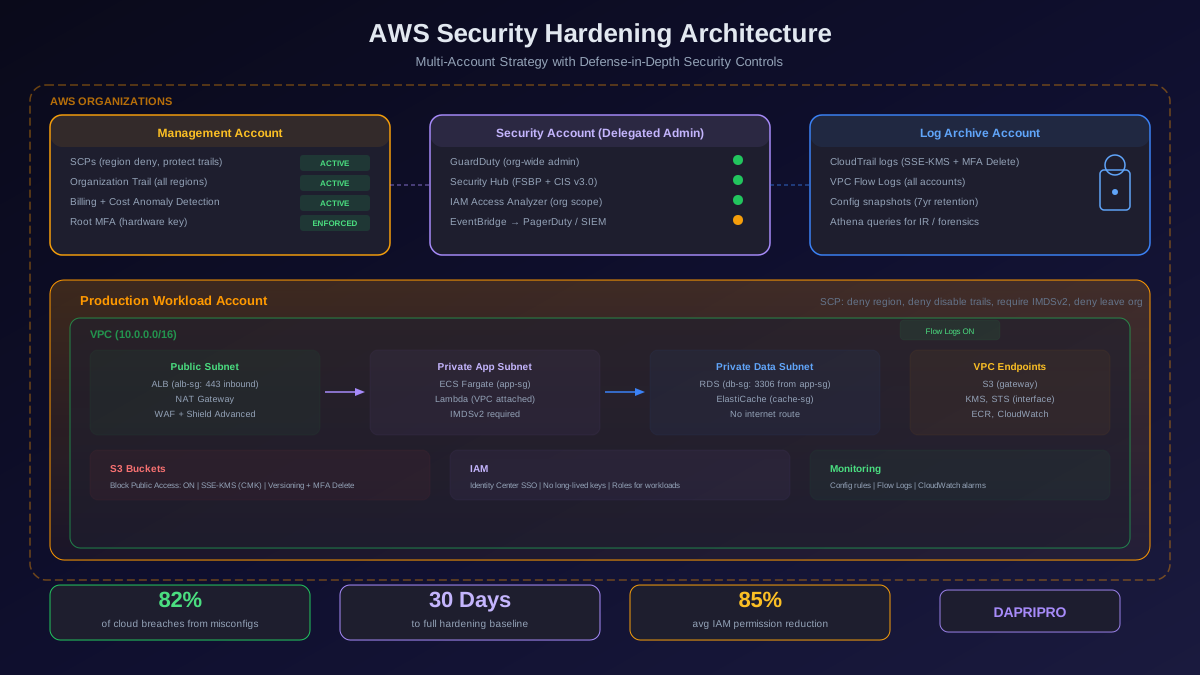
AWS Security Essentials
AWS security starts with these foundational services:
- IAM — Identity and Access Management. Create users, roles, and policies. Never use the root account for daily work.
- CloudTrail — Logs every API call made in your account. Enable it on day one and never turn it off.
- GuardDuty — Threat detection that analyzes CloudTrail, VPC Flow Logs, and DNS queries to find suspicious activity.
- Security Hub — Centralized security dashboard that aggregates findings from GuardDuty, Inspector, Macie, and third-party tools.
- Config — Tracks resource configurations over time and evaluates them against rules. Detects configuration drift.
- KMS — Key Management Service for encryption key management.
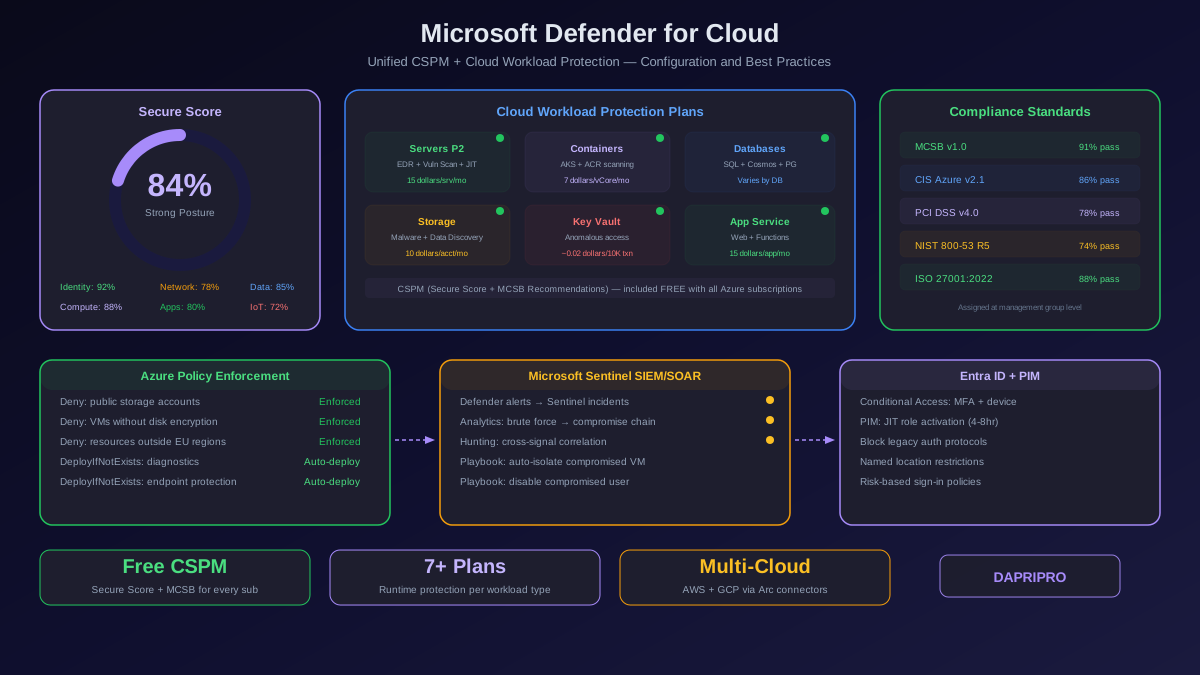
Azure Security Essentials
Azure security uses its own set of tools:
- Entra ID (formerly Azure AD) — Identity platform. Conditional Access policies enforce MFA based on risk signals.
- Microsoft Defender for Cloud — CSPM + CWPP (Cloud Workload Protection). Provides security score and recommendations.
- Azure Policy — Enforce organizational rules across all subscriptions. Block non-compliant resource creation.
- Microsoft Sentinel — Cloud-native SIEM for threat detection, investigation, and response.
- Key Vault — Secrets, keys, and certificate management.
Cloud Security Posture Management (CSPM)
CSPM tools continuously scan your cloud environments and automatically detect misconfigurations, compliance violations, and security risks:
CSPM Tools Comparison
| Tool | Type | Cloud Support | Best Feature |
|---|---|---|---|
| Wiz | Third-party | AWS, Azure, GCP, OCI | Agentless scanning, attack path analysis |
| Prisma Cloud | Third-party | AWS, Azure, GCP, OCI | Full lifecycle (code to cloud) |
| Orca Security | Third-party | AWS, Azure, GCP | SideScanning™ (no agents) |
| AWS Security Hub | Native | AWS only | Free tier, integrates with all AWS services |
| Microsoft Defender | Native | Azure (+ AWS, GCP) | Security score, built into portal |
Multi-Cloud Security Strategy
Multi-cloud environments (using two or more providers) introduce unique security challenges. Each provider has different tools, terminology, and security models. The biggest risk is inconsistency — applying strong security on AWS but forgetting to enable the same controls on Azure.
Multi-Cloud Security Principles
- Unified identity — Use one identity provider across all clouds (Entra ID, Okta, or Google Workspace). Avoid managing separate user directories per cloud.
- Centralized logging — Aggregate all logs into a single SIEM. AWS CloudTrail, Azure Activity Logs, and GCP Cloud Audit Logs should all feed into one place.
- Cloud-agnostic policies — Use tools like Terraform + Open Policy Agent (OPA) or Checkov to enforce consistent security policies across all providers.
- Single CSPM platform — Use a multi-cloud CSPM (Wiz, Prisma Cloud, Orca) that covers all your providers in one dashboard.
- Encrypt everywhere — Enable encryption at rest and in transit across all providers, with centralized key management.
Infrastructure as Code (IaC) Security
Infrastructure as Code scanning catches security issues before deployment. Instead of fixing misconfigurations after they are live in production, IaC scanning reviews your Terraform, CloudFormation, Kubernetes manifests, and ARM templates for security bugs during the development phase:
- Checkov — Open-source IaC scanner by Bridgecrew (now Prisma Cloud). Supports Terraform, CloudFormation, Kubernetes, ARM, Helm.
- tfsec — Fast Terraform-specific scanner. Now part of Trivy.
- Trivy — Aqua Security's multi-purpose scanner: container images, IaC files, file systems, and git repositories.
- KICS — Keeping Infrastructure as Code Secure. Open-source by Checkmarx.
- Snyk IaC — Scans Terraform, CloudFormation, and Kubernetes with IDE integration.
The key is to integrate IaC scanning into your CI/CD pipeline — make it a required gate so no infrastructure change can deploy without passing security checks. This approach is called shift-left security because you are moving security checks earlier (left) in the development process.
Cloud Security Checklist
Use this checklist to assess your cloud security posture:
Identity & Access
- ☐ MFA enabled on all accounts (hardware keys for admin/root)
- ☐ Root/admin accounts used only for break-glass emergencies
- ☐ All IAM policies follow least privilege (no wildcards)
- ☐ Access keys rotated every 90 days or less
- ☐ Service accounts use roles/managed identities, not long-lived keys
- ☐ Unused accounts and access keys deleted
Data & Encryption
- ☐ Encryption at rest enabled on all storage (S3, RDS, EBS, Azure Blob)
- ☐ Encryption in transit enforced (TLS 1.2+ only)
- ☐ No public storage buckets unless intentionally serving public content
- ☐ Database backups encrypted
- ☐ Secrets stored in a secrets manager (not in code, environment variables, or config files)
Monitoring & Logging
- ☐ Audit logging enabled and cannot be disabled (CloudTrail, Activity Logs)
- ☐ Logs sent to a centralized, immutable location
- ☐ Alerting configured for critical events (root login, security group changes, IAM changes)
- ☐ Log retention set to meet compliance requirements (typically 1+ year)
Network Security
- ☐ Security groups/NACLs follow default-deny (only allow what is needed)
- ☐ No 0.0.0.0/0 rules on sensitive ports (SSH, RDP, databases)
- ☐ VPCs properly segmented (public, private, data tiers)
- ☐ VPN/bastion host required for administrative access
- ☐ Flow logs enabled for network traffic analysis
Secure Your Cloud Today
Cloud security is not a one-time setup — it is a continuous process. Start with the fundamentals: enable MFA on every account, lock down storage permissions, turn on audit logging, and implement least-privilege IAM policies. Then layer in CSPM tools for continuous monitoring and IaC scanning for shift-left security.
The shared responsibility model means your cloud provider will never do this for you. They secure the infrastructure. You secure everything you build on top of it.
![CSPM Tools Compared: Best Cloud Security Posture Management Solutions [2026]](/images/sections/network-cloud-security/cloud-security-posture/cspm-tools-compared-best-cloud-security-posture-management-solutions.svg)