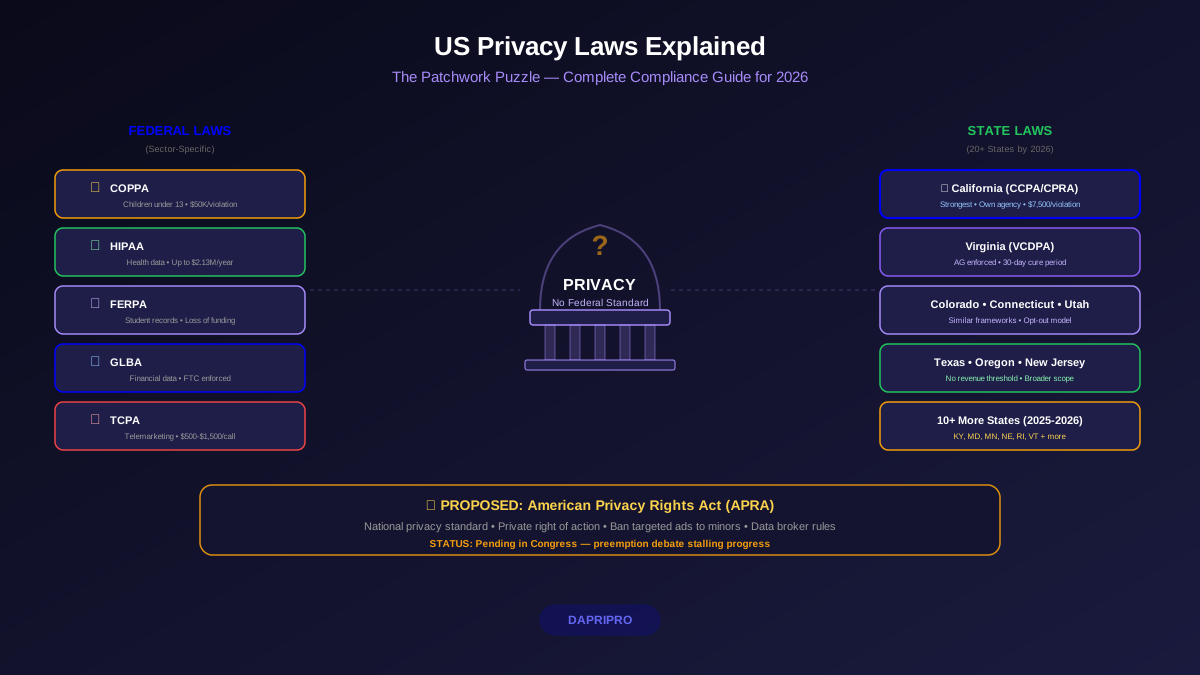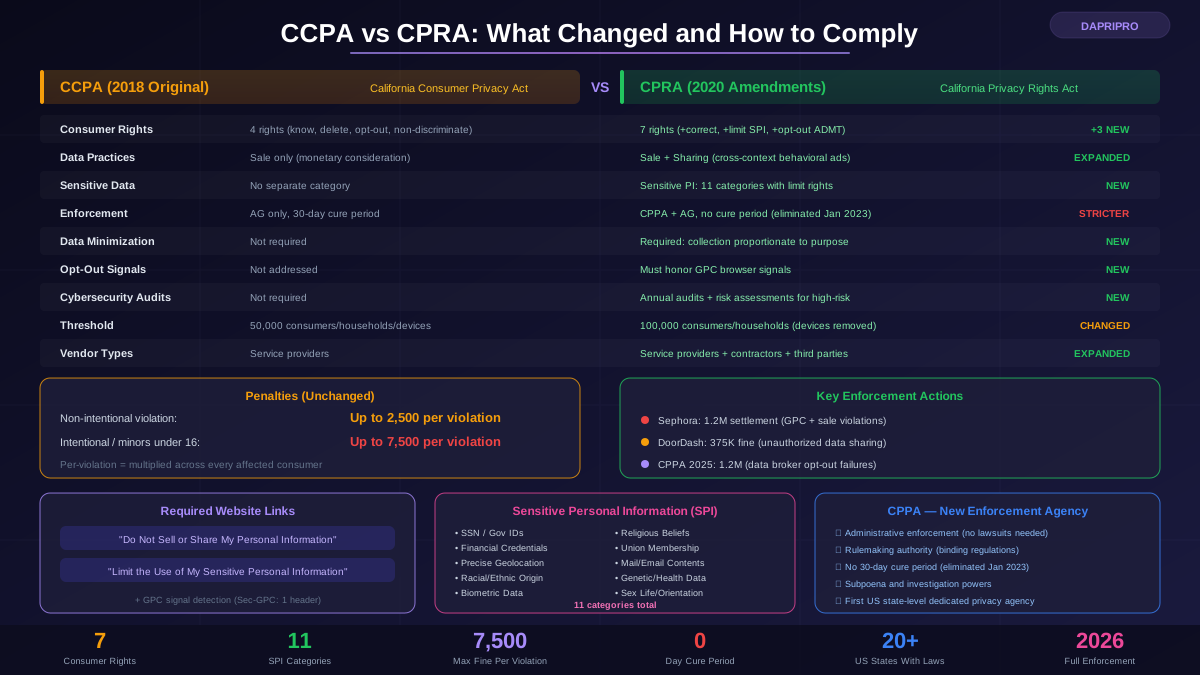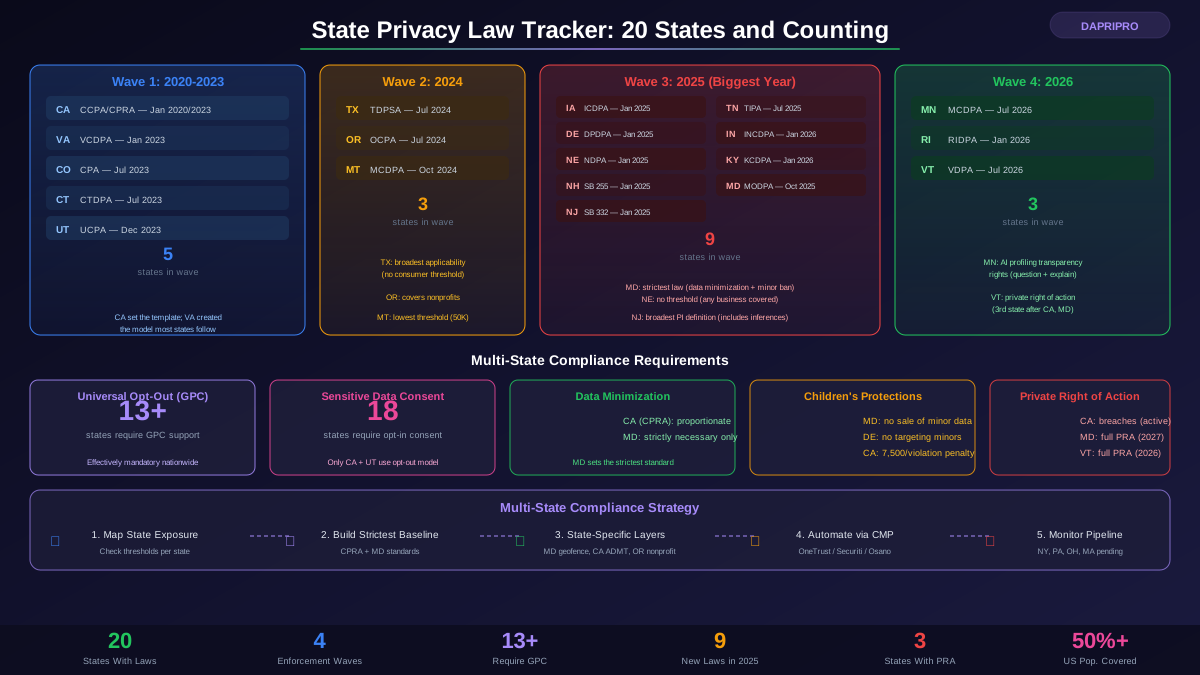
California has the strongest consumer privacy protections in the United States. The California Consumer Privacy Act (CCPA), as amended and expanded by the California Privacy Rights Act (CPRA), gives every California resident a comprehensive set of rights over their personal information — rights that companies must honor regardless of their size, industry, or headquarters location. Yet most Californians do not know these rights exist, let alone how to exercise them.
This guide is written for consumers, not compliance teams. It explains exactly what rights you have, how to exercise each one, what companies are required to do in response, what happens when they do not comply, and the tools available to protect your privacy automatically — with zero ongoing effort.
Who Is Covered and Who Must Comply
If you are a California resident, you are covered. It does not matter if you are temporarily out of state, enrolled in college elsewhere, or deployed by the military. Your domicile — your permanent home — determines your status. Every type of personal information connected to you is covered, from your name and email to your browsing history, purchase records, location data, and biometric information.
Businesses must comply if they meet any one of these three thresholds:
- Annual gross revenue exceeding 25 million dollars — adjusted periodically for inflation, covering most mid-size and large companies
- Buying, selling, or sharing personal information of 100,000+ consumers or households annually — this threshold is easily reached by any website or app with meaningful California traffic
- Deriving 50 percent or more of annual revenue from selling or sharing personal information — this captures data brokers and ad-tech companies regardless of their size
Important: the thresholds apply to companies doing business in California, not just companies based in California. A company headquartered in Texas, New York, or even overseas must comply if it meets any threshold and collects data from California residents.
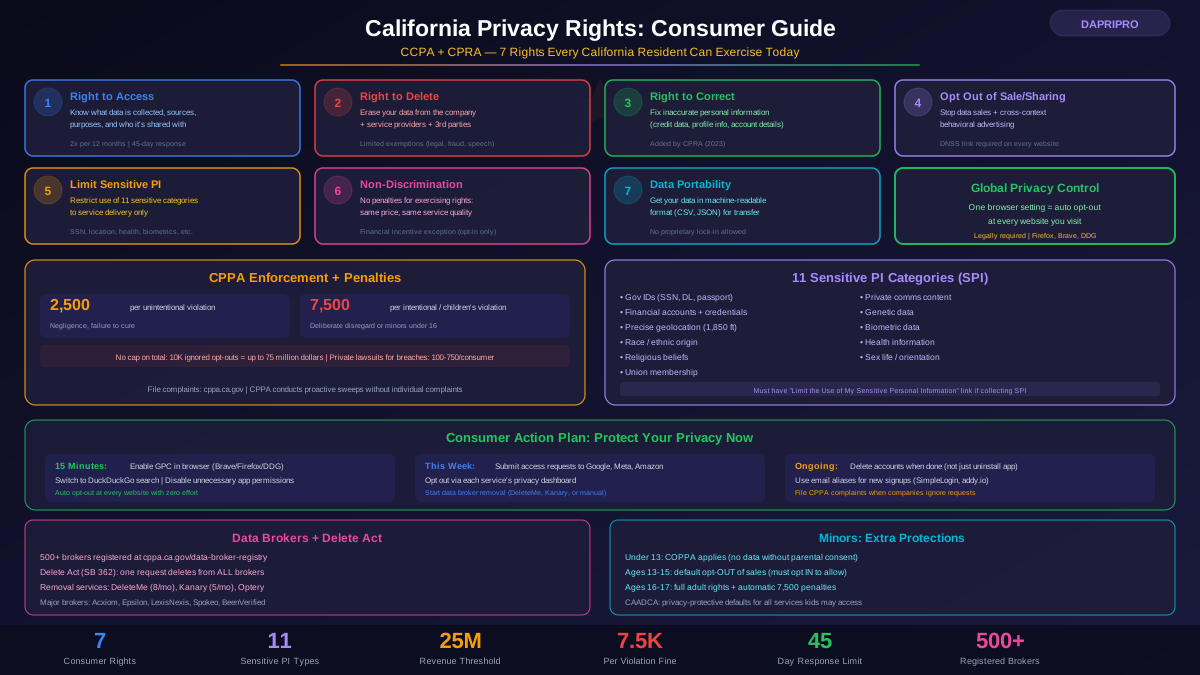
Your 7 Privacy Rights Explained
Right 1: Know What Is Collected (Right to Access)
You can ask any covered business to tell you exactly what personal information it has collected about you. The company must disclose the specific categories of personal information collected (identifiers, commercial info, internet activity, geolocation, audio/visual, professional info, education info, inferences, and sensitive PI), the specific pieces of personal information collected about you, the sources of each category of information, the business or commercial purpose for collecting each category, and the categories of third parties with whom each category was shared.
You can request this information for the preceding 12 months (or longer, if the business retains older data and disclosure is possible). The company must respond within 45 calendar days. You can make this request up to twice in a 12-month period. The company must provide the information in a "readily useable format" — typically a downloadable report, not a vague email summary.
Right 2: Delete Your Personal Information
You can request that a business delete all the personal information it has collected from you. When you submit a deletion request, the company must delete the information from its own records, direct any service providers and contractors to delete it, and direct any third parties who purchased or received your data to delete it.
Companies can deny deletion under specific exemptions: completing a transaction, detecting security incidents, debugging, exercising free speech, complying with legal obligations, conducting public-interest research, or maintaining data needed solely for internal use that a consumer would reasonably expect. But they must tell you which exemption applies and keep only the minimum data necessary.
Right 3: Correct Inaccurate Information
Added by CPRA, this right lets you ask a business to correct inaccurate personal information it maintains about you. This is particularly valuable when companies have wrong information that affects you — incorrect credit data, wrong account details, inaccurate demographic profiles used for targeting, or outdated contact information. The business must make "commercially reasonable efforts" to correct the information and must instruct its service providers and contractors to update their records too.
Right 4: Opt Out of Data Sales and Sharing
This is the right that most directly affects your daily privacy. You can tell any covered business to stop selling or sharing your personal information. Under CPRA, "selling" means providing your data to a third party for monetary or other valuable consideration. "Sharing" means providing your data for cross-context behavioral advertising — the tracking-based ads that follow you across websites and apps.
When you opt out, the company must stop selling or sharing your data immediately and continue honoring your choice until you affirmatively opt back in. The company cannot use "dark patterns" — confusing design choices intended to make you reverse your opt-out. Every covered business that sells or shares data must have a clear, conspicuous link on their website labeled "Do Not Sell or Share My Personal Information."
Right 5: Limit Use of Sensitive Personal Information
CPRA created a special category of "sensitive personal information" (SPI) with additional protections. Sensitive PI includes government-issued identifiers (Social Security number, driver's license), financial account details (account numbers, credentials), precise geolocation, racial or ethnic origin, religious beliefs, union membership, private communications content (mail, email, text messages), genetic data, biometric data, health information, and sex life or sexual orientation data.
You can tell a business to limit its use of your sensitive PI to only what is necessary to provide the service you requested. This means stopping any use of sensitive data for profiling, advertising, or analytics beyond immediate service delivery. Businesses that use sensitive PI must display a "Limit the Use of My Sensitive Personal Information" link on their website.
Right 6: Non-Discrimination
Companies cannot punish you for exercising your privacy rights. This means they cannot deny you goods or services, charge you different prices or rates, provide you a different quality of service, or suggest that exercising your rights will result in any of the above. There is one exception: if a financial incentive program (like a loyalty discount) is directly related to the value of your data, the company can offer different pricing for consumers who provide data versus those who do not — but the incentive must be clearly disclosed and you must affirmatively opt in.
Right 7: Data Portability
When you request your data, the business must provide it in a structured, commonly used, machine-readable format that allows you to transmit it to another entity. This right ensures you can take your data with you — switching from one service to another without losing the information you provided. Companies cannot provide data in proprietary formats that prevent transfer or force you to accept a PDF when a CSV or JSON export is feasible.
How to Exercise Each Right: Step-by-Step
Submitting a Data Access or Deletion Request
Every covered business must provide at least two methods for submitting consumer requests. The most common combination is a web form on the company's privacy page plus a toll-free phone number. Some companies also accept requests by email, postal mail, or through their app. Here is the process:
- Step 1: Find the privacy page — look in the website footer for links labeled "Privacy Policy," "Your California Privacy Rights," or "Do Not Sell or Share My Personal Information." Most companies consolidate privacy requests on a single page
- Step 2: Submit your request — fill out the request form specifying which right you are exercising (access, deletion, correction, or opt-out). You typically need to provide your name, email address, and enough information for the company to verify your identity
- Step 3: Identity verification — the company will verify your identity before processing the request. For access to specific pieces of information, they may require stricter verification (like matching two data points). For deletion requests, they may require a two-step process where you submit the request and then confirm via email
- Step 4: Receive the response — the company has 45 calendar days to respond. They can extend this by another 45 days (90 total) if they notify you. For access requests, they must provide the data in a usable format. For deletion requests, they must confirm deletion and notify service providers
Using "Do Not Sell or Share" Links
Every company that sells or shares personal information must display a "Do Not Sell or Share My Personal Information" link. Clicking it should take you to a mechanism — either a toggle, a form, or an opt-out tool — that immediately stops the sale and sharing of your data with that company. Companies cannot require you to create an account to opt out. They cannot hide the link in dense menus. They cannot use confusing prompts designed to make you change your mind.
If a company uses sensitive personal information beyond what is necessary for service delivery, they must also display a "Limit the Use of My Sensitive Personal Information" link.
Authorized Agent Requests
You can designate an authorized agent to submit privacy requests on your behalf. The agent can be a natural person or a registered business. You must provide signed written authorization to the agent, and the company can require you to directly verify your identity even when using an agent. Several privacy advocacy organizations operate as authorized agents to help consumers submit requests at scale.
Global Privacy Control: The One Tool Every Californian Should Use
Global Privacy Control (GPC) is a browser-level signal that automatically tells every website you visit that you do not want your data sold or shared. California law explicitly requires businesses to treat a GPC signal as a valid opt-out request under CCPA/CPRA. This means that by enabling GPC once, you effectively opt out of data sales and sharing across the entire internet — without needing to visit each website's privacy settings individually.
How to Enable GPC
Several browsers and extensions support GPC natively:
- Firefox — GPC is built in. Go to Settings, then Privacy and Security, and enable "Tell websites not to sell or share my data." Firefox also sends a Do Not Track signal alongside GPC
- Brave — GPC is enabled by default. No configuration needed
- DuckDuckGo Browser — GPC is enabled by default on both the mobile app and desktop browser
- Safari + DuckDuckGo extension — install the DuckDuckGo Privacy Essentials extension to add GPC support to Safari
- Chrome + Privacy Badger — the EFF's Privacy Badger extension sends GPC signals. Install from the Chrome Web Store
- Chrome + OptMeOwt — a dedicated GPC extension for Chrome and Edge
What GPC Actually Does
When your browser sends a GPC signal, compliant websites must treat it as a request to opt out of data selling and sharing, and stop sharing your browsing data with advertising networks. The GPC signal applies to the browser or device that sends it. If you use multiple browsers or devices, you need to enable GPC on each one. Companies that ignore GPC signals are violating California law — the CPPA has explicitly stated that failure to honor GPC is an enforceable violation.
CPPA Enforcement of GPC
The CPPA has already taken enforcement action against companies that failed to honor GPC. In 2024, the agency's compliance sweeps specifically tested whether companies detected and honored GPC signals. The Sephora enforcement action (1.2 million dollar fine) included violations for failing to honor opt-out preference signals. The CPPA has made it clear that GPC compliance is not optional — it is a legal requirement.
Data Brokers and Your Rights
Data brokers are companies that collect and sell personal information about consumers without a direct relationship with those consumers. California has separate requirements for data brokers that go beyond standard CCPA/CPRA obligations:
California Data Broker Registry
Since 2020, all data brokers operating in California must register annually with the CPPA (previously the Attorney General). The registry is publicly accessible at cppa.ca.gov/data-broker-registry. As of 2025, over 500 data brokers are registered. Each listing includes the broker's name, contact information, and a link to their opt-out mechanism.
Delete Act (SB 362)
The California Delete Act, signed into law in 2023 and fully operational by January 2026, creates a one-stop deletion mechanism. Instead of submitting individual opt-out requests to hundreds of data brokers, California residents can submit a single request through the CPPA's accessible deletion mechanism. All registered data brokers must then delete the consumer's data and opt the consumer out of future sales. This effectively reverses the burden — instead of consumers needing to find and opt out of each broker individually, a single request triggers deletion across all registered brokers.
How to Use the Broker Registry Now
Until the Delete Act's one-stop mechanism is fully operational, you can still use the registry to identify and opt out of individual data brokers. Visit the registry, search for brokers by name or browse the full list, follow each broker's opt-out link, and submit deletion or opt-out requests. Common major data brokers include Acxiom, Oracle DataCloud (formerly BlueKai), Epsilon, LexisNexis, Spokeo, BeenVerified, Whitepages, and PeopleFinder. Services like DeleteMe, Kanary, and Privacy Duck automate this process for a monthly fee, typically between 8 and 15 dollars per month.
Understanding Sensitive Personal Information
CPRA created a distinct category of "sensitive personal information" (SPI) with enhanced protections. Understanding this category is important because many companies collect sensitive data without consumers realizing it.
The 11 Categories of Sensitive PI
- Government identifiers — Social Security number, driver's license, state ID, passport number
- Financial account details — account numbers, debit/credit card numbers with access codes or passwords
- Precise geolocation — location data specific enough to identify your position within a radius of 1,850 feet (approximately one-third of a mile)
- Racial or ethnic origin
- Religious or philosophical beliefs
- Union membership
- Private communications content — the content of your emails, texts, and mail, unless the company is the intended recipient
- Genetic data
- Biometric data — fingerprints, facial geometry, voiceprints, iris scans processed for identification purposes
- Health information
- Sex life or sexual orientation data
Many apps collect precise geolocation data through location permissions. Weather apps, navigation apps, food delivery apps, fitness trackers, and even camera apps with geotagging enabled are collecting sensitive PI under CPRA's definition. You have the right to tell every one of these companies to limit their use of your location data to only what is necessary to provide the core service.
Enforcement: The CPPA and How to File Complaints
The CPPA: California's Privacy Enforcer
The California Privacy Protection Agency (CPPA) is the first dedicated privacy enforcement agency in the United States. Created by CPRA (Proposition 24, passed by voters in 2020), the CPPA has full administrative authority to investigate complaints, conduct compliance sweeps (proactive investigations without individual complaints), issue administrative fines, adopt regulations interpreting CCPA/CPRA, and publish guidance for consumers and businesses.
The CPPA is funded independently through fines and penalties collected, which means its enforcement capacity grows as it takes action. Unlike the Attorney General's office, which has many competing priorities, the CPPA's sole focus is privacy enforcement.
Penalty Structure
- 2,500 dollars per unintentional violation — when a company fails to comply due to negligence rather than deliberate disregard
- 7,500 dollars per intentional violation — for deliberate non-compliance or failure to cure within the allowed timeframe
- 7,500 dollars per violation involving children's data — automatically applies to any violation affecting consumers known to be under 16
- No cap on total penalties — since each affected consumer's data represents a separate violation, penalties can accumulate quickly. If a company ignores opt-out requests from 10,000 consumers, that is potentially 75 million dollars in penalties
How to File a CPPA Complaint
If a company violates your privacy rights, here is how to file a complaint:
- Step 1 — visit cppa.ca.gov and navigate to the complaint portal
- Step 2 — provide your contact information and describe the violation. Be specific: name the company, describe what right was violated, include dates the request was submitted, and attach any documentation (screenshots, emails, confirmation numbers)
- Step 3 — the CPPA will review your complaint and may contact you for additional information. While the CPPA does not represent you as an individual, patterns of complaints about the same company trigger investigations
- Step 4 — for data breaches (unauthorized access to your unencrypted personal information due to a company's failure to maintain reasonable security), you may also have a private right of action under CCPA Section 1798.150. This allows you to sue for statutory damages of 100 to 750 dollars per consumer per incident, or actual damages if greater
Privacy Tools That Protect You Automatically
Beyond individual requests and GPC, several tools can protect your California privacy rights with minimal ongoing effort:
Browser-Based Privacy
- Brave Browser — blocks trackers and ads by default, sends GPC signal automatically, includes HTTPS Everywhere and fingerprinting protection. The strongest default-privacy browser available
- Firefox with Enhanced Tracking Protection — blocks third-party tracking cookies by default when set to "Strict" mode. Combined with GPC enabled, this blocks most cross-site tracking
- DuckDuckGo Browser — available on iOS, Android, and desktop. Blocks hidden trackers, sends GPC, and provides daily fire button to clear all browsing data
- Privacy Badger (EFF) — browser extension that automatically learns to block invisible trackers and sends GPC signals
- uBlock Origin — the most effective open-source content blocker, blocking ads, trackers, and malicious domains
Data Broker Removal Services
- DeleteMe (by Abine) — automatically submits opt-out requests to dozens of data brokers on your behalf. Provides quarterly privacy reports showing what data was found and removed. Plans from approximately 8 dollars per month
- Kanary — scans data broker sites for your personal information and automates removal. Monitors for re-listing and re-submits removal requests. Plans from approximately 5 dollars per month
- Privacy Duck — manual removal service where human operators submit opt-out requests to data brokers. More thorough than automated services but slower and more expensive
- Optery — automated data broker removal with a dashboard showing your exposure across hundreds of broker sites
Email and Communication Privacy
- ProtonMail — end-to-end encrypted email hosted in Switzerland. Free tier available with paid plans starting at approximately 4 dollars per month
- Apple Hide My Email — creates unique random email addresses that forward to your real address, preventing companies from linking your identity across services. Available with iCloud+
- SimpleLogin / addy.io — email aliasing services that let you create unlimited private email addresses for different services
- Signal — end-to-end encrypted messaging with disappearing messages. Collects virtually no user data
Common Company Tricks and How to Counter Them
Despite the law being clear, many companies use tactics to discourage consumers from exercising their rights:
Dark Patterns
CPRA explicitly bans dark patterns — user interface designs that have the "substantial effect of subverting or impairing user autonomy, decision-making, or choice." Common dark patterns include making the opt-out process longer or more complex than the opt-in process, using confusing double negatives ("Do not opt out of not sharing"), making the "Accept All" button prominent while hiding the "Reject" option, requiring scroll through lengthy text before reaching the opt-out toggle, and presenting opt-out as a "limited experience" to create fear.
If you encounter dark patterns, document them with screenshots and include them in your CPPA complaint. Dark patterns are a separate violation that carries additional penalties.
Excessive Verification Requirements
Some companies create unnecessarily burdensome identity verification processes to discourage requests. The CPPA has clarified that verification must be "proportional" to the sensitivity of the request. For opt-out requests, companies cannot require identity verification at all — the request must be honored without making you prove your identity. For deletion requests, matching two data points (like name and email) is typically sufficient. Only for access to specific pieces of personal information can companies require stricter verification.
Delayed or Non-Responses
If a company does not respond within 45 days, send a written follow-up referencing the original request date and CCPA Section 1798.105 (for deletion) or 1798.110 (for access). Copy the CPPA's complaint email if possible. Document everything. Companies that consistently fail to respond within the statutory timeframe face "per violation" penalties that accumulate across every affected consumer.
The "We Do Not Sell Data" Claim
Many companies claim they "do not sell" personal information — using the common meaning of "sell" (exchanging data for money). Under CCPA/CPRA, "sale" includes any exchange of data for "valuable consideration," and "sharing" includes providing data for cross-context behavioral advertising with no money changing hands. If a company uses Google Analytics, runs Meta Pixel, deploys TikTok Pixel, or participates in any ad exchange, it is almost certainly selling or sharing data under the legal definition — regardless of what it claims on its website.
Special Protections for Children and Teens
California provides additional privacy protections for minors:
- Under 13 — COPPA requires verifiable parental consent before collecting any personal information. No data collection is permitted without it
- 13 to 15 years old — companies cannot sell or share a minor's personal information unless the minor has affirmatively opted in (not out — the default is protected)
- 16 to 17 years old — standard adult CCPA/CPRA rights apply, with the addition that violations involving minors carry automatic 7,500 dollar per-violation penalties (the "intentional" rate, even if the violation was unintentional)
The California Age-Appropriate Design Code Act (CAADCA) adds further protections by requiring businesses to conduct data protection impact assessments for any service "likely to be accessed by children" under 18. Though CAADCA faces ongoing legal challenges, its intent is to make privacy-protective settings the default for young users — not something parents or teens have to manually enable.
Your Practical Privacy Action Plan
Here is a priority-ordered action plan to maximize your California privacy protections with minimal effort:
Immediate (15 Minutes)
- Enable GPC in your browser or install a GPC-supporting extension (Privacy Badger, DuckDuckGo extension)
- Switch your default search engine to DuckDuckGo or Brave Search to stop search-based profiling
- Review and disable unnecessary app permissions on your phone (especially location, microphone, and contacts)
This Week (1-2 Hours)
- Visit the five largest services you use (Google, Meta, Amazon, Apple, Microsoft) and exercise your data access rights to see what they have collected
- Use each service's privacy dashboard to opt out of personalized advertising and data sharing
- Sign up for a data broker removal service or manually opt out of the top 10 brokers via the CPPA registry
This Month (Ongoing)
- Switch to a privacy-focused browser (Brave, Firefox Strict mode, or DuckDuckGo) for daily browsing
- Set up email aliases for new service signups to prevent cross-service identity linking
- Review your social media privacy settings on every platform you use and restrict data sharing to the minimum
Ongoing
- Before signing up for any new service, check its privacy policy for CCPA/CPRA compliance — look for the "Do Not Sell or Share" link as a basic indicator
- Submit deletion requests when you stop using a service rather than just deleting the app
- Use the CPPA complaint process whenever a company fails to honor your rights — complaints drive enforcement, which improves compliance across the industry
Your California privacy rights are among the strongest in the world. Using them does not require legal expertise or technical knowledge. The combination of GPC, smart tool choices, and willingness to submit requests and complaints when companies fall short makes a meaningful difference — not just for you, but for every California consumer who benefits when enforcement creates accountability.