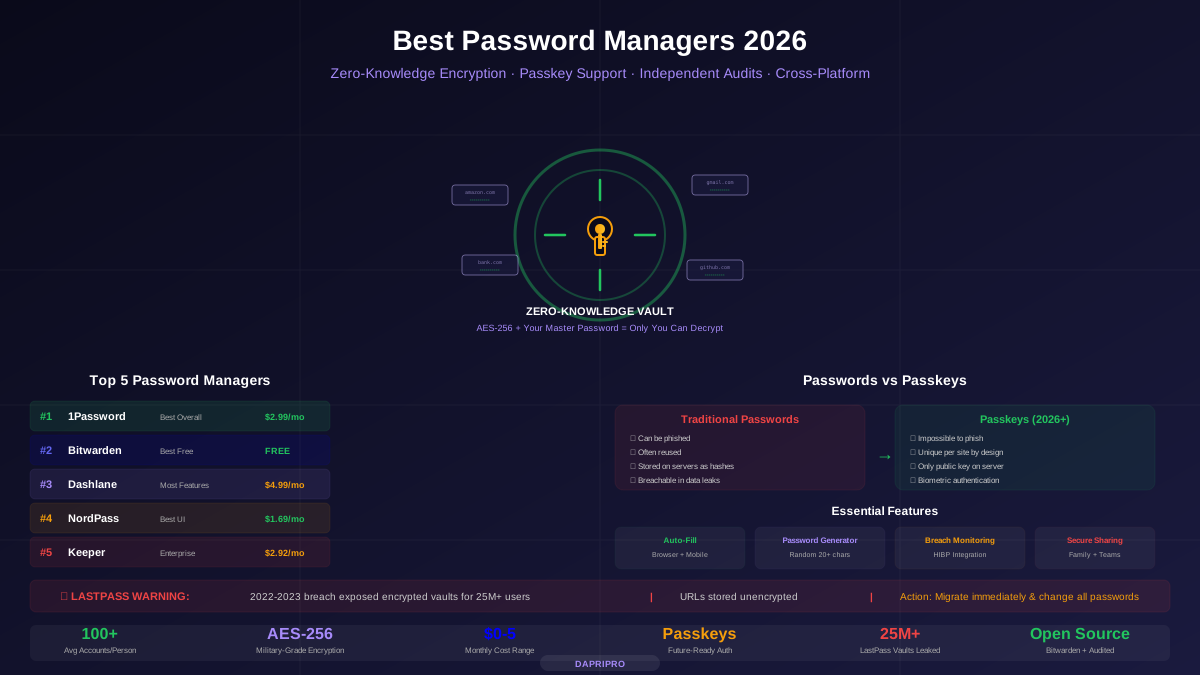
The average person has over 100 online accounts. Without a password manager, you are either reusing passwords (dangerous) or trying to remember unique ones (impossible). A single data breach with a reused password can cascade across every account that shares it.
This guide compares every major password manager based on security architecture, real-world usability, browser extension quality, pricing, and independent audit results.
2026 Password Manager Rankings
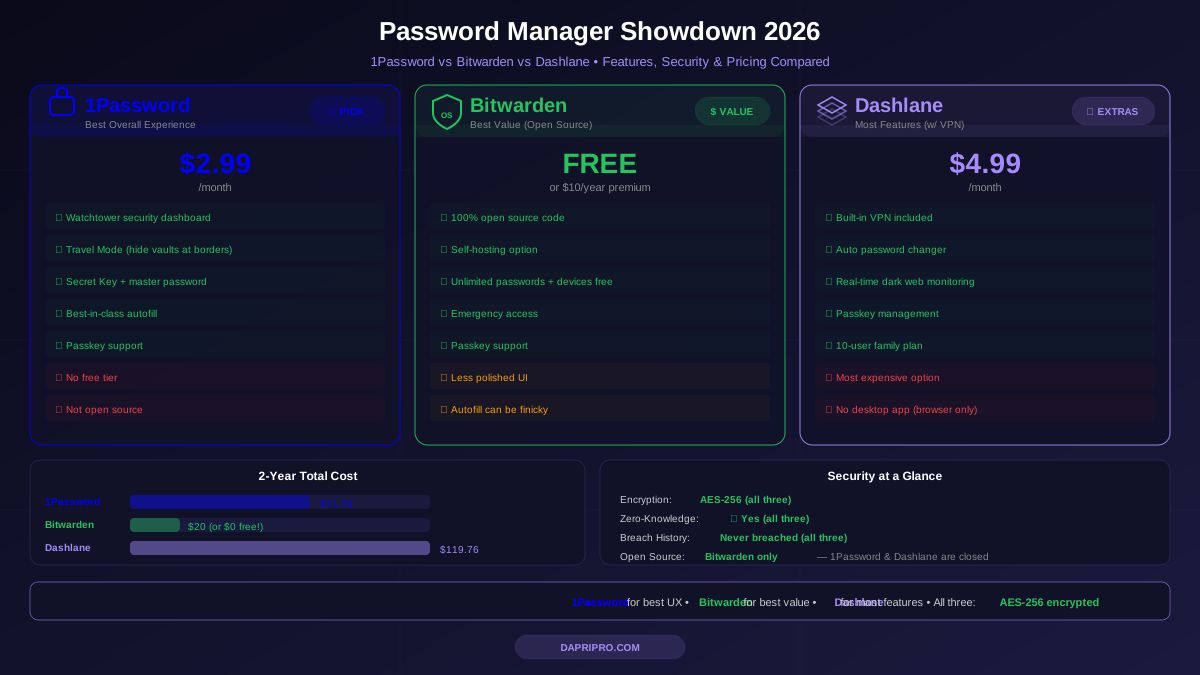
1Password — Best Overall
1Password has the best combination of security, usability, and features. Its browser extension auto-fills passwords flawlessly across Chrome, Firefox, Safari, Edge, and Brave. The desktop apps (Windows, Mac, Linux) and mobile apps (iOS, Android) sync seamlessly.
Security architecture: Zero-knowledge encryption using AES-256. What makes 1Password unique is its Secret Key — a randomly generated 128-bit key stored on your devices that combines with your master password. Even if someone steals 1Password's servers AND your master password, they cannot access your vault without the Secret Key that only exists on your devices.
Watchtower: 1Password's built-in security dashboard that monitors your vault for weak passwords, reused passwords, compromised credentials (via Have I Been Pwned integration), expiring items, and accounts that support 2FA but do not have it enabled.
Standout features: Travel Mode (remove sensitive vaults when crossing borders), item sharing via secure links (even with non-1Password users), passkey support, masked email addresses (via Fastmail partnership), document storage.
Pricing: Individual $2.99/month, Family (5 users) $4.99/month, Business $7.99/user/month. No free tier, but a 14-day free trial.
Bitwarden — Best Free and Open Source
Bitwarden proves that the best security software does not require a premium price. Its free tier includes unlimited passwords, unlimited devices, a password generator, and secure notes — features that competitors lock behind paid plans.
Open source transparency: Bitwarden's entire codebase (server, client apps, browser extensions) is publicly available on GitHub. This means security researchers worldwide can inspect and audit the code. It has been independently audited by Cure53 with results published publicly.
Self-hosting option: For technically inclined users and organizations, Bitwarden can be self-hosted on your own server. This means your encrypted vault data never touches Bitwarden's cloud — complete control over your data.
Free vs Premium ($10/year): The free tier covers most users. Premium adds TOTP authenticator codes, file attachments (1GB encrypted storage), vault health reports, emergency access, and priority support. At $10/year ($0.83/month), it is the most affordable premium password manager.
Dashlane — Most Feature-Rich
Dashlane packs the most features into a single password manager. Beyond password storage, it includes a built-in VPN (powered by Hotspot Shield), dark web monitoring, a password health score, automatic password changer (changes passwords on supported sites with one click), and phishing alerts.
The trade-off: At $4.99/month, Dashlane is the most expensive mainstream option. You are paying for the VPN and dark web monitoring bundled in — features you may already have from other services.
The LastPass Breach: Why It Still Matters
In 2022-2023, LastPass suffered a devastating breach where attackers stole encrypted vault data for over 25 million users. Critical details:
- Encrypted vault data was stolen — attackers have unlimited time to attempt offline brute-force attacks against weak master passwords.
- Not all vault data was encrypted — website URLs were stored in plaintext, revealing which sites users had accounts on.
- Older vaults used weaker encryption — accounts created before 2018 used only 5,000 PBKDF2 iterations (modern standard is 600,000+).
- Action required: If you used LastPass before 2023, change EVERY password stored in your vault and migrate to a different manager.
Passkeys: The Future of Authentication
Passkeys are cryptographic credentials that replace passwords entirely. Instead of typing a password, you authenticate with your fingerprint, face, or device PIN. They cannot be phished, reused, or leaked in a data breach.
| Feature | Passwords | Passkeys |
|---|---|---|
| Phishing risk | High — users type passwords on fake sites | Zero — cryptographically bound to real site |
| Breach risk | High — servers store password hashes | Zero — server only has public key |
| Reuse risk | Common — users reuse across sites | Impossible — unique per site by design |
| User effort | Type or auto-fill password | Touch fingerprint sensor or look at camera |
| Support in 2026 | Universal — every site uses passwords | Growing — Google, Apple, Microsoft, Amazon, PayPal |
Password managers that support passkeys: 1Password, Bitwarden, Dashlane, and NordPass. Using a password manager for passkeys gives you cross-platform sync that platform-native passkeys (Apple Keychain, Google Password Manager) do not.
Browser Extension Quality Comparison
The browser extension is where you interact with your password manager 95% of the time. A bad extension means frustration every day:
| Manager | Auto-fill Accuracy | Speed | Inline Suggestions | Passkey Support |
|---|---|---|---|---|
| 1Password | Excellent (99%) | Fast | Yes | Yes |
| Bitwarden | Good (95%) | Fast | Yes (v2024+) | Yes |
| Dashlane | Very Good (97%) | Medium | Yes | Yes |
| NordPass | Good (93%) | Fast | Yes | Yes |
| Keeper | Good (94%) | Medium | No | Limited |
How to Switch Password Managers
Migrating between password managers is easier than most people think. Every major password manager supports CSV import/export, and many have direct import from competitors:
- Export from your current manager — download your vault as a CSV file. This file contains all your passwords in plain text, so handle it carefully.
- Import into your new manager — upload the CSV. Most managers auto-map the fields (URL, username, password, notes).
- Verify the import — spot-check 10-15 entries to make sure everything transferred correctly.
- Delete the CSV file securely — use permanent deletion (Shift+Delete on Windows, secure empty trash on Mac). The CSV contains unencrypted passwords.
- Uninstall the old manager — remove the old extension and apps to avoid confusion.
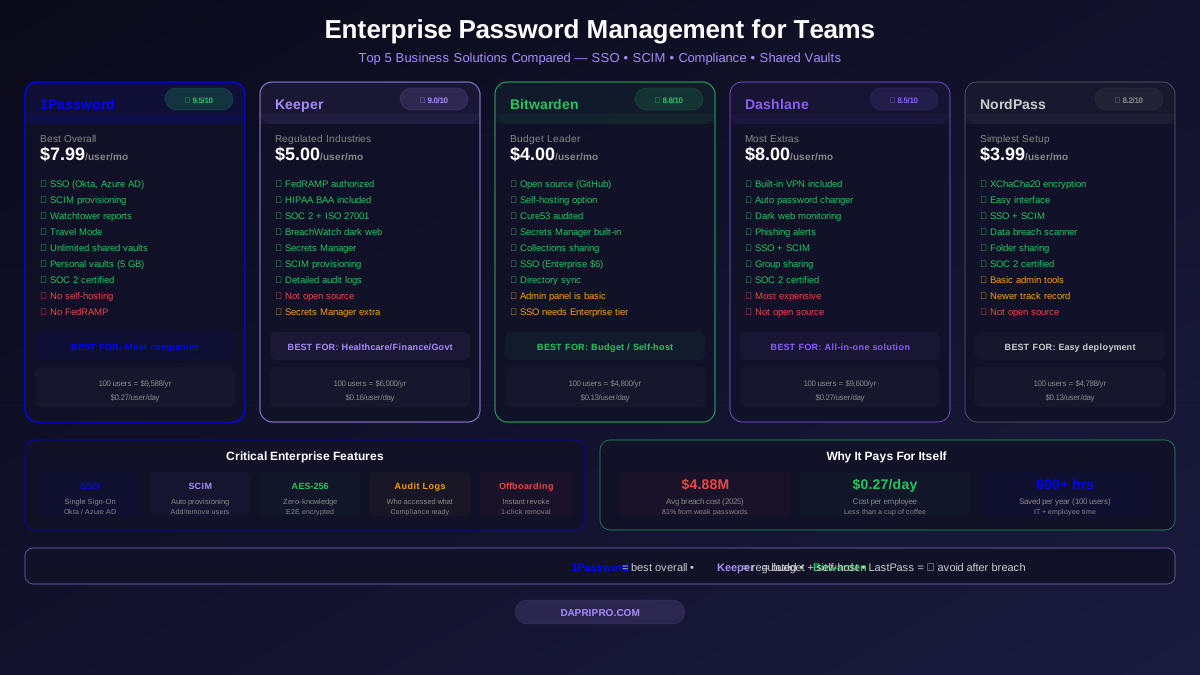
Enterprise Password Management
For businesses and teams, password managers add admin controls, policy enforcement, and compliance features:
Best Free Password Manager Options
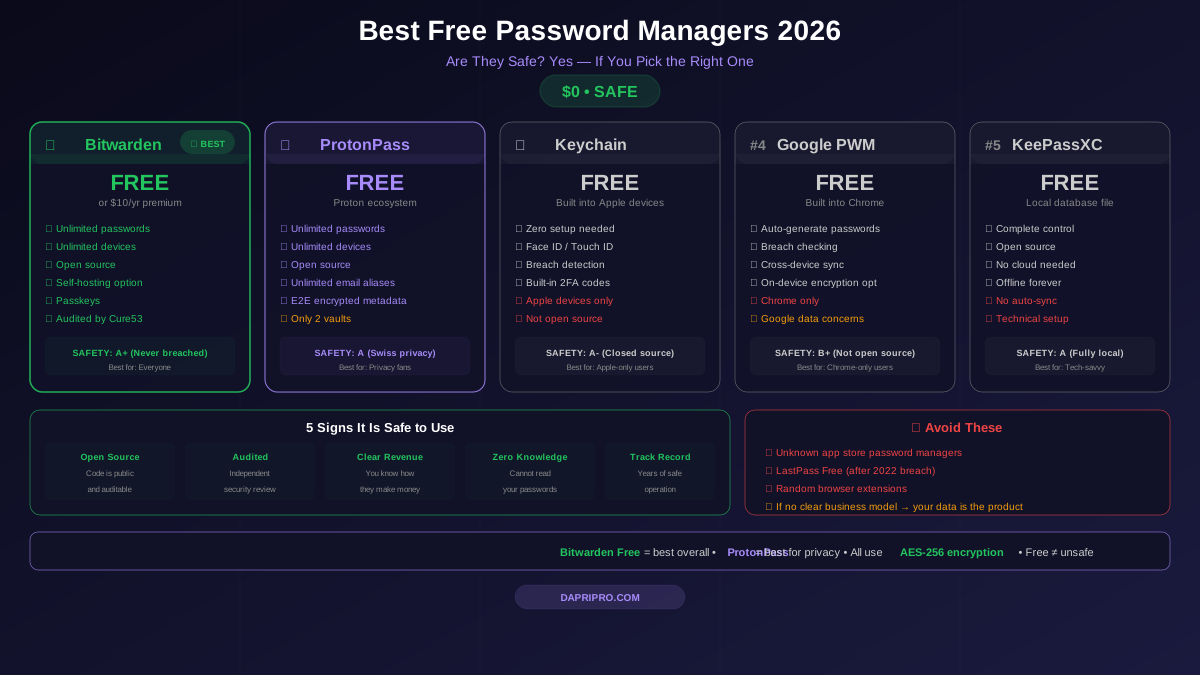
Free password managers range from excellent to dangerous. The safe options:
| Free Manager | Passwords | Devices | Open Source | Limitation |
|---|---|---|---|---|
| Bitwarden Free | Unlimited | Unlimited | Yes | No TOTP, no health reports |
| NordPass Free | Unlimited | 1 device at a time | No | No sharing, no breach scanner |
| Dashlane Free | 25 passwords | 1 device | No | 25 password cap, 1 device only |
| Chrome Built-in | Unlimited | Chrome only | Partial | Chrome-only, no secure sharing |
Our pick: Bitwarden Free is the clear winner — unlimited passwords, unlimited devices, open-source, independently audited. Bitwarden Free offers more than most paid competitors.
Our Verdict
Best overall: 1Password — flawless auto-fill, Secret Key architecture, Watchtower dashboard, passkey support, $2.99/month. Best free: Bitwarden — unlimited everything, open-source, independently audited, $0. Best features: Dashlane — built-in VPN, dark web monitoring, password changer, $4.99/month. Best enterprise: Keeper — admin vault, SSO, SCIM, compliance reporting, $3.75/user/month. Avoid: LastPass — breached vault data still in attacker hands, migrate now.